
1. Okwu mmalite
The Parsonver Smartwatch Z139 is designed to enhance your daily life with a variety of intelligent functions. This manual provides detailed instructions for setting up, operating, and maintaining your smartwatch to ensure optimal performance and user experience.
Key features include Bluetooth calling, comprehensive health monitoring (heart rate, blood oxygen, sleep), over 100 sports modes, and smart notifications.
2. Mmalite: Ntọala
Ihe ngwugwu 2.1
- Parsonver Smartwatch Z139
- Ịchaji eriri
- Akwụkwọ ntuziaka onye ọrụ
2.2 Ịchaji elekere smart
Tupu iji nke mbụ, chaja smartwatch gị nke ọma. Jikọọ eriri magnetik na kọntaktsị ịchaji dị n'azụ elekere wee gbanye eriri USB n'ime ihe nkwụnye ọkụ (anaghị etinye ya) ma ọ bụ ọdụ ụgbọ USB nke kọmputa.
2.3 Ngwa nwụnye na ijikọ
To unlock the full potential of your Parsonver Smartwatch, download the companion app on your smartphone. The app is compatible with iOS 9.0/Android 6.0 or above.
- Scan the QR code in the manual or search for "Parsonver" in your phone's app store (Google Play Store for Android, Apple App Store for iOS).
- Wụnye wee mepee ngwa ahụ.
- Follow the on-screen instructions in the app to create an account and pair your smartwatch via Bluetooth. Ensure Bluetooth is enabled on your smartphone.
- During pairing, grant necessary permissions for notifications, location, and health data synchronization.

Image: The Parsonver Smartwatch Z139, showcasing its main display with time, date, and step count.
3. Ntuziaka ọrụ
3.1 Oku Bluetooth na Ọkwa Amamihe
Once connected via Bluetooth, you can manage calls directly from your smartwatch.
- Answering/Making Calls: Use the watch's interface to answer incoming calls or dial numbers. The watch features high-quality speakers and a high-definition microphone for clear communication.
- Amamọkwa: Receive alerts for SMS, WhatsApp, Facebook, emails, and other app notifications directly on your watch. The watch will vibrate to inform you of new messages.
- Enyemaka Olu: Utilize the integrated voice assistant for hands-free control and information access.
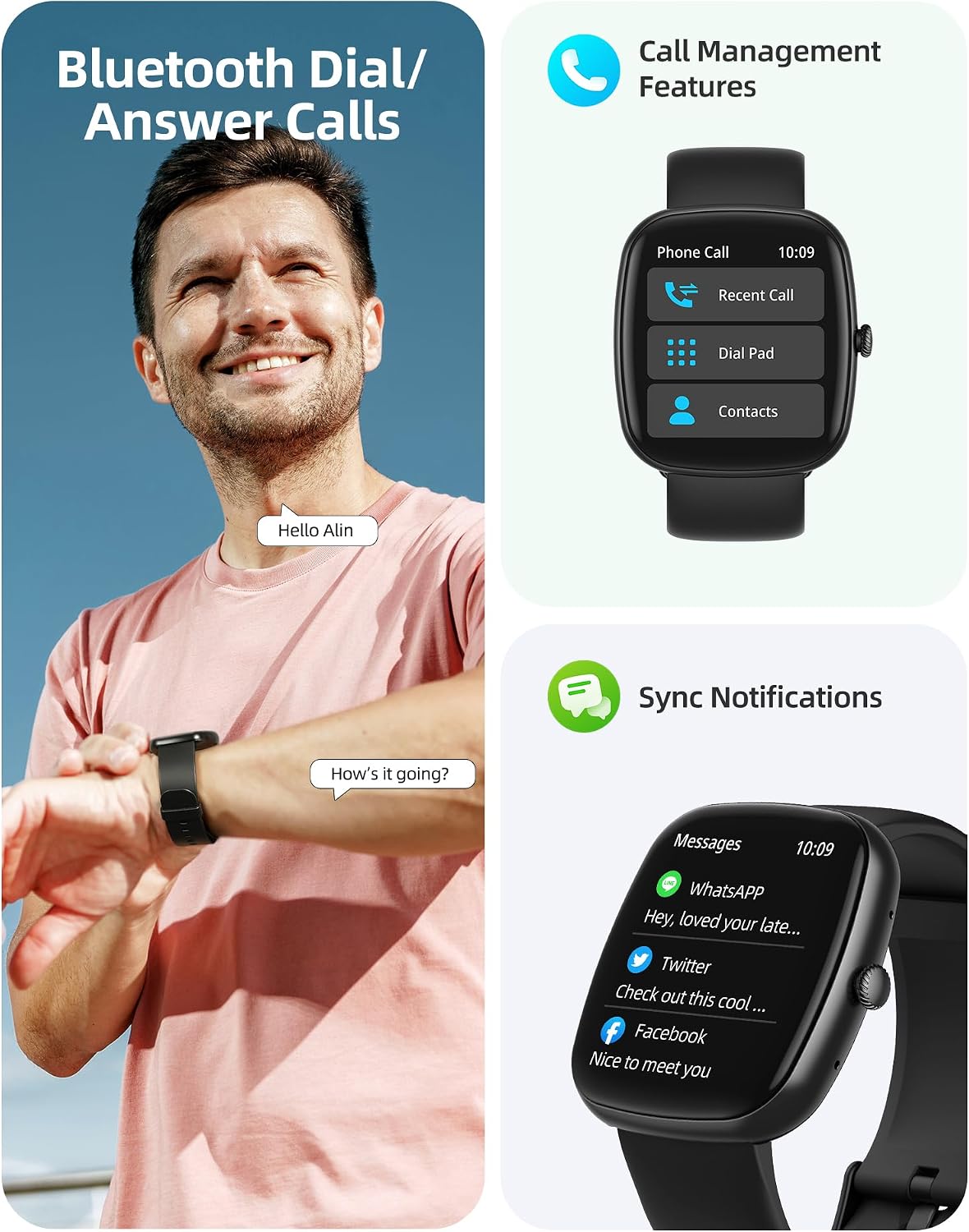
Image: A user interacting with the smartwatch for Bluetooth calls, demonstrating the call management interface.
3.2 Nlekọta ahụike
The smartwatch features advanced sensors for continuous health tracking.
- Nlekota obi obi: Measures and records your heart rate throughout the day. The app displays trends and alerts for abnormal readings.
- Nyocha ọbara oxygen (SpO2): Tracks your blood oxygen saturation levels.
- Nleba anya ụra: Analyzes your sleep patterns, including deep sleep, light sleep, and awake times, to help optimize your sleep habits.
- Nleba anya nrụgide: Na-enye nghọta na ọkwa nrụgide gị.
- Nleba ahụike ụmụ nwanyị: Records menstrual cycles and ovulation periods.

Image: Visual representation of the smartwatch's health monitoring capabilities, including heart rate, blood oxygen, and pressure readings.
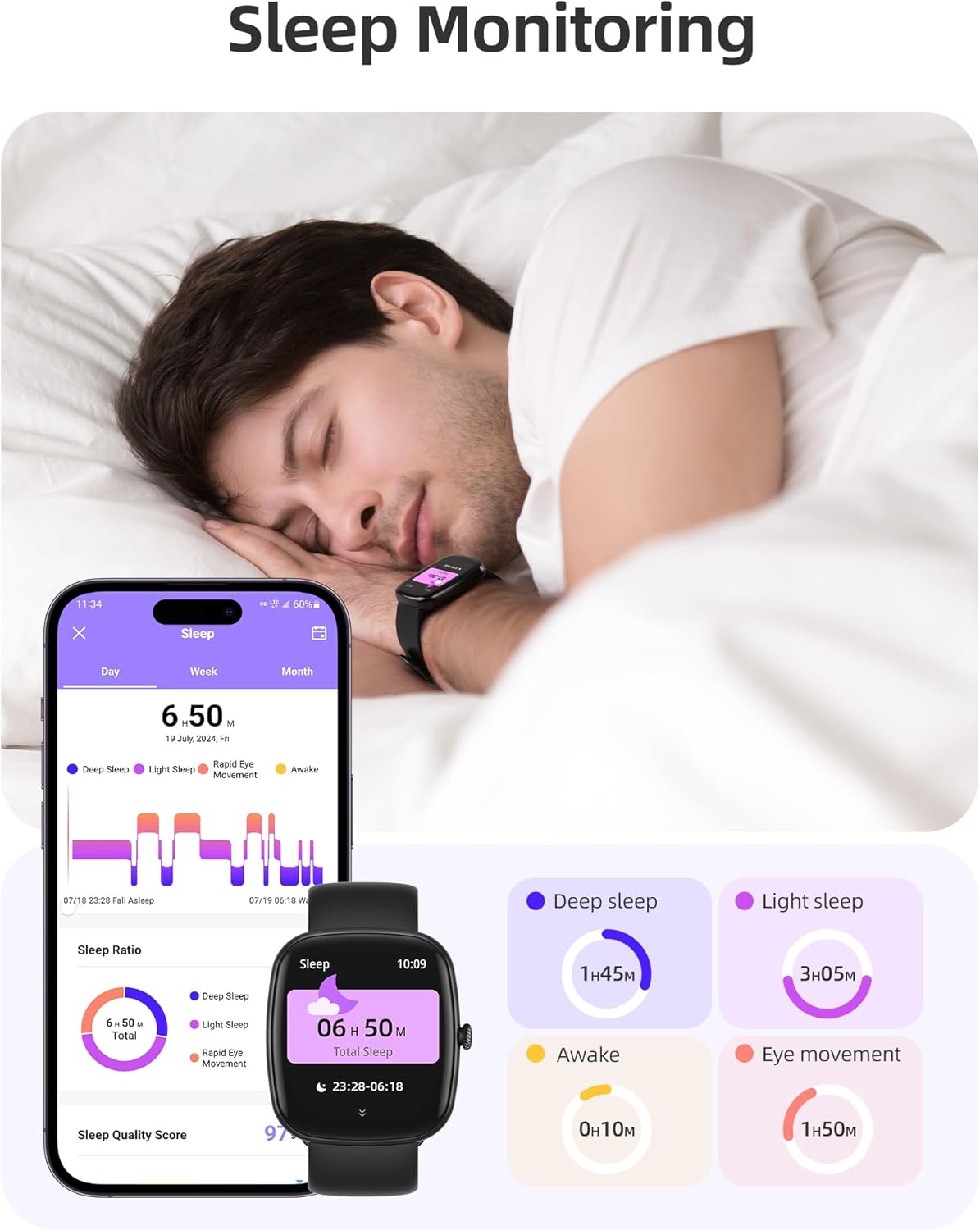
Image: The smartwatch monitoring sleep, with a detailed breakdown of sleep stages displayed on the companion app.
3.3 Ụdị Egwuregwu na Nlele Ọrụ
The activity tracker supports over 100 sports modes to monitor your workouts effectively.
- Ụdị dị: Includes yoga, running, jumping, cycling, badminton, football, rowing, and many more.
- Data Tracking: Records steps, distance, calories burned, and real-time heart rate during exercise.
- Akara Njikere Kwa Ụbọchị: Provides a summary of your daily activity and recovery.

Image: The smartwatch tracking a user's activity during a run, displaying key metrics like calories, steps, heart rate, and distance.
3.4 App Experience and BMI Tracking
The companion app offers additional features for health management.
- Weight and BMI Tracking: Manually input your weight in the app to track changes and automatically calculate your Body Mass Index (BMI). View daily, weekly, monthly, and yearly weight trends.
- Training Courses: Access integrated training courses from beginner to advanced levels.
- Relaxation Features: Includes white noise, meditation exercises, and relaxation training.

Image: The companion app displaying weight and BMI tracking features, helping users monitor their body composition.
Ihu elekere 3.5 nwere ike ịhazi ya
Personalize your smartwatch with over 200 different watch face designs available through the app.

Image: A selection of customizable watch faces, demonstrating the variety of styles and information layouts available.
3.6 Ọrụ ndị ọzọ bara uru
The smartwatch includes several other useful features:
- Amụma ihu igwe: View 7-day weather forecasts.
- Njikwa egwu: Control music playback directly from your wrist.
- Njikwa igwefoto: Jikwaa igwefoto ama ama gị n'ime anya.
- Elekere mkpu: Tọọ ọtụtụ mkpu.
- Elekere nkwụsị na ihe ngụ oge: Precise timing for various activities.
- Ncheta ịnọdụ ala: Na-akpali gị ịkwaga mgbe oge ụfọdụ nke enweghị mmega ahụ gasịrị.
- Ihe omume iku ume: Guided exercises to reduce stress.
- Chọta ekwentị: Locate your paired smartphone with a tap on your watch.
- Ndozi ihie: Continuously adjustable screen brightness for optimal visibility in any lighting condition.

Foto: Ofeview of the various practical functions available on the Parsonver Smartwatch Z139.
4. Nlekọta
Proper care ensures the longevity and performance of your smartwatch.
- Nhicha: Regularly clean the watch and strap with a soft, dry cloth. Avoid harsh chemicals.
- Nguzogide mmiri: The smartwatch has an IP68 water resistance rating, meaning it can withstand hand washing, rain, and splashes. Do not use it for swimming, diving, or in saunas.
- Ịchaji: Use only the provided charging cable. Avoid exposing charging contacts to moisture.
- Nchekwa: Chekwaa elekere n'ebe dị jụụ, kpọrọ nkụ mgbe anaghị eji ya.
5. Nchọpụta nsogbu
If you encounter issues with your smartwatch, try the following steps:
- Lelee anaghị agbanye: Gbaa mbọ hụ na chajịrị elekere ahụ nke ọma.
- Enweghị ike ijikọ na ekwentị:
- Gbaa mbọ hụ na agbanyere Bluetooth na ekwentị gị na elekere.
- Gbaa mbọ hụ na elekere ahụ dị n'ime oke ekwentị gị.
- Malitegharịa ma elekere ahụ ma ekwentị gị.
- Try unpairing and re-pairing through the app.
- Anataghị ọkwa:
- Check app permissions on your phone to ensure notifications are allowed for the Parsonver app.
- Verify that notifications are enabled within the Parsonver app settings.
- Ensure the watch is properly connected via Bluetooth.
- Data ahụike ezighi ezi:
- Gbaa mbọ hụ na etinyere elekere nke ọma na nkwojiaka gị, ọ bụghị nke siri ike ma ọ bụ nke tọgbọrọ chakoo.
- Hichaa ihe mmetụta dị n'azụ elekere.
- Zere oke mmegharị n'oge nha.
- Ihuenyo anaghị anabata: Try restarting the watch. If the issue persists, contact customer support.
6. Nkọwapụta
| Njirimara | Nkọwapụta |
|---|---|
| Ụdị | Parsonver |
| Nọmba nlereanya | Z139 |
| Nha ihuenyo | 1.83 sentimita asatọ |
| Ndakọrịta sistemụ arụmọrụ | iOS 9.0/Android 6.0 or above Smartphones |
| Teknụzụ Njikọta | Bluetooth |
| Atụmatụ pụrụ iche | Bluetooth Calls, 100+ Sports Modes, Heart Rate Monitoring, SpO2 Monitoring, Sleep Monitoring, IP68 Water Resistance, Music Control, Camera Control, Weather, Alarm, Timer, Stopwatch, Sedentary Reminder, Breathing Exercises, Find Phone, Brightness Adjustment, Women's Health Tracking |
| Ngwakọta batrị | Lithium-polymer |
| Ike batrị | 230 mAh |
| Ogo Nguzogide Mmiri | IP68 (Not for swimming/diving/sauna) |
| Ike Nchekwa ebe nchekwa | 512 MB |
| GPS | Site na smartphone |
7. Akwụkwọ ikike na nkwado
For warranty information and customer support, please refer to the documentation included with your purchase or visit the official Parsonver website. Typically, products are covered by a manufacturer's warranty against defects in materials and workmanship for a specified period from the date of purchase. Please retain your proof of purchase.
If you experience any issues not covered in this manual, or require further assistance, please contact Parsonver customer service.