
1. Okwu mmalite
Thank you for choosing the RIKSION JF-H-40JD Under-Desk Treadmill. This manual provides essential information for the safe and effective use, setup, operation, and maintenance of your new fitness equipment. Please read this manual thoroughly before initial use and retain it for future reference.
The RIKSION JF-H-40JD is designed for home and office use, offering a compact and portable solution for walking, jogging, and light running. Its foldable design and transport wheels make it ideal for small spaces, allowing for convenient storage and movement.
2. Ozi nchekwa
WARNING: To reduce the risk of serious injury, read all important precautions and instructions in this manual before using the treadmill.
- Gakwuru dọkịta tupu ịmalite mmemme mmega ahụ ọ bụla.
- Debe ụmụaka na anụ ụlọ n'ebe a na-azọ ụkwụ n'ebe a na-arụ ọrụ.
- Place the treadmill on a flat, stable surface with at least 2 meters (6.5 feet) of clear space behind it and 0.6 meters (2 feet) on each side.
- Ensure the safety clip is properly attached to your clothing before starting the treadmill. In case of an emergency, the safety clip will stop the machine.
- Do not operate the treadmill if it has a damaged power cord or plug, or if it is not working properly.
- Yiri akpụkpọ ụkwụ na uwe egwuregwu kwesịrị ekwesị. Zere uwe ndị na-adịghị mma nke nwere ike ịdaba n'ime akụkụ ndị na-agagharị agagharị.
- Akwụsịla ma ọ bụ pụọ na igwe mgbada mgbe eriri na-agagharị.
- Oke ibu onye ọrụ maka igwe a na-agba ígwè bụ kilogram 120 (264 lbs).
- Wepụ ihe mgbakwụnye ígwè ahụ n'ebe a na-adọba ụgbọala n'ọkụ mgbe a naghị eji ya, tupu e hichaa ya, nakwa tupu e mechaa rụzie ya.
3. Ngwaahịa gafereview
3.1 Akụkụ
- Running Belt (100 cm x 40 cm)
- Ngosipụta LED
- Control Panel (on armrest)
- Njikwa anya
- Foldable Armrests with Device Holder
- Obere nchekwa
- Ụgbọ njem ụgbọ njem
- Ụdọ ọkụ
3.2 Atụmatụ
- Ndabere na-agbanwe agbanwe: Features a manual incline adjustment of 5% and 10% (2 to 4 degrees) to simulate uphill training, enhancing workout intensity and calorie burn.
- Dual Shock Absorption: Equipped with a 5-layer anti-slip running belt and 2 soft rubber cushions for a stable and comfortable experience, reducing joint impact.
- Ọrụ dị jụụ: Designed with multiple layers of anti-slip textures and noise-absorbing coatings, ensuring quiet operation (under 45dB) suitable for home or office environments.
- Nhazi kọmpat na nke enwere ike mpịaji: Ready to use out of the box with no installation required. Armrests fold down, reducing dimensions to 136.5 x 64.5 x 13 cm for easy storage under tables or sofas.
- Ụgbọ njem: Integrated wheels allow for easy relocation and vertical storage, making it ideal for small apartments or offices.
- Ngosipụta LED na Njikwa Ime Obodo: Clearly displays distance, speed, time, and calorie data. Speed can be adjusted, and the treadmill can be started, stopped, or paused via the remote control or the Fitshow app.
- Ọrụ 3-na-1: Supports walking (1-6 km/h), jogging/workstation mode (1-6 km/h), and running (1-14 km/h).
4. Nhazi
4.1 Mwepu na ntinye
- Carefully remove the treadmill from its packaging. The unit comes pre-assembled.
- Place the treadmill on a firm, level surface. Ensure adequate clearance around the unit as described in the Safety Information section.
4.2 Mepee igwe ihe eji eme ihe
- Gently lift the armrests from their folded position until they lock securely into place.
- Gbaa mbọ hụ na etinyere usoro mkpọchi niile tupu ejiri ya.
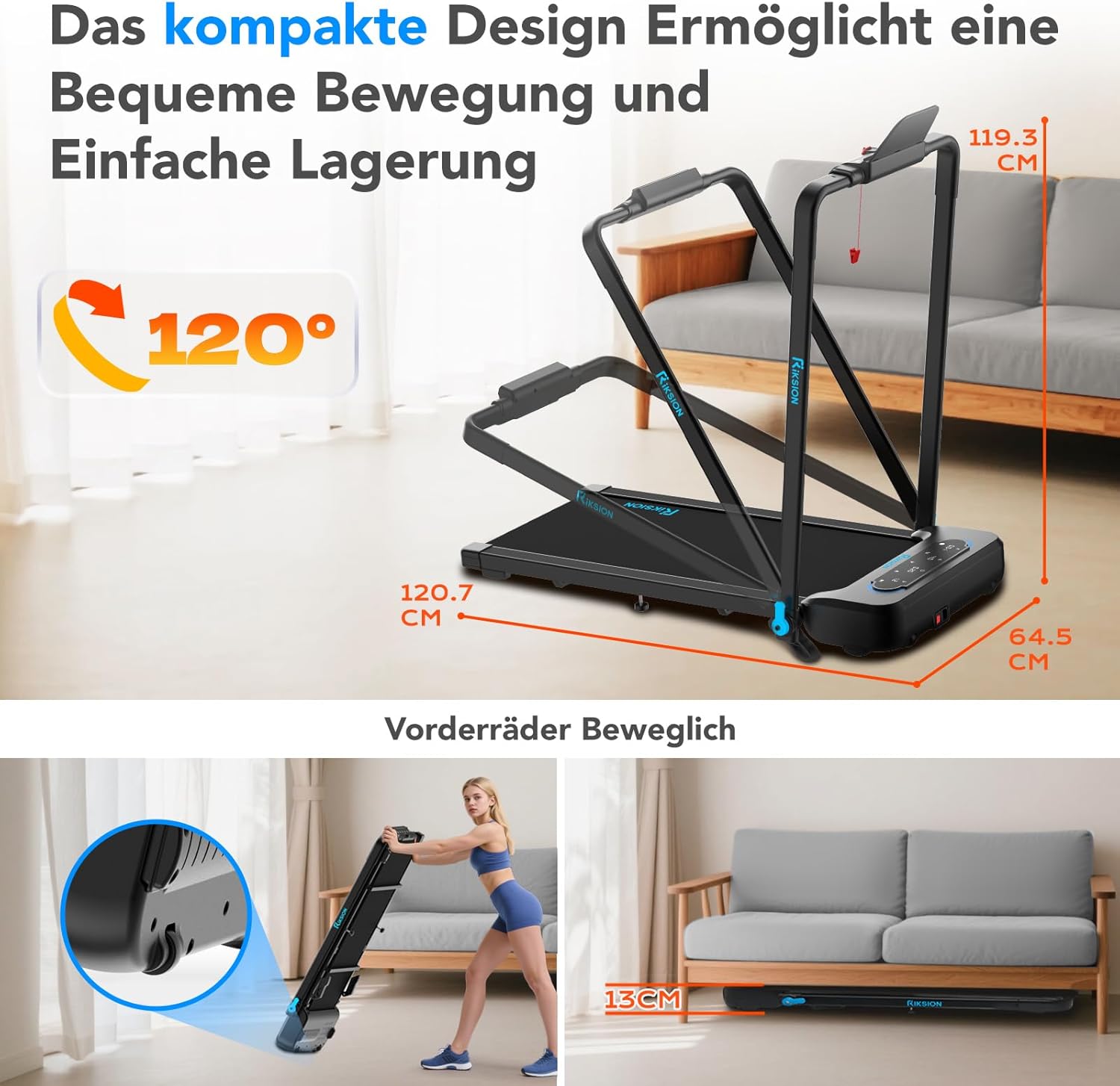
Image: The compact design allows for easy movement and storage. The treadmill can be folded to a height of 13 cm and features front wheels for transport.
4.3 Njikọ ike
- Jikọọ eriri ike ahụ na ntinye ike nke igwe treadmill.
- Tinye nsọtụ nke ọzọ nke eriri ọkụ n'ime oghere eletrik gbadoro ụkwụ.
4.4 Ndozi anya
The incline is manually adjustable. To change the incline, lift the rear of the treadmill and adjust the support legs to the desired 5% or 10% incline level. Ensure both sides are set equally.

Image: Illustration of the manual incline feature, demonstrating 5% and 10% incline settings and their impact on calorie expenditure.
5. Ntuziaka ọrụ
5.1 Gbanyụọ/ gbanyụọ
- Press the power button on the treadmill's control panel or remote control to turn the unit on.
- To turn off, press the power button again or unplug the unit.
5.2 Attaching the Safety Clip
Before each use, attach the safety clip to the designated slot on the control panel and secure the other end to your clothing. The treadmill will not operate without the safety clip in place.
5.3 Using the Control Panel and Remote Control

Image: The treadmill's LED display shows workout data, and the remote control provides convenient speed adjustment and start/stop functions.
- Malite/Kwụsị: Use the 'Start' and 'Stop' buttons on the control panel or remote to begin and end your workout.
- Ndozi ọsọ ọsọ: Use the '+' and '-' buttons on the control panel or remote to increase or decrease the speed. The treadmill offers a speed range of 1-14 km/h.
- Nhọrọ ụdị: The treadmill supports different modes: walking (1-6 km/h), workstation (1-6 km/h), and running (1-14 km/h). Select the appropriate mode based on your activity.
5.4 Ikanam Display
The integrated LED display automatically shows your workout data, including:
- Anya
- Ọsọ
- Oge
- Kalori gbara ọkụ
5.5 App Connectivity (Fitshow)
The treadmill can connect to the Fitshow application. Refer to the Fitshow app's instructions for pairing and advanced control features.

Image: A user exercising on the RIKSION treadmill, demonstrating the device holder for tablets and the remote control for operation.
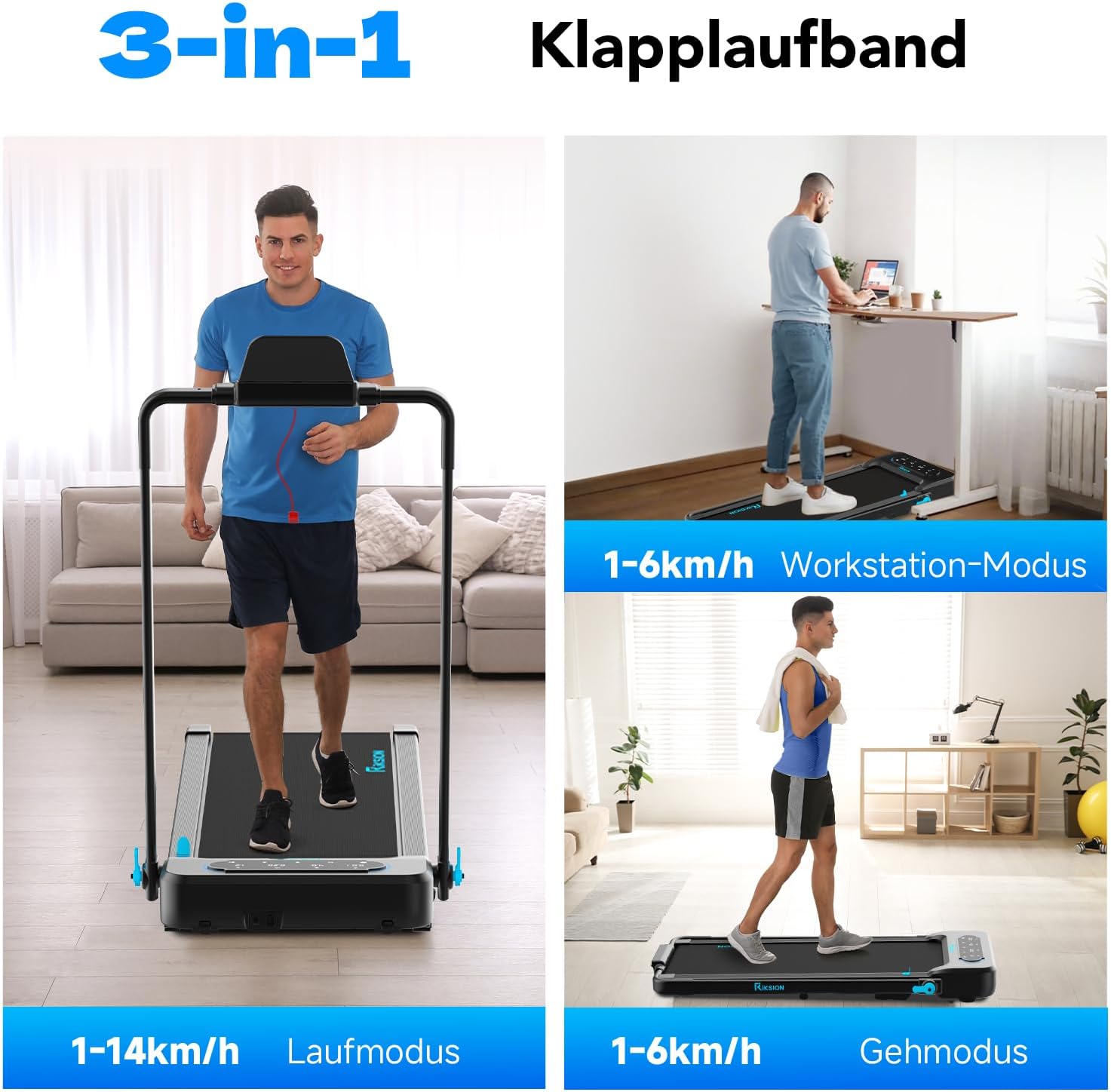
Image: Illustration of the treadmill's versatility, showcasing its use for running, as an under-desk walking pad, and for general walking.
6. Nlekọta
Nlekọta anya mgbe niile na-eme ka ogologo ndụ na ịrụ ọrụ kachasị mma nke igwe mgbada gị.
- Nhicha: Jiri mgbasa ozi hichaa treadmill ahụamp ákwà mgbe ejiri ya mee ihe ọ bụla iji wepụ ọsụsọ na uzuzu. Ejila ihe nhicha ma ọ bụ ihe mgbaze.
- mmanu eriri: The running belt requires periodic lubrication to reduce friction and extend its lifespan. Refer to the specific instructions provided with your lubricant or contact customer support for guidance. Generally, apply silicone lubricant under the belt every 3-6 months depending on usage.
- Belt ahụ erughị ala na nhazi: Check the running belt tension and alignment regularly. If the belt slips or drifts to one side, adjust it according to the instructions in the troubleshooting section or consult customer support.
- Nchekwa: When not in use, fold the treadmill and store it in a dry, cool place away from direct sunlight.
7. Nchọpụta nsogbu
If you encounter any issues with your RIKSION treadmill, refer to the following common problems and solutions:
- Treadmill anaghị arụ ọrụ:
- Ensure the power cord is securely plugged into a grounded outlet and the treadmill.
- Check if the safety clip is properly inserted.
- Verify the power switch is in the 'ON' position. - Running belt slips or stops:
- The running belt may be too loose. Refer to the manual for instructions on adjusting belt tension.
- The belt may require lubrication. See the Maintenance section. - Running belt drifts to one side:
- The running belt may be misaligned. Use the adjustment bolts at the rear of the treadmill to center the belt. Turn the bolt on the side the belt is drifting towards clockwise, or the opposite side counter-clockwise, in small increments (quarter turns) while the treadmill is running at a low speed. - Mkpọtụ na-adịghị ahụkebe mgbe a na-arụ ọrụ:
- Check for any loose parts or foreign objects under the belt.
- The belt may need lubrication.
- Ensure the treadmill is on a level surface. - LED display is not working:
- Check all cable connections.
- Power cycle the treadmill (turn off, unplug, wait 30 seconds, plug in, turn on).
Ọ bụrụ na nsogbu ahụ dịgidere mgbe ị nwara azịza ndị a, biko kpọtụrụ nkwado ndị ahịa.
8. Nkọwapụta
| Njirimara | Nkọwapụta |
|---|---|
| Nọmba nlereanya | JF-H-40JD |
| Ụdị | Riksion |
| Ike ịnyịnya | 2.25 HP |
| Oke ọsọ | 1 - 14 km / h |
| Oke oke ibu | 120 kilogram |
| Ọkwa Ndabere | Manual 5% and 10% (2-4 degrees) |
| Nha eriri agba ọsọ | 100 cm x 40 cm |
| Ụdị ngosi | Ikanam |
| Akụkụ agbakọtara (L x W x H) | 136.5 x 64.5 x 13 cm |
| Akụkụ agbasaghị (L x W x H) | 120.7 x 64.5 x 115.3 cm (ihe dị ka, dabere na onyonyo) |
| Ibu Ibu | 22.5 kilogram |
| Ihe onwunwe | Alloy Steel |
| Atụmatụ pụrụ iche | Foldable, LED Display, Double Shock Absorption, Armrests with Device Holder |
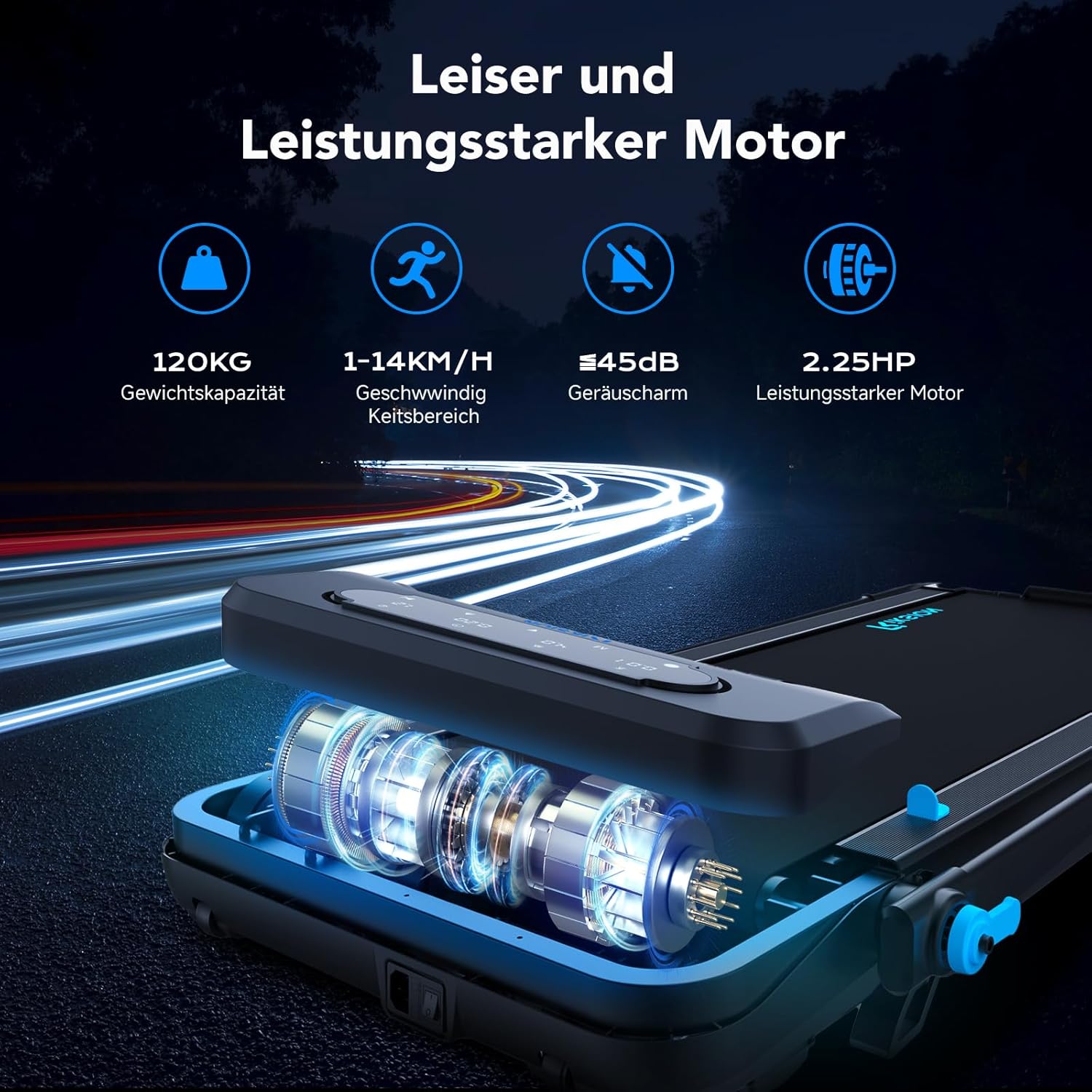
Image: Illustration of the treadmill's quiet and powerful 2.25 HP motor, capable of speeds up to 14 km/h and supporting up to 120 kg.

Foto: Zuru ezu view of the running belt's construction, highlighting its five layers for abrasion resistance, noise reduction, reinforcement, EVA cushioning, and high-strength compression.
9. Akwụkwọ ikike na nkwado
For warranty information and customer support, please refer to the documentation included with your purchase or contact the retailer/manufacturer directly. Keep your proof of purchase for warranty claims.