
Okwu mmalite
Daalụ maka ịzụrụasing the CHOETECH T611-F 3-in-1 Magnetic Wireless Fast Charging Stand. This versatile device is designed to simplify your charging experience by allowing you to simultaneously charge your MagSafe-compatible iPhone, AirPods, and Apple Watch with a single, compact unit. Its foldable design makes it ideal for both home and travel, providing efficient and convenient power whenever you need it.
Ozi nchekwa
Please read all safety instructions carefully before using this product to ensure proper operation and prevent damage to the device or connected accessories.
- Ewepụla ngwaọrụ ahụ na mmiri, mmiri, ma ọ bụ oke okpomọkụ.
- Avoid dropping, disassembling, or attempting to repair the device yourself.
- Use only the provided USB Type-C cable and a compatible QC & PD fast charging adapter (not included) for optimal performance.
- Keep the device away from strong magnetic fields to prevent interference.
- Gbaa mbọ hụ na ikuku ikuku dị mma mgbe ị na-ebufe.
Ihe ngwugwu
Biko lelee ngwungwu ka ị hụ na ihe niile dị:
- 3-in-1 Magnetic Wireless Charging Stand (Main Unit) x 1
- USB Ụdị-C USB x 1
- Akpa nchekwa x 1
- Akwụkwọ ntuziaka onye ọrụ x 1

Image: Contents of the product package, showing the main charging unit, USB-C cable, storage case, and user manual.
Ngwaahịa gafereview
The CHOETECH T611-F is designed for convenience and efficiency, allowing you to charge three Apple devices simultaneously. Its sleek, foldable design makes it an ideal companion for both your desk and travel bag.

Image: The 3-in-1 charging stand with an iPhone magnetically attached, AirPods charging at the base, and an Apple Watch charging on the side arm.
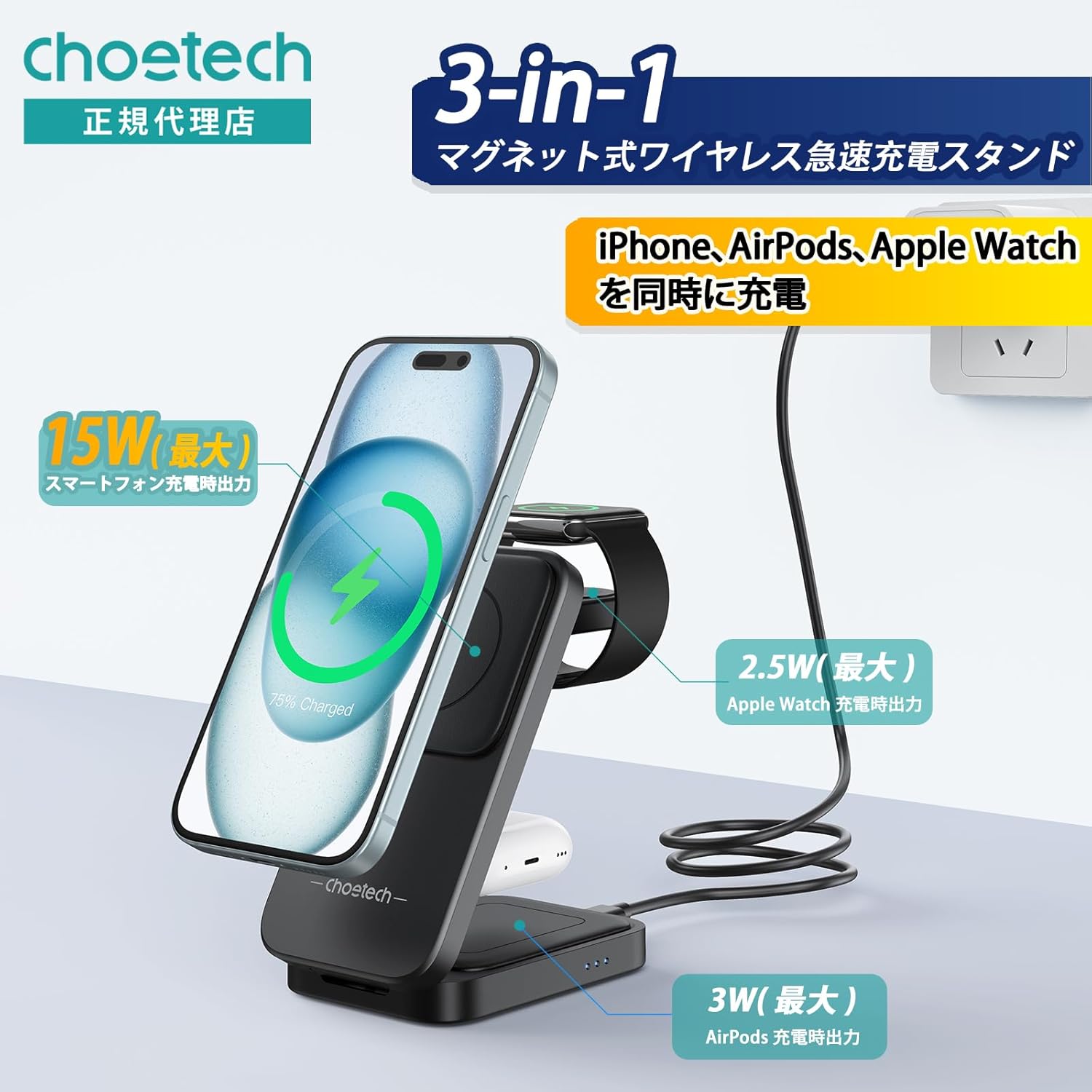
Image: A visual representation of the charging stand highlighting its 3-in-1 capability and power outputs: 15W (max) for smartphones, 2.5W (max) for Apple Watch, and 3W (max) for AirPods.
Melite
- Jikọọ na Ike: Connect the provided USB Type-C cable to the charging stand's USB-C port. Plug the other end of the cable into a compatible QC & PD fast charging adapter (not included). For optimal fast charging, a QC & PD compatible adapter is required.
- Mepee Nkwụsi ike: Gently unfold the charging stand to its desired upright position. The stand is designed to be foldable for easy storage and portability.
- Attach Apple Watch Charger (Optional): The Apple Watch charging part is detachable. If you wish to use it separately, simply detach it from the main unit. It can then be plugged into any USB Type-C port for standalone Apple Watch charging.

Image: Illustration of the detachable Apple Watch charging module. It can be removed from the stand and used independently by plugging it into a USB Type-C port.
Ntuziaka ọrụ
This charging stand offers convenient and efficient charging for your devices.
- Ịchaji iPhone: Place your MagSafe-compatible iPhone onto the magnetic charging pad. The strong magnets will align your device precisely for optimal charging. You can charge your iPhone in both horizontal and vertical orientations while using the stand hands-free.
- Ịchaji AirPods: Place your AirPods (with wireless charging case) onto the designated charging area at the base of the stand.
- Ịchaji Apple Watch: Place your Apple Watch onto the integrated charging module on the side arm.
- Fast Charging Modes: The charger supports 5 charging modes: 15W, 10W, 7.5W, 5W, and 2.5W, providing stable and efficient performance.

Image: A hand demonstrating the magnetic attachment of an iPhone to the charging stand, ensuring precise alignment for charging.

Image: The charging stand supporting an iPhone in both horizontal and vertical orientations for hands-free viewing mgbe ị na-ana.
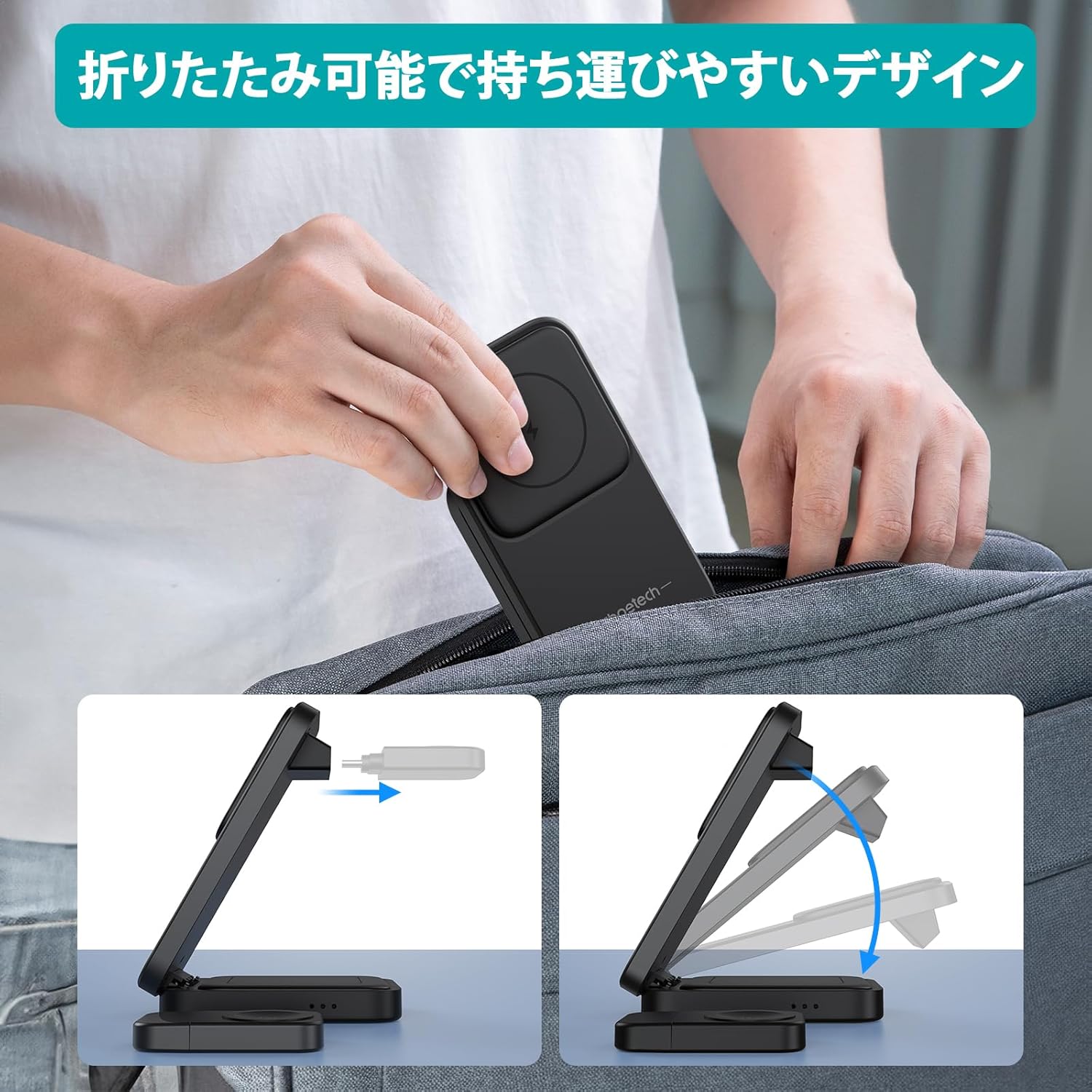
Image: The foldable design of the charging stand, illustrating how it can be easily collapsed and stored in a bag for portability.
Nlekọta
To ensure the longevity and optimal performance of your charging stand, follow these maintenance guidelines:
- Nhicha: Use a soft, dry cloth to wipe the surface of the charger. Do not use abrasive cleaners, solvents, or harsh chemicals.
- Nchekwa: When not in use, store the charger in a cool, dry place, away from direct sunlight and extreme temperatures. Utilize the included storage case for protection during travel.
- Nlekọta USB: Avoid bending or crimping the USB Type-C cable excessively. Always grasp the plug, not the cable, when disconnecting.
Nchọpụta nsogbu
If you encounter any issues with your charging stand, please refer to the following common solutions:
| Nsogbu | Ihe nwere ike ime | Ngwọta |
|---|---|---|
| Ngwaọrụ anaghị akwụ ụgwọ | Loose cable connection; Incompatible power adapter; Device not properly aligned; Foreign object on charging pad. | Ensure USB-C cable is securely connected. Use a QC & PD compatible adapter. Realign device on the charging pad. Remove any foreign objects (e.g., metal, credit cards) from the charging surface. |
| Nchaji nwayọ | Non-QC/PD adapter used; Device case too thick; Background apps consuming power. | Use a QC & PD compatible power adapter. Remove thick phone cases. Close unnecessary background applications on your device. |
| ekpo oke ọkụ | Poor ventilation; Charging in direct sunlight. | Ensure the charger is placed in a well-ventilated area. Avoid charging in direct sunlight or hot environments. |
Nkọwapụta
| Njirimara | Nkọwa |
|---|---|
| Nọmba nlereanya | T611-F |
| Agba | Nwa |
| Ihe onwunwe | Polyurethane + Polycarbonate + ABS |
| Interface | USB Ụdị-C |
| Akụkụ (Ejiri | | Approx. 125mm (Length) x 65mm (Width) x 23mm (Thickness) |
| Ibu | Ihe ruru. 293g |
| Ntinye | 5-9V/3A (Kachasị) |
| Output (iPhone) | 5W/7.5W/10W/15W (Kachasị) |
| Mmepụta (Apple Watch) | 2.5W (Max) |
| Output (AirPods) | 3W (Max) |
| Ụdị eriri igwe | Otu eriri igwe |
| Asambodo | FCC, CE, RoHS |
Ndakọrịta
The CHOETECH T611-F charging stand offers wide compatibility with MagSafe-enabled devices:
- iPhone: iPhone 16/15/14/13/12 Series
- Apple Watch: Apple Watch Ultra/SE/8/7/6/5/4/3/2
- AirPods: AirPods Pro 3/2/Pro/Pro 2

Image: A graphic illustrating the broad compatibility of the charging stand with various iPhone (12 series and later), Apple Watch (Series 2 and later), and AirPods (Pro 2 and later) models.
Akwụkwọ ikike na nkwado
Ngwaahịa a na-abịa na a 2-afọ akwụkwọ ikike. For any product inquiries, technical support, or warranty claims, please contact our customer service team through the retailer where you purchased the product or visit the official CHOETECH websaịtị maka akụrụngwa nkwado.
Biko dowe ihe akaebe nke ịzụrụ ihe maka nkwado akwụkwọ ikike.