
1. Ngwaahịa gafereview
The Nikon Z6III Mirrorless Camera is designed for professionals in photography and filmmaking. It features a 24.5MP partially-stacked CMOS sensor and the EXPEED 7 image processor, delivering high-quality stills and internal 6K60 and 4K120 video recording. The camera offers precise autofocus, a bright 5.76M-dot electronic viewfinder, and a durable, weather-sealed magnesium alloy body.

Foto 1.1: N'ihu view of the Nikon Z6III Mirrorless Camera, showcasing the Z-mount and the partially-stacked CMOS sensor.
2. Kedu ihe dị na Igbe ahụ
Your Nikon Z6III Mirrorless Camera bundle includes the following items:
- Nikon Z6III Mirrorless Camera Body
- Nikon NIKKOR Z MC 105mm f/2.8 VR S Macro Lens
- Nikon EN-EL15c Rechargeable Lithium-Ion Battery
- Kaadị ebe nchekwa 64GB
- USB-A ka eriri USB-C
- HDMI USB
- Eriri aka
- Onye Na-echekwa Okpu Lens
- Ngwa nhicha
- Obere akpa kaadị ebe nchekwa
- USB Card Reader (SD/microSD)
- Video Tripod 72-Inch
- Flexible Vlogging Tripod
- Photo, Video, & Art Suite Deluxe Software
- 62mm Filter Kit
- Akpa njem
- Wireless Shutter Release - Universal
3. Mbido Mbido
3.1. Ịchaji batrị
Before first use, fully charge the Nikon EN-EL15c Lithium-Ion Battery using the provided USB-A to USB-C cable and a compatible USB power adapter (not always included, check packaging). The charging indicator on the camera or charger will show the charging status.
3.2. Ịtinye kaadị ebe nchekwa
The Z6III supports SD and SDXC memory cards. Open the memory card slot cover, insert the 64GB memory card until it clicks into place. Ensure the card is inserted correctly to avoid damage.

Foto 3.1: Memory card slots on the Nikon Z6III, showing insertion of SD cards.
3.3. Na-agbakwunye oghere
Align the mounting mark on the NIKKOR Z MC 105mm f/2.8 VR S Macro Lens with the mounting mark on the camera body. Rotate the lens clockwise until it clicks into place. To remove, press the lens release button and rotate counter-clockwise.
4. Na-arụ ọrụ igwefoto
4.1. Gbanyụọ / gbanyụọ
Iji gbanye igwefoto ahụ, tụgharịa ihe mgba ọkụ eletrik dị gburugburu bọtịnụ mkpuchi ahụ gaa n'ọnọdụ "GBANYỊ". Iji gbanyụọ ya, tụgharịa ya ka ọ bụrụ "GBANYỊ".

Foto 4.1: N'elu view of the Nikon Z6III, highlighting the power switch and mode dial.
4.2. Sensor and Image Processing
The Z6III features a 24.5MP partially-stacked CMOS sensor, which allows for faster data readout, reduced rolling shutter, and improved noise performance. Coupled with the EXPEED 7 image processor, it ensures rapid performance for both stills and video.
4.3. Autofocus and Continuous Shooting
The camera utilizes an enhanced 493-point phase-detection AF system covering the full sensor area for fast and accurate focusing. It supports continuous shooting at up to 20 fps in raw, 60 fps in full-frame JPEG, and 120 fps in DX crop mode with full AF/AE. The Pre-Release Capture function records frames up to 120 fps just before the shutter is fully pressed.
The autofocus system can detect 9 subject types and offers reliable performance even in backlit scenes, detecting human faces in silhouettes. It also features small face detection for video tracking.
4.4. Video Recording Capabilities
The Z6III supports internal 6K60 and 4K120 video recording with full pixel readout. It offers 12-bit N-RAW and ProRes RAW formats for maximum post-production flexibility, along with ProRes and H.265 10-bit recording for professional color grading. Full HD/240p in 10-bit H.265 allows for dramatic 10x slow-motion effects.
Vidio 4.1: Ihe ngosi vidiyo ngwaahịa gọọmentịasing the Nikon Z6III's advanced features, including sensor technology, autofocus, and video capabilities. This video highlights the camera's performance in various shooting scenarios.
4.5. Elektrọnik Viewfinder (EVF) and LCD
The camera features a bright 5.76M-dot electronic viewfinder, offering a clear and sharp view of details, even in bright outdoor conditions (4000 cd/m²). It also includes a four-axis tilting touchscreen LCD for flexible shooting angles.

Foto 4.2: N'azụ view of the Nikon Z6III, showing the tilting touchscreen LCD and control layout.
4.6. Portrait Shooting Features
The Z6III includes Rich Tone Portrait Picture Control for radiant and beautiful rendering of skin textures. Skin softening features smoothen skin while keeping hair and eyes sharp. Combined with NIKKOR Z prime lenses, these features enhance portrait photography.
4.7. Durability and Weather Sealing
The robust magnesium alloy body is cold-resistant down to -10°C/14°F and offers excellent dust- and drip-resistant performance, making it suitable for challenging outdoor environments.
4.8. Connectivity and Image Transfer
The camera features Wi-Fi connectivity for direct and automatic image transfer to cloud storage services via Nikon Imaging Cloud. It also includes USB-C and HDMI ports for versatile connectivity.
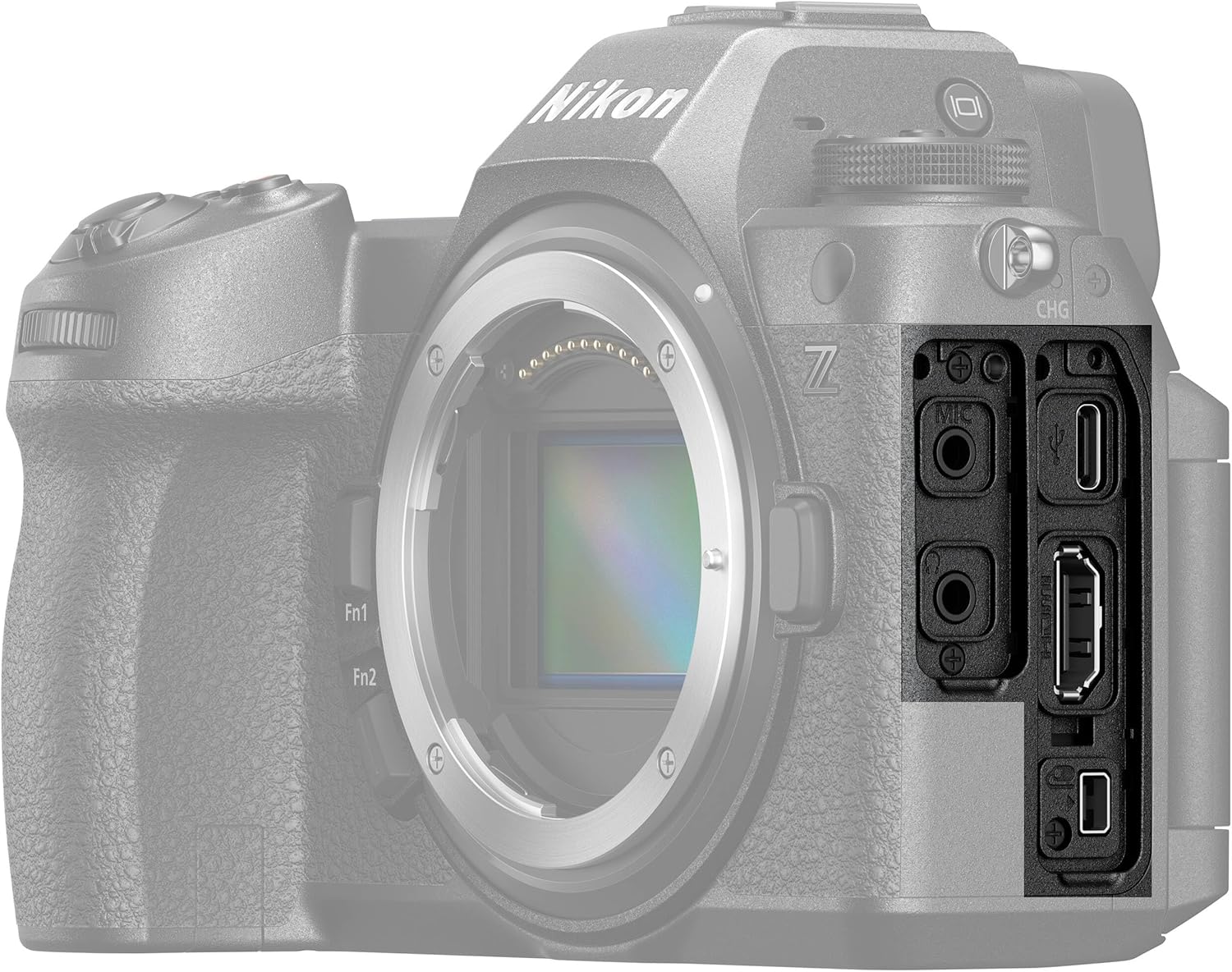
Foto 4.3: Akụkụ view of the Nikon Z6III, showing the various input/output ports.
4.9. Nkwụsi ike onyonyo
The Z6III incorporates sensor-shift image stabilization. It also features Electronic VR for handheld video shooting and 8.0-stop in-camera VR (when using specific lenses like the NIKKOR Z 24-120mm f/4 S) to expand shooting opportunities in low-light conditions.
5. Nlekọta
To ensure the longevity and optimal performance of your Nikon Z6III camera, follow these maintenance guidelines:
- Na-ehicha ahụ igwefoto: Jiri ákwà dị nro ma kpọọ nkụ hichaa ahụ igwefoto ahụ. Maka unyi siri ike, jiri ntakịrị d hichaa ahụ kamera ahụ.ampen the cloth with water or a specialized camera cleaning solution.
- Na-ehicha oghere: Use a lens brush to remove dust, then gently wipe with a microfiber lens cloth. For smudges, use a lens cleaning solution. Avoid touching the lens glass directly.
- ihicha ihe mmetụta: If dust spots appear on images, the sensor may need cleaning. This is a delicate procedure; it is recommended to have it performed by a professional Nikon service center.
- Nlekọta batrị: Store batteries in a cool, dry place. Do not expose them to extreme temperatures. Fully charge batteries before extended storage and recharge every six months to maintain battery health.
- Nchekwa: Mgbe ị na-ejighị ya, debe igwefoto ahụ n'ebe kpọrọ nkụ, nke na-enweghị uzuzu, ọ kacha mma ka ọ dịrị n'ime akpa igwefoto ma ọ bụ akpa ya. Wepụ batrị ahụ ma ọ bụrụ na echekwara ya ruo ogologo oge.
6. Nchọpụta nsogbu
If you encounter issues with your Nikon Z6III, refer to the following common troubleshooting tips:
- Igwefoto anaghị agbanwu:
- Gbaa mbọ hụ na chajịrị batrị zuru oke yana itinye ya nke ọma.
- Lelee ma kọntaktị batrị ahụ dị ọcha.
- Images Are Blurry:
- Hụ na e tinyere lenzi ahụ nke ọma ma dị ọcha.
- Check autofocus settings and ensure the camera is focusing on the intended subject.
- Increase shutter speed in low light or use image stabilization.
- Njehie Kaadị Ebe Nchekwa:
- Tinyeghachi kaadị ebe nchekwa ahụ.
- Try a different, compatible memory card.
- Format the memory card (note: this will erase all data).
- Video Recording Issues:
- Ensure sufficient memory card speed and capacity for the selected video format.
- Check video settings (resolution, frame rate).
- Connectivity Problems (Wi-Fi/USB):
- Restart both the camera and the connected device.
- Ensure Wi-Fi settings are correctly configured on both devices.
- Gbalịa eriri USB ma ọ bụ ọdụ ụgbọ mmiri dị iche.
For more complex issues, consult the full user manual available on the Nikon support website or contact Nikon customer support.
7. Nkọwapụta
| Njirimara | Nkọwapụta |
|---|---|
| Aha Nlereanya | Nikon Z6III |
| Mkpebi ka dị irè | 24.5 MP |
| Ụdị ihe mmetụta | BSI CMOS (Partially-Stacked) |
| Ihe nhazi onyonyo | EXPEED 7 |
| Ihe mgbado anya | 493-point Phase Detection |
| Agbapụ na-aga n'ihu | Up to 120 FPS (DX crop), 60 FPS (full-frame JPEG), 20 FPS (RAW) |
| Mkpebi vidiyo | 6K60, 4K120, 2160p |
| Usoro Nseta vidiyo | N-RAW, ProRes RAW, MP4 |
| Ndozi onyonyo | Sensor-shift (5-axis), Electronic VR |
| Eletrọnịkị Viewonye nchọta (EVF) | 5.76M-dot, 4000 cd/m² brightness |
| Nha ihuenyo | 3.2 Inches (Tilting Touchscreen LCD) |
| Nkwalite dakọtara | Nikon Z |
| Ike Nchekwa ebe nchekwa | 64 GB (gụnyere) |
| Teknụzụ Njikọta | Wi-Fi, USB-C, HDMI |
| Ọkwa Nguzogide mmiri | Water Resistant (Dust- and Drip-resistant) |
| Ibu Ibu | 7.9 pound (ihe dị ka.) |
| Nọmba nlereanya | 1890-AG2 |
| UPC | 703670501791 |
8. Akwụkwọ ikike na nkwado
8.1. Akwụkwọ ikike Ozi
The Nikon Z6III Mirrorless Camera comes with a 90-day limited warranty. Please retain your proof of purchase for warranty claims. For detailed terms and conditions, refer to the warranty card included in your product packaging or visit the official Nikon websaịtị.
8.2. Nkwado ndị ahịa
For technical assistance, troubleshooting, or service inquiries, please contact Nikon customer support through their official website or the contact information provided in your product documentation. Online resources, including FAQs and software downloads, are also available on the Nikon support portal.