
groov e GVEB16
Akwado Dijitalụ - Akwụkwọ ntuziaka onye ọrụ Ekwe ntị dị n'ime ntị
Model: GVEB16
Akara: groov e
Okwu mmalite
Thank you for choosing the groov e Digital Buds. These USB-C earphones are designed to provide a high-quality audio experience for music playback and hands-free calls. This manual will guide you through the setup, operation, and maintenance of your new earphones to ensure optimal performance and longevity.
Ihe ngwugwu
- Digital Buds USB-C Earphones
- Earbuds (3X Sizes) - Note: The product description mentions "Includes Earbuds (3X Sizes)", but "whats_in_the_box" only lists "Earphones". Assuming the different sizes are pre-attached or included as accessories with the main earphones.
Ngwaahịa gafereview
Familiarize yourself with the components of your Digital Buds.
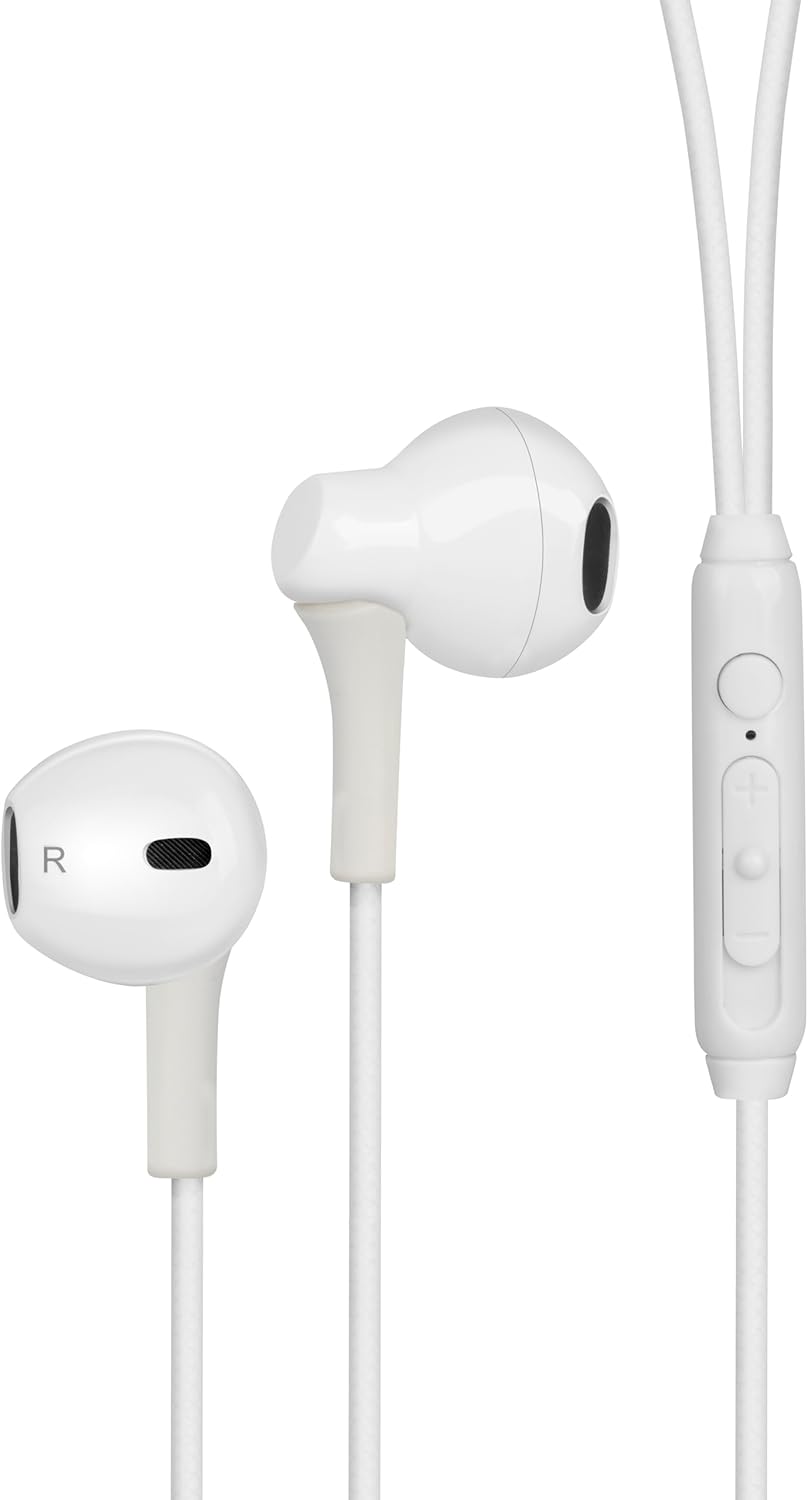
Figure 1: Digital Buds Earphones. This image shows both the left and right earbuds connected by their cable.

Figure 2: In-Line Remote and Microphone. The remote features volume up (+), volume down (-), and a multi-function button for calls and music control. The microphone is integrated into this unit.

Figure 3: USB-C Connector. This connector is used to plug the earphones into compatible devices such as smartphones, tablets, and laptops.
Melite
- Jikọọ na ngwaọrụ: Locate the USB-C port on your smartphone, tablet, or laptop. Insert the USB-C connector of the Digital Buds firmly into the device's USB-C port.
- Earbud Placement: Gently insert the earbuds into your ears. The earbud marked 'L' is for the left ear, and 'R' is for the right ear. Adjust them for a comfortable and secure fit. If necessary, try the different sized ear tips included to find the best fit for optimal sound quality and comfort.
- Nkwenye izizi: Your device should automatically recognize the earphones. You may need to select them as the audio output device in your device's sound settings.
Ntuziaka ọrụ
The in-line remote provides convenient control over your audio and calls.
Egwu Egwu
- Gwuo/kwụsịtụ: Pịa bọtịnụ ọtụtụ ọrụ otu ugboro.
- Track na-esote: Pịa bọtịnụ ọtụtụ ọrụ ugboro abụọ ngwa ngwa.
- Gara aga Track: Pịa bọtịnụ ọtụtụ ọrụ ugboro atọ ngwa ngwa.
- Olu elu: Pịa bọtịnụ '+'.
- Olu ala: Pịa bọtịnụ '-'.
Njikwa Oku
- Azịza/Kwụsị Oku: Pịa bọtịnụ ọrụ ọtụtụ ugboro n'oge oku na-abata ma ọ bụ oku na-arụ ọrụ.
- Jụ oku: Pịa ma jide bọtịnụ ọtụtụ ọrụ ruo ihe dị ka sekọnd abụọ n'oge oku na-abata.
Onye enyemaka olu
- Mee ka onye enyemaka olu rụọ ọrụ: Press and hold the multi-function button for approximately 2 seconds when not on a call or playing music. This will activate your device's default voice assistant (e.g., Google Assistant, Siri).
Nlekọta
Proper care will extend the life of your Digital Buds.
- Nhicha: Use a soft, dry, lint-free cloth to wipe the earbuds and cable. For stubborn dirt, slightly dampen akwa na mmiri. Ejila kemịkalụ siri ike ma ọ bụ ihe mkpocha abrasive.
- Nchekwa: When not in use, store the earphones in a clean, dry place, preferably in a small pouch or case to prevent tangling and damage.
- Zere mmiri mmiri: Do not expose the earphones to excessive moisture, rain, or liquids.
- Jiri Nlekọta Aka: Avoid pulling on the cable excessively or bending the USB-C connector at sharp angles.
Nchọpụta nsogbu
Ọ bụrụ na ị na-enwe nsogbu, rụtụ aka na nsogbu ndị a na-ahụkarị na ngwọta.
| Nsogbu | Ngwọta |
|---|---|
| Enweghị ụda sitere na ekwe ntị. |
|
| Igwe okwu anaghị arụ ọrụ n'oge oku. |
|
| Bọtịnụ njikwa anya anaghị anabata ya. |
|
Nkọwapụta
| Njirimara | Nkọwa |
|---|---|
| Ụdị | groov e |
| Aha Nlereanya | Groove Digital Buds - White |
| Nọmba Nlereanya ihe | GVEB16 |
| Teknụzụ Njikọta | Ejiri waya (USB-C) |
| Ntinye ntị | Na Ntị |
| Ụdị Ihe | Na Ntị |
| Usoro njikwa | Remote (In-line) |
| Ngwa gụnyere | Igwe ntị |
| Ihe onwunwe | Silikoni, plastic |
| Ibu Ibu | 1.06 ounces |
| Akụkụ ngwugwu | 6.61 x 2.36 x 1.26 sentimita asatọ |
| Ngwa dakọtara | Tablets, Mobile phones, Laptops, Desktops |
| Ihe eji eme ihe maka ngwaahịa | Ntụrụndụ |
Akwụkwọ ikike na nkwado
groov e products are manufactured to high standards and undergo rigorous quality checks. For information regarding warranty coverage, technical support, or customer service, please refer to the warranty card included with your purchase or visit the official groov e websaịtị.
Biko dowe akwụkwọ ikike ịzụrụ ihe ọ bụla.
Ask a question about this manual
Ask about setup, troubleshooting, compatibility, parts, safety, or missing instructions. Manuals+ will review the question and use this page’s manual context to help answer it.