
1. Okwu mmalite
Thank you for choosing the SIFENE Mini Single Serve Coffee Maker, Model KC211. This manual provides essential information for the safe operation, maintenance, and troubleshooting of your new coffee maker. Please read it thoroughly before first use and retain it for future reference.

Image 1.1: SIFENE Mini Single Serve Coffee Maker in operation, showing coffee pouring into a white mug.
2. Ntuziaka nchekwa dị mkpa
Mgbe ị na-eji ngwa eletriki, ekwesịrị ịgbaso usoro nchekwa nchekwa bụ isi mgbe niile iji belata ihe egwu ọkụ, ujo eletrik na/ma ọ bụ mmerụ ahụ n'ime mmadụ, gụnyere ihe ndị a:
- Gụọ ntuziaka niile.
- Emetụla ebe dị ọkụ aka. Jiri aka ma ọ bụ mkpọ.
- To protect against fire, electric shock, and injury to persons, do not immerse cord, plugs, or coffee maker in water or other liquid.
- Nleba anya dị mkpa mgbe ụmụaka na-eji ngwa ọ bụla ma ọ bụ nso.
- Kpupu na ntinye mgbe ejighị ya na tupu ihicha. Kwe ka ọ dị jụụ tupu ịtinye ma ọ bụ wepụ akụkụ, na tupu ihicha ngwa ahụ.
- Ejikwala ngwa ọ bụla nwere eriri ma ọ bụ plọg mebiri emebi ma ọ bụ mgbe ngwa ahụ dara, ma ọ bụ mebie ya n'ụzọ ọ bụla. Weghachite ngwa n'ebe ọrụ enyere ikike kacha nso maka nyocha, ndozi ma ọ bụ mmezi.
- Iji mgbakwunye ngwa anaghị akwado ndị nrụpụta ngwa nwere ike bute ọkụ, ujo eletrik, ma ọ bụ mmerụ ahụ ndị mmadụ.
- Ejila n'èzí.
- Ekwela ka eriri kwụgide n'akụkụ tebụl ma ọ bụ counter, ma ọ bụ metụ ebe dị ọkụ aka.
- Etinyela na ma ọ bụ nso gas na-ekpo ọkụ ma ọ bụ ọkụ eletrik, ma ọ bụ na oven ọkụ.
- Buru ụzọ tinye plọg mgbe niile na ngwa, wee tinye eriri n'ime oghere mgbidi. Iji kwupu njikọ, gbanyụọ njikwa ọ bụla ka ọ bụrụ "gbanyụọ", wee wepụ plọg na mpụta mgbidi.
- Ejila ngwa maka ndị ọzọ na-abụghị ebumnuche ebumnuche.
- Ngwa a bụ maka naanị ụlọ.
3. Ngwaahịa gafereview
3.1 Atụmatụ
- 2-in-1 Brewing: Compatible with K-pods and fresh coffee grounds using the included reusable stainless steel filter.
- Customizable Water Levels: Clear water window with measurements from 6 to 12 oz for precise filling.
- Ime ngwa ngwa: Brews a 12 oz cup in approximately 2 minutes.
- Njikwa otu mmetụ: Simple operation with a single button.
- Nhazi kọmpat: Ideal for small spaces (4.3" D x 7.8" W x 9.4" H).
- Self-Cleaning & Descaling Reminder: Indicator light for descaling and easy cleaning process.
- Ngwa ndị na-enweghị BPA: Constructed from non-BPA materials for safety.
3.2 Akụkụ

Foto 3.1: Ofeview of the coffee maker with key dimensions and features. The image shows the compact size of the coffee maker (7.8" W x 4.3" D x 9.4" H) next to a water bottle and a coffee mug, highlighting its small footprint and the water window with cup size markings (6, 8, 10, 12 oz).
- Water Reservoir with Water Window
- Mkpuchi
- Brew Isi
- Control Button / Descale Indicator
- Tray Drip
- K-pod Holder (removable)
- Ground Coffee Filter Basket (removable)
4. Ntọala na ojiji mbụ
4.1 Nwepu
Carefully remove all packaging materials and inspect the coffee maker for any damage. Ensure all components listed in Section 3.2 are present.
4.2 Nhicha mbụ
Before first use, clean all removable parts (K-pod holder, ground coffee filter basket, drip tray) with warm, soapy water. Wipe the exterior of the coffee maker with a damp akwa . Ejila akụkụ bụ isi n'ime mmiri.
4.3 okirikiri ime mmiri mbụ (usoro mkpocha)
To prime the machine and remove any manufacturing residues:
- Fill the water reservoir with fresh water up to the MAX (12 oz) line.
- Tinye iko efu n'elu tray mmiri ahụ.
- Close the lid without any K-pod or ground coffee filter inserted.
- Press the power button once. The white light will illuminate, and the machine will begin a brewing cycle, dispensing hot water into the mug.
- Once the cycle is complete, discard the hot water. Your coffee maker is now ready for use.
5. Ntuziaka ọrụ
5.1 Brewing with K-pods
- Mepee mkpuchi nke onye na-eme kọfị.
- Insert a K-pod into the K-pod holder. Ensure the K-pod is seated correctly.
- Fill the water reservoir with fresh water to your desired level (6-12 oz). Do not exceed the MAX line.
- Place your coffee mug on the drip tray.
- Close the lid firmly. Ensure the handle of the holder is placed horizontally for proper closure.
- Press the power button once for hot coffee. The white light will indicate brewing.
- Wait for the brewing cycle to complete. Do not open the lid during brewing.
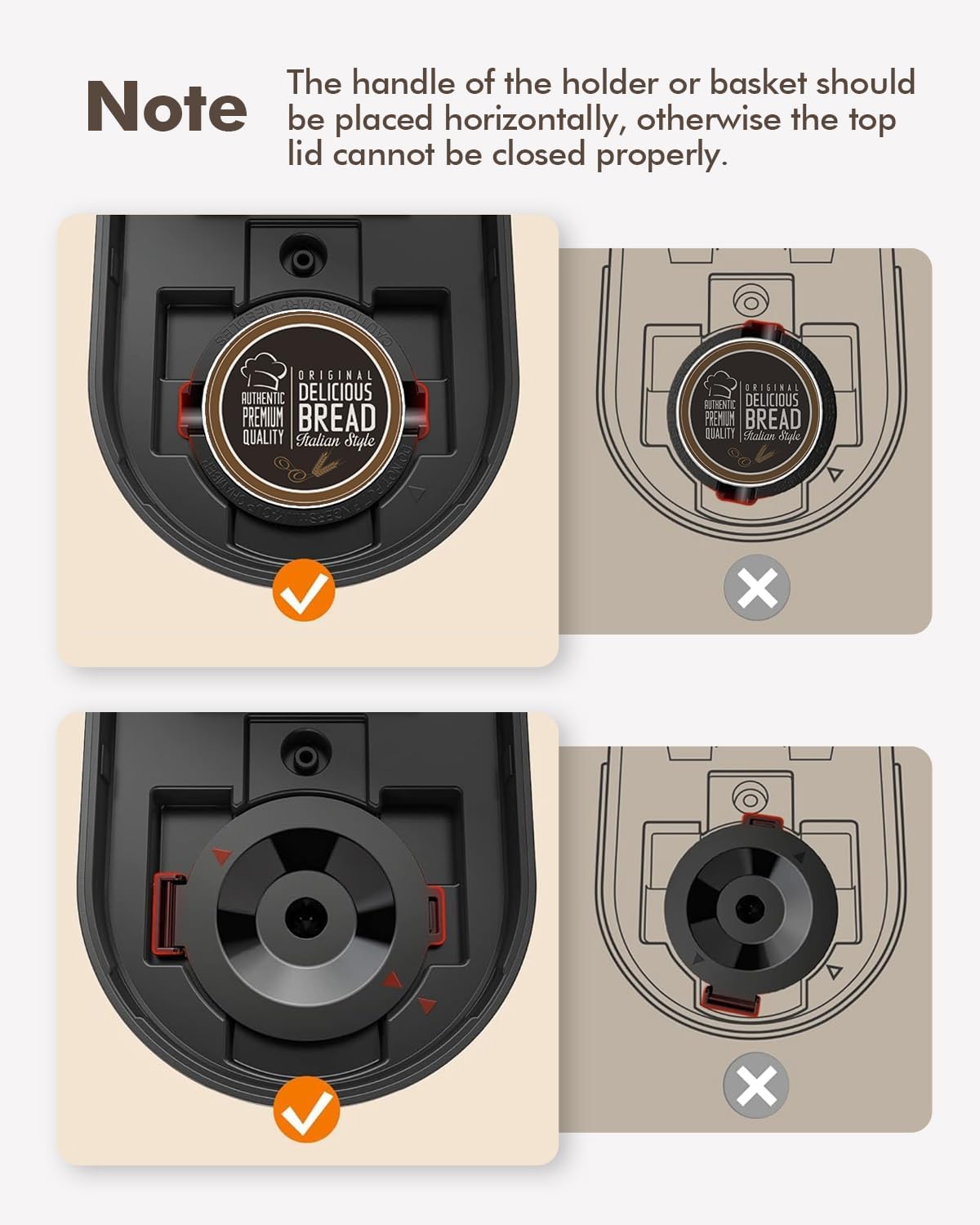
Image 5.1: Correct placement of K-pod and ground coffee filter. The image illustrates the proper horizontal alignment of the holder handle for both K-pods and ground coffee filters to ensure the lid closes securely.
5.2 Brewing with Ground Coffee
- Mepee mkpuchi nke onye na-eme kọfị.
- Insert the reusable ground coffee filter basket into the brew head.
- Add your desired amount of ground coffee to the filter basket. Do not overfill.
- Fill the water reservoir with fresh water to your desired level (6-12 oz). Do not exceed the MAX line.
- Place your coffee mug on the drip tray.
- Close the lid firmly. Ensure the handle of the filter basket is placed horizontally for proper closure.
- Press the power button once for hot coffee. The white light will indicate brewing.
- Wait for the brewing cycle to complete. Do not open the lid during brewing.
5.3 Iced Coffee Function
The coffee maker features an iced coffee brewing mode. Follow these steps:
- Prepare your K-pod or ground coffee as described above.
- Fill the water reservoir with fresh water to your desired level (6-12 oz).
- Fill your coffee mug with ice and place it on the drip tray.
- Mechie mkpuchi nke ọma.
- Press the power button twice. The blue light will illuminate, indicating iced coffee brewing mode.
- Chere ka okirikiri ime ihe ga-agwụ.

Image 5.2: Control panel with power button and descale reminder. The image shows the power button and the "DESCALE" indicator light, along with simple operating instructions printed on the lid.
6. Nlekọta na nhicha
6.1 Nhicha kwa ụbọchị
- After each use, remove and rinse the K-pod holder or ground coffee filter basket.
- Hafuo ma sachaa ebe ntapu ahụ.
- Jiri mgbasa ozi hichaa mpụta nke onye na-eme kọfịamp akwa .
6.2 calhapụ ịda
Over time, mineral deposits (scale) can build up in your coffee maker, affecting performance and coffee taste. The "DESCALE" indicator light will illuminate red when descaling is recommended.

Image 6.1: Preparing descaling solution. The image shows a hand pouring descaling powder into a measuring cup filled with water, next to the coffee maker.
Usoro mkpochapụ:
- Prepare a descaling solution according to the manufacturer's instructions (e.g., a mixture of white vinegar and water, or a commercial descaling agent).
- Pour the descaling solution into the water reservoir up to the MAX (12 oz) line.
- Place a large empty mug or container on the drip tray to collect the solution.
- Close the lid without any K-pod or ground coffee filter inserted.
- Press and hold the power button for 2 seconds to initiate the descaling cycle. The red "DESCALE" light will illuminate.
- The machine will run a descaling cycle, dispensing the solution. This may take longer than a regular brew cycle.
- Once the cycle is complete, discard the used solution.
- Rinse the reservoir thoroughly and run 2-3 cycles with fresh water to flush out any remaining descaling solution.
- The "DESCALE" light should turn off after successful descaling.
7. Nchọpụta nsogbu
| Nsogbu | Ihe nwere ike ime | Ngwọta |
|---|---|---|
| Coffee not brewing / No water dispensed. |
|
|
| Kọfị na-atọ ụtọ adịghị ike ma ọ bụ mmiri. |
|
|
| "DESCALE" light is on. | Ịmepụta ihe ndị dị n'ime igwe. | Mee usoro nkwụsịtụ (Ngalaba 6.2). |
| Igwe na-agbapụta. |
|
|
8. Nkọwapụta
| Njirimara | Nkọwa |
|---|---|
| Ụdị | SIFENE |
| Aha Nlereanya | KC211 |
| Akụkụ ngwaahịa | 7.79"D x 4.33"W x 9.48"H |
| Ụdị Onye na-eme kọfị | Drip Coffee Machine, Single-Serve |
| Ụdị ntinye kọfị | Both K-pods and ground coffee |
| Voltage | 120 volts |
| Atụmatụ pụrụ iche | Auto Clean Function, Auto Shut-Off, Permanent Filter, Descaling Reminder |
| Ngwa gụnyere | Single Serve Coffee Maker, 2 Filters (K-pod holder, ground coffee filter) |
| Ibu Ibu | 2.5 pound |
9. Akwụkwọ ikike na nkwado
9.1 Ozi akwụkwọ ikike
A na-enye nkọwa akwụkwọ ikike kpọmkwem site na nkwakọ ngwaahịa ma ọ bụ na gọọmentị onye nrụpụta. websaịtị. Biko gaa na ebe ndị a maka usoro na ọnọdụ nkwa kachasị zie ezi na nke kachasị ọhụrụ.
9.2 Nkwado ndị ahịa
For technical assistance, troubleshooting beyond this manual, or warranty claims, please contact SIFENE customer support. Contact information can usually be found on the product packaging, the official SIFENE websaịtị, ma ọ bụ site na onye na-ere ahịa gị.
I nwekwara ike ịga leta ya SIFENE Store on Amazon maka ozi ngwaahịa ọzọ na akụrụngwa nkwado.