
1. Ozi nchekwa dị mkpa
Biko gụọ ntuziaka niile nke ọma tupu echichi na iji. Jido akwụkwọ ntuziaka a maka ntụnye aka n'ọdịnihu.
- Do not use corrosive cleaners or chemicals on the lock finish.
- Ensure all components are installed correctly and securely to prevent malfunction.
- Keep physical keys in a safe location away from the lock.
- Regularly check battery levels and replace batteries as needed to avoid lock-out situations.
- Avoid exposing the lock to extreme temperatures or direct water spray beyond its IP54 rating.
2. Ihe ngwugwu
Verify that all parts are present before beginning installation. If any parts are missing or damaged, contact customer support.
- Mgbakọ ahụ igodo mpụta
- Mgbakọ ime ụlọ
- Deadbolt Latch
- Efere efere
- Efere arịọnụ
- Door Handle Set (Interior and Exterior)
- Ịkwanye kposara
- Physical Keys (2)
- Akwụkwọ ntuziaka onye ọrụ
3. Ntuziaka nwụnye
The Ulecoce U18 lock is designed for easy installation on standard U.S. doors with a screwdriver. No drilling is typically required for compatible doors.
3.1 Nkwadebe ọnụ ụzọ
Gbaa mbọ hụ na ọnụ ụzọ gị dabara nkọwa ndị a:
- Mbido: 2-3 / 8 sentimita ma ọ bụ 2-3 / 4 sentimita (60mm ma ọ bụ 70mm).
- Ọkpụrụkpụ ọnụ ụzọ: 1.31 inches to 2.16 inches (35-50mm).
- Dayameta Cross Bore: 2-1/8 sentimita (54mm).

Foto nke 3.1: Door measurement guide for backset, door thickness, and cross bore diameter, indicating compatibility for easy installation without drilling.

Foto nke 3.2: Compatibility guide illustrating different existing door lock types and their compatibility with the Ulecoce U18 lock. The lock is compatible with standard deadbolt and handle sets, but not with certain integrated or multi-point locking systems.
3.2 Nwụnye nzọụkwụ site na nzọụkwụ
- Wụnye Latch: Insert the deadbolt latch into the door edge. Ensure the "UP" arrow on the latch is pointing upwards. Secure with screws.
- Wụnye Mgbakọ Mpụga: Feed the cable from the exterior keypad assembly through the cross bore hole. Align the spindle with the latch mechanism.
- Install the Interior Mounting Plate: Secure the interior mounting plate to the exterior assembly using the provided screws. Ensure the cable passes through the plate.
- Jikọọ eriri: Jikọọ eriri site na mgbakọ dị n'èzí na mgbakọ n'ime ime.
- Wụnye Mgbakọ ime ụlọ: Mount the interior assembly onto the mounting plate, ensuring the thumb turn aligns with the deadbolt mechanism. Secure with screws.
- Wụnye batrị: Open the battery cover on the interior assembly and insert 4 AA alkaline batteries (not included).
- Install the Door Handle Set: Install the interior and exterior door handle components according to the separate instructions for the handle set.
- Nwalee mkpọchi: Close the door and test the deadbolt operation using the thumb turn and a physical key.
4. Ntuziaka ọrụ
The Ulecoce U18 offers multiple convenient unlocking and locking methods.
4.1 Ụzọ mmeghe

Foto nke 4.1: Visual representation of the various unlocking methods available for the Ulecoce U18 lock, including keypad entry, one-time codes, anti-peeping function, and traditional physical key access.
- Koodu igodo: Enter your 6-digit user code followed by the '#' key. The lock will unlock.
- Okwuntughe mgbochi peeping: To enhance security, you can enter random digits before or after your actual code. For example, ọ bụrụ na koodu gị bụ 123456, ị nwere ike itinye 789123456012#. The lock will still recognize the correct sequence within the longer input.
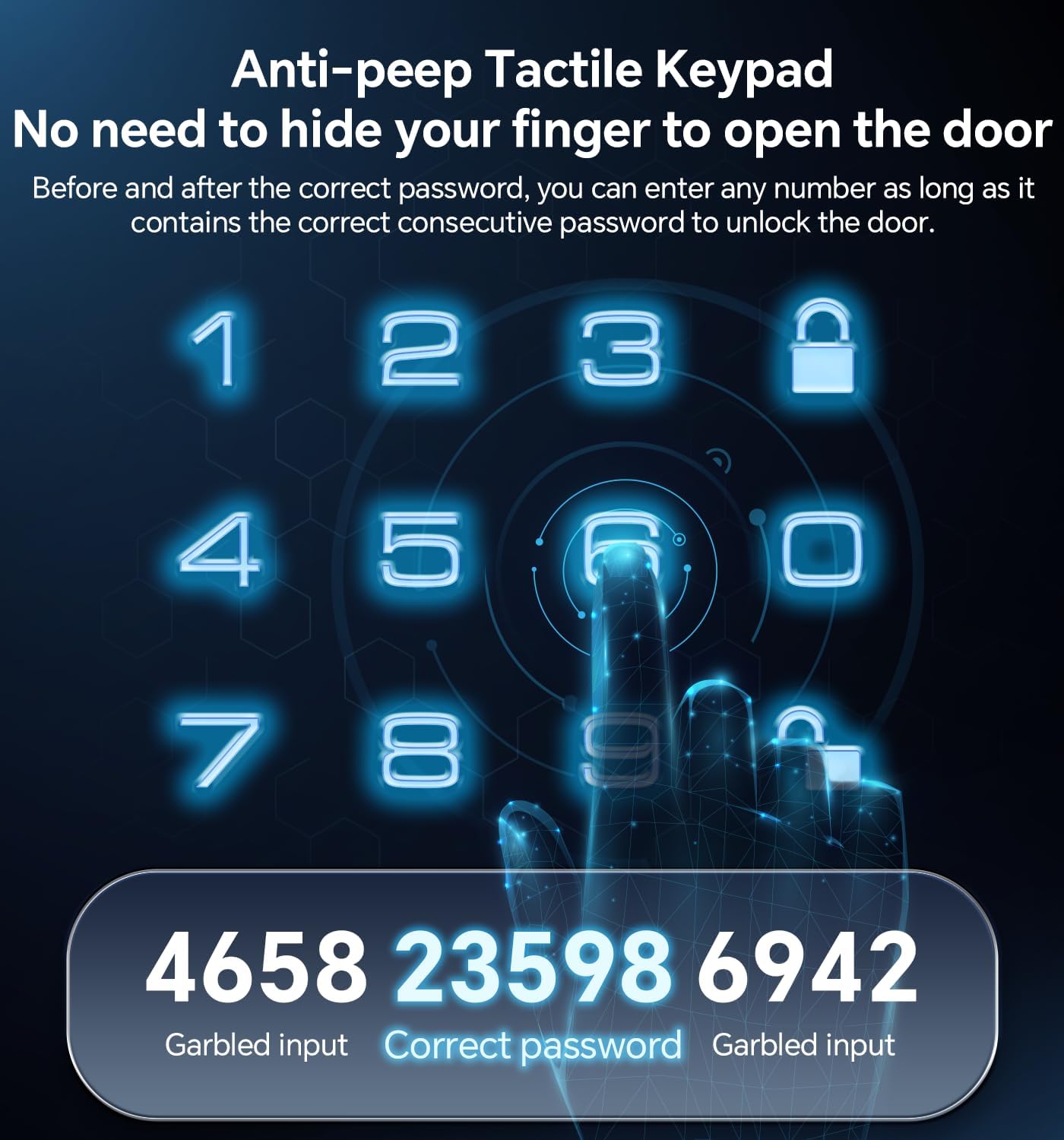
Foto nke 4.2: Explanation of the anti-peep function, demonstrating how to obscure your actual PIN by adding random digits before and after it on the keypad.
- Koodu PIN otu oge: Generate temporary codes for guests or service providers. These codes are valid for a single use.

Foto nke 4.3: A user receiving a one-time PIN code on their mobile device, illustrating the convenience of temporary access for visitors.
- Igodo Anụ ahụ: In case of battery failure or forgotten codes, use the provided physical keys to unlock the deadbolt.
4.2 Ụzọ Mkpọchi

Foto nke 4.4: The auto-lock feature, which automatically secures the door after a customizable delay of 10-30 seconds, providing peace of mind.
- Mkpọchi akpaaka: The lock can be configured to automatically lock after a set period (10-30 seconds) once the door is closed. Refer to programming instructions for setting this feature.
- Mkpọchi otu mmetụ: Press and hold the '#' key on the keypad for 2 seconds to manually lock the door from the outside. From the inside, use the thumb turn.
4.3 User Management and Programming
The lock supports 3 administrator codes and up to 97 user codes. Refer to the detailed programming guide (often provided separately or via email after purchase) for instructions on:
- Adding/Deleting Administrator Codes
- Adding/Deleting User Codes (Permanent, One-Time, Scheduled)
- Setting Auto-Lock Delay
- Na-eme ka/gbanyụọ ụda
- Ntọgharị ụlọ nrụpụta
5. Nlekọta
- Nhicha: Wipe the lock's exterior with a soft, damp cloth. Do not use abrasive cleaners, solvents, or harsh chemicals, as these can damage the finish and electronic components.
- Ngbanwe batrị: The lock will provide a low battery alert. Replace all 4 AA batteries promptly. Use high-quality alkaline batteries for optimal performance.
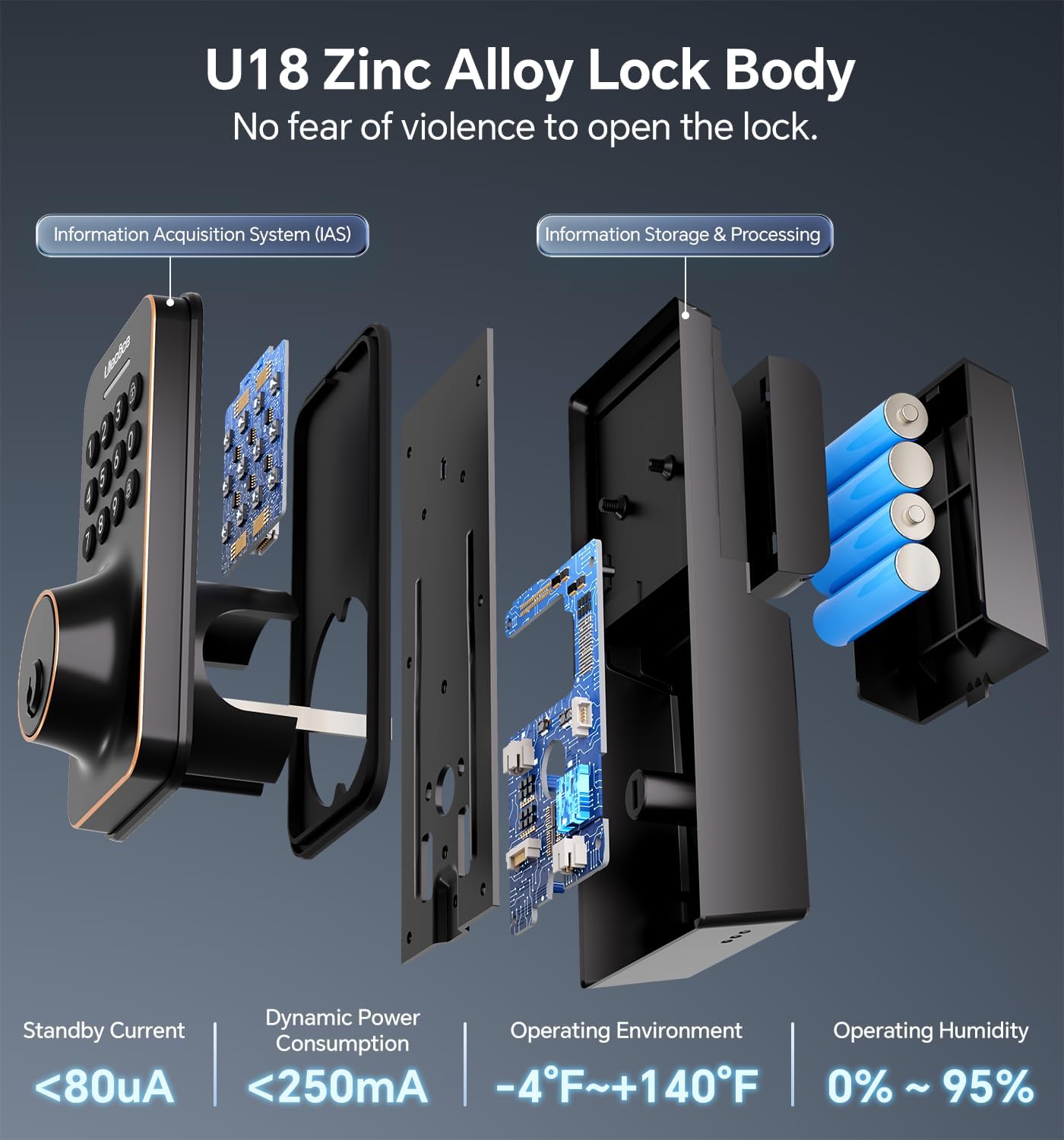
Foto nke 5.1: Internal structure of the Ulecoce U18 lock, highlighting the battery compartment and electronic components, which are designed for durability and efficient power consumption.
- Mechanical Check: Periodically check that all screws are tight and that the deadbolt operates smoothly. If the deadbolt sticks, ensure the strike plate is properly aligned with the latch.
6. Nchọpụta nsogbu
| Nsogbu | Ihe nwere ike ime | Ngwọta |
|---|---|---|
| Lock does not respond to keypad. | Dead batteries; incorrect code; keypad malfunction. | Replace batteries. Re-enter code carefully. Use physical key. Contact support if issue persists. |
| Deadbolt anaghị agbatị/ala azụ kpamkpam. | Misalignment of lock components; strike plate misalignment; obstruction. | Check installation for proper alignment. Adjust strike plate. Clear any obstructions. |
| Low battery alert persists after replacement. | Poor quality batteries; incorrect battery insertion. | Ensure fresh, high-quality alkaline batteries are used and inserted correctly. |
| Cannot program new codes. | Incorrect programming steps; lock in an error state. | Review programming instructions carefully. Perform a factory reset if necessary (this will erase all existing codes). |
7. Nkọwapụta

Foto nke 7.1: Detailed dimensions of the Ulecoce U18 Smart Door Lock Set, illustrating the size of both the exterior keypad and the interior handle components.
- Ụdị: Ulecoce U18
- Ihe: Zinc Alloy
- Agba: Ọla etere mmanụ
- Dimensions (Exterior Keypad): Approximately 6.5in (H) x 2.83in (W)
- Dimensions (Interior Assembly): Approximately 4.8in (H) x 2.6in (W)
- Ike: Batrị 4 x AA (anaghị etinye ya)
- Koodu onye ọrụ: Ruo 100
- Ọkwa nchekwa: ANSI ọkwa 3
- Nguzogide ihu igwe: IP54
- Okpomọkụ arụ ọrụ: -4°F ruo +140°F (-20°C ruo +60°C)
- Iru mmiri na-arụ ọrụ: 0% ruo 95% (na-abụghị condensing)
- Atụmatụ pụrụ iche: Anti-spy password, Portable, Weather-resistant, Automatic locking, One-touch locking.
8. Akwụkwọ ikike na nkwado ndị ahịa
Ulecoce door locks come with a 30-day return policy and a 1-year replacement warranty. Lifetime troubleshooting and customer service are also provided.
For assistance, please contact Ulecoce customer support. Upon receipt of your entry door lock kit, you may receive a follow-up email with additional instructions to ensure proper operation.