
Okwu mmalite
This manual provides detailed instructions for the proper installation, operation, and maintenance of your Starsound SSA-R2-8400.4 Raptor Series 4-Channel Amplifier. Please read this manual thoroughly before using the product to ensure optimal performance and safety.
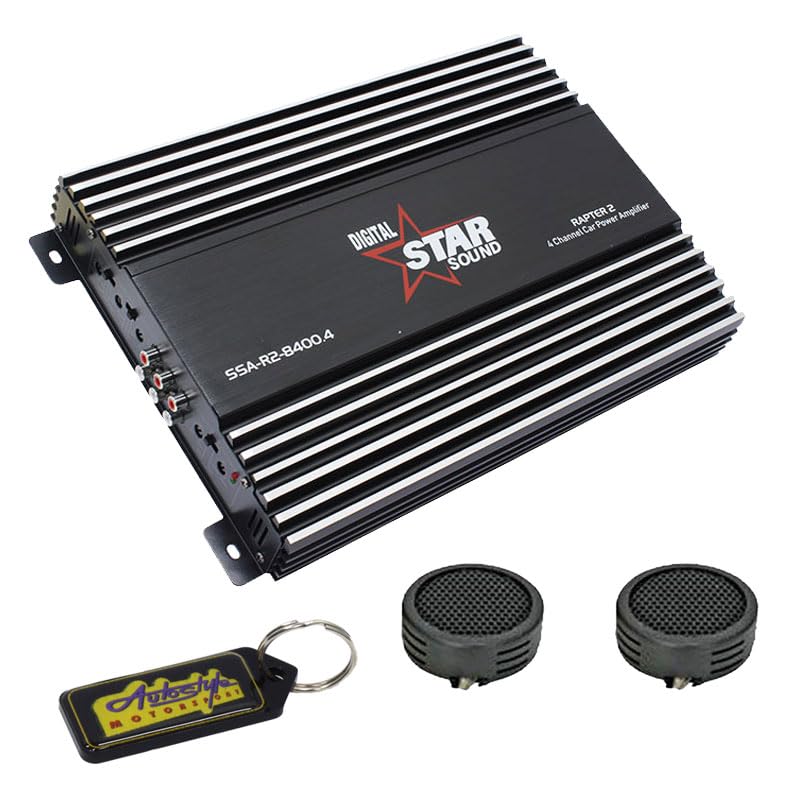
Image: Starsound SSA-R2-8400.4 Raptor Series 4-Channel Amplifier. This image displays the top-down view nke ampihe ngosi, ihe ngosiasing its black casing with silver fins, the 'DIGITAL STAR SOUND' logo, and the model number 'SSA-R2-8400.4' clearly visible.
Akpachara anya maka nchekwa
- Ensure the vehicle's battery is disconnected before installation to prevent electrical shorts.
- Ugwu ahụ amplifier securely in a dry, well-ventilated area, away from direct sunlight or heat sources.
- Jiri waya nha kwesịrị ekwesị maka njikọ ike, ala, na okwu dịka akọwapụtara na ngalaba nrụnye.
- Ekpughela ihe ndị ahụ ampna-eme ka mmiri dị elu ma ọ bụ oke okpomọkụ.
- Seek professional assistance if you are unsure about any installation steps.
Ntọala na nwụnye
1. Iwepu ngwongwo
Jiri nlezianya wepu amplifier from its packaging. Verify that all components listed in the package contents are present. The package includes: 1 x Starsound SSA-R2-8400.4 Amplifier, 1 x EvoTuning 300W Super Tweeters, 1 x Gel Key Holder.
2. Ebe Nkwanye
Choose a mounting location that provides adequate ventilation for the amplifier's heat sinks. Avoid mounting in enclosed spaces or areas prone to vibration. Common locations include under seats, in the trunk, or behind panels.
3. Njikọ njikọ
Njikọ ike: Connect a heavy-gauge power cable (e.g., 4-gauge) from the vehicle's positive battery terminal to the amplifier's +12V terminal. Install an in-line fuse holder (not included) within 18 inches (45 cm) of the battery.
Njikọ ala: Connect a heavy-gauge ground cable of the same length as the power cable from the amplifier's GND terminal to a clean, unpainted metal surface on the vehicle chassis. Ensure a good electrical contact.
Gbanwuo ime anya: Connect a thin wire from your head unit's remote output to the ampỌdụ REM nke lifier. Waya a na-atụgharị ampgbanyụọ ma gbanyụọ ihe na-eme ka ihe na-ekpo ọkụ dị n'ime ya site na iji ihe na-eme ka isi gị dị jụụ.
Ntinye RCA: Jikọọ eriri RCA site na isi ngwaọrụ gị tupu oge eruoamp mmepụta na ampNjikọ ntinye RCA nke lifier.
Mpụta okwu: Jikọọ ọkà okwu gị na amplifier's speaker terminals. Ensure correct polarity (+ to + and - to -) for each speaker. This is a 4-channel amplifier, allowing connection of up to four speakers or two speakers in bridged mode.
Ntuziaka ọrụ
1. Ike Mmalite
Mgbe emechara ma chọpụta njikọ niile, jikọọ batrị ụgbọala ahụ ọzọ. Gbanye isi ngwaọrụ gị. ampihe ngosi ike nke lifier LED kwesịrị ịgba ọkụ.
2. Nweta mmezi
Malite na amplifier's gain control set to minimum. Play a familiar piece of music at a moderate volume on your head unit. Slowly increase the amplifier's gain until you hear distortion, then back it off slightly. This sets the amplifier's input sensitivity to match your head unit's output.
3. Ntọala Crossover
The SSA-R2-8400.4 amplifier typically features built-in crossovers (High-Pass Filter, Low-Pass Filter). Adjust these settings based on the type of speakers connected:
- Ndị na-ekwu okwu zuru oke: Set to FULL or OFF.
- Tweeters/Mid-Range: Set to HPF (High-Pass Filter) and adjust the frequency to prevent low bass from reaching them.
- Subwoofers: Set to LPF (Low-Pass Filter) and adjust the frequency to only allow bass frequencies.
4. Bass Boost
Use the bass boost control sparingly. Excessive bass boost can lead to distortion and potential speaker damage. Adjust to taste, ensuring sound clarity.
Nlekọta
- Nhicha: Na-ehichapụkwa oge ụfọdụ ampJiri ákwà dị nro ma kpọọ nkụ mee ihe n'èzí lifier. Ejila kemịkalụ siri ike ma ọ bụ ihe nhicha na-eme ka ihe dị nro.
- Igwe ikuku: Gbaa mbọ hụ na ampNku oyi nke lifier enweghị uzuzu na ihe mkpofu iji nọgide na-enwe okpomọkụ kwesịrị ekwesị.
- Njikọ: Occasionally check all wiring connections for tightness and corrosion. Loose connections can cause performance issues or damage.
Nchọpụta nsogbu
| Nsogbu | Ihe nwere ike ime | Ngwọta |
|---|---|---|
| Enweghị ike / Amplifier anaghị agbanye | Blown fuse, loose power/ground/remote wire, faulty remote turn-on signal. | Check in-line fuse, verify all power, ground, and remote connections. Test remote wire for 12V signal. |
| Enweghị ụda | Loose RCA cables, incorrect gain settings, speaker wires disconnected, amplifier na ọnọdụ nchekwa. | Check RCA connections, adjust gain, verify speaker wiring, check for protection LED (usually red). |
| Ụda agbagọ | Gain set too high, incorrect crossover settings, faulty speakers, poor ground connection. | Reduce gain, adjust crossover frequencies, inspect speakers, ensure solid ground connection. |
| Amplifier ekpo oke ọkụ | Insufficient ventilation, impedance mismatch (too low), prolonged high volume use. | Hụ na ikuku na-efe efe nke ọma gburugburu amplifier. Check speaker impedance. Reduce volume or allow cooling time. |
Nkọwapụta
- Ụdị: SSA-R2-8400.4
- Usoro: Usoro Raptor
- Ọwa: 4-Ọwa
- Mmepụta ikike Max: 8400 Watt
- Akụkụ ngwaahịa (L x W x H): 25L x 17W x 9H centimita
- Ngwa gụnyere: 1 x Starsound SSA-R2-8400.4 Amplifier, 1 x EvoTuning 300W Super Tweeters, 1 x Gel Key Holder
- UPC: 759649119351
Ozi akwụkwọ ikike
This Starsound SSA-R2-8400.4 amplifier na-abịa na a Ọnwa iri na abụọ warranty from the date of purchase. This warranty covers manufacturing defects and faulty workmanship under normal use. It does not cover damage caused by improper installation, abuse, accidents, modifications, or unauthorized repairs. Please retain your proof of purchase for warranty claims.
Nkwado ndị ahịa
For technical assistance, troubleshooting, or warranty inquiries, please contact your retailer or the manufacturer's customer support. Refer to your purchase documentation for specific contact details.