
T300
Generic T300 LED Mini Projector User Manual
Ụdị: T300
1. Okwu mmalite
Daalụ maka ịzụrụasing the Generic T300 LED Mini Projector. This compact and portable projector is designed for home theater use, offering a clear viewing experience with its short-focus optical lens and diffuse reflection imaging technology, which helps reduce eye strain. This manual provides essential information for setting up, operating, maintaining, and troubleshooting your projector.

Foto 1.1: The T300 Mini Projector's compact size allows for easy portability, fitting conveniently into a bag.
2. Ihe ngwugwu
Biko lelee ọdịnaya ngwungwu mgbe ị na-ebupụ igbe iji hụ na ihe niile dị:
- 1x T300 Projector
- 1x Power Adapter (EU Plug)
- 1x njikwa anya
- 1 x eriri AV
- 1 x Akwụkwọ ntuziaka onye ọrụ (akwụkwọ a)
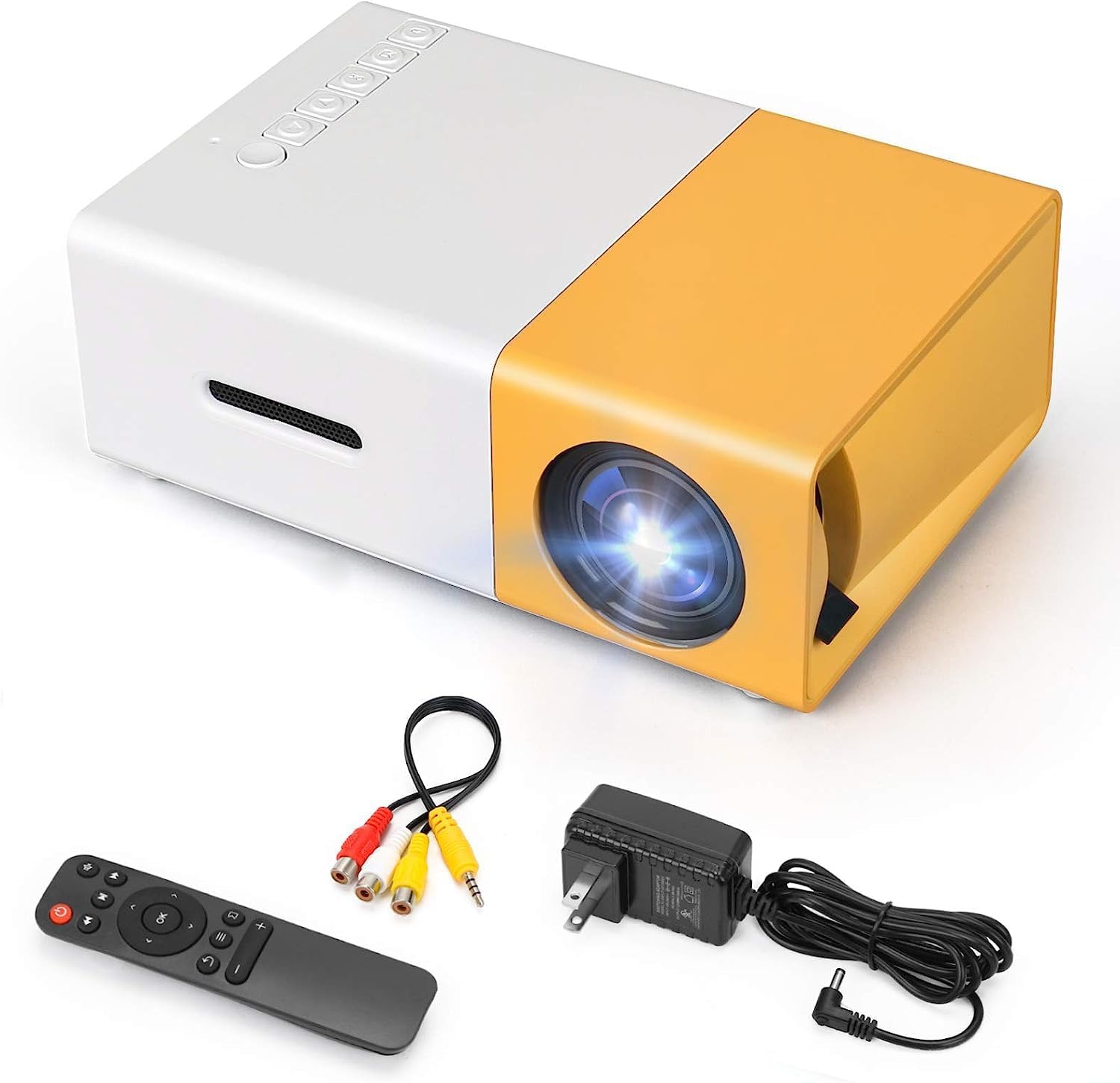
Foto 2.1: The T300 Mini Projector and its included accessories.
3. Ngwaahịa gafereview
Familiarize yourself with the various ports and controls on your T300 Mini Projector:

Foto 3.1: Ihu na azụ views of the T300 Mini Projector, detailing its input/output ports and control buttons.
3.1. Ports na Interface
- Ntinye HDMI: Connect to laptops, TV boxes, gaming consoles, and other HDMI-enabled devices.
- Ntinye USB: For playing media directly from USB drives.
- Oghere kaadị Micro SD: For playing media directly from Micro SD cards.
- Ntinye AV: Connect to older devices using the included AV cable.
- Micro USB (5V/2A): Power input option, compatible with power banks or car chargers.
- Earphone Slot: Maka ijikọ ekweisi ma ọ bụ igwe okwu mpụga.
- Ntinye ike DC: Main power input using the provided power adapter.
3.2. Njikwa
- Ike mgba ọkụ: To turn the projector on or off.
- Navigation Buttons (Left, Right, OK): Maka igodo menu na nhọrọ.
- Bọtịnụ ntinye: Ka ịhọrọ isi iyi ntinye.
- Bọtịnụ nloghachi: To go back in menus.
4. Nhazi
4.1. Njikọ ike
- Connect the provided power adapter to the DC Power Input port on the projector.
- Tinye nkwụnye ọkụ n'ime oghere mgbidi.
- Alternatively, for portable use, connect a 5V/2A power bank or car charger to the Micro USB (5V/2A) port.
4.2. Njikọ ngwaọrụ
The T300 projector supports various input sources:
- HDMI: Connect your laptop, TV box, gaming console (PS4/PS3), or other HDMI devices using an HDMI cable (not included).
- USB: Fanye draịva USB n'ọdụ ụgbọ mmiri USB iji kpọọ mgbasa ozi files ozugbo.
- Micro SD kaadị: Insert a Micro SD card into the Micro SD card slot to play media files.
- Nke: Use the included AV cable to connect to devices with AV output (e.g., DVD players).

Foto 4.1: Multimedia connectivity options for the T300 Mini Projector.
4.3. Placement and Focus
- Debe ihe ngosi ahụ n'elu ebe kwụsiri ike ma dị larịị.
- Position the projector at a distance between 2 to 5 meters from the projection surface to achieve an optimal image size of 60 to 150 inches.
- Adjust the focus ring on the projector lens until the image appears clear and sharp. The short-focus optical lens allows focusing at a distance of 50cm.
5. Ntuziaka ọrụ
5.1. Ịgbanye / gbanyụọ
Press the Power Switch on the projector or the power button on the remote control to turn the projector on or off.
5.2. Ịhọrọ isi mmalite ntinye
After powering on, use the 'Input' button on the projector or the remote control to cycle through available input sources (HDMI, USB, TF Card, AV) until your desired source is displayed.
5.3. Mkpọghachi Multimedia
The projector supports multi-format video, audio, picture, and e-book playback. Navigate through your media files using the navigation buttons on the projector or remote control and press 'OK' to select.
5.4. Mmepụta ọdịyo
The projector has a built-in miniature speaker. For enhanced audio, connect external speakers or headphones to the Earphone Slot.

Foto 5.1: Versatile applications of the T300 Mini Projector for entertainment.
6. Nlekọta
6.1. Na-ehicha oghere
Use a soft, lint-free cloth or lens cleaning paper to gently wipe the projector lens. Avoid using abrasive materials or harsh chemicals that could scratch the lens.
6.2. Igwe ikuku
Ensure the projector's ventilation openings are not blocked during operation to prevent overheating. Keep the projector in a well-ventilated area.
6.3. Nchekwa
When not in use, store the projector in a cool, dry place, away from direct sunlight and excessive dust. It is recommended to use the original packaging or a protective case.
6.4. Lamp Ndụ
Igwe ọkụ LED lamp in your T300 projector has an estimated life of 20,000 hours, providing long-term use without frequent lamp nnọchi.
7. Nchọpụta nsogbu
Ọ bụrụ na ị na-enwe nsogbu na projector gị, rụtụ aka na nsogbu na azịza ndị a na-ahụkarị:
- Enweghị onyonyo egosiri:
- Ensure the projector is powered on and the power adapter is securely connected.
- Verify the input source is correctly selected (HDMI, USB, AV, etc.).
- Check the connection cable between the projector and the source device.
- Onyonyo na-agba agba:
- Adjust the focus ring on the projector lens until the image is clear.
- Ensure the projection distance is within the recommended range (2-5 meters).
- Enweghị ụda:
- Lelee ntọala olu na ma ihe ngosi ahụ ma ngwaọrụ isi mmalite ya.
- If using external speakers/headphones, ensure they are properly connected to the Earphone Slot.
- Verify the audio output settings on your source device.
- Njikwa anya anaghị arụ ọrụ:
- Hụ na enweghị ihe mgbochi ọ bụla n'etiti remote na ihe nnata IR nke projector.
- Replace the batteries in the remote control if necessary.
8. Nkọwapụta
| Njirimara | Nkọwapụta |
|---|---|
| Nlereanya | T300 |
| Mkpebi nkwado | 1920 x 1080 (HD zuru ezu) |
| Mkpebi obodo | 1920 x1080 |
| Ụdị ngosi | LCD, DLP |
| Ọnụ ụzọ | HDMI, USB, TF Card Slot, AV, Micro USB (5V-2A) |
| Ọkà okwu arụnyere n'ime ya | Ee |
| Lamp Ndụ | awa 20,000 |
| Nha ngwaahịa | 114 x 87 x 50 mm |
| Eji akwadoro | Ụlọ ihe nkiri |
| Njirimara Pụrụ Iche | Enwere ike ibugharị |
| Ogo onyonyo kacha | 150 sentimita asatọ |
| Ogo onyonyo kacha nta | 60 sentimita asatọ |
| Ogologo Ntuba kacha | 5 mita |
| Ogologo Obere Opekempe | 2 mita |
| Ntinye ike | 5V/2A |
9. Akwụkwọ ikike na nkwado
9.1. Akwụkwọ ikike Ozi
Ngwaahịa a na-abịa na a Amụma nnọchi ụbọchị iri atọ from the date of purchase. Please refer to your retailer's specific warranty terms and conditions for detailed information. The LED lamp is designed for a long life of 20,000 hours, which is not typically covered by short-term replacement policies.
9.2. Nkwado ndị ahịa
For technical assistance, troubleshooting beyond this manual, or warranty claims, please contact your original retailer or the manufacturer, SHUBH LABH ENTERPRISES. Keep your purchase receipt or proof of purchase handy when contacting support.
Ask a question about this manual
Ask about setup, troubleshooting, compatibility, parts, safety, or missing instructions. Manuals+ will review the question and use this page’s manual context to help answer it.