
1. Ntuziaka nchekwa dị mkpa
When using electrical appliances, basic safety precautions should always be followed to reduce the risk of fire, electric shock, and personal injury. Read all instructions carefully before using the Milex Digital Steam Iron.
- Gbaa mbọ hụ na voltage on the rating label corresponds to your mains voltage.
- Ejila igwe, eriri ike, ma ọ bụ nkwụnye n'ime mmiri ma ọ bụ ihe mmiri ndị ọzọ.
- Wepụ ígwè ahụ na oghere eletrik mgbe ị na-eju mmiri, na-ekpofu ihe, ma ọ bụ mgbe ejighị ya.
- Ejila ngwa ọ bụla nwere eriri ma ọ bụ plọg mebiri emebi rụọ ọrụ, ma ọ bụ mgbe ngwa ahụ dara nke ọma ma ọ bụ tufuo ma ọ bụ mebie n'ụzọ ọ bụla.
- Debe ígwè na eriri ya ka ụmụaka na anụ ụlọ ghara iru mgbe agbanyere ya ma ọ bụ jụrụ oyi.
- Never leave the iron unattended while it is connected to the power supply or on an ironing board.
- Jiri ígwè ahụ naanị maka ihe eji eme ya n'ụlọ.
- The soleplate of the iron can become extremely hot. Avoid direct contact with the hot soleplate.
- Debe ígwè ahụ mgbe niile n'elu ebe siri ike, nke na-anaghị ekpo ọkụ mgbe ị na-ezu ike.
2. Ngwaahịa gafereview
The Milex Digital Steam Iron MSI004 is designed for efficient garment care. Familiarize yourself with its components before use.
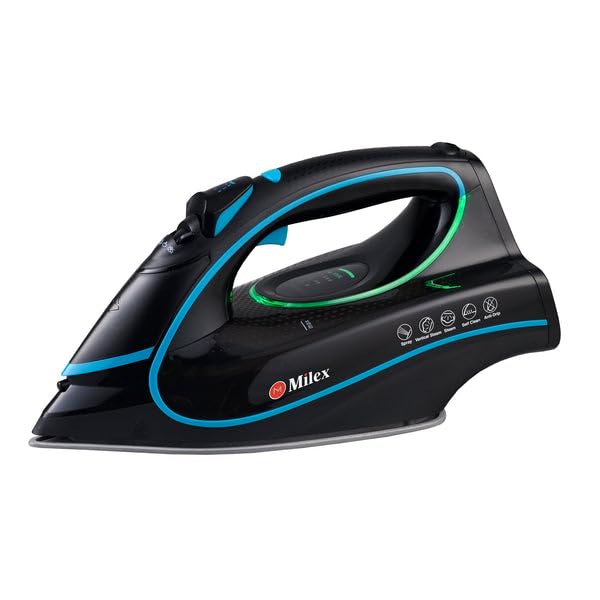
Figure 1: Milex Digital Steam Iron (3/4 view)
This image displays the Milex Digital Steam Iron from a three-quarter angle, highlighting its sleek black design with blue and green accents. Key features visible include the handle, water tank, and the general shape of the soleplate.
Ngwa:
- Water Spray Nozzle: For moistening fabrics.
- Ntinye mmiri na-ejuputa: Where water is added to the tank.
- Steam Control Dial/Buttons: To adjust steam output.
- Temperature Control Dial/Buttons: To select desired heat setting.
- Ikanam Display: Na-egosi ntọala dị ugbu a.
- Jikwaa: For gripping the iron.
- tank mmiri: Reservoir for water.
- Soeplate: The heated surface that glides over fabric.
- eriri ike: Na-ejikọta ígwè na oghere eletrik.

Figure 2: Ceramic Soleplate
Ihe onyonyo a na-enye nso nso view of the ceramic soleplate, showing its textured surface and steam vents designed for even heat distribution and smooth gliding.
3. Ntọala na ojiji mbụ
3.1 Nwepu
- Remove the iron from its packaging.
- Remove any protective film or stickers from the soleplate.
- Lelee ígwè ahụ ma ọ bụrụ na ọ dị ihe ịrịba ama ọ bụla nke mmebi. Ọ bụrụ na ọ mebiri emebi, ejila ya ma kpọtụrụ ndị ọrụ nlekọta ndị ahịa.
3.2 Na-ejuputa tank mmiri
- Gbaa mbọ hụ na ewepụghị ígwè ahụ na ntinye ọkụ.
- Set the steam control to the "Dry Ironing" position (if applicable).
- Mepee mkpuchi ntinye mmiri na-ejuputa.
- Using a measuring cup, carefully pour clean tap water into the water tank up to the "MAX" fill line. Do not overfill.
- Mechie mkpuchi ntinye mmiri nke ọma.
Mara: For areas with hard water, it is recommended to use a mixture of 50% tap water and 50% distilled water to prevent mineral buildup. Never use perfumed water, vinegar, starch, or descaling agents in the water tank.
4. Ntuziaka ọrụ
4.1 Preparing for Ironing
- Sort garments according to fabric type (e.g., linen, cotton, wool, silk, synthetics).
- Check garment care labels for recommended ironing temperatures.
- Plug the iron into a suitable electrical outlet. The LED display will illuminate.
4.2 Ịtọlite okpomọkụ na uzuoku
- Use the temperature control buttons to select the appropriate heat setting for your fabric. The LED display will show the selected temperature.
- Allow the iron to heat up until the indicator light (if present) or LED display confirms it has reached the desired temperature.
- For steam ironing, ensure the water tank is filled. Adjust the steam control to the desired steam level. Steam is typically available at higher temperature settings.
- For dry ironing, ensure the water tank is empty or the steam control is set to "Dry Ironing".
4.3 Using Steam Functions
- Steam na-aga n'ihu: Select a steam setting on the control. Steam will be continuously emitted from the soleplate.
- Mgbawa Steam: Press the "Burst" button for an extra shot of steam to remove stubborn wrinkles. Wait a few seconds between bursts.
- Mgbasa mmiri: Press the "Spray" button to lightly moisten fabric before ironing.
4.4 Auto-Shutoff Feature
The iron is equipped with an auto-shutoff safety feature. If left unattended horizontally for a certain period (e.g., 30 seconds) or vertically (e.g., 8 minutes), the heating element will automatically turn off. To reactivate, simply move the iron.
4.5 Sistemụ mgbochi ntapu
The anti-drip system prevents water from dripping from the soleplate when the iron is not hot enough to produce steam. This helps prevent water stains on delicate fabrics.
5. Nlekọta na nhicha
Regular maintenance ensures optimal performance and extends the life of your Milex Digital Steam Iron.
5.1 Mgbe ojiji ọ bụla
- Wepụ ígwè ahụ ma kwe ka ọ dị jụụ kpamkpam.
- Wepu mmiri ọ bụla fọdụrụ na tank mmiri ahụ.
5.2 Na-ehicha Soeplate
- Mgbe ihe mkpuchi ahụ dị jụụ, jiri mgbasa ozi hichaa yaamp akwa na ihe nhicha na-adịghị mma ma ọ bụrụ na ọ dị mkpa.
- Do not use abrasive scouring pads or harsh chemicals, as these can damage the ceramic coating.
5.3 Ọrụ nhicha onwe
The iron features a self-cleaning function to remove mineral deposits from the steam vents.
- Jupụta tank mmiri na ahịrị MAX.
- Tinye ígwè ahụ ma setịpụ okpomọkụ kachasị elu.
- Once the iron reaches maximum temperature, unplug it.
- Jide ígwè ahụ kwụ n'ahịrị n'elu sink.
- Press and hold the self-clean button (refer to product diagram for location). Hot water and steam will be expelled from the soleplate, flushing out mineral deposits.
- Jiri nwayọọ tigharịa ígwè ahụ azụ na azụ ruo mgbe tank mmiri tọgbọ chakoo.
- Plug the iron back in and allow it to heat up again to dry the soleplate.
- Unplug and store once cool.
5.4 Nchekwa
Always store the iron upright on its heel rest, with the cord neatly wrapped, once it has completely cooled down and the water tank is empty.
6. Nchọpụta nsogbu
| Nsogbu | Ihe nwere ike ime | Ngwọta |
|---|---|---|
| Ígwè anaghị ekpo ọkụ. | A naghị etinye ya; ike gitage; auto-shutoff activated; faulty outlet. | Check power connection; check circuit breaker; move iron to reactivate; try a different outlet. |
| Enweghị uzuoku ma ọ bụ uzuoku ezughi oke. | Water tank empty; temperature too low for steam; steam vents clogged; steam control set to "Dry". | Fill water tank; increase temperature setting; perform self-clean; adjust steam control. |
| Mmiri na-ada site na soleplate. | Temperature too low for steam (anti-drip system working); water tank overfilled. | Mee ka okpomọkụ dịkwuo elu; ejupụtala tankị mmiri gabiga ókè. |
| White flakes or residue on garments. | Mineral buildup in water tank/steam vents. | Perform self-clean function; use distilled water or a mix with tap water. |
7. Nkọwapụta
| Nọmba nlereanya | MSI004 |
| Ụdị | Milex |
| Ike | 2400W |
| Voltage | 220-240V, 50Hz |
| Ọrụ | Dry, Spray, Steam, Burst |
| Ihe Soeplate | Ceramic |
| Ụdị ngosi | Ikanam |
| Ike tank mmiri | 450ml |
| Atụmatụ pụrụ iche | Anti-drip, Auto-shutoff, Lightweight |
| Akụkụ ngwaahịa (L x W) | 32L x 16W centimita |
8. Akwụkwọ ikike na nkwado ndị ahịa
For information regarding warranty coverage, please refer to the warranty card included with your product or contact the retailer where the product was purchased.
If you experience any issues or have questions about your Milex Digital Steam Iron, please contact Milex customer support. You can find more information and contact details on the official Milex website na saịtị ma ọ bụ Milex Store on Amazon.