
nubia V60 (Model Number: 123439101056)
ZTE nubia V60 Smartphone User Manual
Model: V60 (123439101056) | Brand: nubia
1. Okwu mmalite
Welcome to the user manual for your new ZTE nubia V60 smartphone. This guide provides essential information to help you set up, operate, maintain, and troubleshoot your device. Please read this manual thoroughly to ensure optimal performance and longevity of your smartphone.
The nubia V60 features a 6.72-inch FHD+ display, a powerful 50MP AI rear camera, a 32MP front camera, 8GB RAM (expandable with 12GB Dynamic RAM), 256GB ROM, a 5000mAh battery with 22.5W fast charging, NFC, fingerprint recognition, and DTS sound effects.
2. Mbido Mbido
2.1. Unboxing na ngwugwu ọdịnaya
Tupu ịmalite, hụ na ihe niile dị na ngwugwu:
- ZTE nubia V60 Smartphone
- Ihe nkwụnye ọkụ
- eriri USB
- Ngwaọrụ SIM Ejector (nwere ike ịdị iche site na mpaghara)
- Ntuziaka Mmalite Ngwa Ngwa (akwụkwọ a na-eje ozi dị ka ntuziaka zuru oke)
2.2. Ịtinye kaadị SIM na kaadị microSD
- Chọta tray kaadị SIM n'akụkụ ngwaọrụ gị.
- Tinye ngwaọrụ SIM ejector n'ime obere oghere dị n'akụkụ tray ahụ wee pịa nke ọma ruo mgbe tray ahụ pụtara.
- Place your Nano-SIM card(s) and/or microSD card (if applicable) into the tray with the gold contacts facing down, ensuring they are correctly aligned.
- Jiri nwayọ tụgharịa traị ahụ azụ n'ime oghere ruo mgbe ọ pịrị n'ime ya.

Foto: Akụkụ view of the nubia V60, illustrating the location of the SIM card tray and physical buttons.
2.3. Ịchaji batrị
Before first use, fully charge your device. Connect the USB cable to the power adapter and then to the phone's charging port. Plug the power adapter into a wall outlet. The device supports 22.5W fast charging.
2.4. Ịkwanye na nhazi mmalite
- Press and hold the Power button (located on the right side) until the screen lights up.
- Follow the on-screen instructions to select your language, connect to Wi-Fi, set up your Google account, and configure security features like fingerprint recognition.
3. Ijikwa ngwaọrụ gị
3.1. Nsoro ụzọ
The nubia V60 operates on Android 13.0. Use touch gestures such as tap, swipe, pinch-to-zoom, and long-press to navigate the interface. The power button and volume buttons are located on the right side of the device.

Foto: N'ihu view of the nubia V60, showcasing its 6.72-inch FHD+ display.
3.2. Akụkụ igwefoto
Your device is equipped with a 50MP AI Rear Camera and a 32MP Front Camera.
- Ịmalite igwefoto: Tap the Camera icon on your home screen or lock screen.
- Na-ese foto/Video: Tap the shutter button to capture an image or switch to video mode to record.
- AI Enhancements: The AI features automatically optimize settings for various scenes and subjects.
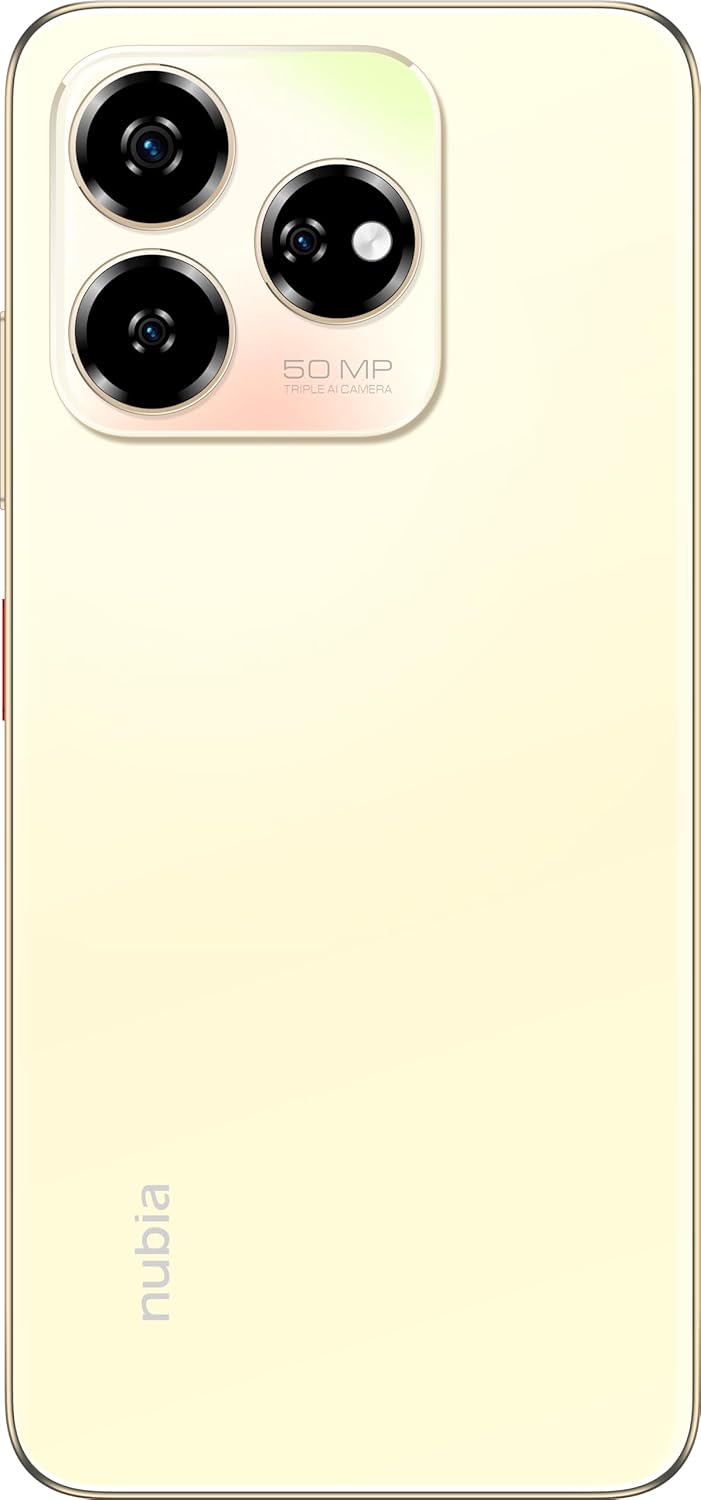
Foto: N'azụ view of the nubia V60, highlighting the 50MP triple AI camera module.
3.3. Nchọpụta akara mkpịsị aka
The device features a side-mounted fingerprint sensor for secure and quick unlocking. To set up:
- Gaa na Ntọala > Nche > Mkpisi aka.
- Follow the on-screen prompts to register your fingerprint(s).
3.4. Ọrụ NFC
NFC (Near Field Communication) allows for quick data exchange and contactless payments. To use NFC:
- Ensure NFC is enabled in Settings > Connected devices > Connection preferences > NFC.
- Tap your phone to another NFC-enabled device or payment terminal to initiate a connection or transaction.
3.5. DTS Sound Effect
Experience enhanced audio quality with DTS sound effects. This feature can be configured in your device's sound settings to optimize audio for various media types.
3.6. Live Island
The Live Island feature provides dynamic notifications and quick access to certain functions around the front camera cutout. Explore its functionalities through your device's display settings or by interacting with notifications.
4. Nlekọta na nlekọta
4.1. Na-ehicha ngwaọrụ gị
Jiri ákwà dị nro, nke na-enweghị lint hichaa ihuenyo na ahụ ekwentị gị. Zere iji kemịkalụ siri ike ma ọ bụ ihe ndị na-emebi emebi nke nwere ike imebi ihe mkpuchi ihuenyo ma ọ bụ mkpuchi ihuenyo.
4.2. Mmelite ngwanrọ
Lelee ma wụnye mmelite ngwanrọ mgbe niile iji hụ na ngwaọrụ gị nwere njirimara kachasị ọhụrụ, patches nche na nkwalite arụmọrụ. Gaa na Ntọala> Sistemu> Mmelite sistemụ.
4.3. Nlekọta batrị
- Zere oke okpomọkụ, n'ihi na ha nwere ike imebi ndụ batrị.
- Use only the original or certified charging accessories.
- For optimal battery health, avoid frequently discharging the battery completely or keeping it at 100% for extended periods.
4.4. Njikwa nchekwa
Mgbe ụfọdụ review your device's storage (256GB ROM) and clear unnecessary files, apps, or media to maintain optimal performance. You can check storage usage in Ntọala > Nchekwa.
5. Nchọpụta nsogbu
This section addresses common issues you might encounter with your nubia V60.
5.1. Ngwaọrụ anaghị agbanye
- Gbaa mbọ hụ na agbagoro batrị. Jikọọ chaja wee chere nkeji ole na ole tupu ị nwaa ịgbanye.
- Pịa ma jide bọtịnụ Ike maka opekata mpe sekọnd 10-15 iji mee ka ọ malitegharịa.
5.2. Okwu Ịchaji
- Verify that the charging cable and adapter are securely connected and undamaged.
- Try using a different power outlet or charging accessory.
- Clean the charging port gently with a soft, dry brush to remove any debris.
5.3. Nsogbu Njikọta netwọkụ
- Lelee ma etinyere kaadị SIM gị nke ọma ma rụọ ọrụ nke ọma.
- Gbanwee ma gbanye ọnọdụ ụgbọelu.
- Malitegharịa ekwentị gị.
- Gaa na Ntọala> Netwọk & ịntanetị> Netwọk mkpanaka and ensure your preferred network type is selected.
5.4. Ngwa na-emebi ma ọ bụ na-ajụ oyi
- Mechie wee mepee ngwa ahụ.
- Hichapụ cache na data n'ime ngwa ahụ Ntọala > Ngwa > [Aha Ngwa] > Nchekwa na ebe nchekwa.
- Gbaa mbọ hụ na emelitere ngwa ahụ ka ọ bụrụ ụdị kachasị ọhụrụ.
- Malitegharịa ekwentị gị.
5.5. Factory Reset (Last Resort)
Warning: A factory reset will erase all data on your phone. Back up important data before proceeding.
Iji rụgharịa ntọala ụlọ ọrụ mmepụta ihe, gaa na Ntọala> Sistemu> Nhọrọ Tọgharia> Hichapụ data niile (ntọgharị ụlọ ọrụ) ma soro ntuziaka.
6. Nka na ụzụ nkọwa
| Njirimara | Nkọwapụta |
|---|---|
| Aha Nlereanya | V60 |
| Nọmba Nlereanya ihe | 123439101056 |
| Ụdị | nubia |
| Sistemụ nrụọrụ | Android 13.0 |
| Nha ihuenyo | 6.72 sentimita asatọ |
| Nha Ebe Nchekwa RAM arụnyere | 8 GB (Additional 12GB Dynamic RAM) |
| Ike Nchekwa ebe nchekwa | 256 GB |
| Ọsọ CPU | 1.8 GHz |
| Igwefoto azụ | Igwefoto AI 50MP |
| Igwefoto ihu | 32MP |
| Ogo ike batrị | 5000 mAh |
| Nchaji ngwa ngwa | 22.5W |
| Teknụzụ nzikọrịta ozi ikuku | NFC |
| Teknụzụ Njikọta | NFC |
| Teknụzụ ekwentị | 4G |
| GPS | GLONASS |
| Jack ọdịyo | Enweghị jakị ekweisi |
| Ụdị Ihe | Ogwe |
| Agba | Sunlit Gold |
| Ibu Ibu | 510 g |
| Akụkụ ngwugwu | 18 x 8.6 x 5.6 cm |
| Kedu ihe dị na igbe ahụ | Power Adapter, USB Cable |
7. Akwụkwọ ikike Ozi
Your ZTE nubia V60 smartphone comes with a standard manufacturer's warranty, covering defects in materials and workmanship under normal use. The duration and terms of this warranty may vary by region. Please refer to the warranty card included in your product packaging for specific details.
Additionally, extended warranty and accidental damage protection plans may be available for purchase. For example, options such as a 1-Year Extended Warranty Plan, 2-Years Extended Warranty Plan, and 1-Year Accidental Damage Protection Plan might be offered by authorized retailers.
Debe ihe akaebe nke ịzụrụ ihe maka akwụkwọ ikike ọ bụla.
8. Nkwado ndị ahịa
For further assistance, technical support, or service inquiries regarding your ZTE nubia V60, please contact nubia customer service through their official websaịtị ma ọ bụ ozi kọntaktị enyere na akwụkwọ ngwaahịa gị.
You can often find FAQs, troubleshooting guides, and software downloads on the official nubia support website. When contacting support, please have your device model number (V60) and item model number (123439101056) ready.
Ask a question about this manual
Ask about setup, troubleshooting, compatibility, parts, safety, or missing instructions. Manuals+ will review the question and use this page’s manual context to help answer it.