
1. Okwu mmalite
This manual provides instructions for the safe and effective operation of the Mastech MS2006B Digital AC Clamp Leakage Current Meter. This device is designed for measuring AC leakage current, offering a reliable tool for electrical testing and troubleshooting.
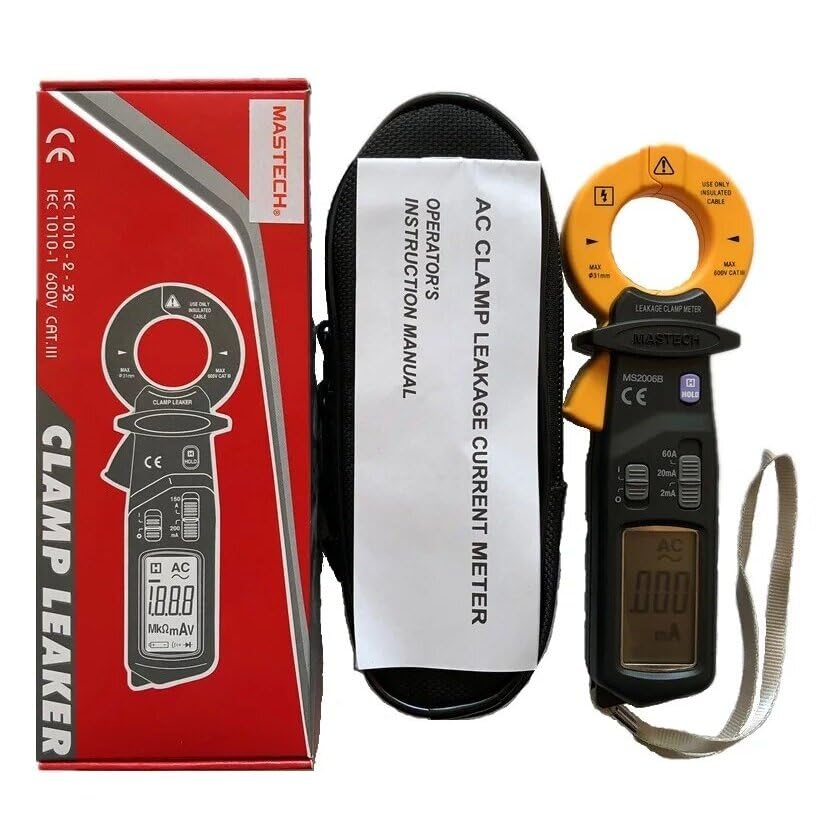
Image 1.1: The Mastech MS2006B Digital AC Clamp Leakage Current Meter, shown with its protective carrying case and instruction manual, alongside its retail packaging.
2. Ozi nchekwa
To ensure safe operation, please read and understand all safety warnings and operating instructions before using the meter. Failure to observe these warnings can result in severe injury or damage to the instrument.
- Na-agbaso koodu nchekwa mpaghara na nke obodo mgbe niile.
- Do not use the meter if it appears damaged or if the insulation is compromised.
- Ensure the meter's range is appropriate for the measurement being taken.
- Avoid contact with live circuits when replacing batteries or opening the case.
- Keep fingers behind the finger guards during operation.
- Ejila mita ahụ rụọ ọrụ n'ime ihe mgbawa gas, vepo, ma ọ bụ uzuzu.
3. Akụrụngwa Ngwaahịa
The Mastech MS2006B offers several key features for efficient and accurate measurements:
- Ngosipụta: 2000 counts digital display for clear readings.
- Mmepe nku: Maximum jaw opening of Φ31mm (1.2 inches) to accommodate various cable sizes.
- Gbanyụọ ike akpaaka: Automatically powers off after a period of inactivity to conserve battery life.
- Jide data: Na-akpọchi ihe a na-egosi ka ọ dị mfe idekọ.
- Low Battery Display: Indicates when battery replacement is needed.
- AC Current Ranges: Includes 60A, 20mA, and 2mA measurement ranges.

Image 3.1: A clear front view of the Mastech MS2006B meter, highlighting its digital display, rotary switch for range selection, and the clamp agba.
4. Components and Packaging Contents
Mgbe ebupuchara, chọpụta na ihe niile edepụtara n'okpuru dị ugbu a yana enweghị mmebi:
- Mastech MS2006B Digital AC Clamp Mita na-agbapụta ugbu a
- Protective Carry Bag
- Asambodo mmezi
- Ntuziaka mmalite ngwa ngwa
- 2 x 1.5V LR44 Batteries (pre-installed or included separately)

Image 4.1: An informational diagram detailing the main applications, contents, and packaging information for the MS2006B meter.
5. Nhazi
5.1 Ntinye batrị
The MS2006B meter requires two (2) LR44 1.5V batteries for operation. These batteries are typically included with the device.
- Chọta ebe mkpuchi batrị n'azụ mita.
- Use a suitable tool (e.g., a small screwdriver or coin) to open the battery compartment.
- Insert the two LR44 batteries, observing the correct polarity (+ and -) as indicated inside the compartment.
- Replace the battery compartment cover and secure it firmly.

Foto 5.1: Ihe dị n'ime view of the MS2006B, illustrating the battery compartment and the meter's internal components.
6. Ntuziaka ọrụ
6.1 Gbanyụọ/ gbanyụọ
To power on the meter, rotate the rotary switch from the 'OFF' position to any desired measurement range (e.g., 60A, 20mA, 2mA). To power off, rotate the switch back to the 'OFF' position.
6.2 AC Leakage Current Measurement
- Select the appropriate AC current range (60A, 20mA, or 2mA) using the rotary switch. Start with the highest range if the current value is unknown.
- Mepee clamp agba site na ịpị ihe mkpali ahụ.
- Enclose the single conductor (not multiple conductors) through which the leakage current is to be measured within the clamp agba. Hụ na agba ahụ emechiela nke ọma.
- Read the current value displayed on the LCD. If the reading is too low for the selected range, switch to a lower range for better resolution.
6.3 Data Jide Ọrụ
Press the 'HOLD' button to freeze the current reading on the display. Press the 'HOLD' button again to release the reading and resume live measurement.
6.4 Gbanyụọ ike akpaaka
The meter is equipped with an Auto Power Off feature to conserve battery life. If no operation is performed for approximately 15 minutes, the meter will automatically power off. To reactivate the meter, rotate the rotary switch to 'OFF' and then back to a measurement range, or press any button.
7. Nlekọta
7.1 Nhicha
Wipe the meter's case with a damp ákwà na ihe nhicha dị nro. Ejila ihe na-eme ka ihe dị nro ma ọ bụ ihe mgbaze dị nro. Hụ na mita ahụ kpọrọ nkụ kpamkpam tupu e jiri ya.
7.2 nnọchi batrị
When the low battery indicator appears on the display, replace the batteries as described in Section 5.1. Always use two new LR44 1.5V batteries.
7.3 Nchekwa
If the meter is not to be used for an extended period, remove the batteries to prevent leakage and store the meter in a cool, dry place away from direct sunlight.
8. Nchọpụta nsogbu
- Enweghị Ngosipụta: Lelee nrụnye batrị ma hụ na batrị anaghị agwụcha. Dochie ma ọ dị mkpa.
- Ọgụgụ na-ezighi ezi: Gbaa mbọ hụ na clamp jaw is fully closed around a single conductor. Verify the correct measurement range is selected.
- Mita anaghị agba ọkụ: Confirm batteries are correctly installed and charged. Rotate the function switch to an 'ON' position.
9. Nkọwapụta
| Oke | Uru |
|---|---|
| Ngosipụta | 2000 Ọnụ |
| Ọkụ na-emeghe | Φ31mm (1.2 inches) |
| AC Current Ranges | 60A, 20mA, 2mA |
| Isi Iyi Ike | 2 x LR44 1.5V Batteries |
| Akụkụ ngwaahịa | 7.87 x 5.91 x 9.84 sentimita asatọ |
| Ibu Ibu | 1 Kilogram (2.2 Pound) |
| Onye nrụpụta | MASTEK |
| Nọmba nlereanya | YQ-MS2006B |
10. Akwụkwọ ikike na nkwado
For warranty information and technical support, please refer to the documentation included with your product or contact Mastech customer service directly. Keep your purchase receipt as proof of purchase.