
1. Okwu mmalite
Thank you for choosing the FREDEES Tall Corner Cabinet. This manual provides essential information for the safe assembly, operation, and maintenance of your new cabinet. Please read these instructions carefully before beginning assembly and retain them for future reference.
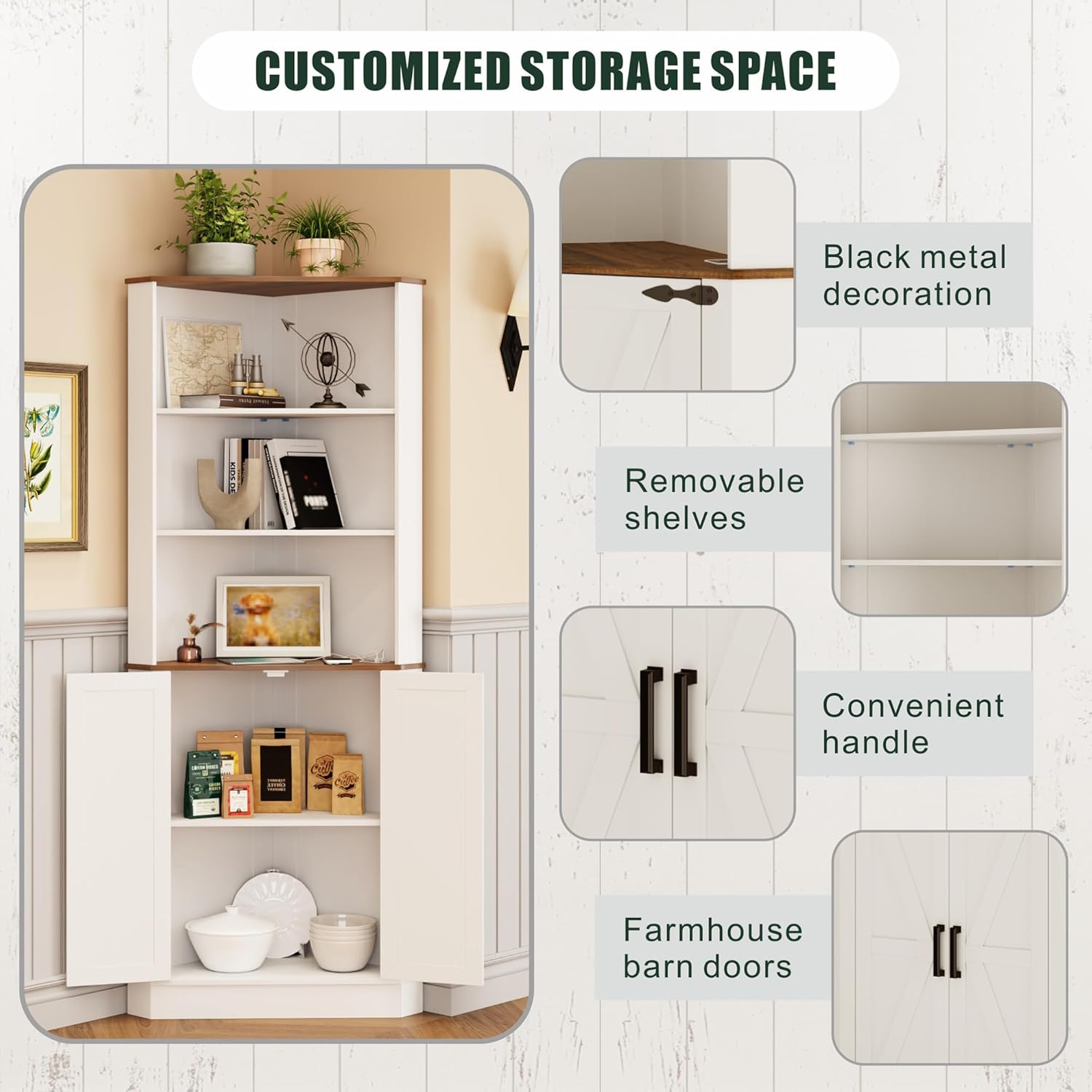
This corner cabinet is designed to maximize storage in various rooms such as bathrooms, living rooms, kitchens, and laundry rooms. It features adjustable shelving, integrated LED lighting with a human sensor, and a convenient charging station.
2. Ozi nchekwa
- Ngwaọrụ mgbochi ndụmọdụ: For your safety and to prevent accidental tipping, especially in households with children or pets, it is mandatory to install the provided anti-tip device. Securely fix the cabinet to the wall using this device as instructed.
- Ike ibu: Do not exceed the recommended weight capacity for each shelf. Overloading can lead to structural damage or tipping.
- Mgbakọ: Gbakọta kabinet ahụ n'elu ebe dị nro ma dị ọcha iji gbochie ọwa. Hụ na skru na ihe njide niile siri ike nke ọma tupu ejiri ya.
- Nchekwa Eletriki: When using the charging station, ensure that the power source is appropriate and avoid overloading the ports. Keep liquids away from electrical components.
- Nkwanye: Place the cabinet on a level surface to ensure stability.

3. Ngwa gụnyere
Nyochaa na akụrụngwa niile dị tupu ịmalite mgbakọ. Ọ bụrụ na akụkụ ọ bụla na-efu ma ọ bụ mebie, biko kpọtụrụ nkwado ndị ahịa.
- Corner Cabinet x 1
- Installation Kit (includes screws, fasteners, anti-tip device)
- Akwụkwọ ntuziaka (akwụkwọ a)
4. Ntọala na Mgbakọ
The FREDEES Tall Corner Cabinet is designed for straightforward assembly. All screws and components are labeled for your convenience. Follow the step-by-step instructions provided in the installation kit.
4.1 Ndepụta nyocha tupu Mgbakọ
- Kpochapụ ebe sara mbara maka mgbakọ.
- Debe ihe niile na ngwaike.
- Gbaa mbọ hụ na ị nwere ngwaọrụ ndị dị mkpa (dịka ọmụmaatụ, screwdriver, hama).
4.2 Nzọụkwụ Mgbakọ
- Refer to the detailed assembly diagrams in the included installation kit.
- Attach the side panels to the base, ensuring proper alignment.
- Insert the fixed shelves and secure them with the designated fasteners.
- Install the removable shelves at your desired height.
- Attach the cabinet doors and handles.
- Finally, install the anti-tip device by securing the cabinet to a wall stud.

5. Ntuziaka ọrụ
Sistemụ ọkụ ọkụ 5.1 LED
The cabinet is equipped with a three-color LED lighting system and a human sensor for enhanced ambiance and convenience.
- Mgbanwe agba: Short press the light control button to cycle through the three available colors: yellow, blue, and white.
- Human Sensor: The integrated human sensor will automatically trigger the light when motion is detected within approximately 1 meter, providing illumination when needed and saving energy.

5.2 Ebe nchaji
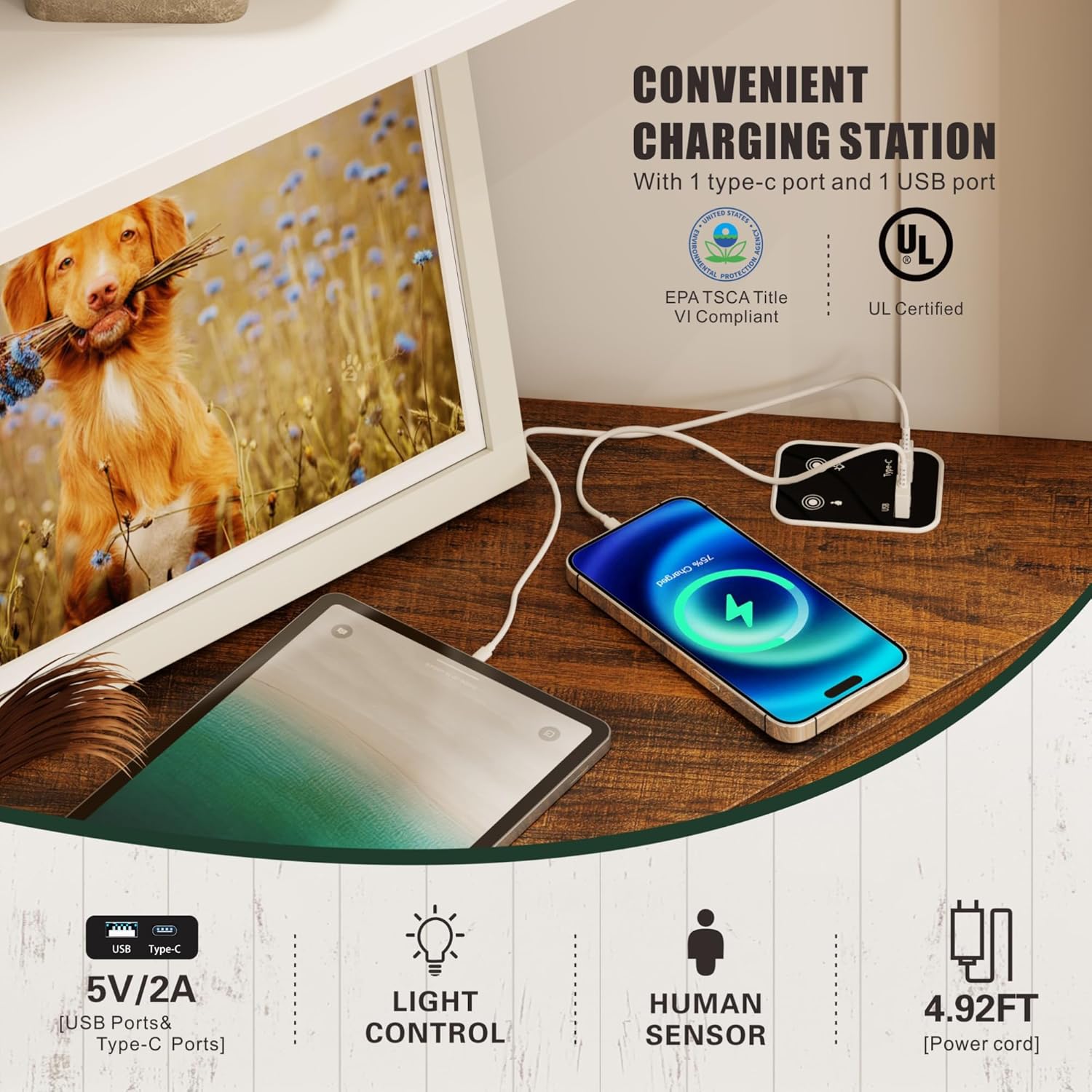
The cabinet includes a convenient charging station with a USB port and a Type-C port.
- Njikọta: Connect your devices to the USB or Type-C port for charging.
- Mpụta ike: The ports provide 5V/2A output.
- eriri ike: The power cord for the charging station is approximately 4.92 feet long.
5.3 Ngwaahịa Video karịrịview
Lelee vidio a ka ị hụ ihe na-eme n'ọdịnihuview of the FREDEES Tall Corner Cabinet's features and functionality.
6. Nlekọta
To ensure the longevity and appearance of your FREDEES Tall Corner Cabinet, follow these simple maintenance guidelines:
- Nhicha: Jiri nwayọ hichaa elu ụlọ kabinet, damp akwa . Zere iji kemịkalụ siri ike ma ọ bụ ihe nhicha abrasive, nke nwere ike imebi njedebe.
- Mwụfu: Promptly wipe up any spills to prevent staining or water damage to the wood material.
- Akụrụngwa: Na-elele skru na ngwa ngwa niile kwa oge iji hụ na ha kwụgidere. Tinyegharịa ma ọ bụrụ na ọ dị mkpa.
- Ọkụ LED: The LED lights are designed for long-term use. If issues arise, refer to the troubleshooting section.
7. Nchọpụta nsogbu
If you encounter any issues with your FREDEES Tall Corner Cabinet, refer to the following common problems and solutions:
| Nsogbu | Ihe nwere ike ime | Ngwọta |
|---|---|---|
| Cabinet na-ama jijiji ma ọ bụ na-akwụghị ụgwọ. | Uneven floor; loose fasteners; anti-tip device not installed. | Ensure cabinet is on a level surface. Check and tighten all assembly fasteners. Install the anti-tip device securely to the wall. |
| Ọkụ LED anaghị agbanwu. | Power cable not connected; sensor obstructed; light control button malfunction. | Verify the power cable for the LED system is properly connected. Ensure the human sensor is not blocked. Try pressing the light control button multiple times. |
| Charging ports (USB/Type-C) are not working. | Power cable not connected; device incompatibility; port damage. | Check if the charging station's power cable is securely plugged in. Test with a different device and cable. If the issue persists, contact customer support. |
| Ọnụ ụzọ anaghị emechi nke ọma. | Hinges misaligned; obstruction. | Adjust the hinges as per the assembly instructions. Check for any items obstructing the door closure. |
8. Nkọwapụta
| Njirimara | Nkọwa |
|---|---|
| Ụdị | EZIOKWU |
| Nọmba nlereanya | BL-97026-25/29 |
| Akụkụ ngwaahịa (D x W x H) | 19.68" x 19.68" x 66.92" (50cm x 50cm x 170cm) |
| Ihe onwunwe | Osisi |
| Agba | Ọcha |
| Ọnụọgụ ọnụ ụzọ | 2 |
| Ọnụọgụ nke shelf | 5 (3 open, 2 enclosed) |
| Atụmatụ ndị ọzọ | 3-color LED Lighting (Yellow/Blue/White), Human Sensor Function, USB Port, Type-C Port |
| Nchaji mmepụta Port | 5V/2A |
| Ụdị nkwụnye | Floor Mount (with anti-tip device for wall attachment) |
| Ibu Ibu | 48.39 pound |
| UPC | 756940844913 |
9. Akwụkwọ ikike na nkwado
For warranty information, please refer to the documentation included with your purchase or contact the retailer where the product was acquired. FREDEES is committed to customer satisfaction.
If you require further assistance, have questions about assembly, or need to report missing/damaged parts, please contact FREDEES customer support through the retailer's platform or the official FREDEES websaịtị.