
Ngwaahịa gafereview
The CREWORKS 180 PPD Commercial Dehumidifier is designed for effective humidity control in large spaces, ranging from 600 to 1600 square feet. This unit features a robust design with upgraded components for efficient moisture removal and durability. Key features include automatic defrost, a user-friendly control panel, and portability for flexible placement.

Foto: N'ihu view of the CREWORKS 180 PPD Commercial Dehumidifier, highlighting its compact and robust design.
- Effective Dehumidification: Capable of removing up to 180 PPD (Pints Per Day) at saturation, suitable for areas up to 1600 sq. ft.
- Mwepu akpaaka: Prevents frost buildup on coils, ensuring continuous operation and efficiency.
- Ihe owuwu na-adịgide adịgide: Features upgraded copper coils for enhanced heat dissipation and longevity.
- Njikwa Enyi na Enyi: An intuitive display panel allows for easy adjustment of humidity levels and timer settings.
- Enwere ike ibugharị: Equipped with large rear wheels and a convenient handle for easy movement.
Ntuziaka nhazi
Follow these steps to properly set up your CREWORKS 180 PPD Commercial Dehumidifier.
1. Mwepu na ntinye
- Jiri nlezianya wepụ ihe mgbapụta na nkwakọ ngwaahịa ya. Nyochaa maka mmebi mbupu ọ bụla.
- Place the unit on a level, stable surface in the desired location. Ensure there is at least 12 inches (30 cm) of clear space around all sides for proper airflow.
- Consider the dimensions of the unit for optimal placement.

Image: Diagram showing the dimensions of the dehumidifier (23.11"D x 17.32"W x 34.13"H).

Foto: Examples of suitable environments for the dehumidifier, including warehouses, garages, basements, and fitness centers.
2. Njikọ drainage
The unit includes a drain hose for continuous drainage. This eliminates the need for manual emptying of a water tank.
- Locate the drain outlet on the unit.
- Connect the provided drain hose securely to the drain outlet.
- Route the other end of the hose to a suitable drain point, such as a floor drain, sink, or large container. Ensure the hose is sloped downwards to allow for gravity drainage and is free from kinks or obstructions.

Image: Illustration of the drain hose connection and the overflow alarm feature, which notifies users if drainage is improper.
3. Njikọ ike
Tinye eriri ọkụ n'ime oghere eletrik gbadoro ụkwụ. Gbaa mbọ hụ na voltage kwekọrọ na ihe achọrọ na nkeji ahụ.
Ntuziaka ọrụ
This section details how to operate your dehumidifier using the control panel.
Ogwe njikwa gafereview
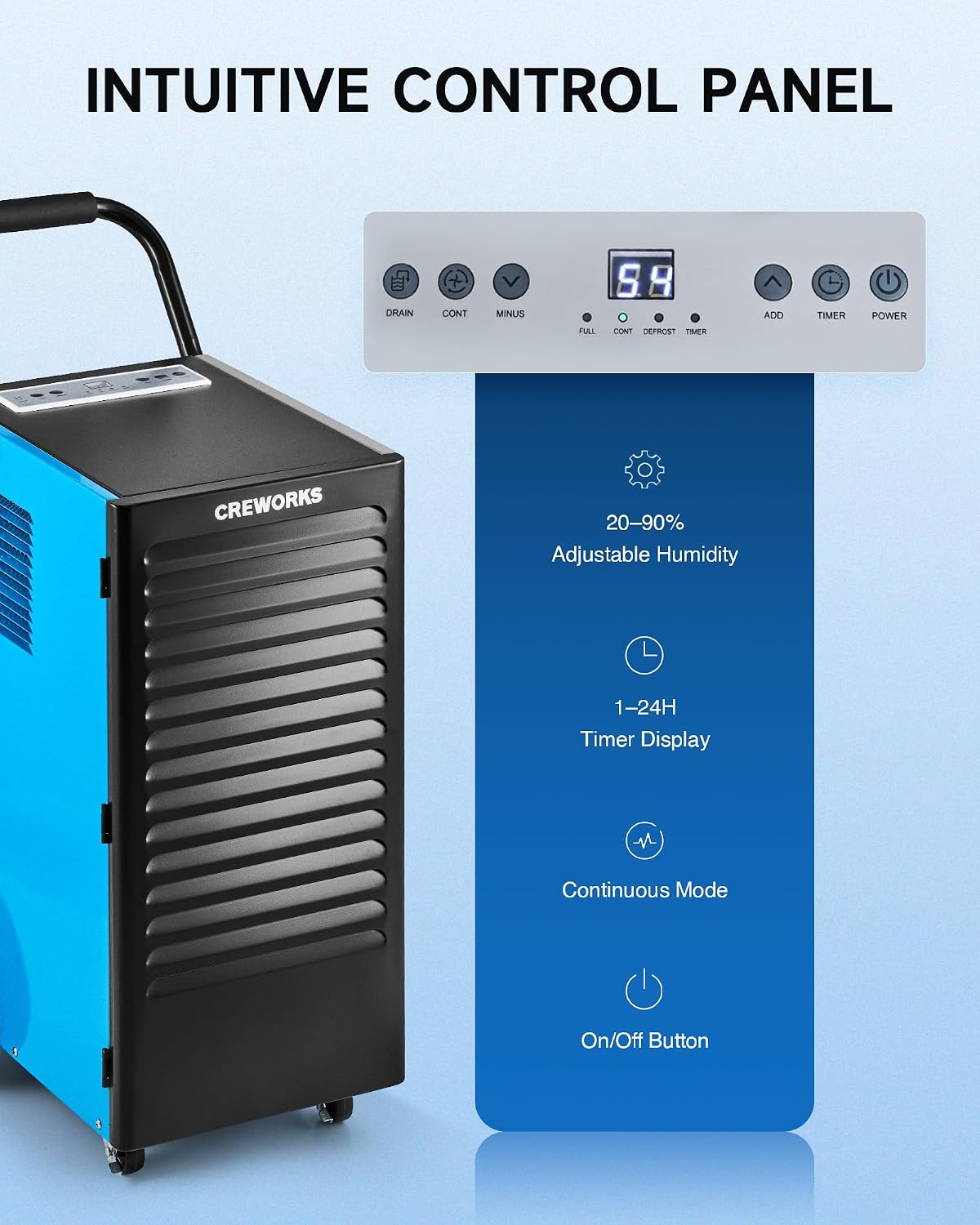
Foto: nso nso view of the dehumidifier's intuitive control panel with various buttons and a digital display.
The control panel features a digital display and several buttons for managing the dehumidifier's functions:
- Bọtịnụ ike: Gbanyụọ otu ahụ ma ọ bụ gbanyụọ.
- ADD / MINUS Buttons: Adjusts the desired humidity level (20-90%) or timer setting (1-24 hours).
- Bọtịnụ ngụ oge: Sets the operational timer.
- CONT (Continuous) Button: Activates or deactivates continuous dehumidification mode.
- DRAIN Button: Activates or deactivates the drain pump (if applicable to the model).
- Ihe ngosi: Shows current humidity, timer, and status indicators for FULL, CONT, DEFROST, and TIMER.
Isi ọrụ
- Ike Na: Pịa IKE button to turn on the dehumidifier. The display will show the current room humidity.
- Tọọ iru mmiri achọrọ: Jiri ihe gbakwunye or MGBE buttons to set your desired humidity level between 20% and 90% Relative Humidity (RH). The unit will operate until the set humidity is reached, then cycle on and off to maintain it.
- Ụkpụrụ na-aga n'ihu: Pịa Ịga n'ihu button for continuous operation, where the unit will run constantly regardless of the humidity level. This is useful for very damp conditions or for faster drying.
- Ọrụ ngụ oge: Pịa TIMER button to set an auto-on or auto-off time (1-24 hours).
Video: Demonstration of setting the desired humidity level and activating continuous mode on the dehumidifier's control panel.
Mwepu akpaaka
The dehumidifier is equipped with an automatic defrost function. If frost builds up on the evaporator coils, the compressor will temporarily shut off, and the fan will continue to run to melt the frost. The DEFROST indicator light will illuminate during this cycle. Once defrosted, the unit will resume normal dehumidification.

Image: Illustration showing the automatic defrost function, where the dehumidifier temporarily halts the compressor to prevent frosting.
Nlekọta
Ndozi mgbe niile na-eme ka arụ ọrụ kacha mma na-agbatịkwu ogologo ndụ nke dehumidifier gị.
1. Na-ehicha ihe nzacha ikuku
The dehumidifier is equipped with a washable air filter. A dirty filter can reduce efficiency and airflow.
- Gbanyụọ dehumidifier wee wepụ ya na oghere ọkụ.
- Locate and remove the air filter from the unit. Refer to the product diagram for filter location.
- Jiri mmiri ọkụ, ncha sachaa nzacha. Sachaa nke ọma ma hapụ ya ka ọ kpọọ nkụ kpamkpam tupu itinyeghachi ya. Ejila efere efere ma ọ bụ kemịkalụ siri ike.
- Tinyegharịa nzacha akọrọ n'ime nkeji.
Nkwanye: Clean the air filter every 2-4 weeks, or more frequently depending on usage and air quality.

Image: Illustration showing the removable and reusable air filter for easy cleaning.
2. Na-ehicha Mpụga
Jiri nwayọ hichaa mpụta nke otu ahụ, damp akwa . Ejila ihe nchacha abrasive ma ọ bụ ihe mgbaze.
3. Nchekwa
If storing the unit for an extended period, ensure it is clean and dry. Coil the power cord and store the unit in a cool, dry place.
Nchọpụta nsogbu nsogbu
Lee ntuziaka a maka nsogbu ndị a na-enwekarị na ngwọta ha.
| Nsogbu | Ihe nwere ike ime | Ngwọta |
|---|---|---|
| Dehumidifier anaghị agbanwuo. | No power, power cord loose, unit not plugged in. | Ensure the unit is properly plugged into a working outlet. Check circuit breaker. |
| Unit runs but does not collect water. | Humidity setting too high, room temperature too low, air filter clogged, unit in defrost mode. | Lower the desired humidity setting. Ensure room temperature is above 41°F (5°C). Clean the air filter. Wait for defrost cycle to complete. |
| Unit is freezing up (frost on coils). | Low room temperature, refrigerant issue. | The unit has an automatic defrost function. If freezing persists, ensure room temperature is within operating range. If problem continues, contact support. |
| Mmiri na-agba agba. | Drain hose not connected properly, drain hose kinked or blocked, unit not level. | Check drain hose connection and ensure it is secure. Clear any kinks or blockages in the hose. Ensure the unit is on a level surface. |
| Ngalaba na-eme mkpọtụ. | Akụkụ rụrụ arụ, unit abụghị ọkwa, ihe mgbochi fan. | Ensure the unit is on a stable, level surface. Check for any loose components. Inspect fan for obstructions. |
Nkọwapụta ngwaahịa
Detailed technical specifications for the CREWORKS 180 PPD Commercial Dehumidifier.
| Njirimara | Nkọwa |
|---|---|
| Ụdị | ỌRỤ |
| Aha Nlereanya | 180PPD |
| Dehumidification Capacity (Saturation) | 180 pints kwa ụbọchị |
| Ike Mwepu ikuku (AHAM) | 85 pints kwa ụbọchị |
| Mpaghara mkpuchi akwadoro | 600 ruo 1600 Square Feet |
| Akụkụ ngwaahịa (D x W x H) | 23.11" x 17.32" x 34.13" |
| Ike ikuku | 350 Cubic Centimeters Per Minute |
| Ụdị ọrụ | Na-aga n'ihu |
| Atụmatụ pụrụ iche | Automatic Defrost, Portable, Timer, Wheels, Drain Hose, Display Panel |
| Ihe onwunwe | Ọla |
| Igwe nju oyi | R32 (Low-Impact) |
Akwụkwọ ikike na nkwado
Ozi akwụkwọ ikike
CREWORKS products typically come with a manufacturer's warranty. Specific warranty terms, including duration and coverage, may vary. Please refer to the warranty card included with your product or contact CREWORKS customer service for detailed information. Keep your purchase receipt as proof of purchase for warranty claims.
Mara: Some customer reviews indicate a potential for issues after approximately one year of use. Regular maintenance and proper operation as outlined in this manual can help ensure product longevity.
Nkwado ndị ahịa
For technical assistance, troubleshooting beyond this guide, or warranty inquiries, please contact CREWORKS customer support. Contact information can typically be found on the manufacturer's official websaịtị ma ọ bụ na nkwakọ ngwaahịa.
When contacting support, please have your product model number (180PPD) and purchase date available.