
Okwu mmalite
Thank you for choosing the Mastech MS8233D Digital Multimeter. This manual provides essential information for the safe and effective operation, maintenance, and troubleshooting of your device. Please read this manual thoroughly before use and keep it for future reference.
Ozi nchekwa
WARNING: To avoid electric shock or personal injury, read and understand all safety information before using this product.
- Jide n'aka na multimeter ahụ dị n'ọrụ na oke kwesịrị ekwesị tupu ị na-eme nha.
- Etinyekwala ihe karịrị ogo voltage, as marked on the meter, between terminals or between any terminal and earth ground. The MS8233D has a Safety Rating of CATII 600V.
- Jiri nlezianya na-arụ ọrụ na voltages n'elu 30V AC RMS, 42V elu, ma ọ bụ 60V DC. Ụdị voltages na-ebute ihe egwu ujo.
- Keep your fingers behind the probe barriers during measurements.
- Do not use the meter if it is damaged or if the case is open. Inspect the meter and test leads before use.
- Dochie batrị ahụ ozugbo mgbe ihe ngosi batrị dị ala pụtara iji hụ na agụpụtara ya nke ọma.
- Ejila mita ahụ rụọ ọrụ n'ime ihe mgbawa gas, vepo, ma ọ bụ uzuzu.
Atụmatụ igodo
The Mastech MS8233D Digital Multimeter offers a range of functionalities for various electrical measurements:
- Ngosipụta: Ọnụọgụ 2000 maka ịgụ ihe ziri ezi.
- Ọkwa: Auto and Manual Ranging capabilities.
- Nnwale diode: Features a Diode Open Voltagnke 1.5V.
- Nnwale na-aga n'ihu: Audible buzzer for resistance less than 60Ω.
- Jide data: Na-akpọchi ihe a na-egosi ka ọ dịrị gị mfe.
- Gbanyụọ ike akpaaka: Na-echekwa ndụ batrị.
- Ndị na-abụghị kọntaktị Voltage Nchọpụta (NCV): Maka ịchọpụta waya ndị dị ndụ na-enweghị kọntaktị kpọmkwem.
- Oke kachasị: Records the highest value measured.
- Gosipụta ọkụ azụ: Maka visibiliti na ọnọdụ ọkụ dị ala.
- Low Battery Display: Indicates when battery replacement is needed.
- Ịnye ọkụ: Operates on 1x 9V 6F22 Battery.
- Asambodo: RoHS kwadoro.
- Ogo nchekwa: CATII 600V.
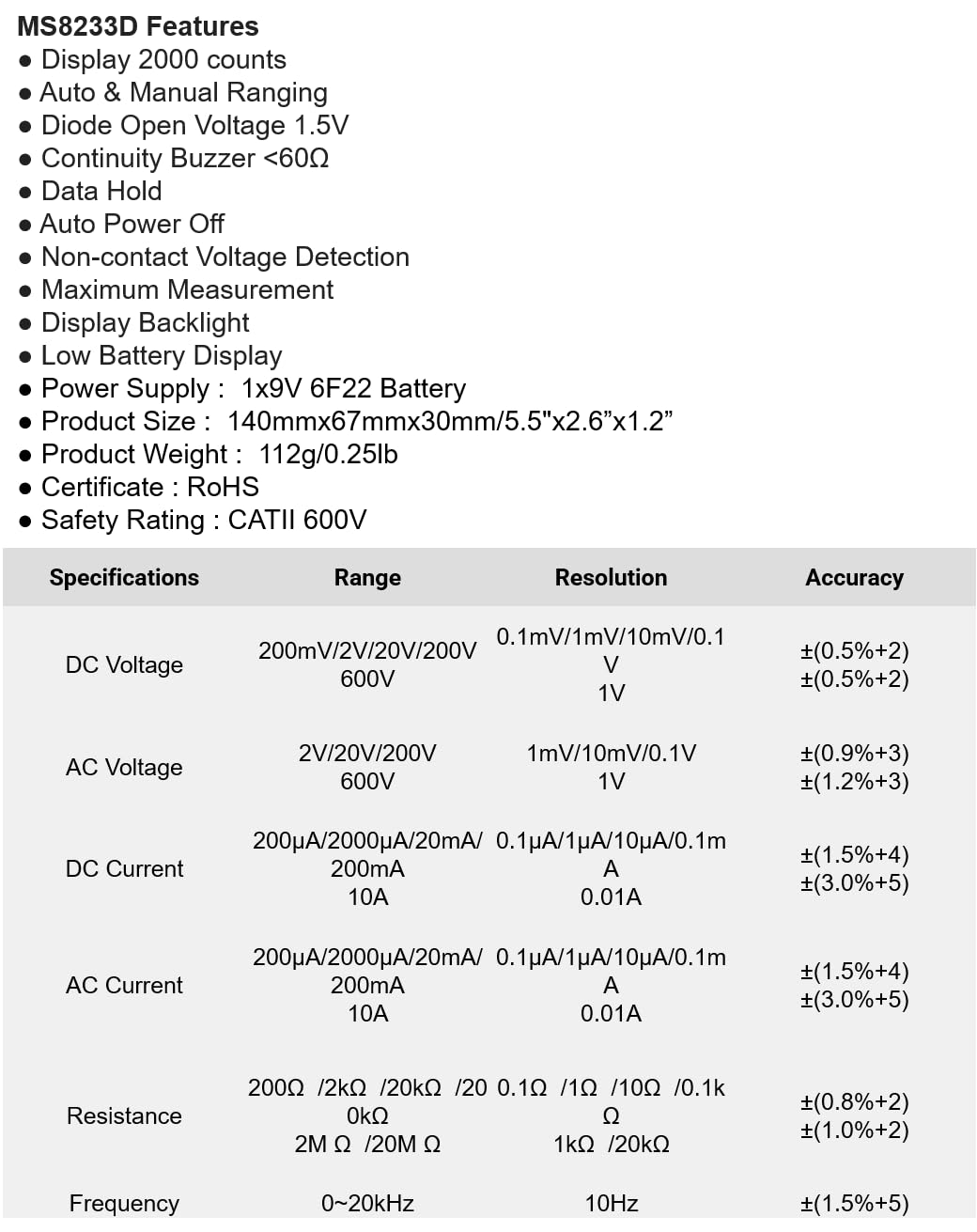
Foto 1: N'ihu view of the Mastech MS8233D Digital Multimeter, highlighting the display, rotary function switch, and input terminals.
Ngwaahịa gafereview na akụrụngwa
The MS8233D multimeter is designed for ease of use and durability. Familiarize yourself with its main parts:

Nyocha 2: N'eluview of the MS8233D Digital Multimeter, illustrating its physical dimensions, power supply, and typical applications in domestic, industrial, and electronics settings.
- Ngosipụta LCD: Na-egosi ngụ nha, nkeji na ihe ngosi ọrụ.
- Ọrụ Mgbanwe Rotary: Used to select the desired measurement function (e.g., ACV, DCV, Resistance, Diode, Continuity, Temperature, NCV).
- Ntinye Jacks: Terminals for connecting test leads.
- COM Jack: Common (negative) input terminal for all measurements.
- VΩmA Jack: Ọnụ ntinye ntinye dị mma maka voltage, resistance, diode, continuity, and small current measurements.
- 10A Jack: Positive input terminal for high current (up to 10A) measurements.
- Bọtịnụ ọrụ: For features like Data Hold, Backlight, and Range selection.
Melite
Ntinye batrị
The MS8233D requires one 9V 6F22 battery for operation. To install or replace the battery:
- Ensure the multimeter is turned off and disconnect all test leads from the input terminals.
- Chọta ebe mkpuchi batrị n'azụ mita.
- Use a screwdriver to loosen the screw(s) on the battery cover and remove the cover.
- Connect the new 9V battery to the battery clips, observing the correct polarity.
- Tinye batrị ahụ n'ime ebe nchekwa ahụ wee dochie mkpuchi ahụ, jiri skru(s) jide ya.
Mara: The meter includes a low battery indicator. Replace the battery promptly when this indicator appears to maintain measurement accuracy.
Ntuziaka ọrụ
Before making any measurement, ensure the test leads are properly connected and the function switch is set to the desired range.
Na-atụ DC Voltage (DCV)
- Insert the red test lead into the VΩmA jack and the black test lead into the COM jack.
- Set the rotary switch to the desired DCV range (e.g., 200mV, 2V, 20V, 200V, 600V). If unsure, start with the highest range or use auto-ranging if available.
- Connect the test probes across the component or circuit to be measured, observing polarity.
- Gụọ voltage uru na LCD ngosi.
Na-atụ AC Voltage (ACV)
- Insert the red test lead into the VΩmA jack and the black test lead into the COM jack.
- Set the rotary switch to the desired ACV range (e.g., 2V, 20V, 200V, 600V).
- Jikọọ ihe nyocha ule n'ofe akụkụ ma ọ bụ sekit a ga-atụ.
- Gụọ voltage uru na LCD ngosi.
Measuring DC/AC Current (DCA/ACA)
CAUTION: Never connect the meter in parallel to a voltage source when measuring current. This can damage the meter and the circuit.
- For currents up to 200mA, insert the red test lead into the VΩmA jack. For currents up to 10A, insert the red test lead into the 10A jack. Insert the black test lead into the COM jack.
- Set the rotary switch to the desired DC or AC current range (e.g., 200µA, 2000µA, 20mA, 200mA, 10A).
- Mepee sekit ebe a ga-atụ ọkụ eletrik ma jikọọ mita ahụ n'usoro na ibu ya.
- Gụọ uru dị ugbu a na ngosipụta LCD.
Measuring Resistance (Ω)
- Insert the red test lead into the VΩmA jack and the black test lead into the COM jack.
- Set the rotary switch to the desired Resistance range (e.g., 200Ω, 2kΩ, 20kΩ, 200kΩ, 2MΩ, 20MΩ).
- Hụ na sekit ma ọ bụ akụkụ ahụ anaghị arụ ọrụ nke ọma tupu ị tụọ ihe ndị na-eguzogide ya.
- Jikọọ nyocha ule n'ofe akụkụ ahụ.
- Gụọ uru iguzogide na ngosipụta LCD.
Nnwale Diode
- Insert the red test lead into the VΩmA jack and the black test lead into the COM jack.
- Set the rotary switch to the Diode symbol (usually shared with Continuity).
- Connect the red probe to the anode and the black probe to the cathode of the diode.
- Ngosipụta ga-egosi volta n'ihutage drop. Reverse the probes; the display should show 'OL' (Open Loop) for a good diode.
Nnwale na-aga n'ihu
- Insert the red test lead into the VΩmA jack and the black test lead into the COM jack.
- Set the rotary switch to the Continuity symbol (usually shared with Diode).
- Jikọọ ihe nyocha ule n'ofe sekit ma ọ bụ akụkụ ahụ.
- If the resistance is below approximately 60Ω, the buzzer will sound, indicating continuity. The display will also show the resistance value.
Onye na-akpọtụrụ Voltage (NCV) Nchọpụta
- Set the rotary switch to the NCV function.
- Move the top part of the meter (NCV sensor area) close to the conductor suspected of having AC voltage.
- Mita ahụ ga-ewepụta mkpọtụ a na-anụ, ihe ngosi NCV ga-enwu ma ọ bụrụ na AC volttage achọpụtara.
Ọrụ Jide data
Press the 'HOLD' button to freeze the current reading on the display. Press it again to release the hold and resume live measurements.
Ọrụ Backlight
Press the 'LIGHT' button to turn on the display backlight. Press it again to turn it off. The backlight may automatically turn off after a short period to conserve battery.
Nlekọta
Nhicha
Wipe the meter's case with a damp ákwà na ihe nhicha dị nro. Ejila ihe na-eme ka ihe dị nro ma ọ bụ ihe mgbaze dị nro. Hụ na mita ahụ kpọrọ nkụ kpamkpam tupu e jiri ya.
Ngbanwe batrị
Refer to the 'Battery Installation' section under 'Setup' for instructions on replacing the 9V battery. Always replace the battery when the low battery indicator is displayed to ensure accurate readings and proper operation.
Ndochi Fuse
The MS8233D is equipped with internal fuses to protect against overcurrent. If the current measurement function stops working, the fuse may need replacement. Fuse replacement should only be performed by qualified personnel. Use only fuses of the specified type and rating (e.g., F200mA/250V for mA range, F10A/250V for 10A range).
Nchọpụta nsogbu
| Nsogbu | Ihe nwere ike ime | Ngwọta |
|---|---|---|
| Enweghị ngosipụta ma ọ bụ ngosipụta dị jụụ | Ọnwụ anwụ ma ọ bụ obere batrị | Dochie batrị 9V. |
| Ọgụgụ na-ezighi ezi | Incorrect function/range selected; poor test lead connection; low battery | Verify function and range; check test lead connections; replace battery. |
| Nha nha ugbu a anaghị arụ ọrụ | Fọpụ gbawara agbawa | Replace the appropriate fuse (refer to Maintenance section). |
| Egosipụtara 'OL' (Overload) | Measurement exceeds selected range; open circuit (for continuity/resistance) | Select a higher range; check for open circuit. |
| Enweghị ụda na-aga n'ihu | Resistance too high; open circuit | Check for continuity; ensure resistance is below 60Ω. |
Nkọwapụta
The following table details the measurement ranges, resolutions, and accuracies for the Mastech MS8233D Digital Multimeter:

Figure 3: Comprehensive specifications for the MS8233D, outlining measurement capabilities and precision.
| Njirimara | Nkọwapụta |
|---|---|
| Ngosipụta | 2000 na-agụta |
| DC Voltage | 200mV / 2V / 20V / 200V / 600V |
| AC Voltage | 2V / 20V / 200V / 600V |
| DC ugbu a | 200µA / 2000µA / 20mA / 200mA / 10A |
| AC Ugbu a | 200µA / 2000µA / 20mA / 200mA / 10A |
| Nguzogide | 200Ω / 2kΩ / 20kΩ / 200kΩ / 2MΩ / 20MΩ |
| Ugboro ugboro | 0-20kHz |
| Diode Open Voltage | 1.5V |
| Ịga n'ihu Buzzer | <60Ω |
| Ịnye ọkụ | 1x 9V 6F22 Battery |
| Akụkụ ngwaahịa | 140mm x 67mm x 30mm (5.5" x 2.6" x 1.2") |
| Ibu ngwaahịa | 112g (0.25 lb) |
| Ogo nchekwa | CATII 600V |
| Asambodo | CE, RoHS |
Akwụkwọ ikike na nkwado
For warranty information and technical support, please refer to the documentation provided with your purchase or contact the seller/manufacturer directly. Keep your purchase receipt as proof of purchase for any warranty claims.


