
1. N'eluview
The OBEST H360 Motorcycle Helmet Bluetooth Headset provides a true wireless audio solution for various helmet types, including motorcycle, cycling, ski, vintage, and off-road helmets. It features Bluetooth 5.3 technology for stable and fast connections, active noise cancellation for clear communication, and a long-lasting battery. The headset includes a wireless remote control for easy operation while riding.

Foto: Ofeview of the OBEST H360 Wireless Bluetooth Headset components.
2. Kedu ihe dị na Igbe ahụ
Ngwungwu ahụ gụnyere ihe ndị a:
- Akpa nchaji ikuku
- Headset (2 speakers)
- Njikwa ime ikuku ikuku
- -Dị-C Nchaji USB
- Velcro Pads (4 pieces)
- Akwụkwọ ntuziaka onye ọrụ
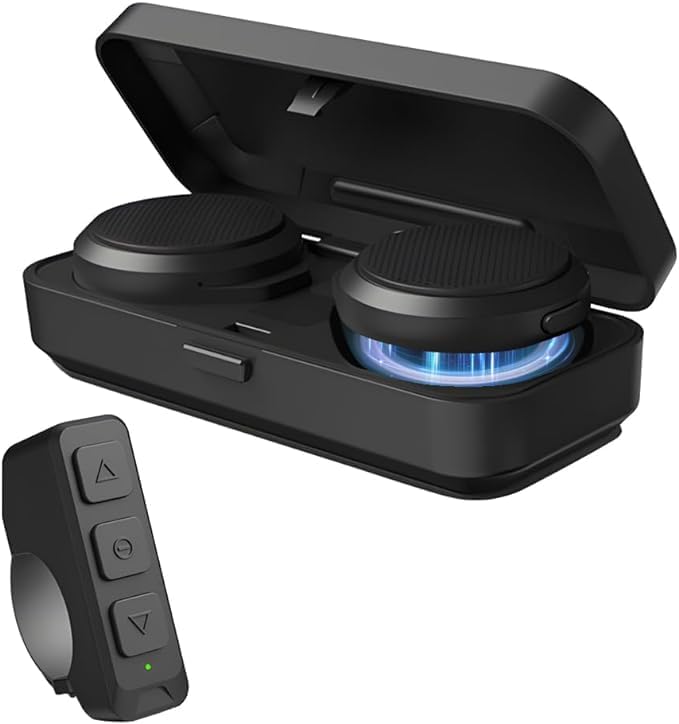
Image: All components included in the OBEST H360 package.
3. Ntọala & nwụnye
Follow these steps to install your OBEST H360 headset into your helmet:
- Prepare the Helmet: Ensure your helmet's ear pockets are clean and dry.
- Attach Velcro to Speakers: Peel the protective backing from the adhesive side of two Velcro pads. Attach one pad to the back of each headset speaker.
- Install Speakers in Helmet: Carefully position each speaker inside the helmet's ear pockets. Press firmly to secure the Velcro. Ensure the speakers are centered over your ears for optimal sound.
- eriri ụzọ: Tuck any excess speaker cables neatly under the helmet's lining to prevent tangling and ensure comfort.
- Attach Remote Control: The wireless remote control can be mounted on your handlebar or other convenient location using its integrated strap.

Image: Visual guide for headset installation in a helmet.
Vidiyo nwụnye
Video: A short demonstration of the motorcycle helmet Bluetooth headset installation process.
4. Ntuziaka ọrụ
4.1. Gbanyụọ / gbanyụọ
- Ike Na: Open the charging case. The headsets will automatically power on.
- Gbanyụọ: Place the headsets back into the charging case and close the lid. They will automatically power off.
4.2. Njikọ Bluetooth
- Ensure the headsets are powered on and in pairing mode (indicated by flashing LED lights).
- On your mobile phone, enable Bluetooth and search for available devices.
- Select "OBEST H360" from the list to connect. A voice prompt will confirm successful pairing.
- To pair the wireless remote control, ensure it is powered on and in pairing mode. Select it from your phone's Bluetooth list.
4.3. Call & Music Control (via Remote Control)
The wireless remote control allows for easy management of calls and music:
- Azịza/Kwụsị Oku: Pịa bọtịnụ etiti.
- Kpọọ/Kwụsị Egwu: Pịa bọtịnụ etiti.
- Increase Volume/Previous Track: Pịa bọtịnụ elu.
- Decrease Volume/Next Track: Pịa bọtịnụ ala.

Image: Remote control functions for calls, music, and GPS.
5. Ịchaji
The OBEST H360 headset comes with a portable charging case to keep your headsets powered on the go.
- Charging Headsets: Place the headsets into the charging case. The LED display on the case will show the charging status for each earphone (L/R) and the case's battery capacity.
- Nchaji akpa: Connect the Type-C charging cable to the charging port on the case and to a suitable USB power source. The LED display will indicate the charging progress.

Image: Charging case with digital display for battery levels.
6. Nlekọta
- Keep the headset and charging case clean and dry.
- Zere ikpughe ngwaọrụ ahụ na oke okpomọkụ ma ọ bụ ìhè anyanwụ kpọmkwem.
- Anwala ịkwasa ma ọ bụ rụkwaa ngwaọrụ n'onwe gị. Kpọtụrụ nkwado ndị ahịa maka enyemaka.
7. Nchọpụta nsogbu
- Enweghị ike: Ensure the headsets and charging case are fully charged.
- Enweghị ike ijikọ: Make sure Bluetooth is enabled on your device and the headset is in pairing mode. Try restarting both devices.
- Ogo ụda adịghị mma: Check the speaker placement in the helmet. Ensure there are no obstructions. Adjust volume levels on both the headset and your connected device.
- Njikwa anya anaghị aza: Ensure the remote control is paired and its battery is charged.
8. Nkọwapụta
| Njirimara | Nkọwa |
|---|---|
| Aha Nlereanya | Motorcycle Helmet Bluetooth Headset (H360) |
| Teknụzụ Njikọta | Ikuku (Bluetooth 5.3) |
| Njikwa mkpọtụ | Nkagbu mkpọtụ nọ n'ọrụ |
| Battery Life (Headset) | Awa 5.5 (Oge Mkparịta ụka) |
| Oge Njikere | Ruo awa 50 |
| Ịchaji batrị akpa | 1900mAh |
| Nchaji Interface | Ụdị-C |
| Ogologo nnyefe | Ruo mita 10 |
| Usoro njikwa | Ime ime |
| Ibu Ibu | 9.2 ounces |
| Ihe onwunwe | Plastic Or Silicone |

Image: Dimensions of the headset components.
9. Akwụkwọ ikike na nkwado
For warranty information or customer support, please refer to the contact details provided in your product packaging or visit the official OBEST websaịtị.