
1. Okwu mmalite
Thank you for choosing the MONODEAL DV68 Bone Conduction Headphones. These headphones are designed to provide a comfortable and safe listening experience, especially during sports and outdoor activities. Utilizing advanced bone conduction technology and Bluetooth 5.3, they deliver clear audio while keeping your ears open to ambient sounds. The integrated smart light enhances visibility and safety during nighttime use.
2. Ihe ngwugwu
Biko lelee ngwungwu maka ihe ndị a:
- MONODEAL DV68 Bone Conduction Headphones
- Igwe Oji Magnetik
- Akwụkwọ ntuziaka onye ọrụ
- Earplugs (optional, for enhanced sound isolation)
3. Ngwaahịa gafereview
Familiarize yourself with the components of your MONODEAL DV68 headphones.
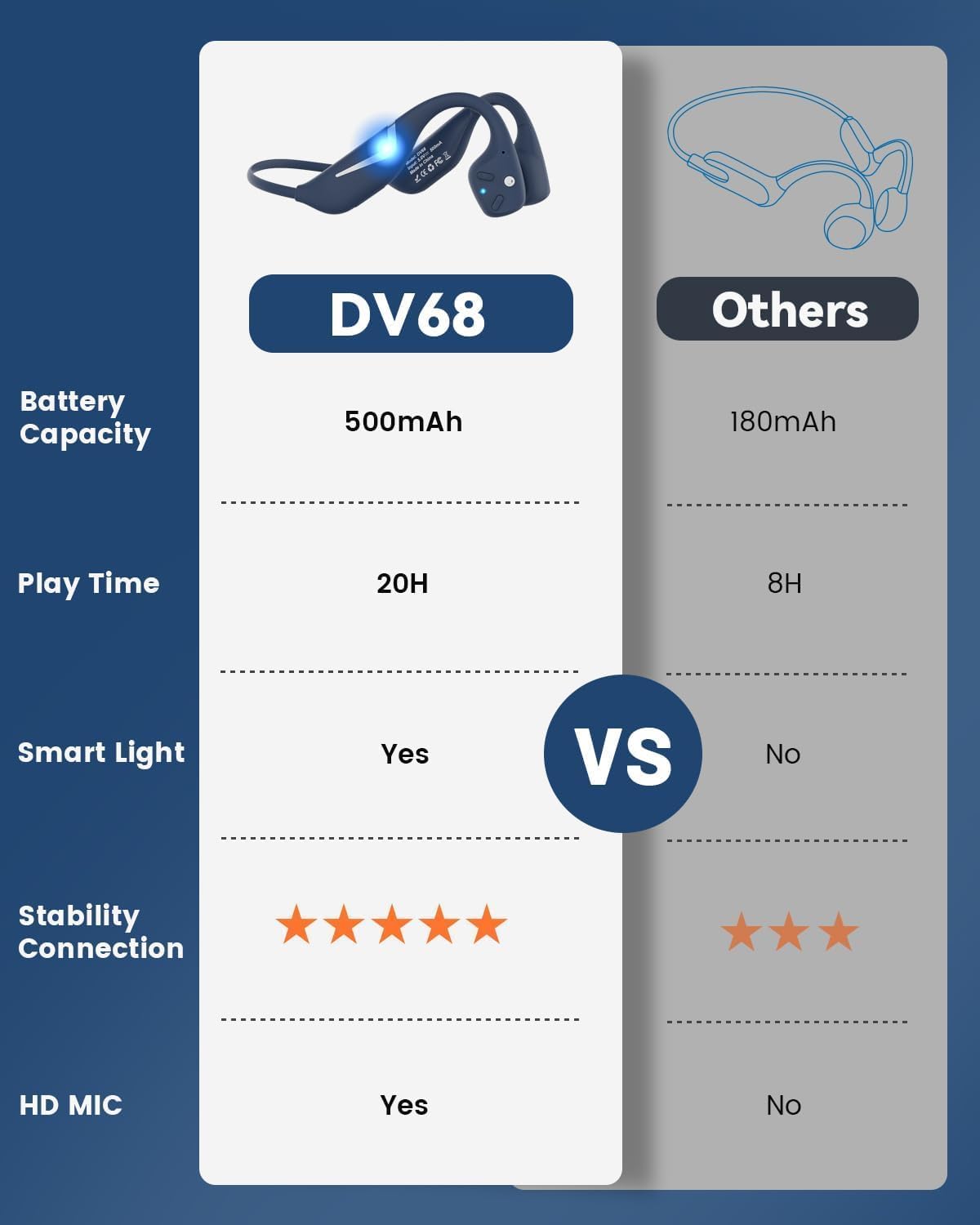
Figure 3.1: MONODEAL DV68 Bone Conduction Headphones, showing the overall design.

Ọgụgụ 3.2: gbawara view illustrating the bone conduction transducer and built-in microphone.
3.1 Njikwa na ọdụ ụgbọ mmiri
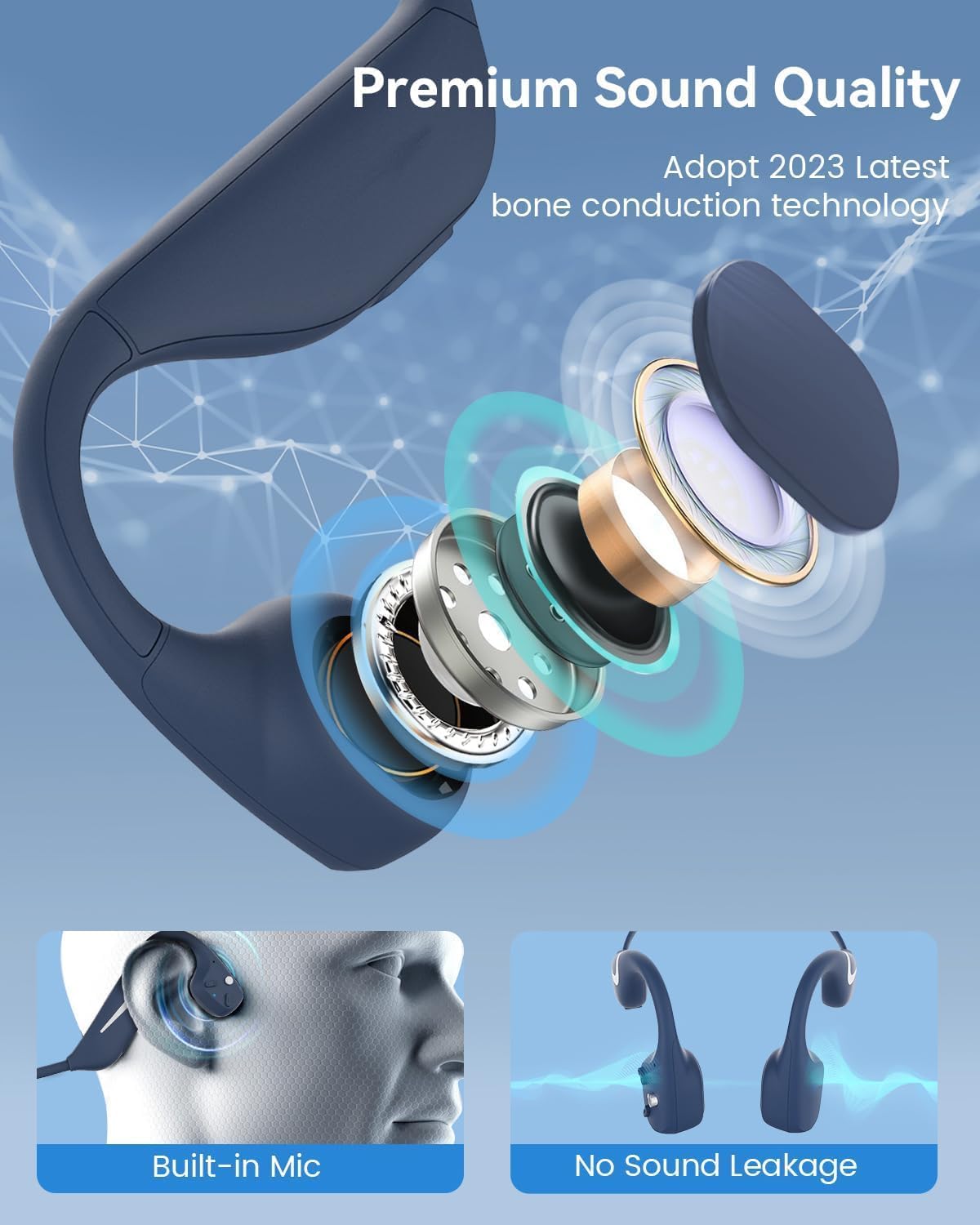
Foto 3.3: Akụkụ view of the headphones highlighting the control buttons.

Ọgụgụ 3.4: nso nso view of the magnetic charging port.
The headphones feature physical buttons for power, volume, and playback control. The magnetic charging port is located on one of the ear pieces for convenient charging.
4. Nkọwapụta
| Njirimara | Nkọwapụta |
|---|---|
| Nọmba nlereanya | DV68 |
| Ụdị Bluetooth | 5.3 |
| Ike batrị | 500 mAh |
| Oge egwuregwu | Ruo awa iri abụọ |
| Ogo Nguzogide Mmiri | IP67 (Sweat, rain, and splash resistant) |
| Ibu | 34 grams |
| Oke ugboro ugboro | 20 Hz - 20,000 Hz |
| Teknụzụ Njikọta | Ikuku (Bluetooth) |
| Ụdị ọkwọ ụgbọ ala ọdịyo | Nduzi Ọkpụkpụ |
| Atụmatụ pụrụ iche | Smart LED Light, Built-in Microphone, Multipoint Pairing |

Nyocha 4.1: N'eluview of key features including Open-Ear design, IP67 Waterproofing, 500mAh Battery, Bluetooth V5.3, Lightweight, HD Microphone, Multipoint Pairing, and RGB Light.
5. Nhazi
5.1 Ịchaji ekweisi
Tupu iji nke mbụ, chajịa ekweisi gị nke ọma.
- Connect the magnetic charging cable to the charging port on the headphones.
- Jikọọ nsọtụ nke ọzọ nke eriri na ihe nkwụnye ọkụ USB (anaghị etinye ya) ma ọ bụ ọdụ ụgbọ USB nke kọmputa.
- The LED indicator will show the charging status. A full charge typically takes approximately 2 hours.

Figure 5.1: Illustration of 20-hour battery life and quick charge feature (10 minutes charging for 2 hours playtime).
5.2 Njikọ Bluetooth
Iji jikọọ ekweisi gị na ngwaọrụ:
- Gbaa mbọ hụ na agbanyụrụ ekweisi.
- Press and hold the Power button until the LED indicator flashes red and blue, indicating pairing mode.
- Na ngwaọrụ gị (smartphone, tabletị, kọmpụta), mee ka Bluetooth nwee ike wee chọọ ngwaọrụ dị.
- Select "MONODEAL DV68" from the list of found devices.
- Once connected, the LED indicator will turn solid blue or flash blue slowly.
The headphones support multipoint pairing, allowing connection to two devices simultaneously. Refer to your device's Bluetooth settings for managing multiple connections.
6. Ntuziaka ọrụ
6.1 Gbanyụọ ma ọ bụ gbanyụọ
- Ike Na: Pịa ma jide bọtịnụ ike maka sekọnd iri na ise.
- Gbanyụọ: Pịa ma jide bọtịnụ ike maka sekọnd iri na ise.
6.2 Nghaghachi egwu
- Gwuo/kwụsịtụ: Pịa bọtịnụ Multi-function ozugbo.
- Track na-esote: Pịa ma jide bọtịnụ Volume + maka 2 sekọnd.
- Gara aga Track: Pịa ma jide bọtịnụ olu maka sekọnd 2.
- Olu elu: Pịa bọtịnụ + Mpịakọta.
- Olu ala: Pịa bọtịnụ olu.
6.3 Njikwa oku
- Azịza/Kwụsị Oku: Pịa bọtịnụ Multi-function ozugbo.
- Jụ oku: Pịa ma jide bọtịnụ ọtụtụ ọrụ maka sekọnd iri na abụọ.
- Enyemaka Olu: Pịa bọtịnụ Multi-function ugboro abụọ.
6.4 Smart LED Light
The headphones feature a smart LED light for enhanced visibility during nighttime activities.
- Gbanwuo/ Gbanyụọ ọkụ: Refer to the specific button combination in your quick start guide (usually a dedicated light button or a long press of a volume button).
- The light can cycle through different colors (e.g., blue, green, red) to increase your safety and visibility.

Figure 6.1: A runner demonstrating the smart LED light feature for night safety.
7. Nlekọta
7.1 Nhicha
To maintain hygiene and product longevity:
- After sweating or intense workouts, gently wipe the headphones with a damp akwa ma ọ bụ mmiri na-ehichapụ.
- Zere iji kemịkalụ siri ike ma ọ bụ ihe nchacha.
7.2 Nchekwa
- Chekwaa ekweisi n'ebe dị jụụ, kpọrọ nkụ, pụọ na ìhè anyanwụ kpọmkwem na oke okpomọkụ.
- When not in use, it is recommended to store them in their original packaging or a protective case.
7.3 Mmiri Nguzogide
The MONODEAL DV68 headphones are IP67 rated, meaning they are resistant to sweat, rain, and splashes. However, they are not suitable for swimming or submersion in water.

Figure 7.1: A person exercising with the headphones, demonstrating their IP67 water resistance against sweat and rain. Note: Not for swimming.
8. Nchọpụta nsogbu
If you encounter issues with your headphones, please refer to the following common solutions:
- Enweghị ike:
Ensure the headphones are fully charged. Connect them to the charging cable and a power source. - Enweghị ike ijikọ:
Make sure the headphones are in pairing mode (LED flashing red and blue). Turn off Bluetooth on other nearby devices that may have previously connected. Try restarting both the headphones and your device. - Enweghị ụda/olu dị ala:
Check the volume levels on both the headphones and your connected device. Ensure the headphones are properly positioned on your cheekbones. If using earplugs, ensure they are correctly inserted. - Njikọ na-adịte aka:
Ensure your device is within the Bluetooth range (up to 15 meters) and there are no significant obstacles between the headphones and your device. Avoid strong electromagnetic interference. - Ogo oku na-adịghị mma:
Ensure the microphone is not obstructed. Move to an area with better network reception for your phone.
9. Akwụkwọ ikike na nkwado
9.1 Ozi akwụkwọ ikike
MONODEAL provides a 2-afọ akwụkwọ ikike for the DV68 Bone Conduction Headphones from the date of purchase. This warranty covers manufacturing defects and ensures the product meets its specified performance. Please retain your proof of purchase for warranty claims.
9.2 Nkwado ndị ahịa
For further assistance, technical support, or warranty inquiries, please contact MONODEAL customer service through the retailer where you purchased the product or visit the official MONODEAL websaịtị maka ozi kọntaktị.