
Outdoor Tech OT4800-B
Outdoor Tech Turtle Shell 4.0 Wireless Bluetooth Speaker User Manual
Model: OT4800-B
Brand: Outdoor Tech
Okwu mmalite
The Outdoor Tech Turtle Shell 4.0 is a portable, rugged, and waterproof wireless Bluetooth speaker designed for outdoor adventures. It features 360-degree sound, a durable IPX7-rated construction, and an extended battery life, making it ideal for various environments from camping to poolside relaxation. This manual provides essential information for setting up, operating, and maintaining your speaker.

Figure 1: Turtle Shell 4.0 highlighting key features like waterproof, 18-hour battery, impressive sound, Siri/Power Bank, and simple controls.
Kedu ihe dị na Igbe ahụ
- Turtle Shell 4.0 Wireless Bluetooth Speaker
- USB-C eriri USB
- Buru obere akpa
- Instructional manual (this document)
Melite
1. gingchaji Okwu Okwu
Before first use, fully charge your Turtle Shell 4.0. The charging port has been upgraded to USB-C for faster and more efficient charging.
- Connect the provided USB-C charging cable to the speaker's charging port.
- Jikọọ nsọtụ nke ọzọ nke eriri na ihe nkwụnye ọkụ USB dakọtara (anaghị etinye ya) ma ọ bụ ọdụ ụgbọ USB nke kọmputa.
- A full charge takes approximately 3 hours. The LED indicator will change to show charging status (refer to LED indicator section for details).
2. Ịgbanye / gbanyụọ
- To power on: Press and hold the power button (⏻) until you hear an audible cue or see the LED indicator light up.
- To power off: Press and hold the power button (⏻) again until you hear an audible cue or the LED indicator turns off.
3. Njikọ Bluetooth
The Turtle Shell 4.0 can be effortlessly paired with your smartphone or other Bluetooth-enabled devices from up to 65 feet away.
- Ensure the speaker is powered on and in pairing mode (the LED indicator will typically flash rapidly).
- Na ngwaọrụ gị, gaa na ntọala Bluetooth.
- Select "Turtle Shell 4.0" from the list of available devices.
- Once connected, the LED indicator will show a solid light, and you will hear a confirmation tone.
4. Daisy-Chaining Multiple Speakers
The Turtle Shell 4.0 features an upgraded daisy-chain function, allowing you to link up to 50 Shells together for a massive portable stereo sound experience.
- Ensure all speakers you wish to link are powered on and not currently paired to any device.
- Pair the first speaker (master speaker) to your device via Bluetooth as described above.
- On the master speaker, press the daisy-chain button (refer to button layout for specific icon).
- On the additional speakers, press their daisy-chain button. They will automatically connect to the master speaker.
- Repeat for up to 50 speakers.
Ntuziaka ọrụ
1. Ọrụ bọtịnụ

Foto 2: Akụkụ view of the Turtle Shell 4.0 with visible control buttons.
| Bọtịnụ | Ọrụ (Short Press) | Ọrụ (Long Press) |
|---|---|---|
| Ike (⏻) | Lelee ọkwa batrị | Gbanyụọ/ Gbanyụọ |
| Mpịakọta ọnụ (-) | Belata olu | Egwu gara aga |
| Multi-function (Bigfoot icon) | Kpọọ/Kwụsị, Zaa/Kwụsị oku | Activate Siri/Google Assistant, Reject Call, Daisy-chain pairing |
| Elu elu (+) | Welie olu | Egwu na-esote |
2. 360-Degree Audio Experience
The Turtle Shell 4.0's patented Dual-Directional Sound technology produces an immersive 360-degree audio experience, ensuring powerful sound from all angles. This is achieved through two full-range drivers and a bass radiator housed within its unique polygonal design.
3. Smart Assistant Compatibility
Activate your device's Siri or Google Assistant directly from the speaker by long-pressing the multi-function button (Bigfoot icon).
4. Oku na-enweghị aka
With the built-in microphone, you can answer and end calls directly through the speaker. Short press the multi-function button to answer or end a call. Long press to reject an incoming call.
5. Power Bank Functionality
The 4K mAh battery allows you to charge small devices while enjoying your music. Connect your device to the speaker's USB-A output port (located under the sealed port cover) using your device's charging cable.
6. Nhọrọ nrịgo
The Turtle Shell 4.0 includes a standard 1/4"-20 camera threading mount and custom strap mounts for multiple easy carry and transport options, allowing you to secure it to various surfaces or gear.

Figure 3: The Turtle Shell 4.0 is versatile for various outdoor activities including camping, general outdoor use, beach, and pool.
Nlekọta
1. Waterproof and Durability
The Turtle Shell 4.0 is IPX7-rated waterproof, dustproof, and shockproof. This means it can be submerged in water up to 1 meter for 30 minutes. Ensure all port covers are securely sealed before exposing the speaker to water or dusty environments.

Figure 4: The Turtle Shell 4.0 demonstrating its IP67 waterproof capability.
2. Nhicha
Iji hichaa ọkà okwu ahụ, jiri ihe dị nro hichaa ya, damp cloth. Do not use abrasive cleaners or solvents. If exposed to saltwater or chlorinated water, rinse thoroughly with fresh water and allow to air dry completely before charging or opening port covers.
3. Nchekwa
Store the speaker in a cool, dry place away from direct sunlight and extreme temperatures. For long-term storage, ensure the battery is partially charged (around 50%) to preserve battery health.
Nchọpụta nsogbu
| Nsogbu | Ihe nwere ike ime | Ngwọta |
|---|---|---|
| Ọkà okwu anaghị agba ọkụ. | Batrị dị ala. | Chajie ọkà okwu ahụ ruo opekata mpe nkeji iri atọ. |
| Enweghị ike ijikọ site na Bluetooth. | Ọkà okwu adịghị n'ụdị njikọta; gbanyụọ ngwaọrụ Bluetooth; tere aka site n'ikwu okwu. | Ensure speaker is in pairing mode (flashing LED). Turn device Bluetooth off and on. Move device closer to speaker (within 65 feet). Forget device on your phone and re-pair. |
| Sound distortion at high volume. | Volume too high for audio source. | Reduce the volume on the speaker or your connected device. |
| Daisy-chaining not working. | Speakers not in correct mode; too many speakers. | Ensure all speakers are powered on and not paired to other devices before initiating daisy-chain. Confirm you are within the 50-speaker limit. |
| Ọkà okwu anaghị akwụ ụgwọ. | Cable issue; port issue; power source issue. | Gbalịa eriri USB-C dị iche na nkwụnye ọkụ. Gbaa mbọ hụ na ọdụ ụgbọ mmiri ahụ dị ọcha na enweghị irighiri ihe. |
Nkọwapụta
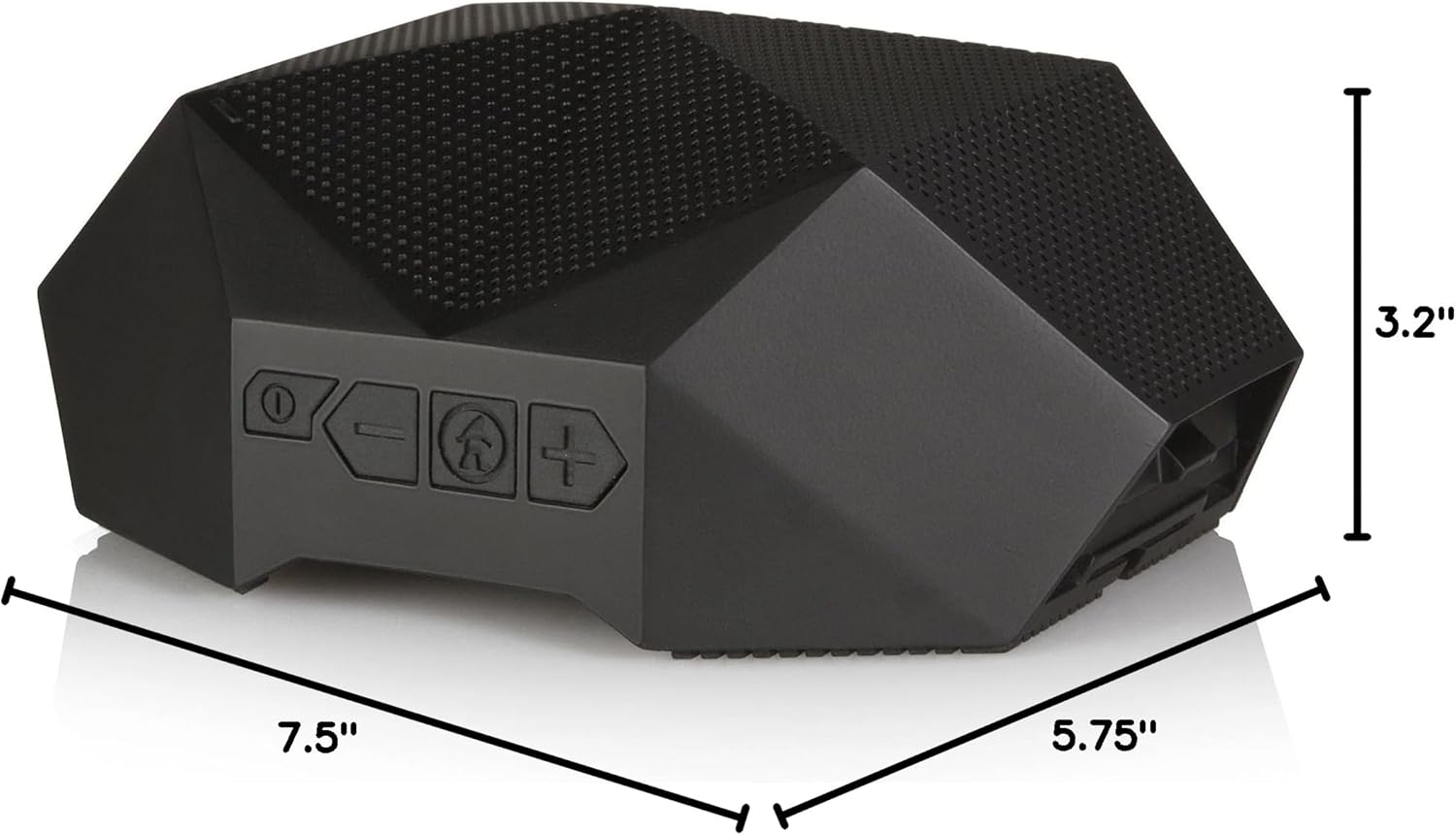
Figure 5: Physical dimensions of the Turtle Shell 4.0 speaker.
| Njirimara | Nkọwa |
|---|---|
| Aha Nlereanya | OT4800-B |
| Ụdị Ọkà Okwu | N'èzí |
| Njirimara Pụrụ Iche | Waterproof |
| Eji akwadoro | Ime/n'èzí |
| Ngwa dakọtara | Amanta, Mbadamba, Laptọọpụ, Desktọpụ |
| Ụdị njikwa | Njikwa olu |
| Agba | Nwa |
| Ndụ batrị | Ruo awa iri abụọ |
| Ngwa gụnyere | USB charging cable, carry pouch, instructional manual |
| Akụkụ ngwaahịa | 7.5"D x 5.75"W x 3.2"H |
| Ngosi nke enweghị mmiri | IPX7 |
| Ike batrị | 4000 mAh |
| Oge Nchaji | Awa 3 |
| Oke Bluetooth kacha | 65 ụkwụ |
| Ibu Ibu | 1.37 pound |
| Teknụzụ Njikọta | Bluetooth |
| Ọnọdụ mmepụta ọdịyo | Stereo |
| Ihe onwunwe | Mixed Plastic/Silicone |
Vidiyo ngwaahịa ngwaahịa
Watch this video to see the Turtle Shell speaker in action, demonstrating its ruggedness and suitability for outdoor activities like paddleboarding. Please note this video features the Turtle Shell 3.0, a previous model, but showcases similar core functionalities and durability relevant to the Turtle Shell 4.0.
Video 1: "SUP with the Turtle Shell 3.0 Speaker" by Outdoor Technology. This video demonstrates the speaker's use in a water environment.
Akwụkwọ ikike na nkwado
Outdoor Tech products are designed for durability and performance. For warranty information and customer support, please visit the official Outdoor Tech websaịtị ma ọ bụ kpọtụrụ ndị ahịa ha ozugbo. Debe ihe akaebe nke ịzụrụ ihe maka akwụkwọ ikike ọ bụla.
Maka enyemaka ọzọ, ị nwekwara ike zoo aka na ya Outdoor Tech Store on Amazon.
Ask a question about this manual
Ask about setup, troubleshooting, compatibility, parts, safety, or missing instructions. Manuals+ will review the question and use this page’s manual context to help answer it.