
1. Okwu mmalite
Welcome to the user manual for your ZOMBIES CAT Transformers TF-T06 Wireless Earbuds. This guide provides detailed instructions on how to set up, operate, maintain, and troubleshoot your new earbuds. Please read this manual carefully to ensure optimal performance and longevity of your device.
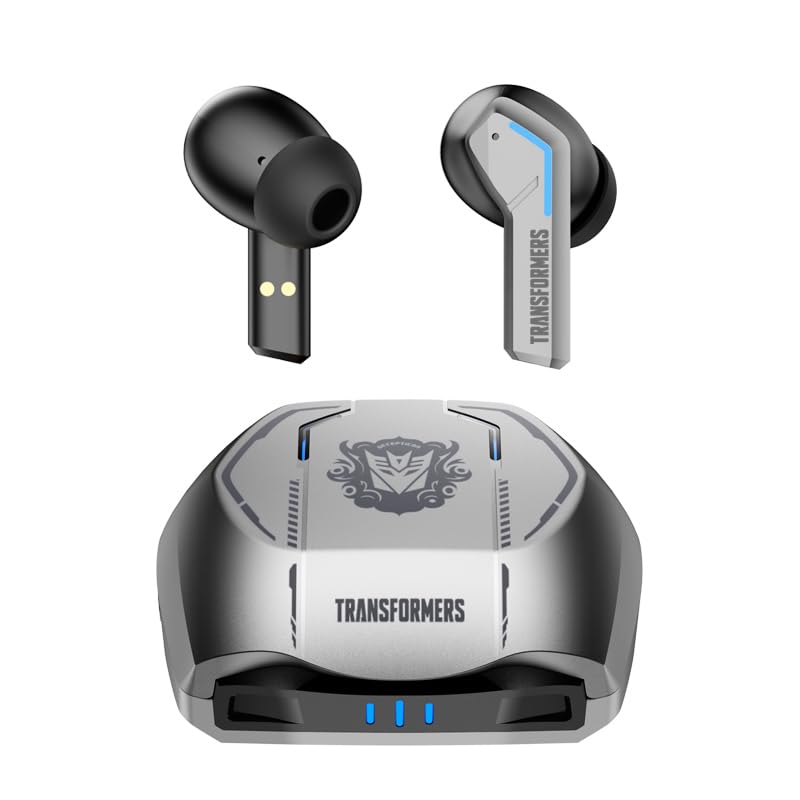
Image 1.1: The Transformers TF-T06 Wireless Earbuds and their charging case.
2. Ihe ngwugwu
Chọpụta na ihe niile dị na ngwugwu gị:
- Transformers In-Ear Headphones (2 units)
- Earbuds Charging Case (1 unit)
- Eriri Nchaji Ụdị-C (otu nkeji)
- Akwụkwọ ntuziaka onye ọrụ (Akwụkwọ a)

Image 2.1: The TF-T06 Earbuds, charging case, and packaging.
3. Ngwaahịa gafereview
3.1 Earbud Design and Ergonomics
The TF-T06 earbuds are designed for a comfortable and secure fit within the ear, ensuring stability during various activities. Their lightweight and skin-friendly construction allows for extended wear without discomfort.

Image 3.1: An earbud shown in an ear, highlighting its ergonomic design for comfortable wear.
3.2 Njikwa Smart Touch
Each earbud features a touch-sensitive area for controlling various functions without needing to access your connected device. The controls are intuitive and responsive.

Image 3.2: Visual representation of the smart touch control functions on the earbuds.
- Gwuo/kwụsịtụ: Otu mgbata na ntị ntị.
- Track na-esote: Pịa bọtịnụ ntị aka nri ugboro abụọ.
- Gara aga Track: Kpatụ ntị ugboro abụọ n'akụkụ aka ekpe.
- Olu elu: Pịa ugboro atọ na ntị ntị aka nri.
- Olu ala: Pịa ugboro atọ na ekwe ntị aka ekpe.
- Azịza/Kwụsị Oku: Otu pịa ma ọ bụ ekwe ntị n'oge oku mbata ma ọ bụ oku nọ n'ọrụ.
- Jụ oku: Pịa ma jide otu ntị ntị maka sekọnd 2 n'oge oku mbata.
- Mee ka onye enyemaka olu rụọ ọrụ: Pịa ma jide otu ekwe ntị maka sekọnd 2 (mgbe ọ bụghị na oku).
4. Nhazi
4.1 Ịchaji ntị na akpa
Tupu ojiji nke mbụ, chajie nke ọma ekwe ntị na akpa nchaji.
- Place the earbuds into the charging case. Ensure they are correctly seated; magnetic contacts will hold them in place.
- Connect the Type-C charging cable to the charging port on the case and the other end to a USB power adapter (not included).
- The indicator lights on the charging case will illuminate to show charging status. A full charge typically takes approximately 3 hours for the case.
- Once fully charged, disconnect the charging cable. The earbuds will charge automatically when placed in the powered case.
4.2 Initial Pairing with a Device
The TF-T06 earbuds feature one-step pairing for convenience.
- Mepee igbe nchaji. Igwe ntị ga-agbanye na-akpaghị aka wee banye ọnọdụ njikọta.
- Na ama gị, mbadamba, ma ọ bụ ngwaọrụ Bluetooth ọzọ, gaa na ntọala Bluetooth.
- Chọọ maka available devices and select "TF-T06" from the list.
- Ozugbo ejikọrọ, ị ga-anụ nkwenye a na-anụ, na ntị ntị ga-adị njikere maka ojiji.

Image 4.1: The earbuds in their open charging case, indicating they are ready for Bluetooth pairing.
Mara: After the initial pairing, the earbuds will automatically connect to the last paired device when removed from the charging case, provided Bluetooth is enabled on the device and it is within range.
5. Ntuziaka ọrụ
5.1 Gbanyụọ ma ọ bụ gbanyụọ
- Ike Na: Open the charging case, or press and hold the touch area on both earbuds for 3 seconds.
- Gbanyụọ: Place the earbuds back into the charging case and close the lid, or press and hold the touch area on both earbuds for 5 seconds.
5.2 Nghaghachi egwu
Use the smart touch controls as described in Section 3.2 to manage your music.
5.3 Njikwa oku
Handle incoming and active calls using the smart touch controls as described in Section 3.2. The built-in ENC noise-cancelling microphone ensures clear communication.
5.4 Onye enyemaka olu
Activate your device's voice assistant (e.g., Siri, Google Assistant) by pressing and holding the touch area on either earbud for 2 seconds (when not on a call).
5.5 Ogo ụda
The TF-T06 earbuds feature 10mm double-layer diaphragm drivers, delivering powerful bass, clear midrange, and bright treble for a high-fidelity audio experience.

Image 5.1: An illustration of the 10mm dynamic driver, responsible for the earbud's sound quality.
6. Nlekọta
- Nhicha: Jiri akwa dị nro, kpọrọ nkụ na-adịghị na-ehicha ntị ntị na chaja mgbe niile. Ejila ihe nchacha abrasive ma ọ bụ ihe mgbaze.
- Nguzogide mmiri: The earbuds have an IPX4 waterproof rating, meaning they are resistant to splashing water and sweat. Do not submerge them in water or expose them to heavy rain. Ensure they are dry before placing them back in the charging case.
- Nchekwa: Mgbe ị na-ejighị ya, debe ekweisi ntị n'ime akpa chaja ha iji chebe ha ma mee ka ha dị ọkụ. Debe ha n'ebe dị jụụ ma kpọọ nkụ, ebe okpomọkụ na-adịghị oke njọ.
- Nlekọta batrị: Ka ịgbatị ndụ batrị ogologo, zere ịchaji ekwe ntị na chaja ugboro ugboro. Na-ana ha ebubo mgbe niile, ọbụlagodi na ọ bụghị iji ya eme ihe mgbe niile.
7. Nchọpụta nsogbu
If you encounter issues with your TF-T06 earbuds, refer to the following common solutions:
- Igwe ntị anaghị ejikọta:
- Gbaa mbọ hụ na akwụgoro ekwe ntị abụọ ahụ.
- Gbanyụọ Bluetooth na ngwaọrụ gị wee gbanye ya azụ.
- Forget "TF-T06" in your device's Bluetooth settings and attempt to pair again.
- Malitegharịa ekwentị gị.
- Naanị otu earbud na-arụ ọrụ:
- Gbaa mbọ hụ na akwụgoro ekwe ntị abụọ ahụ.
- Place both earbuds back into the charging case, close the lid, wait a few seconds, then open the lid and remove them.
- Try resetting the earbuds (refer to specific reset instructions if available in a separate quick start guide, or try forgetting the device and re-pairing).
- Enweghị ụda ma ọ bụ obere olu:
- Lelee ọkwa olu dị na ma ntị ekwe ntị gị ma ngwaọrụ ejikọrọ gị.
- Gbaa mbọ hụ na ejikọrọ ekwe ntị nke ọma na ngwaọrụ gị.
- Clean any debris from the earbud speaker mesh.
- Nsogbu ịchaji:
- Gbaa mbọ hụ na ejikọrọ eriri chajị na echekwabara na ikpe ahụ yana isi iyi ike.
- Gbalịa eriri chaja dị iche ma ọ bụ nkwụnye ọkụ.
- Hichaa kọntaktị ịchaji na ntị ntị na n'ime akpa ahụ.
8. Nkọwapụta
| Aha Nlereanya | TF-T0602 |
| Ụdị | ZOMBIES CAT |
| Teknụzụ Njikọta | Ikuku (Bluetooth 5.3) |
| Ụdị Bluetooth | 5.3 |
| Ụdị ọkwọ ụgbọ ala ọdịyo | Onye ọkwọ ụgbọ ala dị ike (10mm) |
| Ndụ Batrị (Mkpokọta na akpa ahụ) | Ruo awa 30 |
| Oge egwuregwu ihe ntị (otu ụgwọ) | 3-4 Awa |
| Oge Nchaji | Approx. 3 Hours (Case) |
| Usoro njikwa | Metụ aka |
| Ọkwa Nguzogide mmiri | IPX4 (ihe mgbochi mmiri) |
| Ịkagbu mkpọtụ | ENC (Environmental Noise Cancellation) Mic |
| Ngwa dakọtara | Most Bluetooth-enabled devices (smartphones, tablets, laptops, smartwatches) |
| Ogologo ọrụ kacha | 10 mita |
| Ibu Ibu | 132 g |
| Akụkụ ngwaahịa | 3.3 x 2.18 x 1.83 cm |
9. Akwụkwọ ikike na nkwado
Maka ozi gbasara akwụkwọ ikike na nkwado ndị ahịa, biko lee akwụkwọ enyere n'oge ịzụrụ ihe ma ọ bụ kpọtụrụ onye na-ere ahịa gị. Debe ihe akaebe nke ịzụrụ ihe gị maka akwụkwọ ikike ọ bụla.