Okwu mmalite
This manual provides essential instructions for the Pioneer Dedicated Home Theater Remote Control, model AXD7731. It covers basic setup, operation, maintenance, and troubleshooting to ensure optimal use with your compatible Pioneer home theater system. Please note that this product is a remote control only, and an instruction manual for the original home theater system or batteries for the remote are not included.
Melite
1. Ntinye batrị
Njikwa remote ahụ chọrọ batrị AAA abụọ (anaghị etinye ya). Soro usoro ndị a iji wụnye ha:
- Chọta mkpuchi mkpuchi batrị n'azụ nke njikwa anya.
- Wetuo mkpuchi ahụ ala ma ọ bụ pịa eriri ma welie ya ka imepee.
- Fanye batrị AAA abụọ, na-ahụ na njedebe dị mma (+) na nke na-adịghị mma (-) dabara nke ọma na akara ndị dị n'ime ụlọ ahụ.
- Dochie mkpuchi nke batrị batrị, na-atụgharị ya azụ n'ime ebe ruo mgbe ọ pịrị na nchekwa.
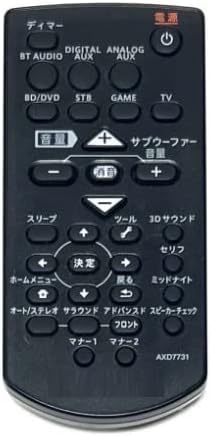
Image: The Pioneer AXD7731 remote control. The battery compartment is typically located on the back, requiring two AAA batteries.
2. Ojiji mbụ
Once batteries are installed, the remote control should be ready for immediate use with compatible Pioneer home theater systems. No complex pairing or programming is typically required for dedicated replacement remotes. Point the remote directly at your home theater receiver or device and press the desired function button.
Ntuziaka ọrụ
This section outlines the general functions of the buttons on your AXD7731 remote control. Button layouts may vary slightly depending on the specific home theater model, but core functions remain consistent.
Foto: N'ihu view of the Pioneer AXD7731 remote control, displaying its array of control buttons.
- IKE: Turns the home theater system ON or OFF.
- Ntinye ntinye: Cycles through available audio/video input sources (e.g., HDMI 1, HDMI 2, Optical, Coaxial).
- Mpịakọta +/-: Increases or decreases the master volume level.
- IHE: Silences the audio output. Press again to restore sound.
- MENU / HOME: Accesses the system's main menu or returns to the home screen.
- Ịnyagharị (Elu/Ala/Aka ekpe/Aka nri) ma tinye: A na-eji ya agagharị na menus ma kwado nhọrọ.
- RETURN / BACK: Na-alaghachi na menu ma ọ bụ ihuenyo gara aga.
- PLAYBACK CONTROLS (Play, Pause, Stop, Fast Forward, Rewind, Skip): Controls media playback for connected devices (e.g., Blu-ray player, media server).
- SOUND MODE / SURROUND: Selects different audio processing modes or surround sound settings.
- TUNER (AM/FM): Switches to radio tuner mode and allows station selection.
For detailed functions of specific buttons, refer to the original instruction manual of your Pioneer home theater system.
Nlekọta
Na-ehicha njikwa anya
Iji nọgide na-enwe ọdịdị na ọrụ nke njikwa remote:
- Jiri akwa dị nro hichaa elu ya.
- Maka unyi isi ike, obere dampJiri mmiri ma ọ bụ ihe nhicha dị nro, nke na-anaghị afụ ụfụ kpuchie ákwà ahụ. Efesala ihe nhicha ahụ ozugbo n'ime remote.
- Zere iji kemịkalụ siri ike, ihe mgbaze, ma ọ bụ akwa nhicha abrasive, n'ihi na ndị a nwere ike imebi njedebe nke ime ime ma ọ bụ ihe dị n'ime.
Ngbanwe batrị
Replace batteries when the remote control becomes unresponsive or its range decreases significantly. Always replace both batteries at the same time with new AAA batteries. Do not mix old and new batteries, or different types of batteries.
Nchekwa
When not in use for extended periods, remove the batteries to prevent leakage and potential damage to the remote control.
Nchọpụta nsogbu
Ọ bụrụ na ị na-enwe nsogbu na njikwa remote gị, gbalịa ngwọta ndị a:
| Nsogbu | Ihe nwere ike ime | Ngwọta |
|---|---|---|
| Njikwa anya anaghị arụ ọrụ. |
|
|
| Ụfọdụ bọtịnụ anaghị anabata ozi. |
|
|
| Remote na-arụ ọrụ nwa oge. |
|
|
Nkọwapụta
| Njirimara | Nkọwa |
|---|---|
| Nọmba nlereanya | AXD7731 |
| Ụdị | Generic (Dedicated for Pioneer) |
| Ngwa dakọtara | Sistemụ ihe nkiri ụlọ |
| Agba | Nwa |
| Achọrọ batrị | AAA x 2 (Not included) |
| Ọnụọgụ bọtịnụ | 25 |
| Akụkụ ngwugwu | 15 x 12 x 2 cm |
| Ibu Ibu | 100 g |
Akwụkwọ ikike na nkwado
As this product is often sold as a replacement part, specific warranty information or a dedicated support manual may not be included. For warranty details, technical support, or further assistance, please refer to the original documentation provided with your Pioneer home theater system or visit the official Pioneer support website. If purchased from a third-party seller, please consult their return and warranty policies.