
Ulecoce U18R-B
Ulecoce Keyless Entry Door Lock Deadbolt with Handle Set User Manual
Model: U18R-B
Okwu mmalite
This manual provides comprehensive instructions for the installation, operation, and maintenance of your Ulecoce Keyless Entry Door Lock Deadbolt with Handle Set. Please read this manual thoroughly before installation and use to ensure proper function and safety.
Njirimara ngwaahịa
- Keyless Entry Deadbolt with Handle Set: Supports multiple access methods including 100 user codes, one-time codes, and 2 backup keys.
- Smart Access Management: Features 3 administrators and 97 user codes. Allows generation and sharing of one-time, permanent, and scheduled codes. Ideal for homes, Airbnb, apartments, offices, and hotels.
- Auto-Lock Convenience: Customizable automatic locking within 10-30 seconds. Includes a one-touch lock function on the rear lock body for quick locking.
- Nchekwa Deadbolt: ANSI Grade 3 certified smart door lock cylinder made of zinc alloy. Powered by 4 AA batteries. IP54 weather resistance rating.
- Ọ dị mfe ịwụnye: No extra drilling or locksmith required. Can be installed and programmed in approximately 15 minutes using a screwdriver. Compatible with both left and right-hand doors.

Figure 1: Multiple Convenient Unlocking Methods. This image illustrates the various ways to unlock the Ulecoce smart lock, including keypad code, one-touch locking, one-time codes, anti-peeping password, physical key, and door knob.
Ihe ngwugwu
| Ihe | Ọnụọgụ |
|---|---|
| Deadbolt Front Lock | 1 |
| Deadbolt Rear Lock | 1 |
| Door Knob Front | 1 |
| Door Knob Rear | 1 |
| Mkpọchi larịị | 2 |
| Igodo | 2 |
| Hole Opening Diagram | 1 |
| Installation Tutorial Card | 1 |
| Ntuziaka | 1 |
| Mounting Plate Screws 1.46in/37mm (A) | 2 |
| Mounting Plate Screws 1.19in/30mm (B) | 3 |
| Mounting Plate Screws 0.24in/6mm (C) | 2 |
| Fixed Leg (D) | 2 |
| Silicone Ring (E) | 1 |
| Akụkụ mapụtara | 4 |
Nkọwapụta
- Akara: Ulecoce
- Aha nlereanya: U18R-B
- Ụdị mkpọchi: Ahụigodo
- Ihe: Zinc
- Agba: Matte Black
- Akụkụ ihe (L x W x H): 2.6 x 0.39 x 4.78 sentimita asatọ
- Ibu ihe: 3.34 pound
- Imecha Type: Agba
- Isi mmalite ike: Batrị 4 AA (anaghị etinye ya)
- Nguzogide ihu igwe: IP54
- Ọkwa nchekwa: ANSI ọkwa 3
- Eji akwadoro: Homes, Airbnb, Apartments, Offices, Hotels
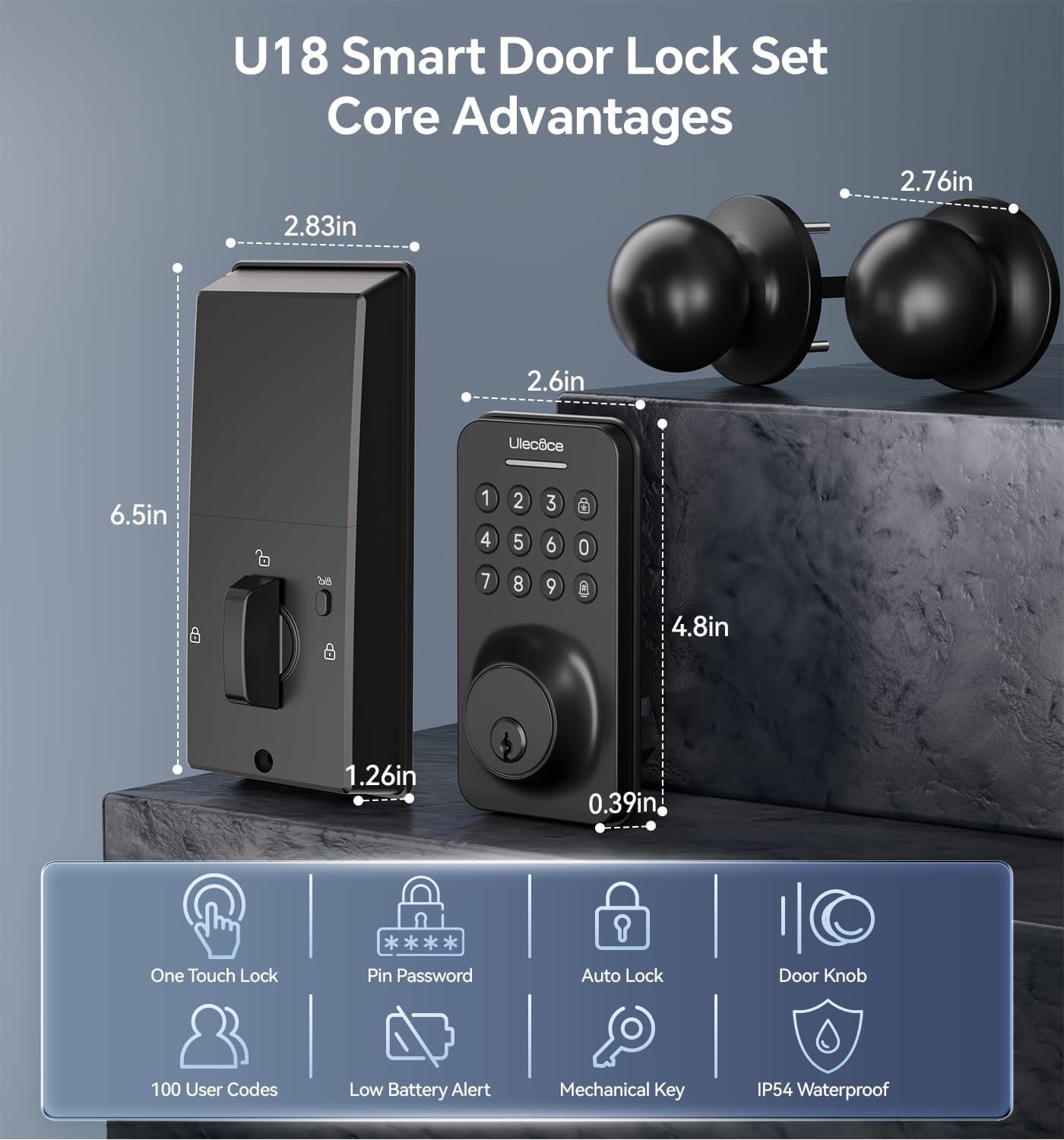
Figure 2: U18 Smart Door Lock Set Core Advantages and Dimensions. This image provides detailed measurements of the lock components and highlights key features like one-touch lock, pin password, auto lock, door knob, 100 user codes, low battery alert, mechanical key, and IP54 waterproof rating.
Ntuziaka nwụnye
The Ulecoce Keyless Entry Door Lock is designed for easy installation without the need for extra drilling. A screwdriver is the only tool required.
Door Compatibility Check
Gbaa mbọ hụ na ọnụ ụzọ gị dabara nkọwa ndị a:
- Mbido: 2-3/8 inches or 2-3/4 inches (60 or 70mm)
- Ọkpụrụkpụ ọnụ ụzọ: 1.31 inches to 2.16 inches (35-55mm)
- Dayameta oghere: 2-1/8 inches (54mm) for the main lock body.

Figure 3: Easy Installation without Drilling. This image shows the required latch hole and door compatibility (single cylinder vs. mortise/integrated) and provides key measurements for backset and hole diameter.
Nwụnye nzọụkwụ site na nzọụkwụ
- Kwadebe ọnụ ụzọ: Ensure the door is clean and the existing holes are clear.
- Wụnye eriri: Insert the latch into the door edge and secure it with screws.
- Install the exterior keypad assembly: Route the cable through the door and align the keypad with the latch.
- Install the interior mounting plate: Secure the mounting plate to the exterior assembly using screws.
- Connect the cable and install the interior assembly: Connect the cable from the exterior unit to the interior unit. Secure the interior unit to the mounting plate.
- Install the door knob: Attach the handle set according to the provided diagram.
- Fanye batrị: Mepee mkpuchi batrị dị n'ime ngwaọrụ ahụ wee tinye batrị AA anọ (anaghị etinye ya).
- Nwalee mkpọchi: Verify that the deadbolt extends and retracts smoothly.

Figure 4: Installed Ulecoce Keyless Entry Door Lock. This image displays the smart lock and handle set mounted on a white door, showcasing njikọta mara mma ya.
Ntọlite na Mmemme
Before initial use, you will need to set up administrator codes and user codes.
Ntọlite mbụ
- Set Administrator Code: Follow the instructions on the Installation Tutorial Card to set your primary administrator code. This code is essential for managing other user codes.
- Tinye koodu onye ọrụ: You can program up to 97 user codes. These can be permanent, one-time, or scheduled codes.

Figure 5: One-Time PIN Code Functionality. This image depicts a user sending a temporary access code via smartphone, highlighting the convenience of managing access remotely.
Anti-Peeping Password Feature
To enhance security, you can enter random digits before or after your actual passcode. The lock will still recognize the correct sequence within the longer string of numbers.

Figure 6: Anti-Peep Tactile Keypad. This image illustrates how the anti-peeping feature works, allowing users to input garbled numbers before and after the correct password to prevent code exposure.
Ntuziaka ọrụ
Ịkpọghe ụzọ
- Iji Koodu: Enter your programmed user code or administrator code on the keypad, then press the unlock button (usually a checkmark or lock icon).
- Iji igodo anụ ahụ: Insert the backup key into the keyhole and turn to unlock.
Ịkpọchi ụzọ
- Mkpọchi akpaaka: Enwere ike ịhazi mkpọchi ahụ ka ọ kpọchie onwe ya mgbe oge edobere (sekọnd 10-30) gachara ozugbo emechiri ụzọ ahụ.
- Mkpọchi otu mmetụ: Press the dedicated lock button on the interior unit to manually lock the deadbolt.
Nlekọta
- Ngbanwe batrị: The lock is powered by 4 AA batteries. Replace them when the low battery indicator appears or when the lock's performance diminishes. Battery consumption may increase in colder temperatures.
- Nhicha: Use a soft, dry cloth to clean the keypad and lock body. Avoid abrasive cleaners or solvents.
- mmanu mmanu: Jiri mmanu nke dabere na silicone were were mmanye ihe na-egbu egbu oge ụfọdụ iji hụ na ọ na-arụ ọrụ nke ọma.

Figure 7: U18 Zinc Alloy Lock Body and Internal Components. This image provides an exploded view of the lock, highlighting its robust zinc alloy construction and internal electronics, including the battery compartment.
Nchọpụta nsogbu
| Nsogbu | Ihe nwere ike ime | Ngwọta |
|---|---|---|
| Mkpọchi anaghị aza ntinye ahụ igodo. | Low batteries; incorrect code entered; keypad malfunction. | Replace batteries; re-enter code carefully; contact support if issue persists. |
| Deadbolt anaghị agbatị/ala azụ kpamkpam. | Misalignment during installation; obstruction in door frame; low batteries. | Check alignment of lock and strike plate; clear any obstructions; replace batteries. |
| Njirimara mkpọchi akpaaka anaghị arụ ọrụ. | Feature disabled; incorrect time setting; door sensor issue. | Ensure auto-lock is enabled and set correctly in programming; check door closure. |
| Screws loosen after use. | Normal wear and tear; insufficient tightening during installation. | Periodically re-tighten all mounting screws. |
Akwụkwọ ikike na nkwado
Ulecoce is committed to providing peace of mind. We offer a Akwụkwọ ikike ngwaahịa afọ 3 na ọrụ ndụ mgbe ire ere gasịrị.
If you have any questions or concerns, please feel free to send us an email. Our customer support team is ready to assist you at any time, providing 24/7 email support and prompt responses to resolve your needs.
Maka nkwado, biko gaa na Ulecoce Store on Amazon or contact customer service via email (details typically found on product packaging or official websaịtị).
Ask a question about this manual
Ask about setup, troubleshooting, compatibility, parts, safety, or missing instructions. Manuals+ will review the question and use this page’s manual context to help answer it.