
IXITAB FS8233Pro
FS8233Pro Touch Smart Digital Multimeter User Manual
Model: FS8233Pro | Brand: IXITAB
1. Okwu mmalite
The IXITAB FS8233Pro is an advanced, automatic smart digital multimeter designed for professional electricians and DIY enthusiasts. Featuring an intelligent sensing touch screen, this device offers convenient operation and clear display for various electrical measurements. Its rechargeable lithium battery ensures long-lasting performance without the need for frequent battery replacements. The FS8233Pro is equipped with intelligent anti-burning fuse protection and a durable silicone protective case, enhancing both safety and hardware longevity. This manual provides comprehensive instructions for safe and effective use of your multimeter.
2. Ozi nchekwa
Always adhere to safety precautions when operating electrical testing equipment. Failure to do so may result in injury or damage to the device.
- Ekwela ka oke ntinye nke akọwapụtara maka oke nha ọ bụla.
- Ensure test leads are in good condition and properly connected before making measurements.
- Avoid using the multimeter in wet environments or with wet hands.
- Anwala ịtụ voltage or current on circuits exceeding the device's rated capacity.
- Always disconnect power to the circuit before measuring resistance, capacitance, or continuity.
- Use caution when working with live circuits.
- Refer to local electrical codes and safety standards.
3. Ihe ngwugwu
Chọpụta na ihe niile dị na ngwugwu gị:
- 1 x FS8233Pro Digital Multimeter
- 1 x Akwụkwọ ntuziaka
- 1 x eriri chaja (USB)
- 1 x Ụzọ ụzọ nnwale

Image: The FS8233Pro multimeter shown with its standard accessories, including the red and black test leads and a USB charging cable.
4. Ngwaahịa gafereview
The FS8233Pro features a large, clear LCD display and intuitive touch controls for ease of use.

Foto: A nso nso view of the FS8233Pro's front panel, highlighting its large digital display and touch-sensitive buttons for various functions like HOLD, AUTO, NCV, Live, and input jacks.
4.1 Atụmatụ:
- Intelligent Sensing Touch Screen: For convenient operation and clear display.
- Batrị Lithium nwere ike ibugharị: Long life, USB charging.
- Nchọpụta akpaaka: Eliminates the need for manual gear shifting.
- Intelligent Anti-Burning Fuse: Enhanced safety protection.
- Silicone Protective Case: Prevents shock and protects hardware.
- Ìhè azụ: Allows clear viewing na ọchịchịrị ọnọdụ.
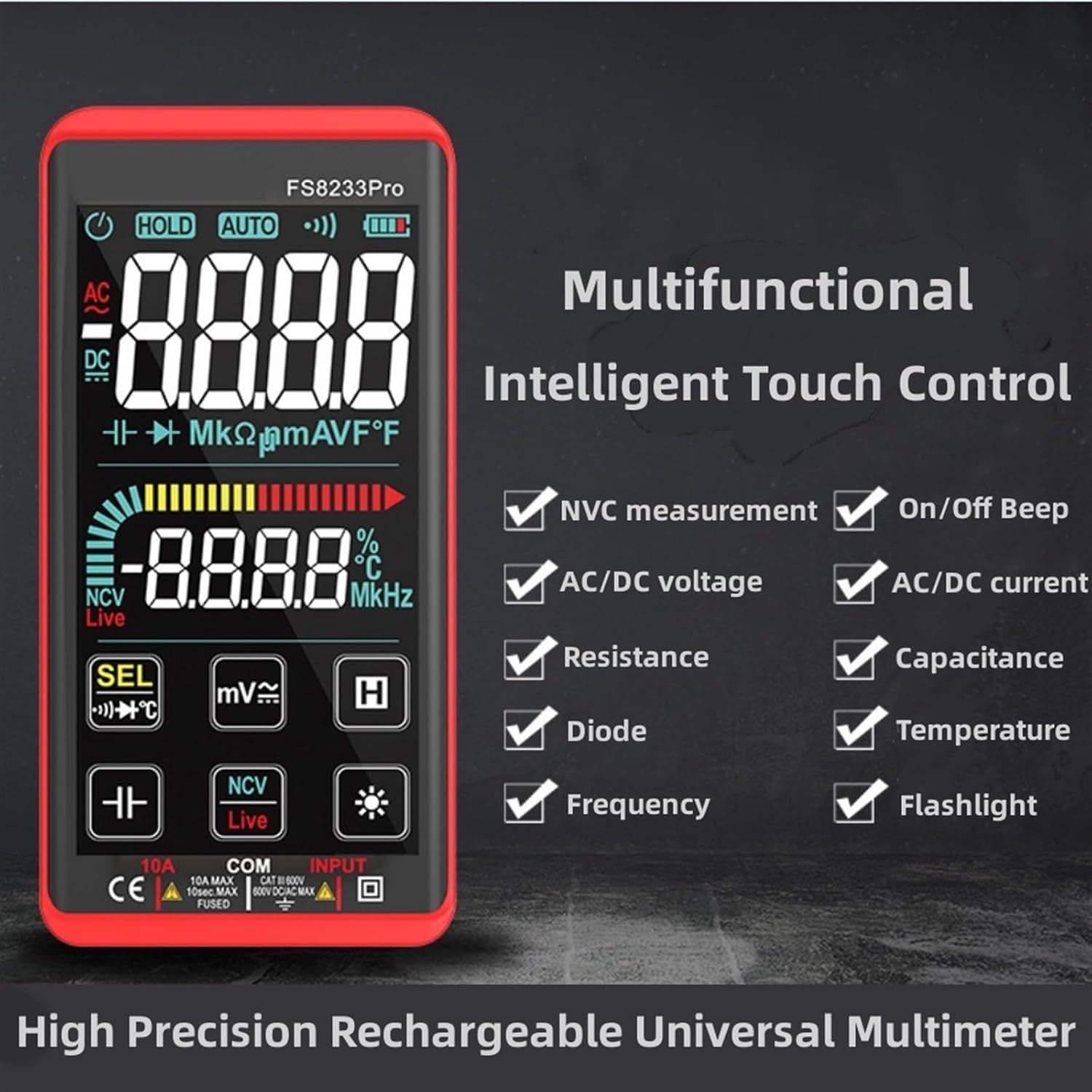
Foto: Ihe ngosi onyonyo nkwaliteasing the multifunctional intelligent touch control features of the FS8233Pro, including NVC measurement, AC/DC voltage, resistance, diode, frequency, on/off beep, AC/DC current, capacitance, temperature, and flashlight.
5. Nhazi
5.1 Nchaji izizi
Before first use, fully charge the multimeter's internal lithium battery. Connect the provided USB charging cable to the multimeter's charging port and to a standard USB power adapter (not included) or a computer USB port. The battery indicator on the display will show charging status.
5.2 Njikọ Ndị Nnwale Nlele
Insert the red test lead into the "INPUT" jack and the black test lead into the "COM" (common) jack. Ensure they are securely inserted.
6. Ntuziaka ọrụ
The FS8233Pro features automatic detection, simplifying measurement selection. Simply turn on the device and it will automatically identify the measurement type for most common functions.

Image: A hand interacting with the touch-sensitive display of the FS8233Pro multimeter, demonstrating its "Intelligent Movement Touch Sensing" for sensitive and fast measurements.
6.1 Gbanyụọ ma ọ bụ gbanyụọ
Press the power button (usually indicated by a power symbol) to turn the multimeter on or off. The device will automatically shut down after approximately 15 minutes of inactivity to conserve battery life.
6.2 AC Voltage (ACV) Measurement
- Connect the test leads in parallel to the AC voltage isi iyi.
- The multimeter will automatically detect AC voltage.
- Range: 0.5V-750V (Accuracy: 1%+5)
6.3 DC Voltage (DCV) Measurement
- Connect the test leads in parallel to the DC voltage source, observing polarity.
- The multimeter will automatically detect DC voltage.
- Range: 0.5V-1000V (Accuracy: 0.5%+3)
6.4 Nledo Nguzogide
- Hụ na sekit ahụ anaghịzi enye ike tupu ị tụọ ihe ndị na-eguzogide ya.
- Jikọọ ihe nlele ndị a ga-eji tụọ.
- Range: 0.1Ω-99.999MΩ (Accuracy: 1%+3)
6.5 Nleta ugboro ugboro
- Connect the test leads to the signal source.
- Range: 40Hz-10000Hz (Accuracy: 0.5%+3)
6.6 Mmesho ikike
- Ensure the capacitor is discharged before measurement.
- Jikọọ ndị na-enye ule n'ofe ọdụ capacitor ahụ.
- Range: 10nF-60000μF (Accuracy: 4.5%+5)
6.7 Tụọ oke okpomọkụ
- Use the appropriate temperature probe (if included, or purchased separately) and connect it to the multimeter.
- Range: -40°C to 1000°C (Accuracy: 2%+5)
6.8 On & Off Beep (Continuity)
- Jikọọ ndị na-enye ule n'ofe sekit ma ọ bụ akụkụ ahụ.
- If the resistance of the tested circuit is less than 50Ω, the auxiliary buzzer will sound, indicating continuity.
6.9 Diode Ule
- Jikọọ ndị na-enye ule n'ofe diode ahụ.
- The display will show the approximate diode forward voltage uru.
6.10 NCV (anaghị ana-akpọtụrụ Voltage) Nchọpụta
- Select the NCV function.
- Bring the top of the multimeter close to the AC voltage isi iyi.
- There are three alarm modes (visual and audible) according to the detected voltage strength.
6.11 Live Line Identification
- Select the Live function.
- Insert the red test lead into the suspected live line.
- If it is a live line, "Live" will appear on the screen, and an alarm sound will be emitted.
7. Nlekọta
7.1 Nhicha
Wipe the multimeter's casing na adamp cloth. Do not use abrasive cleaners or solvents. Ensure the device is off and disconnected from any power source before cleaning.
7.2 Nchekwa
Store the multimeter in a cool, dry place, away from direct sunlight and extreme temperatures. If storing for extended periods, ensure the battery is partially charged (around 50%) to prolong its lifespan.
7.3 Nlekọta batrị
The built-in lithium battery is designed for long life. Avoid fully discharging the battery frequently. Recharge as needed. If the device will not be used for a long time, charge it every 3 months to maintain battery health.
8. Nchọpụta nsogbu
| Nsogbu | Ihe nwere ike ime | Ngwọta |
|---|---|---|
| Multimeter anaghị agba ọkụ. | Batrị agwụla. | Charge the multimeter using the provided USB cable. |
| Ọgụgụ na-ezighi ezi. | Incorrect measurement mode; Damaged test leads; Environmental interference. | Ensure correct mode is selected (though often automatic); Check test leads for damage; Move away from strong electromagnetic fields. |
| Enweghị ụda na-aga n'ihu. | Resistance is too high; Test leads not making good contact. | Ensure resistance is below 50Ω; Re-seat test leads firmly. |
| Automatic shutdown occurs too quickly. | Inactivity timer. | The device is designed to shut down after approximately 15 minutes of inactivity. This is normal operation. |
9. Nkọwapụta
| Oke | Oke / Uru | Izi ezi |
|---|---|---|
| AC Voltage (ACV) | 0.5V-750V | (1%+5) |
| DC Voltage (DCV) | 0.5V-1000V | (0.5%+3) |
| Nguzogide | 0.1Ω-99.999MΩ | (1%+3) |
| Ugboro ugboro | 40Hz-10000Hz | (0.5%+3) |
| Ike | 10nF-60000μF | (4.5%+5) |
| Okpomọkụ | -40°C ruo 1000°C | (2%+5) |
| Continuity Beep Threshold | <50Ω | N/A |
| Mkpuchi akpaaka | Ihe ruru. Nkeji 15 nke enweghị ọrụ | N/A |
| Isi Iyi Ike | Batrị Lithium nwere ike ibugharị | N/A |
| Onye nrụpụta | IXITAB | N/A |
| Nlereanya | FS8233Pro | N/A |
10. Akwụkwọ ikike na nkwado
For warranty information and technical support, please refer to the contact details provided by your retailer or visit the official IXITAB websaịtị. Debe nnata nzụta gị dị ka ihe akaebe nke ịzụrụ maka nkwupụta ikike.
For additional assistance, you may contact the seller directly through the platform where the product was purchased.
Ask a question about this manual
Ask about setup, troubleshooting, compatibility, parts, safety, or missing instructions. Manuals+ will review the question and use this page’s manual context to help answer it.