
1. Okwu mmalite
This manual provides detailed instructions for the safe and effective operation of your AquilaPro KL02100 Laser Measuring Tool. Please read this manual thoroughly before using the device to ensure proper functionality and to prevent potential hazards. This device is designed for accurate distance measurement in various applications.
2. Ozi nchekwa
WARNING: Laser Radiation. Do not stare into beam. Class II Laser Product.
- The AquilaPro KL02100 emits a visible laser beam with a power output of less than 1mW.
- Avoid direct eye exposure to the laser beam. Never point the laser at people or animals.
- Do not disassemble or modify the device. Unauthorized modifications can result in hazardous laser radiation exposure.
- Debe ngwaọrụ ahụ ka ụmụaka ghara iru ya.
- Jiri naanị dị ka akọwara n'akwụkwọ ntuziaka a.
3. Ngwaahịa gafereview
The AquilaPro KL02100 is a compact and versatile laser distance meter. Familiarize yourself with its components and display.
3.1 Ngwa ngwaọrụ
The device features a durable aluminium casing, an HD display, and intuitive buttons for various functions.

Foto: N'ihu view of the AquilaPro KL02100 Laser Measuring Tool.
3.2 Display and Button Layout
The device's display provides measurement readings and status indicators. The buttons control power, measurement functions, unit switching, and reference point selection.

Foto: Zuru ezu view of the AquilaPro KL02100 display and button functions. Labels indicate 'screen', 'Single measurement / Unit switch', 'Addition / subtraction measurement', 'Funtion / Front/rear reference', 'History / Preset value setting', and 'Power / Backlight button'.
4. Nhazi
4.1 Ịchaji ngwaọrụ
The AquilaPro KL02100 features a built-in Lithium-Ion battery and is USB rechargeable. Connect the device to a standard USB power source using the provided cable. The battery indicator on the display will show charging status.
4.2 Gbanyụọ ma ọ bụ gbanyụọ
- Iji gbanye: Pịa Bọtịnụ ike/ọkụ azụ (
 ) briefly.
 - Ka ịgbanyụ: Pịa ma jide Bọtịnụ ike/ọkụ azụ for approximately 3 seconds. The device will also automatically power off after a period of inactivity to conserve battery.
5. Ntuziaka ọrụ
5.1 Basic Measurement (Single Measurement)
- Ike na ngwaọrụ.
- Point the laser beam at the target surface.
- Pịa Single measurement / Unit switch button () once. The measurement will be displayed instantly.
5.2 Na-aga n'ihu nha
- Pịa ma jide Single measurement / Unit switch button (
 ) for approximately 2 seconds. The device will enter continuous measurement mode, displaying real-time distance updates as you move.
 - Pịa Single measurement / Unit switch button again to exit continuous measurement.
5.3 Mgbanwe nkeji
To change the measurement unit (meters, inches, feet), briefly press the Single measurement / Unit switch button () while the device is idle (not actively measuring). The unit will cycle through m, in, ft.
5.4 Benchmark Switching (Front/Rear Datum)
The device allows you to select the measurement reference point: either from the front edge of the device or the rear edge. This is crucial for accurate measurements depending on your placement of the tool.

Image: Illustration of front and rear datum points for measurement. The device can measure from its front edge or its rear edge.
To switch the benchmark, press the Function / Front/rear reference button () briefly. An icon on the display will indicate the currently selected reference point.
5.5 Multiple Measurement Modes
The AquilaPro KL02100 supports various measurement functions for different applications.

Image: Visual representation of the different measurement modes available on the device, including single, continuous, area, volume, Pythagorean, and addition/subtraction.
To cycle through measurement modes, press the Function / Front/rear reference button () repeatedly until the desired mode icon appears on the display.
- Length Measurement: Standard single or continuous measurement.
- Nlele mpaghara: Measure two sides (length and width) to calculate the area.
- Ntụle olu: Measure three sides (length, width, height) to calculate the volume.
- Pythagorean Measurement (Indirect Measurement): Used to calculate inaccessible distances (e.g., height of a building) by measuring two or three other distances. Follow the on-screen prompts for each segment measurement.
- Addition/Subtraction: Add or subtract measurements.
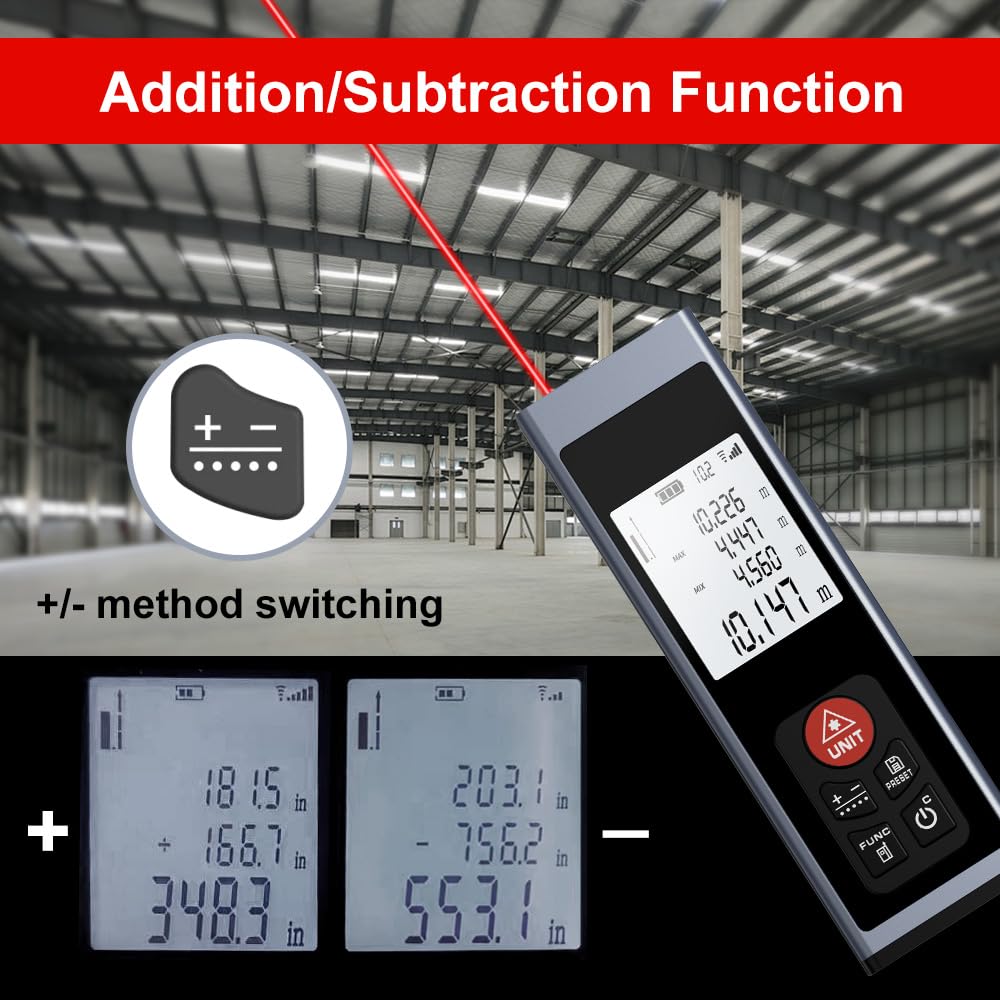
Image: The device display illustrating the addition and subtraction functions, showing how multiple measurements are combined or differentiated.
5.6 Field Measurement
The real-time measurement mode allows for on-the-go calculations from walls and various surfaces as you move, providing dynamic distance updates.

Image: A hand holding the AquilaPro KL02100, demonstrating its use for field measurements with the laser beam active.
6. Nlekọta
- Nhicha: Jiri nwayọọ, damp cloth to clean the device. Do not use abrasive cleaners or solvents. Pay special attention to keeping the laser lens clean for accurate measurements.
- Nchekwa: Chekwaa ngwaọrụ ahụ n'ebe dị jụụ, kpọrọ nkụ, pụọ na ìhè anyanwụ kpọmkwem na oke okpomọkụ.
- Batrị: Tinyegharịa batrị mgbe niile, ọbụlagodi ma ọ bụrụ na ejighị ngwaọrụ ahụ ugboro ugboro, iji kwado ahụike batrị.
7. Nchọpụta nsogbu
| Nsogbu | Ihe nwere ike ime | Ngwọta |
|---|---|---|
| Ngwaọrụ anaghị agbanwu ọkụ | Batrị dị ala; Nsogbu ngwaọrụ adịghị | Charge the battery; Contact support if issue persists |
| Ntụle ezighi ezi | Dirty laser lens; Incorrect benchmark setting; Unstable surface | Clean the laser lens; Verify benchmark (front/rear); Ensure stable measurement surface |
| A naghị ahụ ọkụ laser | Bright ambient light; Device malfunction | Use in lower light conditions; Contact support |
8. Nkọwapụta
- Akara: AquilaPro
- Nọmba nlereanya: KL02100
- Oke nha: 328ft (100m)
- izi ezi: ±0.078 inch (2mm)
- Nkeji: Meters (m), Inches (in), Feet (ft)
- Klas Laser: Klas II, <1mW
- Ụdị batrị: Lithium-Ion (Rechargeable via USB)
- Ihe: Aluminom
- Ibu ihe: 25 grams
- Akụkụ ngwaahịa: 28L x 15W x 86H Millimeters
- Ọkwa Nguzogide mmiri: IP54
- Ngwa gụnyere: Lanyard
9. Akwụkwọ ikike na nkwado
For warranty information and technical support, please refer to the documentation provided at the point of purchase or contact AquilaPro customer service. Keep your purchase receipt as proof of purchase.