
1. Okwu mmalite
Welcome to the NARWAL S10 Pro user manual. This document provides essential information for the safe and efficient operation, maintenance, and troubleshooting of your new cordless wet dry vacuum mop. Please read this manual thoroughly before first use and keep it for future reference.

Image: The NARWAL S10 Pro Cordless Wet Dry Vacuum Mop with its charging base and accessories.
2. Kedu ihe dị na Igbe ahụ
Your NARWAL S10 Pro package includes the following components:
- Vacuum Mop Unit (including Roller Brush and HEPA Filter)
- Jikwaa
- Isi nhicha onwe
- Nhicha ahịhịa
- Ahịhịa mapụtara Roller
- Ihe nzacha HEPA mapụtara
- Akwụkwọ ntuziaka onye ọrụ

Image: A close-up of the NARWAL S10 Pro's cleaning head and various accessories, including a spare roller brush and filter.
3. Nhazi
- Iwepu: Jiri nlezianya wepụ ihe niile dị na nkwakọ ngwaahịa. Jido nkwakọ ngwaahịa maka mbugharị ma ọ bụ nchekwa n'ọdịnihu.
- Mgbakọ njikwa: Insert the handle into the main body of the vacuum mop until it clicks securely into place.
- Ntinye Isi Nchaji: Place the self-cleaning base on a flat, stable surface near a power outlet. Ensure there is enough space around the base for easy access.
- Ebube mbụ: Place the assembled vacuum mop onto the charging base. The display will indicate charging status. Fully charge the device before its first use.
Video: A user unboxes the NARWAL S10 Pro, assembles the handle, and places it on the charging base for initial setup.
4. Ntuziaka ọrụ
4.1 Na-ejuputa tank mmiri
- Locate the clean water tank on the back of the main unit.
- Press the release button and pull the tank out.
- Open the tank cap and fill with clean water. For optimal cleaning, use NARWAL-approved cleaning solution as directed. Do not use foaming detergents.
- Securely close the cap and reinsert the tank into the unit until it clicks.
4.2 Ịgbanye na Nhọrọ ọnọdụ
- Pịa bọtịnụ ike dị na aka ka ịgbanwuo ngwaọrụ ahụ.
- Tilt the handle backward to unlock the vacuum mop from its upright position.
- Use the mode selection button to cycle through available cleaning modes:
- Nchekwa onwe na ọnọdụ: Automatically adjusts suction and water flow based on dirt detection for general cleaning.
- Ụdị Turbo: Provides maximum suction and water for stubborn stains and heavy messes.
- Ụdị dị jụụ: Operates with reduced noise for lighter cleaning tasks.
- Ụdị imi: Maka ịsacha ihe ọṅụṅụ n'enweghị mmiri.

Image: The NARWAL S10 Pro's display illustrating the five available cleaning modes for diverse needs.
4.3 Ịsacha Ala Gị
Guide the vacuum mop across your hard floors. The self-propelling feature assists in movement, requiring minimal effort. For optimal results, move the device in a steady, overlapping pattern. The 180° fold-flat flexibility allows for easy cleaning under furniture and in tight spaces.

Image: The NARWAL S10 Pro head folded flat, showcasing its 180-degree flexibility for reaching under low furniture.

Image: The NARWAL S10 Pro cleaning under a low cabinet, highlighting its ability to reach tight spaces.

Image: A person effortlessly maneuvering the lightweight NARWAL S10 Pro across a floor.

Image: The NARWAL S10 Pro cleaning close to a baseboard, illustrating its precise edge cleaning capability.
5. Nlekọta
5.1 Ịsacha na Ịkpọcha Onwe Onye
After each use, return the vacuum mop to its self-cleaning base. Press the dedicated self-clean button (often indicated by a water droplet icon) to initiate the self-cleaning cycle. The device will clean its roller brush and then activate hot air drying to prevent odors and maintain hygiene.

Image: Visual representation of the NARWAL S10 Pro's self-cleaning and hot air drying functions.
Video: A demonstration of the NARWAL S10 Pro's self-cleaning cycle, showing the brush roll being cleaned and dried.
5.2 Emptying the Dirty Water Tank and Cleaning Filters
- Regularly empty the dirty water tank after each cleaning session. Press the release button and pull out the dirty water tank.
- Separate solid debris from liquid waste using the integrated filter system. Dispose of solids and pour out dirty water.
- Rinse the dirty water tank and the filter thoroughly with clean water. Allow all parts to air dry completely before reassembling.
- The HEPA filter should be cleaned periodically and replaced every 3-6 months, or as needed, depending on usage.

Image: A close-up of the dirty water tank, illustrating the wet-dry waste separation feature.
Vidiyo: obere oge tupuview showing the removal and cleaning of the dirty water tank and filter.
5.3 Na-ehicha ahịhịa ahịhịa
While the self-cleaning function handles most of the brush maintenance, occasional manual cleaning may be necessary. Remove the brush roll cover and then the brush roll itself. Use the provided cleaning brush to remove any tangled hair or debris. Rinse the brush roll under running water and allow it to dry completely before reinstallation.
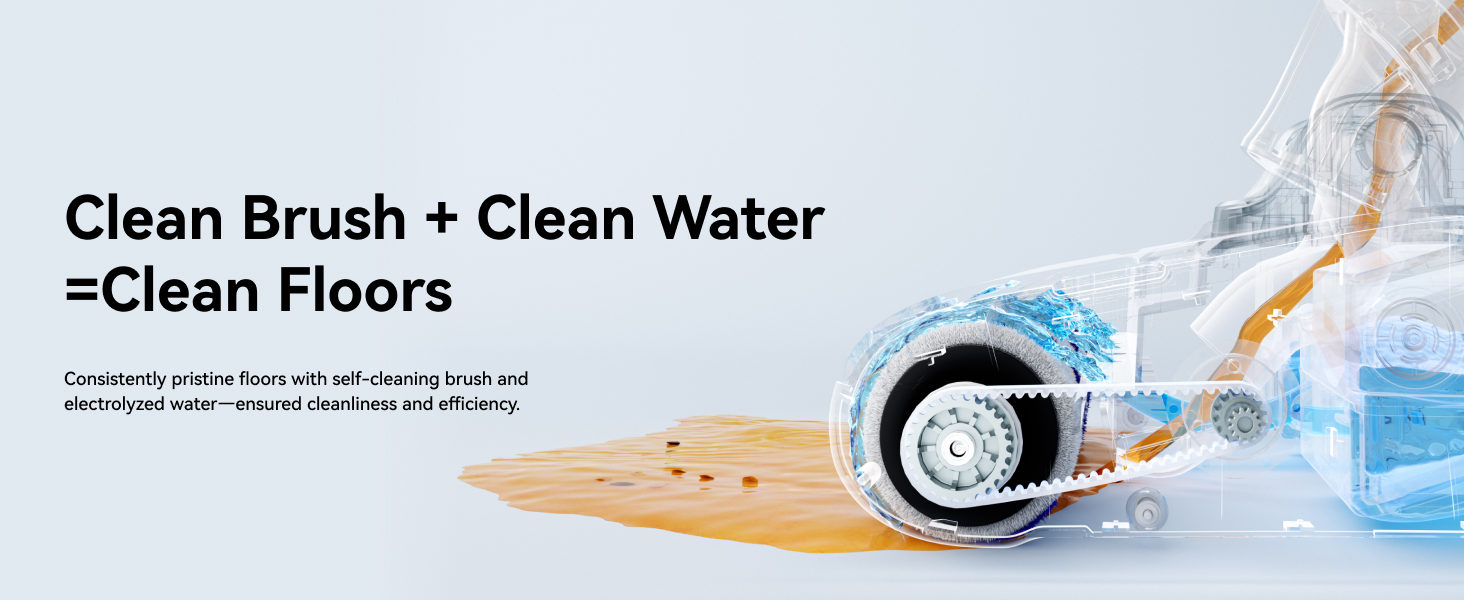
Foto: Ihe dị n'ime view of the NARWAL S10 Pro's cleaning head, showing the brush roll and water flow for effective cleaning.
6. Nchọpụta nsogbu
- Enweghị ike: Ensure the device is fully charged and correctly seated on the charging base. Check the power adapter connection.
- Mmanya na-adịghị mma: Check if the dirty water tank is full or if the filter is clogged. Clean or replace the filter as needed. Ensure the brush roll is free of obstructions.
- Mgbapu mmiri: Verify that both clean and dirty water tanks are correctly installed and their caps are securely closed.
- Mkpọtụ na-adịghị ahụkebe: Inspect the brush roll for any foreign objects or tangled hair. Remove any obstructions.
- Ozi mperi: Refer to the LCD display for specific error codes and consult the full user manual for detailed solutions.
7. Nkọwapụta
| Njirimara | Nkọwa |
|---|---|
| Ụdị | NARWAL |
| Aha Nlereanya | S10 Pro (YJSC001) |
| Atụmatụ pụrụ iche | 14,000Pa Suction, Cordless, Lightweight, Self-Cleaning & Drying, Wet/Dry, 180° Flexibility |
| Ụdị nzacha | EGO HEPA |
| Enweghị eriri? | Ee |
| Ike tank mmiri dị ọcha | 790 milliliters |
| Wattage | 750 watt |
| Oge Nchaji | Awa 3.5 |
| Eji akwadoro | Hard Floor, Tile Floor, Hardwood, Bare Floor |
| Akụkụ ngwaahịa | 28.7"L x 10.7"W x 13.8"H |
| Ụdị batrị | Lithium-ion |
| Ọkwa mkpọtụ | 72 decibel |
| Ndụ batrị | Ruo nkeji iri abụọ |
8. Akwụkwọ ikike na nkwado
For warranty information, product registration, or technical support, please visit the official NARWAL websaịtị ma ọ bụ kpọtụrụ ndị ọrụ nlekọta ndị ahịa. Debe risit ịzụrụ ihe gị dị ka ihe akaebe nke ịzụrụ ihe.
Nkwado n'ịntanetị: Visit the NARWAL Store on Amazon