
HITBOX MIG250DP
HITBOX MIG250DP 5-in-1 250A Multi-Process Welder Instruction Manual
Model: MIG250DP | Brand: HITBOX
1. Ozi nchekwa
Mgbe niile, ihe kacha mkpa bụ nchekwa mgbe ị na-eji ngwa ịgbado ọkụ. Ọ bụrụ na ị gbasoghị ntuziaka nchekwa, ọ nwere ike ibute nnukwu mmerụ ahụ ma ọ bụ ọnwụ.
1.1 Nchekwa nchekwa izugbe
- Gụọ ma ghọta akwụkwọ ntuziaka dum tupu arụ ọrụ.
- Wear appropriate Personal Protective Equipment (PPE), including welding helmet, gloves, protective clothing, and safety shoes.
- Ensure the work area is well-ventilated to avoid inhaling welding fumes.
- Debe ụmụaka na ndị ọrụ na-enweghị ikike ka ha ghara ịnọ n'ebe a na-agba ọkụ.
- Do not operate the welder in damp ma ọ bụ ọnọdụ mmiri.
- Always disconnect power before performing maintenance or changing accessories.
1.2 Nchekwa eletriki
- Ensure the power supply matches the welder's requirements (230V DC).
- Use only properly grounded power outlets.
- Inspect power cables and welding leads for damage before each use. Replace damaged cables immediately.
- Zere imetụ akụkụ eletrik dị ndụ aka.
1.3 Welding Specific Hazards
- Arc Rays: Can burn eyes and skin. Use a welding helmet with appropriate shade.
- Uzuoku na gas: Can be hazardous to your health. Work in a well-ventilated area.
- Ọkụ eletrik: Can kill. Ensure proper grounding and insulation.
- Ọkụ na mgbawa: Welding sparks can cause fires. Keep flammable materials away from the work area.

Figure 1: Safety features of the HITBOX MIG250DP, including overheat, overload, VRD (Voltage Reduction Device), and excessive voltage nchedo.
2. Ngwaahịa gafereview
The HITBOX MIG250DP is a versatile 5-in-1 multi-process welding machine designed for various welding applications, including gas MIG, gasless MIG, MMA (Stick), and LIFT TIG welding. It features advanced single-pulse aluminum welding capabilities and a user-friendly interface.
2.1 Atụmatụ
- Usoro dị iche iche nke abụọ n'ime otu: Supports MIG CORED FLUX, MIG CO2, MIG MIX, LIFT TIG, and MMA welding.
- Single Pulse Aluminum Welding: Reduces deformation and breakage on thin materials (down to 0.7mm).
- Njikwa Njikọta: Automatically adjusts current and wire feed speed based on wire diameter and gas selection, simplifying operation.
- Color LED Display: Provides precise data display for easy monitoring.
- Nchedo Nchedo: Equipped with overheat and overcurrent protection, Insulation Class F, and Protection Degree IP21.
- AC36V Gas Heater Connection: For improved weld aesthetics.

Figure 2: The HITBOX MIG250DP supports multiple welding processes.

Figure 3: Advanced features for aluminum welding with the HITBOX MIG250DP.

Foto nke 4: Advantages of the HITBOX MIG250DP, including its large LCD and synergic 5-in-1 functions.
3. Nhazi
3.1 Unboxing na akụrụngwa
Carefully unpack the welding machine and all accessories. Verify that all components listed in the manual are present.
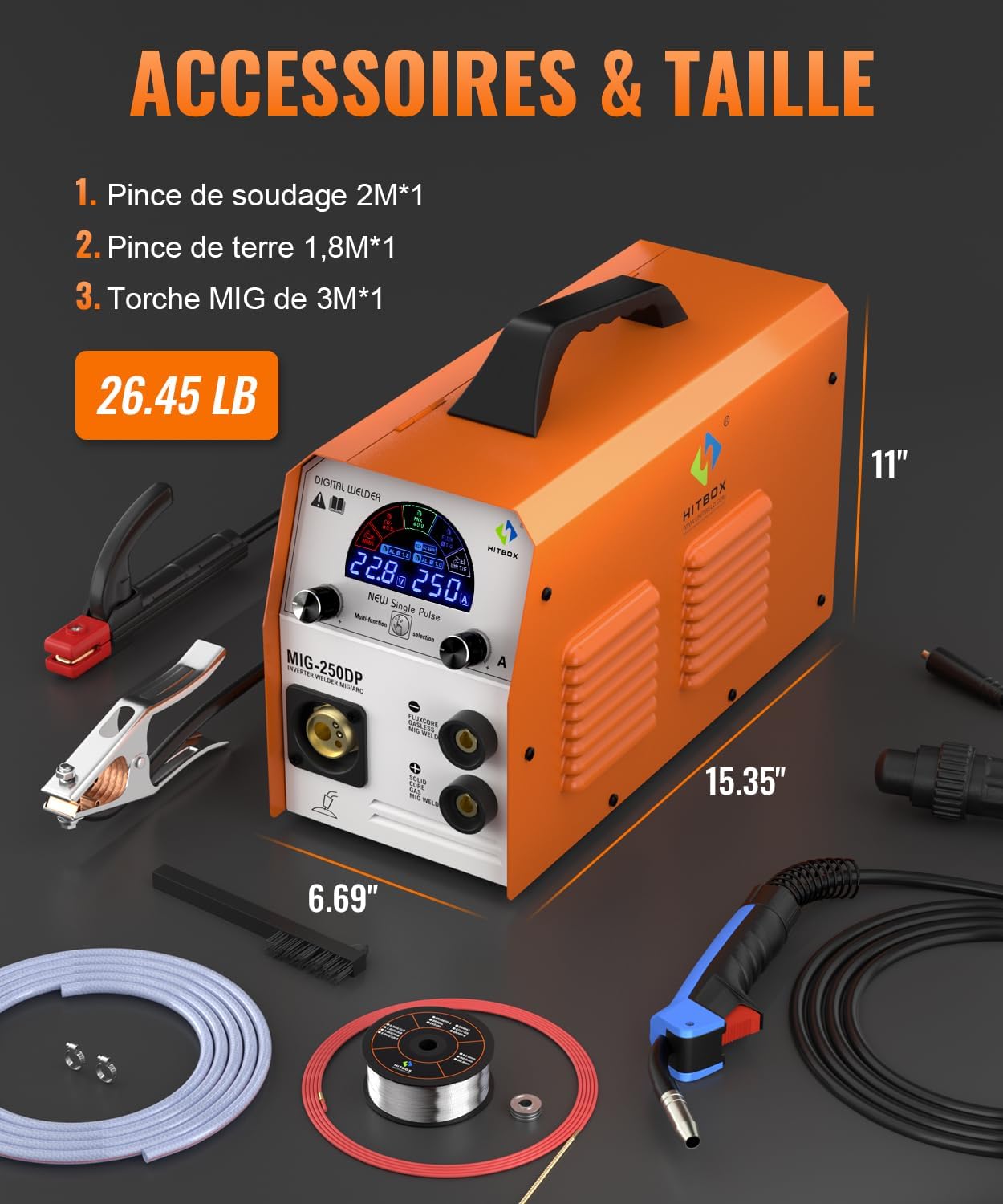
Figure 5: Included accessories with the HITBOX MIG250DP.
3.2 Wire Feed Installation
Open the side panel of the welder to access the wire feed mechanism. Install the appropriate welding wire (solid, aluminum, or flux-cored) onto the spool holder. Ensure the wire is correctly threaded through the drive rollers and into the MIG torch liner.
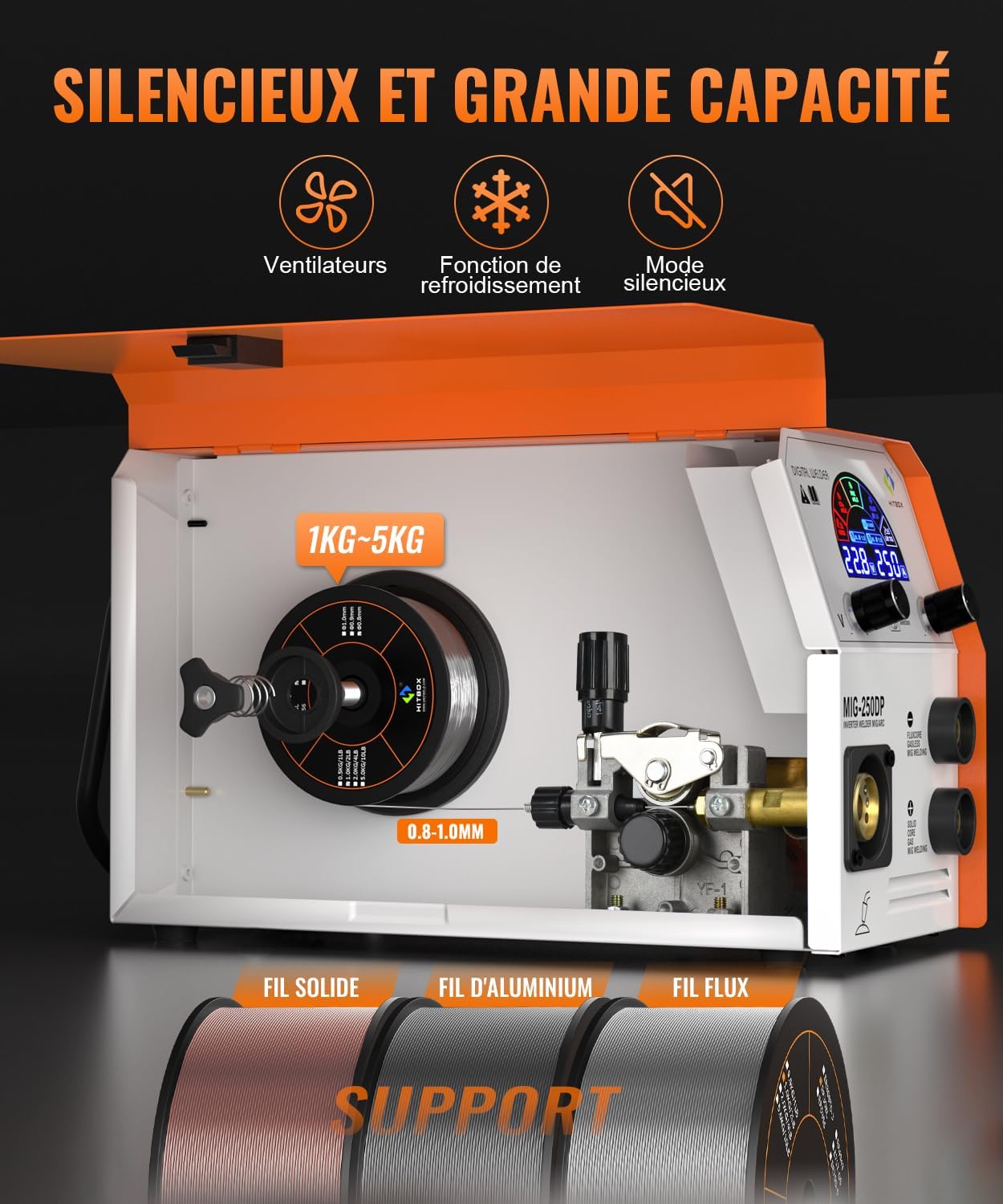
Figure 6: Wire feed mechanism and spool support.
3.3 Njikọ eriri
Connect the welding cables according to the specific welding process you intend to use. Ensure all connections are secure.
3.3.1 Spool Gun Connection (for Aluminum Welding)
For aluminum welding, a spool gun is often used. Connect the spool gun to the designated port on the welder. Ensure the mode button is set to the MIG gun status to activate wire feeding from the spool gun. Press the torch handle switch to start wire feed and perform welding operations.
Video 1: Spool gun operation for welding. This video shows how to connect and use a spool gun with a welding machine, including switching modes and feeding wire.
Video 2: Usage of a spool gun. This video illustrates the process of setting up and using a spool gun for welding applications.
4. Ụdị arụ ọrụ
The MIG250DP offers multiple welding modes. Select the appropriate mode and adjust parameters using the color LED display and control knobs.
4.1 MIG Welding (Gas & Gasless)
- MIG Gas (CO2/MIX): Connect the gas cylinder to the gas inlet on the rear of the machine. Use solid wire and appropriate shielding gas (CO2 or Argon/CO2 mix).
- MIG Gasless (Flux-Cored): Use flux-cored wire. No external shielding gas is required.
- Ụdị mmekọrịta: Select the wire diameter and material type on the display. The machine will automatically suggest optimal current and wire feed speed. Fine-tune as needed.
4.2 MMA (Mkpado) Ịgbado ọkụ
- Jikọọ ihe njide elektrọd na njedebe dị mma (+) na cl alaamp gaa na njedebe (-) adịghị mma.
- Select MMA mode on the display.
- Adjust the current based on the electrode type and diameter.
4.3 LIFT TIG Welding
- Connect the TIG torch to the negative (-) terminal and the ground clamp gaa na njedebe (+) dị mma.
- Connect an argon gas cylinder to the gas inlet.
- Select LIFT TIG mode.
- Initiate the arc by gently touching the tungsten electrode to the workpiece and lifting it slightly.
4.4 Aluminum Pulse Welding
The MIG250DP features a single-pulse function specifically for aluminum welding. This mode helps to control heat input, reducing burn-through and distortion on thinner aluminum materials. Use a spool gun with aluminum wire and 100% Argon shielding gas for best results.
5. Nlekọta
Ndozi mgbe niile na-eme ka igwe ịgbado ọkụ gị dị ogologo ma nwee ike ịrụ ọrụ nke ọma.
- Nhicha: Periodically clean the internal components of the welder using compressed air to remove dust and metal particles. Ensure the machine is unplugged before cleaning.
- Torch and Cable Inspection: Regularly inspect welding torches, cables, and connections for wear, damage, or loose fittings. Replace any damaged parts.
- Sistemụ Nnyefe Waya: Keep the wire feed rollers clean and free of debris. Ensure the correct drive rollers are installed for the wire type and diameter being used.
- Nchekwa: Store the welder in a clean, dry environment, away from excessive dust, moisture, and extreme temperatures.
6. Nchọpụta nsogbu
This section provides solutions to common issues. For problems not listed here, contact customer support.
6.1 Okwu nkịtị na Ngwọta
- No Arc: Check power supply, ground clamp connection, and welding mode selection. Ensure the electrode or wire is making proper contact.
- Poor Weld Quality: Verify correct parameters (current, voltage, wire feed speed), proper gas flow (if applicable), and clean workpiece. Check for correct electrode/wire size.
- Nsogbu Nri Waya: Inspect wire spool for tangles, check drive roller tension, ensure correct drive rollers are installed, and clean the torch liner.
- Arụ ọrụ Nchedo Okpomọkụ: Allow the machine to cool down. Ensure proper ventilation and avoid exceeding the duty cycle.
7. Nkọwapụta
| Njirimara | Uru |
|---|---|
| Onye nrụpụta | HITBOX |
| Akụkụ ngwaahịa (L x W x H) | 47 x 29 x 37 cm |
| Ntuziaka Model | MIG250DP |
| Ụdị | MIG250DP |
| Ụdị Ike | DC |
| Ọnụọgụ ihe | 1 |
| Ngwa gụnyere | 1 |
| Agụnyere batrị? | Mba |
| Achọrọ batrị? | Mba |
| Ibu | 8 kilogram |
| Nnweta akụkụ mapụtara | Ozi adịghị na akụkụ mapụtara |
| ASIN | B0CPNZRH2S |
| Ụbọchị mbụ dị | Disemba 19, 2023 |
8. Akwụkwọ ikike na nkwado
The HITBOX MIG250DP comes with a comprehensive after-sales service. If you encounter any problems during the use of this machine, please contact us first. Our 24-hour online customer service will assist you in resolving your issues.
The package includes: 1x MIG250DP machine, 1x MB15 torch, 1x ground clamp, 1x welding clamp, 1x welding wire, 1x graphite sheath, 1x gas tube, 1x instruction manual.
Ask a question about this manual
Ask about setup, troubleshooting, compatibility, parts, safety, or missing instructions. Manuals+ will review the question and use this page’s manual context to help answer it.