
1. Okwu mmalite
The xTool S1 Riser Base is an accessory designed to expand the engraving capabilities of your xTool S1 machine. It allows for the processing of thicker materials and facilitates the use of the xTool RA2 Pro rotary attachment for cylindrical objects. This manual provides essential information for the proper setup, operation, and maintenance of the riser base.

Figure 1: xTool S1 Riser Base
2. Nhazi
2.1 Unboxing na akụrụngwa
Carefully unpack the xTool S1 Riser Base and verify all components are present.
- xTool S1 Riser Base unit
- Akwụkwọ ntuziaka (akwụkwọ a)
- Any included fasteners or tools
2.2 Installation onto xTool S1 Machine
- Ensure the xTool S1 machine is powered off and disconnected from the power source.
- Remove the base plate from the xTool S1 machine if it is currently installed.
- Position the xTool S1 Riser Base on a stable, level surface.
- Carefully place the xTool S1 machine onto the Riser Base, aligning the mounting points.
- Secure the xTool S1 machine to the Riser Base using the provided fasteners, if applicable.

Figure 2: Installation of the Riser Base
3. Ntuziaka ọrụ
3.1 Engraving Thick Objects
The Riser Base increases the working height of the xTool S1, allowing engraving of materials up to 5.3 inches (133.5 mm) thick.
- Place the thick object directly onto the base plate of the Riser Base.
- Adjust the laser module height as necessary to achieve proper focus on the material surface.
- Ensure the object is stable and does not obstruct the laser path or movement.
- Proceed with engraving operations as per the xTool S1 machine's standard operating procedures.

Figure 3: Engraving a thick object with the Riser Base

Ọgụgụ 4: Ọpụample of a thick workpiece (up to 133.5mm)
3.2 Using with xTool RA2 Pro Rotary Attachment
The xTool S1 Riser Base is required for operating the xTool RA2 Pro rotary attachment with the xTool S1 machine. This combination enables engraving on cylindrical and irregular objects such as tumblers, wine glasses, baseball bats, and rings.
- Install the RA2 Pro onto the Riser Base according to the RA2 Pro's instruction manual.
- Place the cylindrical object securely in the RA2 Pro attachment.
- Adjust the RA2 Pro and laser module for optimal focus and alignment.
- Ensure the object rotates freely without obstruction.
- Initiate engraving through the xTool software, selecting the appropriate rotary settings.
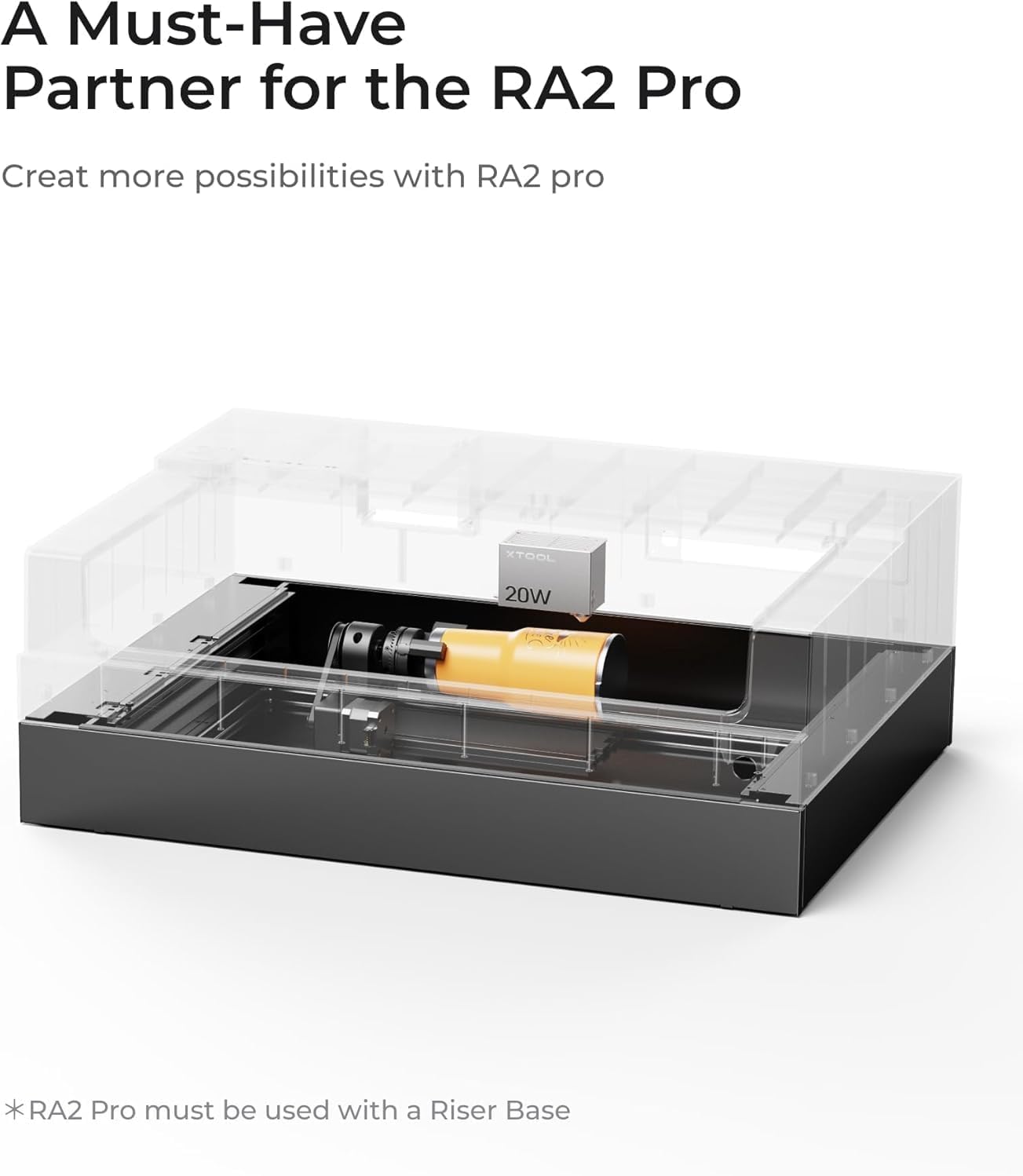
Figure 5: RA2 Pro setup with Riser Base

Figure 6: Rotary Engraving Diameter with RA2 Pro

Ọgụgụ 7: Ọpụamples of rotary engraved items
3.3 Adjustable Base Plate Height
The Riser Base features a base plate with four adjustable height gears. This allows for quick adaptation to various material heights. To adjust, gently pull and push the base plate to the desired gear position.
4. Nlekọta
- Nhicha: Regularly clean the Riser Base to remove dust, debris, and engraving residue. Use a soft, dry cloth. Avoid abrasive cleaners or solvents.
- Nyocha: Periodically inspect the Riser Base for any signs of wear, damage, or loose connections. Ensure all components are securely in place.
- Nchekwa: When not in use for extended periods, store the Riser Base in a clean, dry environment.
5. Nchọpụta nsogbu
| Nsogbu | Ihe nwere ike ime | Ngwọta |
|---|---|---|
| Smoke Leakage | Improper sealing or gaps around the Riser Base. | Ensure the Riser Base is correctly installed and flush with the xTool S1 machine. Check for any gaps and seal them if necessary. |
| Unstable Engraving Surface | Riser Base not placed on a level surface or loose connections. | Verify the Riser Base and xTool S1 machine are on a stable, level workbench. Tighten any loose fasteners. |
| RA2 Pro Not Functioning Correctly | Incorrect installation or software settings. | Refer to the RA2 Pro instruction manual for proper installation and calibration. Ensure correct settings are applied in the xTool software. |
6. Nkọwapụta
| Njirimara | Nkọwa |
|---|---|
| Aha ngwaahịa | xTool S1 Riser Base |
| Akụkụ ngwaahịa | 11 x 7.4 x 32.5 sentimita (279.4 x 188 x 825.5 mm) |
| Nha Ngwaahịa (ihe dị ka) | 4.2" x 22" x 30" (106 x 561 x 765 mm) |
| Package Size (Approx.) | 32.7" x 10.8" x 7.6" (831 x 276 x 195 mm) |
| Ibu ngwaahịa | 12.79 lbs (5.8 n'arọ) |
| Ibu na ngwugwu | 16.75 lbs (7.6 n'arọ) |
| Max. Workpiece Height (with Riser Base) | 5.3 sentimita (133.5 mm) |
| Ihe onwunwe | Mpempe akwụkwọ metal |
| Ndakọrịta | xTool S1 Laser Engraver, xTool RA2 Pro Rotary Attachment |

Ọgụgụ 8: Nkọwapụta Ngwaahịa zuru ezu
7. Akwụkwọ ikike na nkwado
For warranty information and technical support, please refer to the official xTool website or contact xTool customer service directly.
- Nkwado n'ịntanetị: Gaa leta xTool Support Page for FAQs, guides, and contact options.
- Kpọtụrụ: For direct assistance, refer to the contact information provided with your original xTool S1 machine documentation or on the xTool websaịtị.