Okwu mmalite
This user manual provides detailed instructions for the operation and maintenance of your ZK-1002 HiFi 100WX2 TPA3116 Bluetooth 5.0 High Power Digital Amplifier Stereo Board. Please read this manual thoroughly before using the product to ensure proper functionality and safety.
Ozi nchekwa
- Gbaa mbọ hụ na ọkọnọ ọkụ voltage is within the specified range (DC 5-27V).
- Do not expose the device to moisture, rain, or extreme temperatures.
- Zere idobe ihe amplifier na ìhè anyanwụ kpọmkwem ma ọ bụ nso isi mmalite okpomọkụ.
- Achịsakwala ma ọ bụ gbanwee ya amponye na-ebelata ihe mgbu. Nye ndị ọrụ ruru eru ọrụ niile.
- Debe ebe ụmụaka na-apụghị iru.
- Gbaa mbọ hụ na ikuku ikuku dị mma iji gbochie ikpo oke ọkụ.
Ngwaahịa gafereview
The ZK-1002 is a compact and powerful digital amplifier board designed for home theater and audio projects. It features Bluetooth 5.0 connectivity and an AUX input, delivering 100W x 2 channels of high-fidelity stereo sound.

N'ihu view of the ZK-1002 HiFi Digital Amplifier Board, showing the volume knob, input switch, and power/speaker terminals.
Ihe ngwugwu
Biko lelee ngwungwu maka ihe ndị a:
- 1 x ZK-1002 Digital AmpBoard nke na -eme mkpọtụ
- 1 x DC eriri USB
- 1 x Small Screwdriver (for terminal connections)
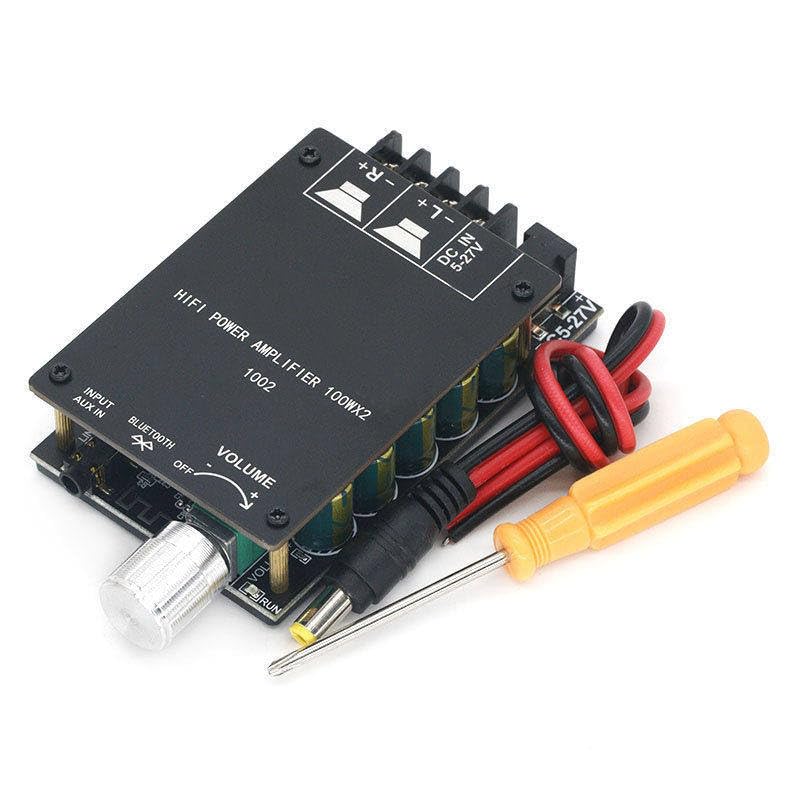
The ZK-1002 amplifier board shown with its included DC power cable and a small screwdriver for easy terminal connections.
Melite
1. Njikọ ike
Connect a DC power supply (5-27V) to the "DC IN 5-27V" terminal. Ensure correct polarity (+ and -).
2. Njikọ Ọkà Okwu
Connect your passive speakers to the speaker output terminals. The board supports stereo output (Left and Right channels). Ensure correct polarity for each speaker (+ and -).
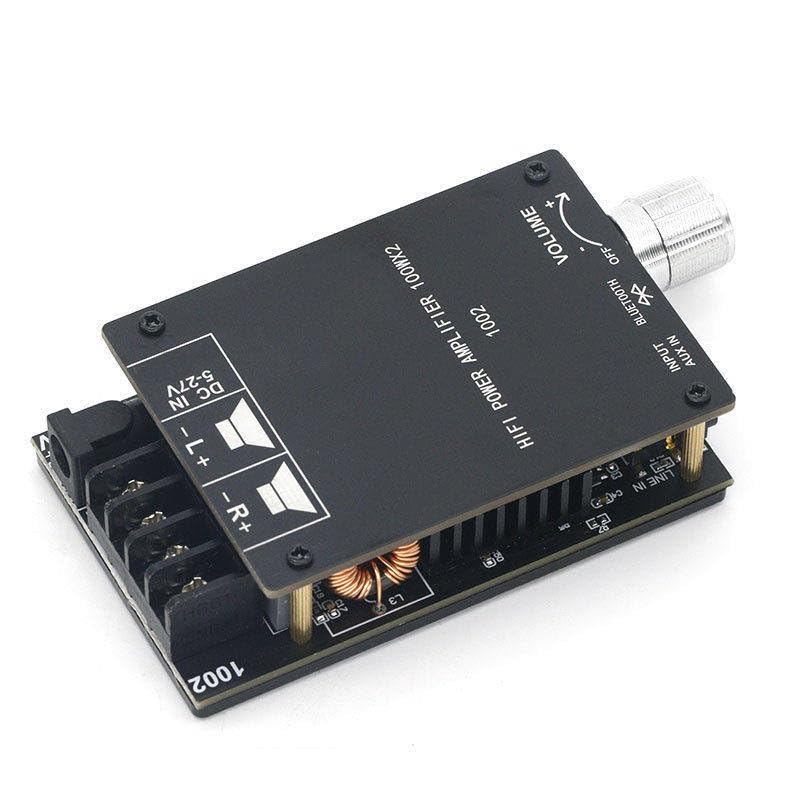
A zuru ezu view of the ZK-1002 amplifier board, highlighting the DC power input and speaker output terminals for proper wiring.
3. Njikọ Ntinye Audio
Nke amplifier supports two audio input methods: Bluetooth and AUX IN.
- Bluetooth: Switch the input selector to "Bluetooth". The device will enter pairing mode.
- Nkeji oge: Connect an audio source (e.g., smartphone, MP3 player) to the "AUX IN" jack using a 3.5mm audio cable. Switch the input selector to "AUX IN".
Ntuziaka ọrụ
Gbanyụọ/ Gbanyụọ
Nke amplifier powers on automatically when a DC power supply is connected. To turn off, disconnect the power supply.
Njikwa olu
Rotate the "VOLUME" knob clockwise to increase volume and counter-clockwise to decrease volume.
Nhọrọ ntinye
Use the "INPUT" switch to select between "Bluetooth" and "AUX IN" audio sources.
Njikọ Bluetooth
- Switch the input selector to "Bluetooth".
- On your audio device (e.g., smartphone), enable Bluetooth and search for available devices.
- Select "ZK-1002" from the list of devices to pair.
- Ozugbo ejikọtara ya, ị nwere ike ịkwanye ọdịyo na ikuku ikuku ampna -emegharị ihe.
Nlekọta
- Hichaa amplifier board with a soft, dry cloth. Do not use liquid cleaners or solvents.
- Gbaa mbọ hụ na amplifier is disconnected from power before cleaning.
- Keep the ventilation areas clear of dust and debris to maintain optimal performance.
Nchọpụta nsogbu
| Nsogbu | Ihe nwere ike ime | Ngwọta |
|---|---|---|
| Enweghị mmepụta ụda |
|
|
| Bluetooth anaghị ejikọta |
|
|
| Ụda agbagọ |
|
|
Nkọwapụta
| Njirimara | Nkọwa |
|---|---|
| Nọmba nlereanya | ZK-1002 |
| Ụdị | N'ozuzu |
| Ụdị nkwụnye | Ugwu elu |
| Ọnụọgụ nke ọwa | 2 |
| Mpụta ike | 100W x 2 |
| Ụdị Bluetooth | 5.0 |
| Ntinye Voltage | DC 5-27V |
| Akụkụ (ihe dị ka.) | 84mm x 72mm x 24mm (L x W x H) |
| Ibu (ihe dị ka.) | 137g |
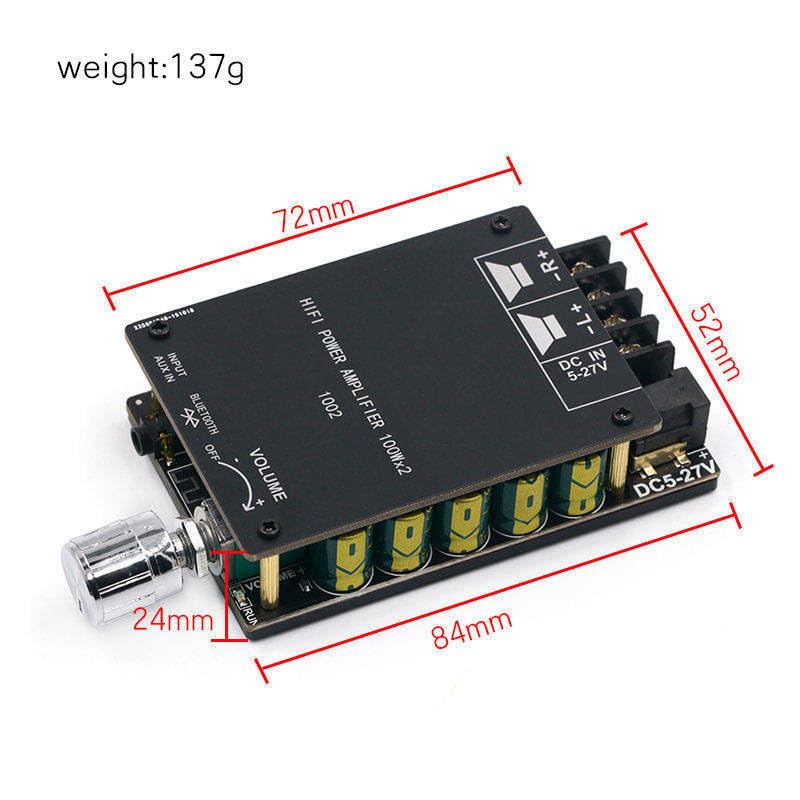
The ZK-1002 amplifier board with approximate dimensions indicated, showing its compact size.
Akwụkwọ ikike na nkwado
This product is covered by a standard manufacturer's warranty. For warranty claims or technical support, please contact your retailer or the manufacturer directly. Please refer to your purchase documentation for specific warranty terms and contact information.
Maka enyemaka ọzọ, ị nwekwara ike ịga na ibe ngwaahịa na Amazon.com: https://www.amazon.com/dp/B0CPCZJCFC


