
1. Okwu mmalite
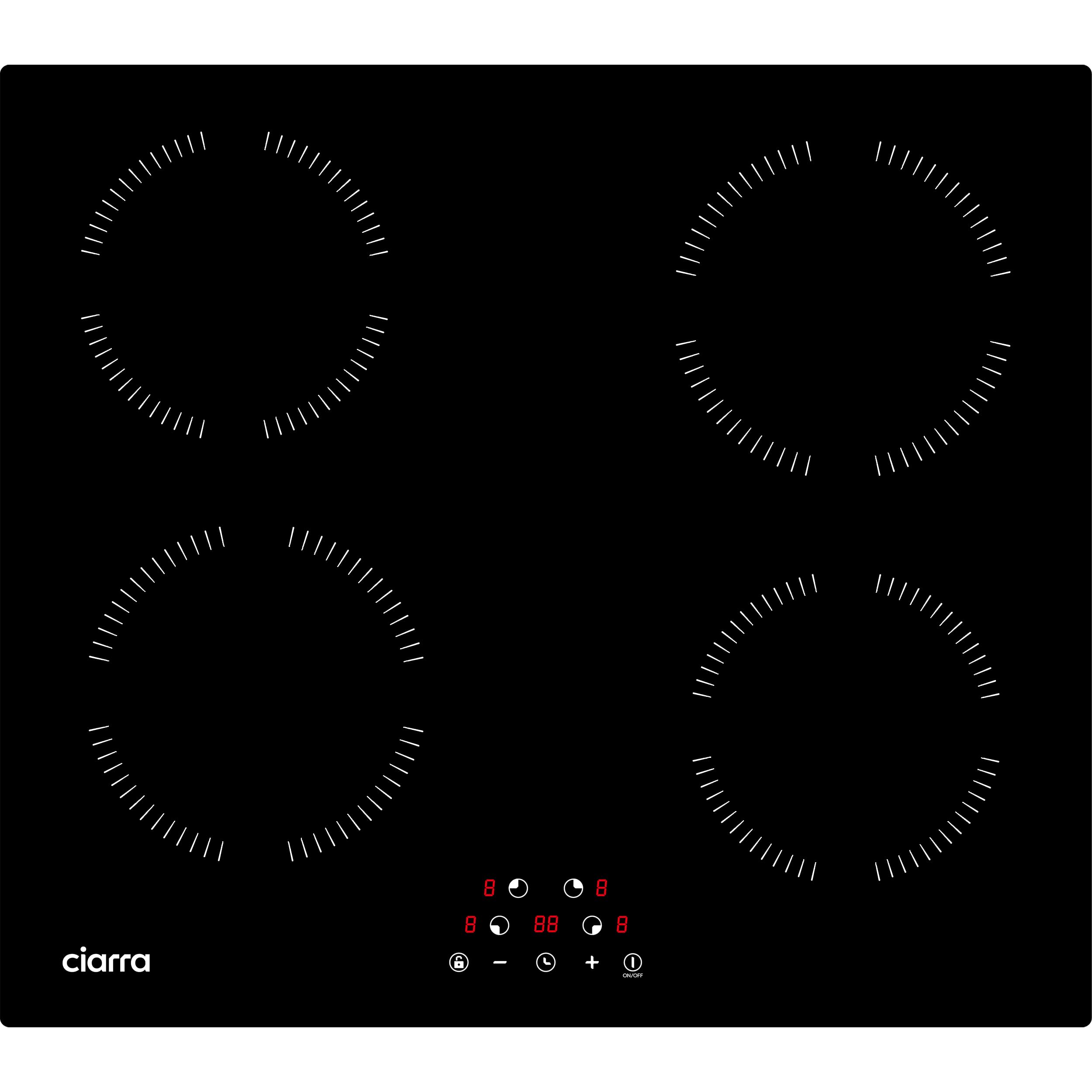
This manual provides essential information for the safe and efficient use of your Ciarra CABBIH4 induction cooktop. Please read these instructions thoroughly before installation and operation, and retain them for future reference. The Ciarra CABBIH4 is a 4-zone, 6000W built-in induction cooktop featuring touch controls and 9 power levels, designed for modern kitchens.
2. Ozi nchekwa
Ntuziaka nchekwa dị mkpa:
- Gụọ ntuziaka niile tupu i jiri ngwa.
- Emetụla ebe dị ọkụ aka. Jiri aka ma ọ bụ mkpọ.
- Iji kpuchido ujo ọkụ eletrik, etinyela eriri, plọg, ma ọ bụ ngwa n'ime mmiri ma ọ bụ mmiri mmiri ọzọ.
- Nleba anya dị mkpa mgbe ụmụaka na-eji ngwa ọ bụla ma ọ bụ nso.
- Kpupu na ntinye mgbe ejighị ya na tupu ihicha. Kwe ka ọ dị jụụ tupu ịtinye ma ọ bụ wepụ akụkụ.
- Ejikwala ngwa ọ bụla nwere eriri ma ọ bụ plọg mebiri emebi ma ọ bụ mgbe ngwa ahụ dara ma ọ bụ mebie ya n'ụzọ ọ bụla.
- Iji mgbakwunye ngwa nke onye nrụpụta ngwa anaghị akwado nwere ike bute mmerụ ahụ.
- Ejila n'èzí.
- Ekwela ka eriri kwụgide n'akụkụ tebụl ma ọ bụ counter, ma ọ bụ metụ ebe dị ọkụ aka.
- Etinyela na ma ọ bụ nso gas na-ekpo ọkụ ma ọ bụ ọkụ eletrik, ma ọ bụ na oven ọkụ.
- Ekwesịrị iji nlezianya mee ihe mgbe ị na-ebugharị ngwa nwere mmanụ ọkụ ma ọ bụ ihe ọ bụla na-ekpo ọkụ.
- Buru ụzọ tinye plọg mgbe niile na ngwa, wee tinye eriri n'ime oghere mgbidi. Iji kwupu njikọ, gbanyụọ njikwa ọ bụla ka ọ bụrụ "gbanyụọ", wee wepụ plọg na mpụta mgbidi.
- Ejila ngwa maka ndị ọzọ na-abụghị ebumnuche ebumnuche.
- Ezubere ngwa a maka iji naanị ụlọ.
Mkpọchi nchekwa ụmụaka: The cooktop features a child lock function to prevent accidental operation. Refer to the 'Operating Instructions' section for details on how to activate and deactivate this feature.

3. Nwụnye
Ihe dị mkpa: Installation must be carried out by a qualified technician in accordance with local regulations and standards.
3.1 Nwepu
Carefully unpack the cooktop and check for any damage. Do not discard packaging materials until you are satisfied with the product's condition. Keep packaging out of reach of children.
3.2 Akụkụ
- Cooktop Dimensions (L x H x P): 59 x 6.2 x 52 cm
- Cut-out Dimensions (L x P): 56 x 49 cm
Ensure adequate ventilation space around the cooktop for proper operation and heat dissipation.
3.3 Njikọ eletrik
The appliance requires a 220V electrical supply. The total power is 6000W. Ensure the electrical circuit is properly grounded and protected by an appropriate circuit breaker. Consult a qualified electrician for connection.

4. Ntuziaka ọrụ
The Ciarra CABBIH4 induction cooktop features intuitive touch controls for easy operation.
4.1 Gbanyụọ/ gbanyụọ
- Ka ịgbanwuo: Metụ aka Gbanye/ Gbanyụọ button. The display will show "-" for each cooking zone.
- Iji gbanyụọ: Metụ aka Gbanye/ Gbanyụọ bọtịnụ ọzọ.
4.2 Ịhọrọ Mpaghara Nri na Ọkwa Ike
- After powering on, select the desired cooking zone by touching its corresponding zone selection button.
- Jiri ihe "+" na "-" buttons to adjust the power level from 1 to 9. Level 9 is the highest power setting.

4.3 Ọrụ ngụ oge
The cooktop features a timer function, allowing you to set cooking durations up to 99 minutes.
- To activate: With a cooking zone active, touch the Ngụ oge bọtịnụ.
- To set time: Use the "+" na "-" buttons to adjust the desired cooking time.
- The cooking zone will automatically turn off once the set time expires.

4.4 Mkpọchi ụmụaka
The child lock prevents accidental operation of the cooktop, especially useful when children are present.
- To activate: Touch and hold the Mkpọchi button for a few seconds until an indicator light appears.
- To deactivate: Touch and hold the Mkpọchi bọtịnụ ọzọ ruo mgbe ọkụ egosi gbanyụọ.
5. Cookware ndakọrịta
Induction cooktops require specific types of cookware. Only use pots and pans with a magnetic base.
5.1 Compatible Cookware
- Stainless steel with a magnetic bottom
- Magnetic pots
- Cast iron pans
- Cast iron woks
5.2 Incompatible Cookware
- Enamel esi nri
- Copper/Aluminum cookware
- Ihe eji esi nri seramiiki
- Igwe esi nri iko
To check if your cookware is compatible, place a magnet on the bottom. If it sticks, the cookware is suitable for induction.

6. Nhicha na mmezi
Nhicha na mmezi mgbe niile ga-eme ka ọ dị ogologo ndụ yana ịrụ ọrụ kacha mma nke kichin kichin gị.
6.1 Nhicha kwa ụbọchị
- Gbaa mbọ hụ na ebe a na-esi nri adịghị mma tupu ihicha ya.
- Wipe the glass surface with a soft cloth and a mild detergent or a specialized ceramic/induction cooktop cleaner.
- Jiri mgbasa ozi sachaaamp cloth and dry thoroughly to prevent water spots.
- Ejila ihe nchacha abrasive, mpe mpe akwa, ma ọ bụ kemịkalụ siri ike, n'ihi na ndị a nwere ike ịcha ma ọ bụ mebie elu ugegbe ahụ.
6.2 Stubborn Stains
- For burnt-on food or stubborn stains, apply a small amount of induction cooktop cleaner and let it sit for a few minutes.
- Gently scrape off residue with a plastic scraper designed for glass cooktops.
- Wipe clean and dry.
7. Nchọpụta nsogbu
If you encounter issues with your cooktop, refer to the following common problems and solutions before contacting customer service.
| Nsogbu | Ihe nwere ike ime | Ngwọta |
|---|---|---|
| Cooktop anaghị agbanwuo. | No power supply; Child lock active; Faulty connection. | Check power outlet and circuit breaker. Deactivate child lock. Ensure proper electrical connection. |
| Mpaghara isi nri abụghị kpo oku. | Incompatible cookware; Cookware not centered; Small cookware. | Use compatible magnetic cookware. Center the pot/pan on the zone. Use cookware with a base diameter appropriate for the zone. |
| Display shows an error code (e.g., "E0", "E1"). | Overheating; Internal fault; Voltage okwu. | Turn off the cooktop and let it cool down. Check power supply. If the error persists, contact customer support. |
| Mkpọtụ na-adịghị ahụkebe n'oge arụ ọrụ. | Ọrụ fan nkịtị; Ngwa ngwa ngwa ngwa ngwa ngwa. | A slight humming or fan noise is normal for induction cooktops. Ensure cookware is flat and stable on the surface. |
8. Nkọwapụta
| Njirimara | Nkọwapụta |
|---|---|
| Ụdị | CIRRA |
| Nọmba nlereanya | CABBIH4 |
| Ụdị | Itinye n'ọkwa Cooktop |
| Ọnụọgụ mpaghara nri | 4 |
| Mgbakọta Ike | 6000 Watt |
| Voltage | 220 volts |
| Ụdị njikwa | Njikwa aka |
| Ọkwa ike | 9 |
| Ihe onwunwe | Glass |
| Product Dimensions (L x H x P) | 59 x 6.2 x 52 cm |
| Cut-out Dimensions (L x P) | 56 x 49 cm |
| Ibu | 7 kilogram |

9. Akwụkwọ ikike na nkwado
For warranty information, please refer to the warranty card included with your product or visit the official Ciarra websaịtị. Debe ihe akaebe nke ịzụrụ maka akwụkwọ ikike.
For technical support, troubleshooting assistance beyond this manual, or spare parts inquiries, please contact Ciarra customer service through their official websaịtị ma ọ bụ nkọwa kọntaktị enyere na nkwakọ ngwaahịa gị.