
1. Okwu mmalite
The FLIPSKY Mini V6 MK5 is an advanced electronic speed controller (ESC) designed for various electric vehicle applications, including e-skateboards, e-bikes, scooters, and robots. Based on VESC6.6 hardware, it features an integrated power button and an aluminum anodized heat sink for efficient thermal management. This manual provides essential information for the safe and effective use of your Mini V6 MK5 ESC.
2. Ozi nchekwa
- Always disconnect the battery before performing any wiring or maintenance.
- Gbaa mbọ hụ na njikọ niile echekwara na mkpuchi nke ọma iji gbochie sekit mkpụmkpụ.
- Operate the ESC within its specified voltage range. The Mini V6 MK5 supports 14V-60V (4-13S battery cells). It is safe for 4S to 12S configurations, but voltage spikes must not exceed 60V. Exceeding this limit can cause permanent damage.
- Avoid operating the ESC in wet conditions or environments with excessive dust or debris.
- Ensure adequate airflow around the heat sink to prevent overheating during operation.
- Debe ebe ụmụaka na-apụghị iru.
3. Ngwaahịa gafereview
The FLIPSKY Mini V6 MK5 ESC is a compact and powerful controller featuring a robust design with an aluminum anodized heat sink for improved heat dissipation. It includes an integrated power button for convenient operation.

Ọgụgụ 3.1: N'ozuzu view of the FLIPSKY Mini V6 MK5 ESC, showing the main board, capacitors, motor wires, battery wires, and the external power button.

Foto 3.2: Top view of the ESC, highlighting the main integrated circuits, capacitors, and various connection ports.
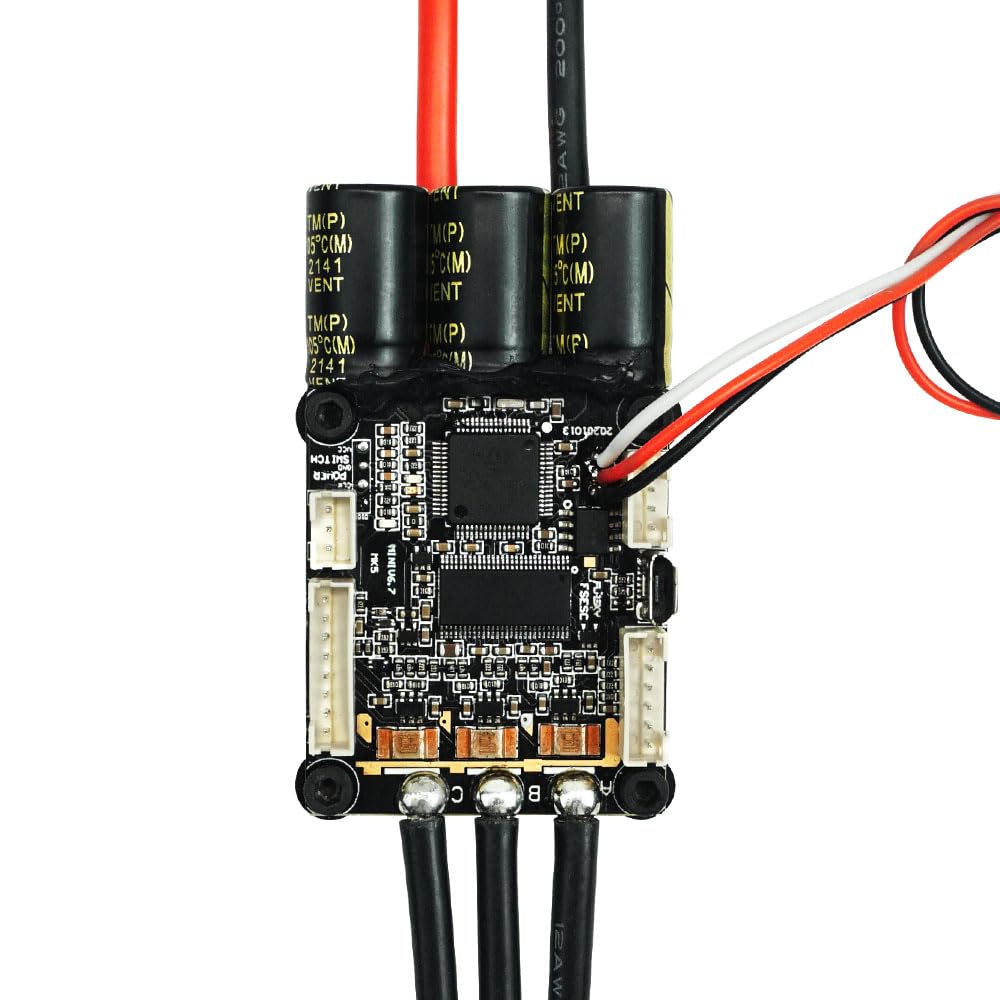
Ọgụgụ 3.3: nso nso view of the aluminum anodized heat sink, which aids in dissipating heat generated during operation, ensuring stable performance.
4. Nkọwapụta
| Oke | Uru |
| Ụdị ngwa ngwa | 60 |
| Ụdị ngwaike | VESC 6.4 |
| Na-aga n'ihu ugbu a | 70A |
| Instantaneous Current | 200A |
| Voltage Oke | 14V-60V (4-13S, safe for 4S to 12S; voltage spikes must not exceed 60V) |
| Control Interface Ports | USB, CAN, UART, SPI, IIC |
| Ihe mmetụta akwadoro | ABI, HALL, AS5047, AS5048A |
| Input Set Support | PPM, ADC, NRF, UART |
| Ụdị njikwa | DC, BLDC, FOC (sinusoidal) |
| Regenerative Capacity | Ee |
| Mpụta nke BEC | 5V @ 1A |
| ERPM | 150000 |
| Enwere ike ime mmemme | Ee |
| Ihe nlele waya moto | 12AWG |
| Power Cable Gauge | 12AWG |
| Akụkụ (L x W x H) | 67mm x 39mm x 18.7mm (2.64" x 1.54" x 0.74") (Including heatsink) |
| Ibu | 130g (0.13 Kilograms) |
| Ihe onwunwe | Aluminom |
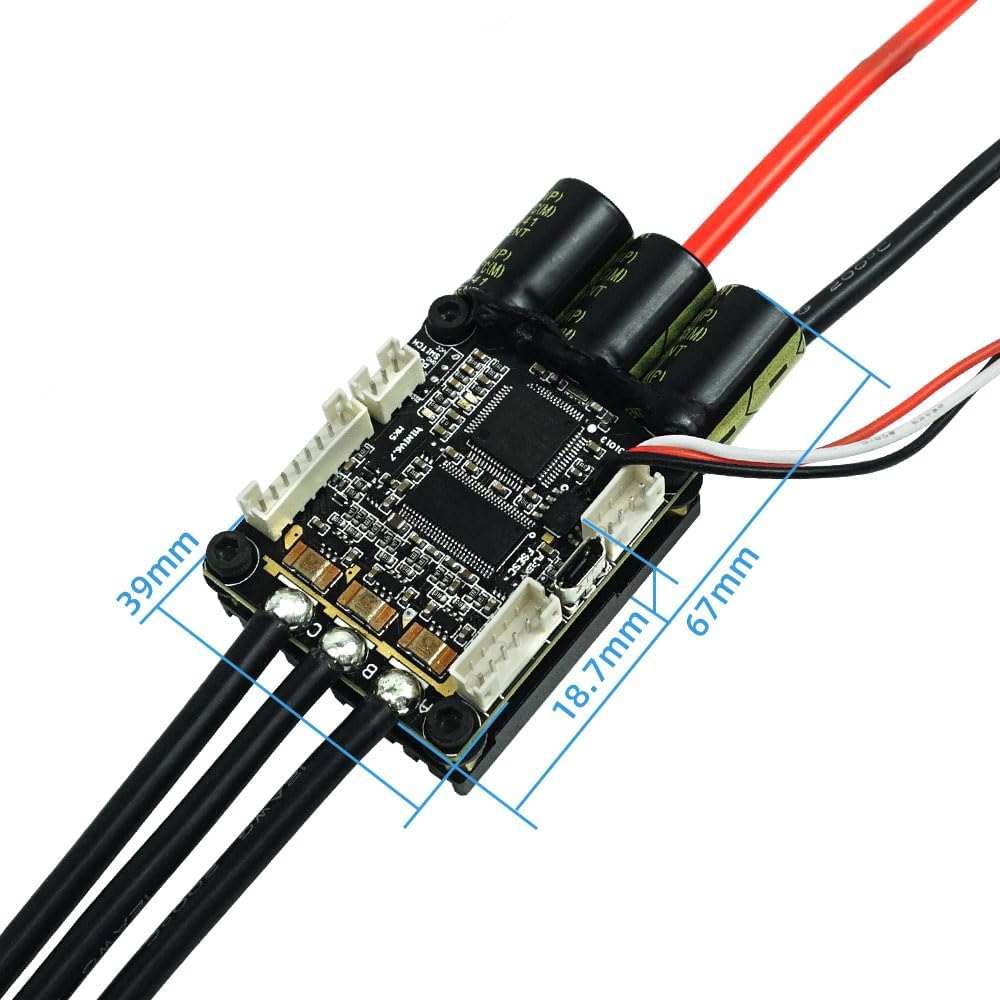
Figure 4.1: Dimensions of the FLIPSKY Mini V6 MK5 ESC, showing length, width, and height measurements.
5. Ntọlite na Wiring
Proper wiring is crucial for the safe and correct operation of the Mini V6 MK5 ESC. Follow the diagram below for connecting your battery, motor, and receiver.
5.1 eserese waya

Figure 5.1: Detailed wiring diagram illustrating connections for battery, motor, receiver, and various control interfaces (CAN, SENSE, COMM, Power Switch, USB).
5.2 Nzọụkwụ Njikọ
- Njikọ batrị: Connect your battery pack to the main power cables (red for positive, black for negative) of the ESC. Ensure correct polarity.
- Njikọ moto: Connect the three motor phase wires (A, B, C) from your motor to the corresponding outputs on the ESC. The order may affect motor rotation direction, which can be adjusted in software.
- Njikọ nnata: Connect your receiver to the COMM port or other appropriate input set support (PPM, ADC, NRF, UART) as per your setup.
- Bọtịnụ ike: The integrated power button connects to the designated switch port.
- Njikọ USB: Use the USB port to connect the ESC to a computer for initial configuration and firmware updates using compatible VESC tool software.
- Modul nhọrọ: For balancing car functions, connect an IMU module (e.g., MPU9250, MPU9150, MPU6050, LSM6DS3, BMI160) via the IIC interface.
6. Ụdị na Ọrụ Ọrụ
The Mini V6 MK5 ESC offers versatile control and power management features:
6.1 Ụdị njikwa
- Current Control Mode: Regulates the motor current.
- Dutycycle Control Mode: Controls the motor's duty cycle (voltage applied).
- Speed Control Mode: Maintains a set motor speed (RPM).
- Position Control Mode: Controls the motor's angular position.
6.2 Njikwa ike
- Sliding Power On: Allows the device to power on automatically when motion is detected.
- Gbanyụọ ike akpaaka: The ESC can be configured to power off after a period of inactivity.
- Ọrụ njikere: Supports 4 different standby modes for power efficiency.
7. Nlekọta
To ensure the longevity and optimal performance of your FLIPSKY Mini V6 MK5 ESC, consider the following maintenance tips:
- Nyocha oge niile: Periodically check all wiring connections for looseness or damage.
- Ịdị ọcha: Keep the ESC and its heat sink free from dust, dirt, and moisture. Use a soft, dry brush or compressed air for cleaning.
- Njikwa okpomọkụ: Ensure the heat sink is not obstructed and has adequate airflow, especially during high-load operations.
- Mmelite femụwe: Regularly check for and apply official firmware updates using the VESC tool to benefit from performance improvements and bug fixes.
8. Nchọpụta nsogbu
The Mini V6 MK5 ESC incorporates several protection functions to safeguard itself and connected components. If you encounter issues, consider the following:
8.1 Ọrụ nchekwa
- Vol dị alatage Nchedo: The ESC will reduce power or shut down if the battery voltage drops below a configurable threshold.
- Akwa Voltage Nchedo: Protects against overvoltage ọnọdụ.
- Nchekwa gafere ugbu a: Limits current to prevent damage from excessive loads.
- Temperature Abnormally Protection: Monitors internal temperatures and reduces power if they exceed safe limits.
- MOSFETs Over-Temperature Protection: Specifically protects the MOSFETs from overheating.
8.2 Okwu nkịtị na Ngwọta
- Enweghị ike: Check battery connections, ensure the power button is pressed, and verify battery charge level.
- Motor Not Spinning: Verify motor phase wire connections, check sensor connections (if used), and ensure the ESC is properly configured via the VESC tool.
- Ọrụ na-adịte aka: Inspect all wiring for loose connections or damage. Check for signs of overheating.
- ESC Not Responding to Input: Confirm receiver connection and proper configuration of input set support (PPM, ADC, NRF, UART) in the VESC tool.
9. Akwụkwọ ikike na nkwado
The FLIPSKY Mini V6 MK5 ESC comes with a warranty description of "2m+". For specific warranty terms and conditions, please refer to your purchase documentation or contact the retailer.
For technical support, troubleshooting assistance beyond this manual, or inquiries regarding repairs, please contact FLIPSKY directly or your authorized dealer. Provide your product model number (Mini V6 MK5) and any relevant purchase information when seeking support.