

1. Okwu mmalite
This manual provides essential information for the safe and efficient operation of your Defy Electronic Convection Microwave Oven, model DMO400. This appliance combines microwave, grill, and convection cooking functions, offering versatility for various culinary tasks. Please read these instructions thoroughly before using the appliance and retain them for future reference.
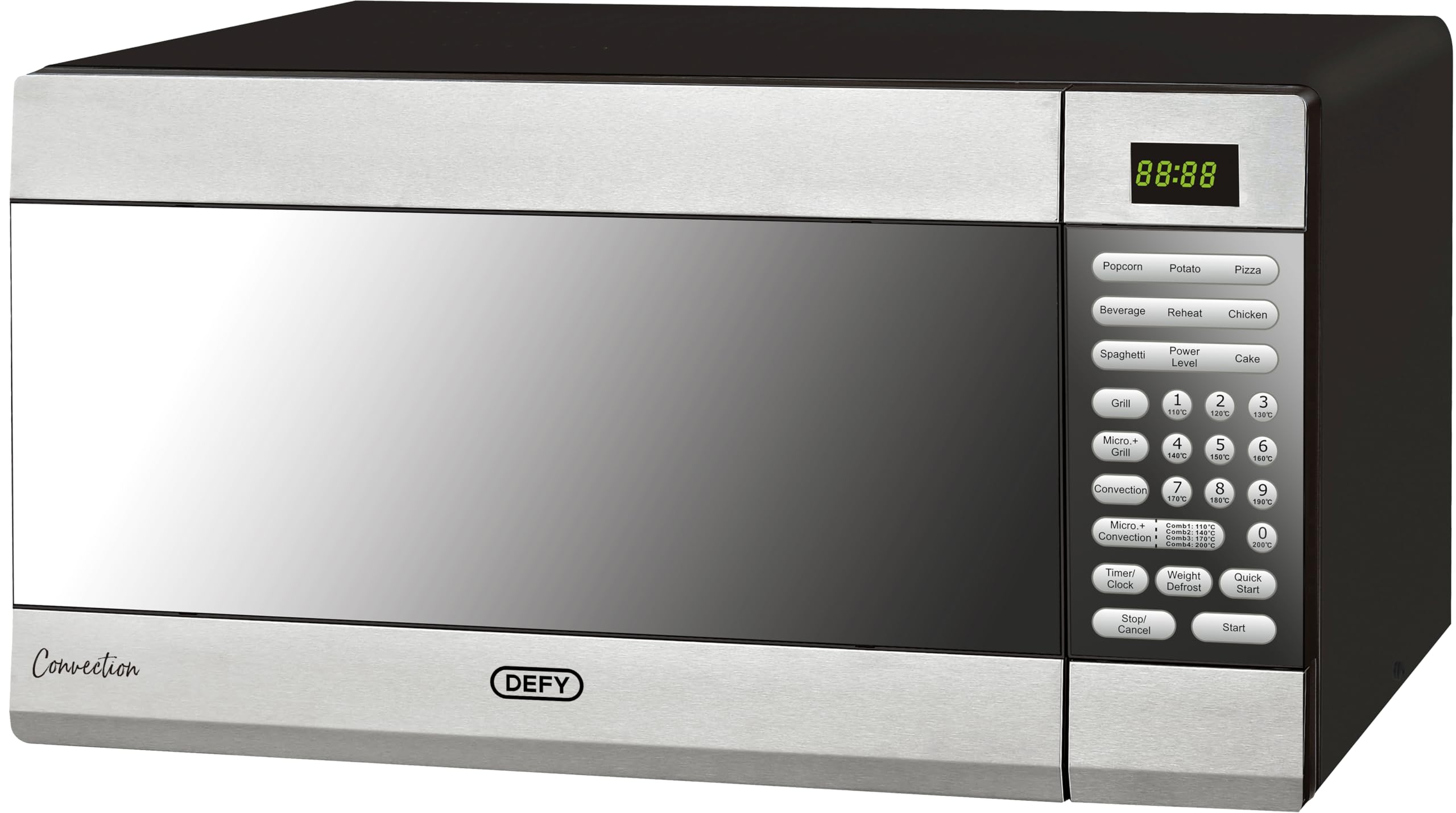
Figure 1: Defy Electronic Convection Microwave Oven DMO400, front view.
2. Ntuziaka nchekwa dị mkpa
Mgbe ị na-eji ngwa eletriki, a ga-agbaso usoro nchekwa nchekwa bụ isi mgbe niile iji belata ihe egwu ọkụ, ujo eletrik na mmerụ ahụ mmadụ nwere.
- Gụọ ntuziaka niile tupu i jiri ngwa.
- Ejila oven ahụ rụọ ọrụ ma ọ bụrụ na eriri ma ọ bụ plọg ahụ emebie, ma ọ bụrụ na ọ naghị arụ ọrụ nke ọma, ma ọ bụ ma ọ bụrụ na emebie ma ọ bụ daa.
- Ejila mmiri ọkụ ma ọ bụ ihe oriri ndị ọzọ ọkụ n'ime akpa ejiri mechiri emechi ka ha nwere ike ịgbawa.
- Naanị hapụ ụmụaka ka ha jiri oven na-enweghị nlekọta mgbe enyerela ntụziaka zuru oke ka nwatakịrị ahụ nwee ike iji oven n'ụzọ dị nchebe ma ghọta ihe ize ndụ nke iji na-ekwesịghị ekwesị.
- Jiri naanị arịa kwesịrị ekwesị maka ojiji na oven microwave.
- Mgbe ị na-ekpo ọkụ nri n'ime akpa rọba ma ọ bụ akwụkwọ, lekwasị anya na oven n'ihi ohere nke ịgbanye ọkụ.
- Ọ bụrụ na ahụrụ anwụrụ ọkụ, gbanyụọ ma ọ bụ wepụ ngwa ahụ ma mechie ọnụ ụzọ ka ị kwụsị ire ọkụ ọ bụla.
- Ejila nri gabiga ókè.
- Do not use the oven for storage purposes. Do not leave paper products, cooking utensils, or food in the oven when not in use.
- A ghaghị itinye oven n'elu ala dị larịị ma kwụsie ike.
- Ejila ngwa ngwa a rụọ ọrụ ma ọ bụrụ na ọ nwere eriri ma ọ bụ plọg mebiri emebi, ọ bụrụ na ọ naghị arụ ọrụ nke ọma, ma ọ bụ ọ bụrụ na emebiela ma ọ bụ daa.
- Ezubere ngwa a maka iji naanị ụlọ.
3. Ngwaahịa gafereview na akụrụngwa
The Defy DMO400 is a versatile appliance featuring a digital display and a user-friendly control panel for various cooking functions.

Ọgụgụ 2: nso nso view nke njikwa njikwa.
Isi ihe:
- Ngosipụta Digital: Shows time, power level, and cooking settings.
- Ogwe njikwa: Buttons for various functions including Popcorn, Potato, Pizza, Beverage, Reheat, Chicken, Spaghetti, Power Level, Cake, Grill, Micro+Grill, Convection, Micro+Convection, Timer/Clock, Weight Defrost, Quick Start, Stop/Cancel, and Start.
- Ọghe oven: Oghere ime ụlọ maka nri.
- Igwe ntughari: Na-emesi ike na ọ bụ nri ka esi nri.
- Oven ụzọ: With mirror glass finish.
4. Nwụnye na Ntọala
Proper installation ensures optimal performance and safety of your microwave oven.
Iwepu:
- Wepu ihe niile nkwakọ ngwaahịa n'ime na n'èzí oven.
- Lelee oven maka mmebi ọ bụla, dị ka dent ma ọ bụ ọnụ ụzọ na-adịghị mma. Ejila oven rụọ ọrụ ma ọ bụrụ na ọ mebiri emebi.
Nkwanye:
- Place the oven on a flat, stable countertop surface that can support its weight.
- Ensure adequate ventilation by leaving at least 20 cm of space above the oven, 10 cm at the rear, and 5 cm on both sides.
- Akwụsịla ikuku ikuku.
- Debe oven ka ọ ghara isi iyi ọkụ na ebe magnetik siri ike.
Njikọ eletrik:
- Plug the oven into a properly grounded electrical outlet. Ensure the voltage na ugboro ole kwekọrọ na nkọwapụta dị na akara ọkwa.
- Ejila eriri ndọtị ma ọ bụ ihe nkwụnye ọkụ.

Figure 3: Microwave oven placed on a countertop, demonstrating proper placement.
5. Ntuziaka ọrụ
Your Defy DMO400 offers multiple cooking modes. Familiarize yourself with the control panel for optimal use.
5.1. Ịtọ elekere
- Press the 'Timer/Clock' button once.
- Use the number buttons to enter the current time (e.g., 12:30).
- Press 'Timer/Clock' again to confirm.
5.2. Basic Microwave Operation
- Tinye nri n'ime efere e ji microwave sie ike na tebụl ahụ.
- Mechie ọnụ ụzọ oven.
- Press the 'Power Level' button repeatedly to select the desired power level (e.g., P100 for 100% power).
- Jiri bọtịnụ nọmba iji tinye oge nri.
- Pịa 'Malite'.
5.3. Quick Start Function
For quick cooking at full power (1000W):
- Press the 'Quick Start' button. Each press adds 30 seconds of cooking time.
- Press 'Start' to begin cooking immediately.
5.4. Nri nri convection
This mode uses a fan to circulate hot air, ideal for baking and roasting.
- Pịa bọtịnụ 'Convection'.
- Use the number buttons to set the desired temperature (e.g., 180 for 180°C).
- Press 'Convection' again to confirm temperature.
- Jiri bọtịnụ nọmba ka ịtọ oge nri.
- Pịa 'Malite'.
5.5. Ọrụ Anụ Ehihie
Use for browning and crisping food.
- Pịa bọtịnụ 'Grill'.
- Use the number buttons to set the grilling time.
- Pịa 'Malite'.
5.6. Combination Cooking (Micro+Grill, Micro+Convection)
Combines microwave power with grill or convection heat for faster, more even results.
- Obere + Grill: Press 'Micro+Grill', select power/grill level, set time, then 'Start'.
- Micro+Convection: Press 'Micro+Convection', select power/temperature, set time, then 'Start'.
5.7. Pre-set Cooking Menus
The oven includes pre-programmed settings for common foods:
- Press the desired food button (e.g., 'Popcorn', 'Potato', 'Pizza', 'Beverage', 'Reheat', 'Chicken', 'Spaghetti', 'Cake').
- Select the quantity/weight using number buttons if prompted.
- Pịa 'Malite'.
5.8. Ikpochapu mmiri
Use the 'Weight Defrost' function for thawing frozen foods.
- Press the 'Weight Defrost' button.
- Enter the weight of the food using the number buttons.
- Press 'Start'. The oven will automatically calculate the defrosting time.
6. Nlekọta na nlekọta
Regular cleaning and proper care will extend the life of your appliance.
Nhicha Mpụta Oven:
- Jiri mgbasa ozi hichaa mpụtaamp akwa na ncha dị nro.
- Zere ihe nchacha abrasive ma ọ bụ ihe nkpuchi.
Nhicha ime ụlọ nke oven:
- Clean the interior cavity after each use with a damp akwa .
- For stubborn food residue, place a bowl of water with lemon juice inside and microwave for 2-3 minutes to loosen the grime, then wipe clean.
- Remove and wash the glass turntable and roller ring in warm, soapy water. They are also dishwasher safe.
Nlekọta ọnụ ụzọ:
- Jiri mgbasa ozi hichaa akara ọnụ ụzọ na akụkụ ndị dị n'akụkụ ugboro ugboroamp cloth to remove spills and splashes.
- Ejila ihe nchacha abrasive siri ike ma ọ bụ nchara ígwè dị nkọ ihicha iko ọnụ ụzọ oven ebe ọ bụ na ha nwere ike ịcha elu, nke nwere ike ime ka iko ahụ daa.
7. Ntuziaka nchọpụta nsogbu
Ọ bụrụ na ị hụ nsogbu na oven microwave gị, lee tebụl na-esonụ maka nsogbu na ngwọta ndị a na-ahụkarị.
| Nsogbu | Ihe nwere ike ime | Ngwọta |
|---|---|---|
| Igwe ọkụ anaghị ebido | E jighị waya ọkụ eletrik arụ ọrụ nke ọma. E mechighị ụzọ nke ọma. Fuse ahụ gbawara agbawa ma ọ bụ ihe mgbawa sekit agbajiela. | Ensure plug is firmly in outlet. Close door securely. Check household fuse/circuit breaker. |
| Nri abụghị kpo oku | Door not closed properly. Incorrect cooking time or power level set. Food not suitable for microwave. | Ensure door is closed. Adjust cooking time/power. Use microwave-safe dishes. |
| Turntable anaghị atụgharị | Turntable not properly placed on roller ring. Roller ring or turntable dirty. | Reposition turntable and roller ring. Clean turntable and roller ring. |
| Na-ekpo ọkụ n'ime oven | Metal or foil in oven. Utensils not microwave-safe. Food splatters on cavity walls. | Remove all metal objects. Use only microwave-safe dishes. Clean oven interior thoroughly. |
| Igwe ọkụ anaghị arụ ọrụ | Igwe ọkụ chọrọ nnọchi. | Kpọtụrụ ndị ọrụ ruru eru maka nnọchi bọlbụ. |
If the problem persists after attempting these solutions, please contact Defy customer support.
8. Nka na ụzụ nkọwa
| Njirimara | Nkọwapụta |
|---|---|
| Ụdị | Defy |
| Nlereanya | DMO400 |
| Ike | 43 lita |
| Wattage (Microwave) | 1000 watt |
| Ụdị nwụnye | Countertop |
| Usoro kpo oku | Convection, Microwave, Grill |
| Atụmatụ pụrụ iche | Temperature Control, Digital Display |
| Usoro Ntughari | Manual defrost (Weight Defrost function) |
| Ihe (Mpụta) | Igwe anaghị agba nchara |
| Ụdị ihe dị n'ime | Igwe anaghị agba nchara |
| Agba | Igwe enyo enyo |
| Akụkụ ngwaahịa (D x W x H) | 30D x 90W x 60H centimetres (Note: Package dimensions are 62 x 60.2 x 37.6 cm) |
| Ngwa gụnyere | 1 x Defy Electronic Convection Microwave Oven, 43 Liter Capacity, Mirror Glass |
9. Akwụkwọ ikike na nkwado
For warranty information, please refer to the warranty card included with your product or visit the official Defy website. Spare part availability information is not provided in this manual.
Nkwado ndị ahịa:
If you require assistance, have questions, or need to report a fault, please contact Defy customer service. Contact details can typically be found on the Defy websaịtị ma ọ bụ na akwụkwọ ịzụrụ ihe gị.
Akụrụngwa dị n'ịntanetị: For additional support and product information, visit the Defy Store on Amazon.