
FREDEES BL-84011
FREDEES Entryway Table Instruction Manual
Ụdị: BL-84011
Okwu mmalite
Thank you for choosing the FREDEES Entryway Table. This manual provides essential information for the safe assembly, operation, and maintenance of your new console table. Please read these instructions thoroughly before use and retain them for future reference.
Ntuziaka nchekwa dị mkpa
- Soro ntuziaka mgbakọ mgbe niile nke ọma.
- Do not exceed the maximum weight recommendation of 22.68 kg (50 lbs) for the tabletop and shelves.
- Ensure all connections for the power outlets and USB ports are secure before use.
- Keep liquids away from the power outlets and USB ports to prevent electrical hazards.
- Place the table on a flat, stable surface. Use the adjustable footpads to ensure stability and prevent tilting.
- Do not allow children to climb on or play with the table.
- Unplug the power cord from the wall outlet when not in use or during cleaning.
Ihe ngwugwu
Biko chọpụta na akụrụngwa niile dị tupu ịmalite mgbakọ:
- Console Table *1
- Assembly Guide *1
- Installation Tool *1
- Hardware Package (screws, bolts, etc.)
Ntọala na Mgbakọ
Assembly of the FREDEES Entryway Table is designed to be straightforward. Please follow the included Assembly Guide for detailed, step-by-step instructions. Ensure you have adequate space and the necessary tools (provided) before starting.
- Wepu akụrụngwa: Jiri nlezianya wepụ akụkụ niile na nkwakọ ngwaahịa ma dobe ha n'elu dị ọcha ma dị nro iji gbochie ncha.
- Mkpọkọta Frame: Attach the metal frame components according to the diagrams in the Assembly Guide. Ensure all screws are tightened securely.
- Wụnye Shelves: Secure the wooden shelves to the frame.
- Fanye Drawers: Slide the rattan drawers into their designated slots.
- Connect Power Unit: Secure the power outlet and USB port unit to the side of the table as indicated in the guide.
- Adjust Footpads: Once assembled, place the table in its desired location. Adjust the footpads at the bottom of the legs to ensure the table is level and stable on uneven floors.

This image illustrates the overall dimensions of the entryway table, including height, width, and depth, along with shelf spacing. It also highlights key features such as the metal frame construction, 50 lbs weight capacity, high-quality material, and integrated smart power sensor.

This image highlights four main features of the entryway table: the three rattan-front drawers for storage, the unique rattan design detail, the two open storage shelves, and the adjustable footpads designed to ensure stability on uneven floors.
Ntuziaka ọrụ
1. ọdụ ụgbọ mmiri jikọtara ọnụ
The entryway table features a built-in charging station for your convenience. It includes:
- 2 AC Power Outlets (120V/12A)
- 1 ọdụ ụgbọ mmiri USB (5V/2A)
- 1 Ụdị-C Port (5V/2A)
To use, simply plug the table's main power cord into a wall outlet. You can then connect your electronic devices directly to the available ports.

Ihe onyonyo a na-enye nkọwa zuru ezu view of the integrated charging station located on the side of the entryway table. It shows the two AC power outlets, one USB port, and one Type-C port, demonstrating how devices can be connected for charging.
2. Three-Color Ambient LED Lighting
The table is equipped with LED lights offering three color options and adjustable brightness.
- Nhọrọ agba: The lights can display Cold light, White light, or Warm light. Refer to the Assembly Guide for the specific control button location.
- Ndozi ihie: To adjust brightness (0-100%), press and hold the light control button. Release when the desired brightness is achieved.

This image showcases the entryway table's LED lighting system, illustrating the three available light colors: cold light, white light, and warm light. It also indicates the 0-100% brightness adjustment feature, controlled by a long-press function.
3. Smart Motion Sensing Design
The table features a human motion sensor that automatically activates the LED lights when movement is detected within its range (approximately 2-3 meters) and dims them when no presence is detected, conserving energy.
- Nkwalite: The lights will automatically brighten when a person approaches the table.
- Nkwụsị: The lights will dim or turn off after a period of inactivity.
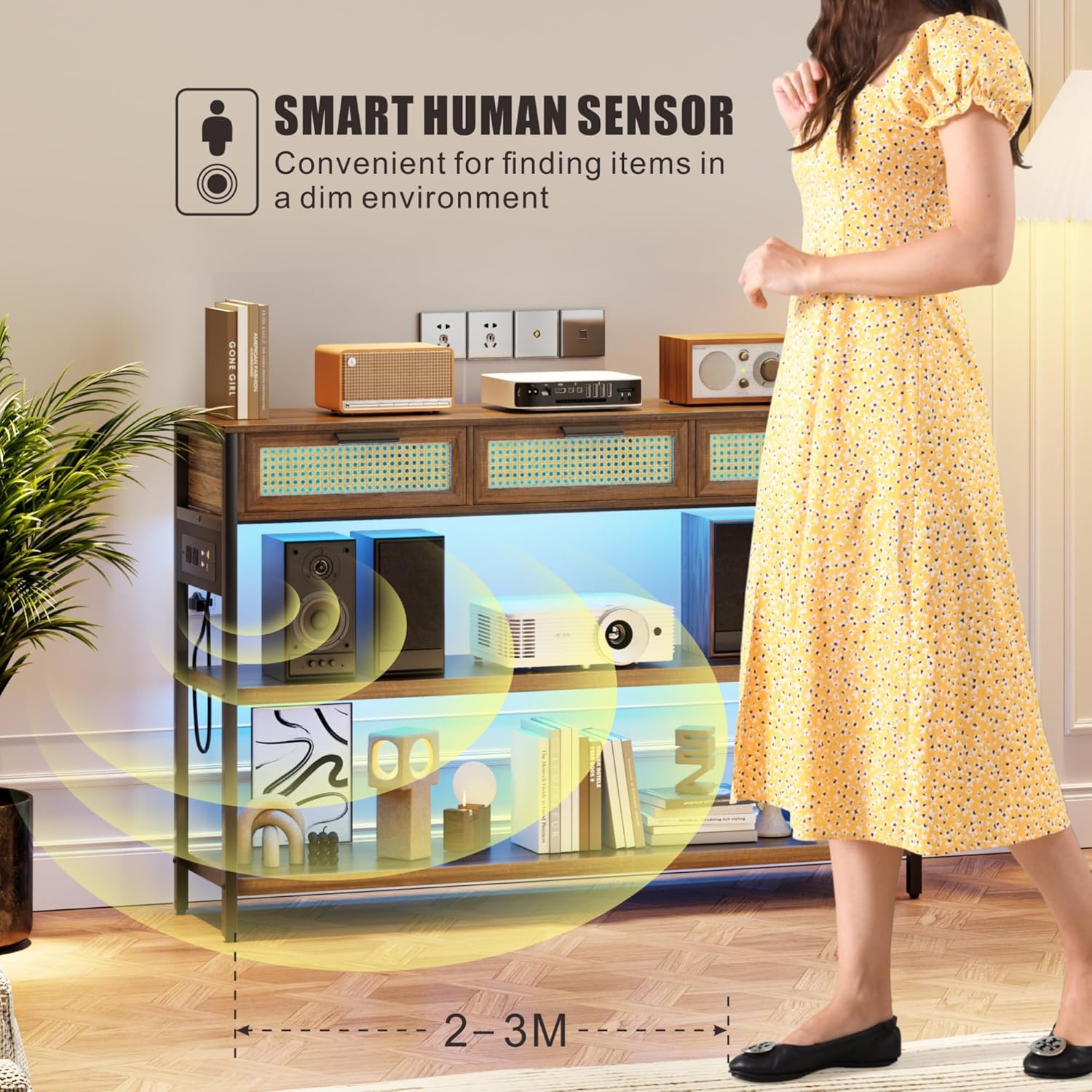
This image depicts a person approaching the entryway table, triggering the smart human sensor. The LED lights beneath the shelves illuminate, demonstrating the automatic lighting feature for convenience in dim environments.
Nlekọta
- Nhicha: Jiri nwayọ hichaa elu osisi, damp cloth. Avoid harsh chemicals or abrasive cleaners that may damage the finish. For rattan drawers, use a soft brush or cloth to remove dust.
- Nchara Na-ekpochasị ihe niile n'elu ka ọ ghara ịwulite ya.
- Mwụfu: Clean spills immediately to prevent staining, especially on the wooden surfaces.
- Ngalaba Ike: Ensure the power unit and cables are free from dust and debris. Do not attempt to disassemble the power unit.
- Nyocha: Lelee skru na njikọ niile iji hụ na ha kwụgidere. Tinyegharịa ma ọ bụrụ na ọ dị mkpa.
Nchọpụta nsogbu
| Nsogbu | Ihe nwere ike ime | Ngwọta |
|---|---|---|
| Ọkụ anaghị agbanwu | 1. Table not plugged in. 2. Power outlet not working. 3. Light control button not pressed. | 1. Ensure the table's power cord is securely plugged into a functional wall outlet. 2. Test the wall outlet with another device. 3. Press the light control button to activate. |
| Ịchaji ọdụ ụgbọ mmiri anaghị arụ ọrụ | 1. Table not plugged in. 2. Device cable faulty. 3. Power unit connection loose. | 1. Verify the table is plugged into a live outlet. 2. Try a different charging cable or device. 3. Check the connection of the power unit to the table frame. |
| Ihe mmetụta ngagharị anaghị aza | 1. Obstruction blocking sensor. 2. Insufficient movement. 3. Ihe mmetụta sensọ adịghị arụ ọrụ. | 1. Ensure the sensor area is clear of obstructions. 2. Ensure movement is within the sensor's range (2-3 meters). 3. Kpọtụrụ nkwado ndị ahịa ma ọ bụrụ na okwu ahụ dịgidere. |
| Table is wobbly/unstable | 1. Ala na-enweghị isi. 2. Loose assembly screws. 3. Footpads not adjusted. | 1. Move the table to a level surface. 2. Check and tighten all assembly screws. 3. Adjust the adjustable footpads at the bottom of the legs until stable. |
Nkọwapụta
| Njirimara | Nkọwa |
|---|---|
| Ụdị | EZIOKWU |
| Aha Nlereanya | BL-84011 |
| Akụkụ (LxWxH) | 116 x 30 x 80 Centimeters (45.67"D x 11.81"W x 31.5"H) |
| Ibu Ibu | 21 n'arọ |
| Nkwanye ịdị arọ kacha | 22.68 n'arọ (50 lbs) |
| Ihe onwunwe | Wood (MDF), Metal frame, Rattan drawers |
| Agba | Rustic Brown |
| Onu ogugu | 3 |
| Nchaji Ebe | 2 AC Outlets (120V/12A), 1 USB Port (5V/2A), 1 Ụdị-C Port (5V/2A) |
| Ọkụ | 3 LED Light Colors (Warm/White/Blue), 0-100% Brightness Adjustable |
| Sensọ | Smart Human Motion Sensor |
| Ngwa gụnyere | Console Table, Assembly Guide, Installation Tool |
Akwụkwọ ikike na nkwado
For warranty information or technical support, please refer to the documentation provided with your purchase or contact FREDEES customer service directly. Keep your purchase receipt for warranty claims.
Ask a question about this manual
Ask about setup, troubleshooting, compatibility, parts, safety, or missing instructions. Manuals+ will review the question and use this page’s manual context to help answer it.