
1. Okwu mmalite
Thank you for choosing the OREiN 4500LM/30W Hardwired Motion Sensor LED Flood Light. This manual provides essential information for the safe installation, operation, and maintenance of your new flood light. Please read these instructions thoroughly before installation and retain them for future reference.
2. Ozi nchekwa
Ịdọ aka ná ntị: Ihe ize ndụ nke ujo eletrik. Kwupu ike na fiusi ma ọ bụ sekit breaker tupu echichi ma ọ bụ ọrụ.
- Installation must be performed by a qualified electrician or person familiar with the construction and operation of the product and the hazards involved.
- Gbaa mbọ hụ na ọkọnọ voltage ziri ezi (120V AC).
- Awụnyela n'akụkụ ihe mgbanyụ ọkụ.
- Yiri ugogbe nchekwa na uwe aka n'oge ntinye.
- This fixture is designed for outdoor use and is IP65 waterproof rated.
3. Ihe ngwugwu
Chọpụta na akụrụngwa niile dị tupu ịmalite nrụnye:
- Igwe ọkụ (1)
- Nkwado mgbago (1)
- Skrọ (nha dị iche iche)
- Akụ waya (3)
- Akwụkwọ ntuziaka (1)
4. Ngwaahịa gafereview
The OREiN Flood Light features three adjustable LED heads and a motion sensor for comprehensive outdoor illumination and security.
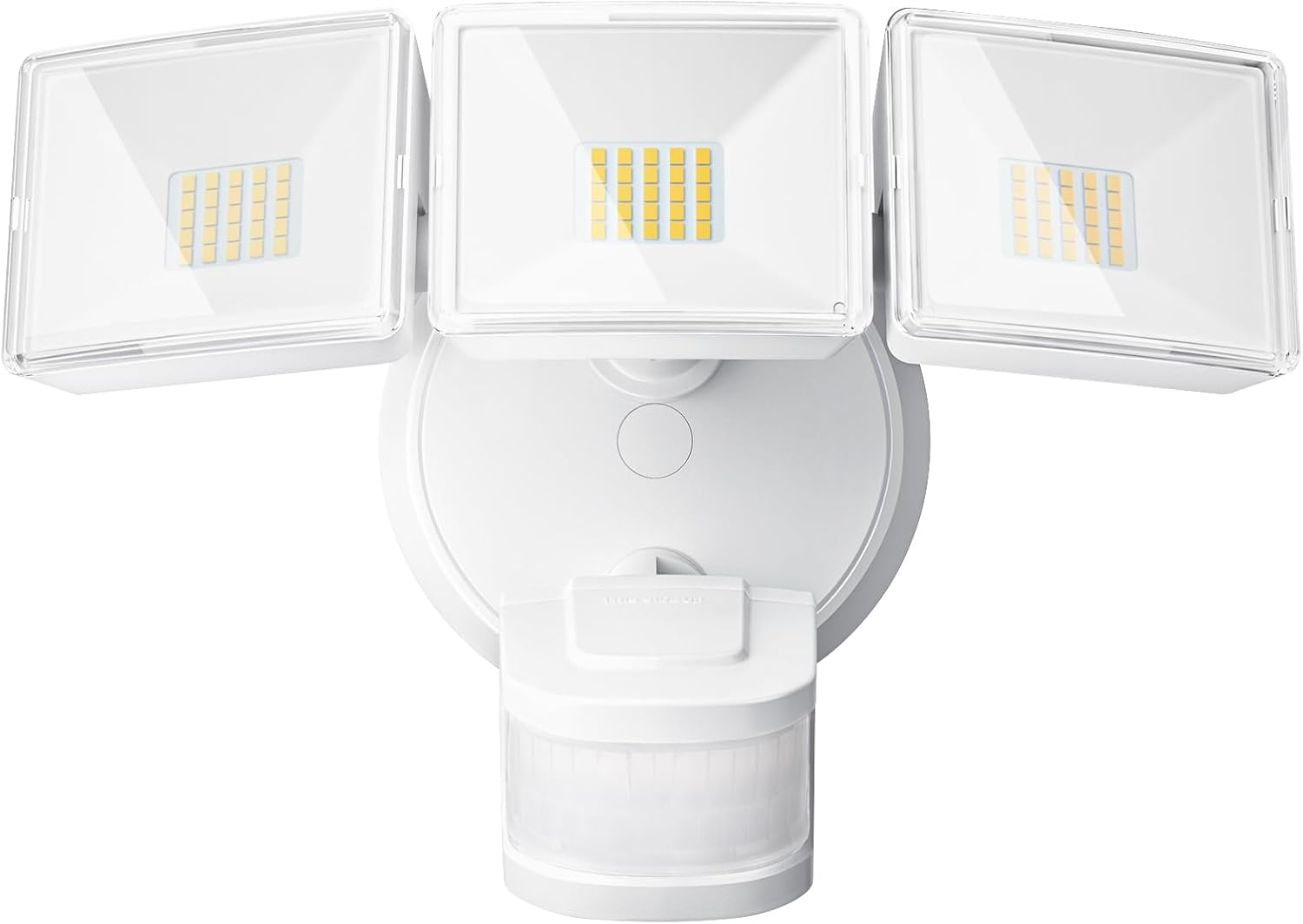
Foto 1: N'ihu view of the OREiN 4500LM/30W Hardwired Motion Sensor LED Flood Light, showing the three adjustable light heads and the motion sensor below.

Figure 2: Diagram illustrating the flexible adjustment angles of the three light heads (340°) and the motion sensor (270° horizontally, 120° vertically).
5. Nwụnye
This flood light is designed for hardwired installation on a standard junction box (2.75” / 3.5”). It supports both wall and eave mounting.
Nzọụkwụ nwụnye:
- Gbanyụọ Ike: Disconnect power at the circuit breaker before starting.
- Mpempe mgbago echekwabara: Attach the metal mounting bracket to your existing junction box using the provided screws.
- Jikọọ waya: Connect the household wiring to the fixture wires using the provided wire nuts. Typically, black to black (live), white to white (neutral). This light belongs to secondary luminaires, so no extra ground wire connection is needed.
- Chekwaa ihe ndozi ọkụ: Align the light fixture with the mounting bracket and secure it with the appropriate screws.
- Insert Waterproof Plug: Ensure the waterproof plug is properly inserted to prevent moisture ingress.
- Gbanwee Isi na Sensọ Ọkụ: Position the three light heads and the motion sensor to cover the desired areas.
- Weghachi ike: Gbanyụọ ọkụ azụ na ihe nbibi sekit.
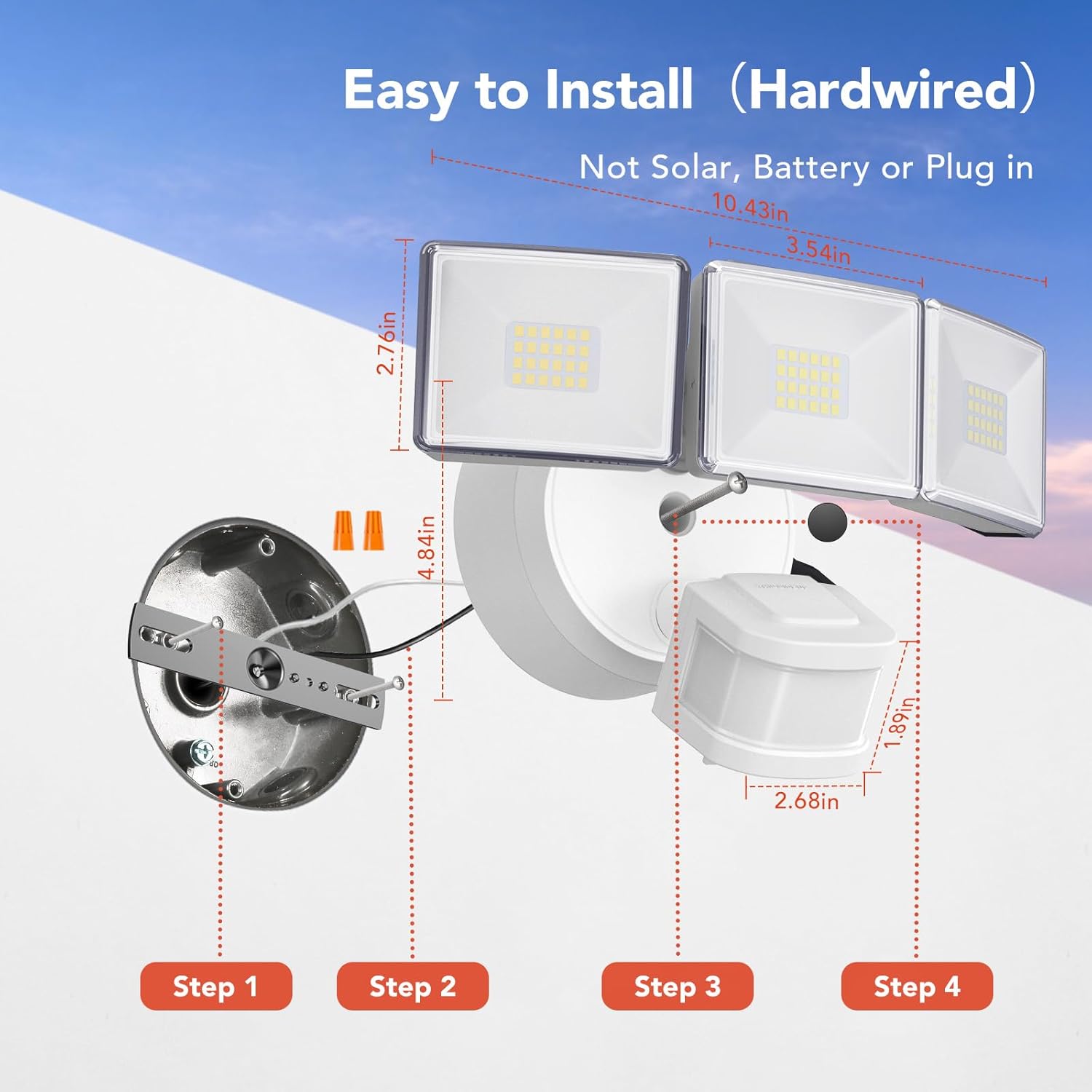
Figure 3: Step-by-step diagram for hardwired installation, showing mounting bracket, wire connections, and securing the fixture.

Ọgụgụ 4: Ọpụamples of wall-mounted and soffit-mounted installations for the flood light.
6. Ụdị arụ ọrụ
The OREiN Flood Light offers three operational modes, selectable via a switch on the motion sensor unit:
- Ọnọdụ Ule: The light turns on for 5 seconds when motion is detected, regardless of ambient light. Useful for testing sensor coverage during installation.
- Dusk to Dawn (D2D) Mode: The light automatically turns on at night and off during the day. In this mode, the motion sensing function is inactive.
- Nchekwa onwe na ọnọdụ: The light turns on only at night when motion is detected. The duration the light stays on (1, 5, or 10 minutes) can be adjusted.
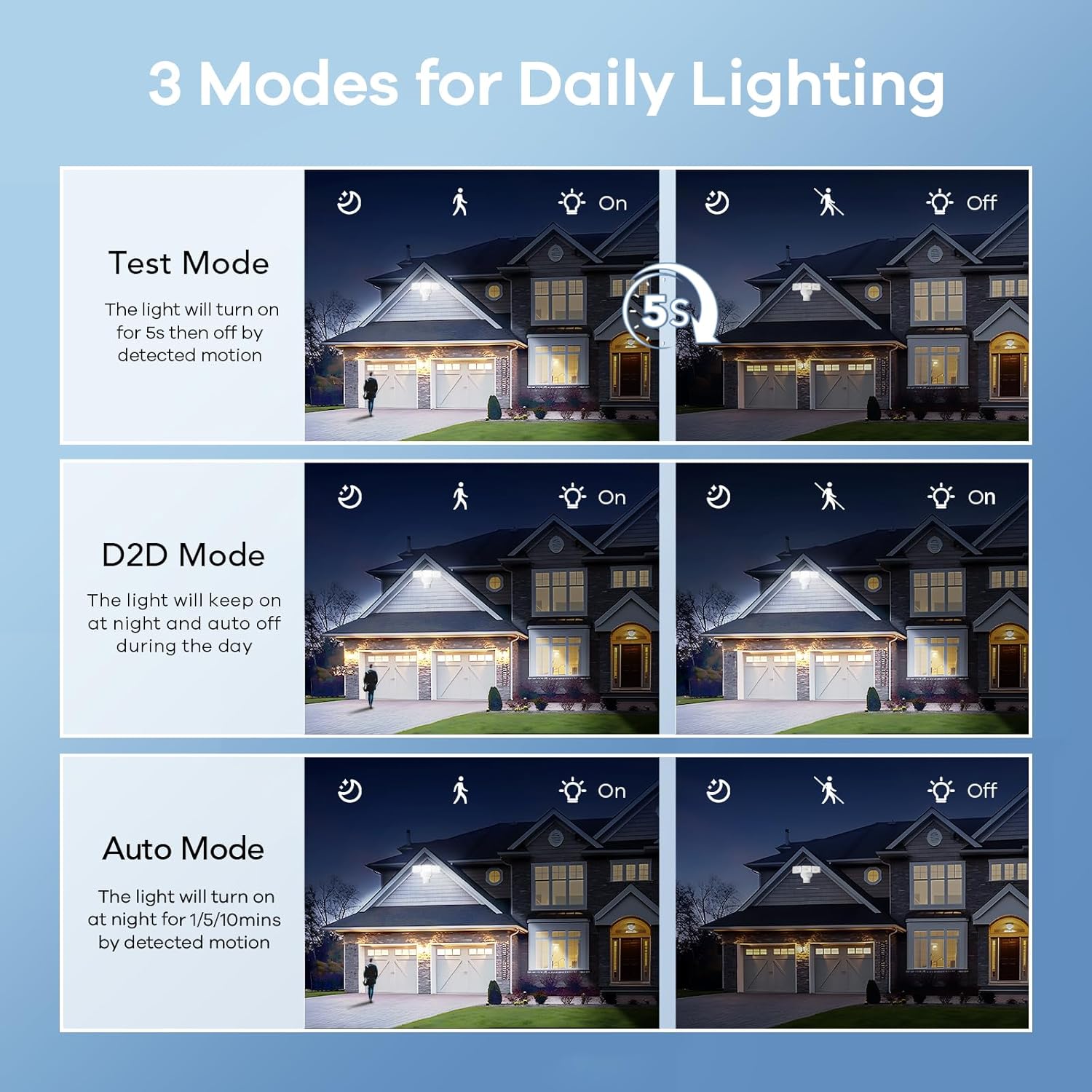
Figure 5: Visual representation of Test, Dusk to Dawn, and Auto modes in operation.

Figure 6: Illustration of the Dusk to Dawn mode, showing the light automatically activating when surroundings are dark and deactivating when bright.
7. Ịgbanwe Ntọala
The motion sensor unit includes dials for adjusting the light's duration and sensitivity:
- Time Adjustment (Timer Minutes): Set the duration the light stays on after motion detection in Auto Mode (1, 5, or 10 minutes).
- Sensitivity Adjustment (Sensitivity): Adjust the motion detection range (10ft, 20ft, 30ft, 40ft). Max setting provides up to 40ft detection.

Figure 7: Close-up of the motion sensor with dials for adjusting mode, timer minutes, and sensitivity.
Video 1: Official OREiN video demonstrating the motion sensor outdoor lights, including features like wide detection, adjustable sensing distance, heat dissipation, adjustable time/sensitivity, flexible adjustment, and easy installation.
8. Nlekọta
- Nhicha: Jiri nwayọ hichaa ihe ndozi ahụ, damp akwa . Ejila ihe nchacha abrasive ma ọ bụ ihe mgbaze.
- Nyocha: Periodically check for any damage to the wiring or housing.
- Ndokwa bọlbụ: The LED bulbs are integrated and not user-replaceable. The fixture has a lifespan of up to 50,000 hours.

Figure 8: Illustration demonstrating the IP65 waterproof rating, showing the light functioning reliably under rain.

Figure 9: Diagram showing the heat dissipation design of the light heads, contributing to the product's longevity.
9. Nchọpụta nsogbu
| Nsogbu | Ihe nwere ike ime | Ngwọta |
|---|---|---|
| Ìhè anaghị agbanwuo. | No power; incorrect wiring; sensor settings. | Check circuit breaker. Verify wiring connections. Adjust sensor mode/sensitivity. |
| Ìhè na-anọgide na-enwu. | Sensor in D2D mode; continuous motion detected; sensitivity too high. | Switch to Auto mode. Check for constant heat sources or movement in detection zone. Reduce sensitivity. |
| Ìhè na-agbanye n'ehihie. | Sensor in Test mode; ambient light sensor blocked. | Switch to Auto or D2D mode. Ensure the ambient light sensor is not obstructed. |
| Motion detection range is too short/long. | Sensitivity setting incorrect. | Adjust the sensitivity dial on the motion sensor. |
10. Nkọwapụta
| Njirimara | Nkọwa |
|---|---|
| Aha Nlereanya | OL3600354 |
| Ụdị | OREiN |
| Icha ọkụ | 4500 Lumen |
| Wattage | 30 Watt |
| Okpomọkụ agba | 5000 Kelvin (ìhè ụbọchị) |
| Voltage | 120 volts |
| Ihe onwunwe | Acrylonitrile Butadiene Styrene (ABS) |
| Ọkwa Nguzogide mmiri | Ihe mgbochi mmiri IP65 |
| Akụkụ Nchọpụta Motion | 240° |
| Ogologo Nchọpụta Motion | Ruo 40 ụkwụ |
| Ndozi isi ọkụ | 340° mkpuchi |
| Ogologo ndụ echere | awa 50,000 |
| Ụdị nwụnye | Hardwired (Wall Mount, Eave Mount) |
| Akụkụ ngwaahịa | 7.6"L x 8"W x 6"H |
| Ibu Ibu | 1.87 pound |
11. Akwụkwọ ikike na nkwado
OREiN offers an extended warranty for this product. For specific warranty details, please refer to the product packaging or contact OREiN customer support.
Nkwado ndị ahịa:
- For assistance, contact OREiN directly through Amazon or search for the brand name online.
- If you encounter any issues, it is recommended to contact customer support before initiating a return.

Figure 10: Image representing OREiN customer support, available for assistance.