
1. Okwu mmalite
Welcome to the KRUPS Sensation C10 EA910A10 Superautomatic Coffee Machine user manual. This guide provides comprehensive instructions for the safe and efficient operation, maintenance, and troubleshooting of your new coffee machine. Please read this manual thoroughly before first use and keep it for future reference.
2. Ntuziaka nchekwa dị mkpa
Iji hụ na ọrụ ahụ dị mma, na-agbaso iwu nchekwa ndị a mgbe niile:
- Gụọ ntuziaka niile tupu i jiri ngwa.
- Ejila ngwa, eriri ọkụ, ma ọ bụ nkwụnye na mmiri ma ọ bụ mmiri mmiri ndị ọzọ.
- Ezubere ngwa a maka iji naanị ụlọ.
- Gbaa mbọ hụ na voltage gosiri na ngwa a dabara na isi igwe voltage.
- Mgbe niile, kwụpụ ihe na-arụ ọrụ ahụ na ebe ọkụ eletrik tupu ị na-ehicha ya ma ọ bụ mgbe a na-ejighị ya.
- Ejila ngwa ọ bụla nwere eriri ma ọ bụ plọg mebiri emebi rụọ ọrụ, ma ọ bụ mgbe ngwa ahụ dara ma ọ bụ mebie n'ụzọ ọ bụla.
- Debe ụmụaka pụọ na ngwa ngwa mgbe a na-arụ ọrụ.
- Jiri naanị ngwa ndị nrụpụta kwadoro.
- Avoid contact with hot surfaces, such as the coffee spouts or steam nozzle.
3. Ngwa ngwaahịa
Familiarize yourself with the main components of your KRUPS Sensation C10 EA910A10 coffee machine:
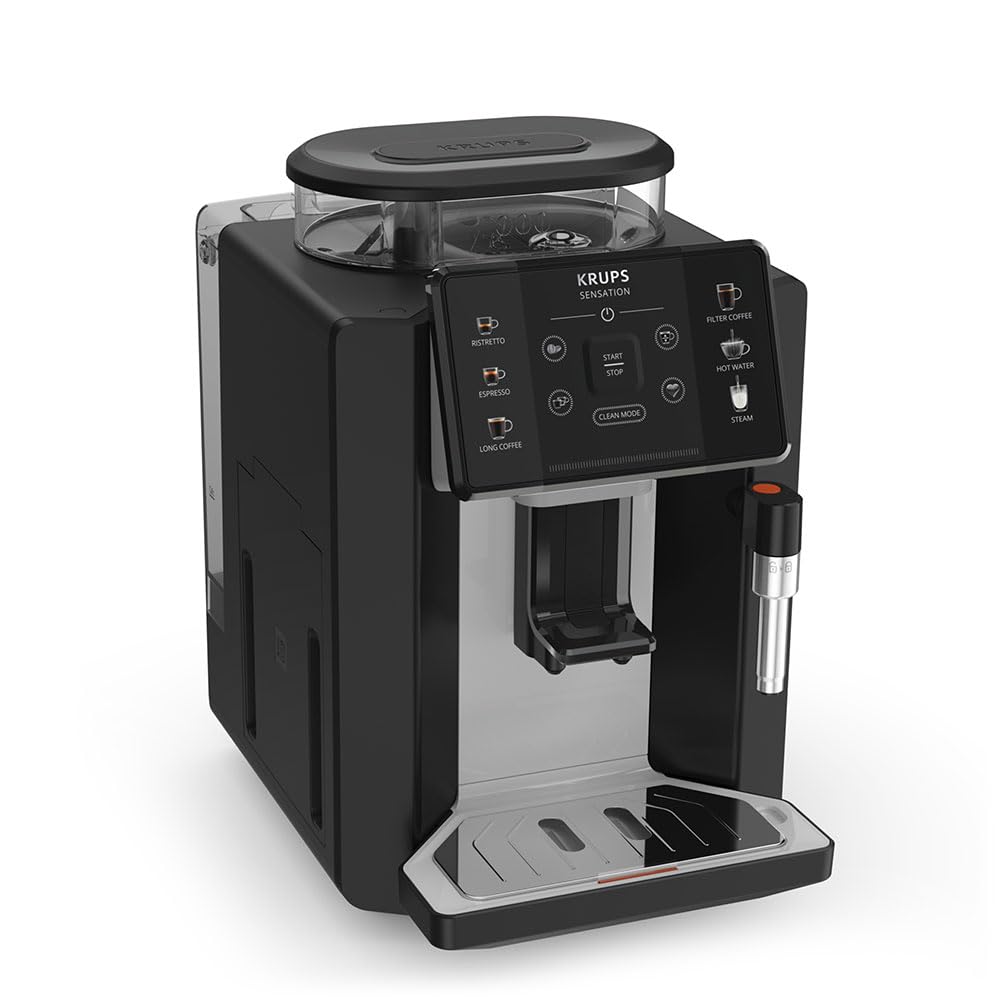
Foto: Ihu-aka nri view of the KRUPS Sensation C10 EA910A10 Superautomatic Coffee Machine, showing the bean hopper, control panel, coffee spouts, and drip tray. Two cups of coffee are being dispensed.
- Bean Hopper nwere mkpuchi
- Mmiri mmiri
- Control Panel (Touchscreen)
- Coffee Spouts (Adjustable)
- Tray Drip na Grid
- Akpa Grounds kọfị
- Steam Nozzle / Hot Water Spout
- Njikọ eriri ọkụ
4. Mbido Mbido
4.1. Iwepu ngwongwo
- Jiri nlezianya wepụ igwe kọfị na nkwakọ ngwaahịa ya.
- Wepụ ihe niile e ji ekpuchi ihe, gụnyere ihe mkpuchi na ihe mmado.
- Debe igwe ahụ n'elu ebe siri ike, dị larịị, nke na-anaghị ekpo ọkụ, ebe dị anya na ebe mmiri na okpomọkụ.
4.2. Mbụ Jiri Nkwadebe
- Rinse the Water Tank: Remove the water tank, rinse it thoroughly with fresh water, and fill it to the MAX level. Reinsert the tank securely.
- Dejupụta Bean Hopper: Open the lid of the bean hopper and fill it with fresh coffee beans. Do not use ground coffee in the bean hopper.
- Njikọ ike: Tinye eriri ọkụ n'ime igwe wee banye n'ime oghere eletrik gbadoro ụkwụ.
- Usoro nchacha nke mbụ: The machine will prompt you to perform an initial rinse cycle. Follow the instructions on the touchscreen. This primes the system and cleans internal components.
5. Ntuziaka ọrụ
5.1. Ogwe njikwa gafereview

Image: A hand interacting with the intuitive touchscreen control panel of the KRUPS Sensation C10 EA910A10, highlighting its ease of use.
The KRUPS Sensation C10 EA910A10 features an intuitive touchscreen control panel for easy operation. Key functions include:
- Ristretto: For a very short, concentrated espresso.
- Umuahia For a classic espresso shot.
- Kọfị dị ogologo: For a larger volume of coffee.
- Filter Coffee: For a milder, filter-style coffee.
- Mmiri ọkụ: For tea or other hot beverages.
- Steam: Maka mmiri ara ehi na-esi ísì.
- Malite/Kwụsị: To begin or end a brewing cycle.
- Ụdị dị ọcha: Initiates cleaning cycles.
- Coffee Strength/Volume Adjustment: Icons to customize your drink.
5.2. Ime kọfị
To brew a coffee beverage:
- Gbaa mbọ hụ na tank mmiri juputara na ihe mkpofu agwa nwere agwa zuru oke.
- Place a cup under the coffee spouts. Adjust the spout height if necessary.
- Select your desired coffee type (e.g., Espresso, Long Coffee) from the touchscreen.
- Adjust coffee strength and volume using the on-screen options if desired.
- Press the "Start" button to begin brewing.
- The machine will grind the beans, brew the coffee, and dispense it into your cup.
- The machine will automatically stop when the brewing is complete.

Image: A selection of coffee beverages, including espresso, long coffee, and a milk-based drink, demonstrating the versatility of the KRUPS Sensation C10 EA910A10.
5.3. Ọrụ Mmiri ọkụ
- Tinye otu iko n'okpuru mmiri ọkụ.
- Select the "Hot Water" option on the touchscreen.
- Press "Start" to dispense hot water. Press "Stop" to cease dispensing.
5.4. Steam Function (for milk frothing)
- Jupụta mmiri ara ehi oyi.
- Position the steam nozzle into the milk.
- Select the "Steam" option on the touchscreen.
- Press "Start" to activate the steam. Move the pitcher up and down to froth the milk.
- Press "Stop" when desired froth is achieved.
- Ihe dị mkpa: Clean the steam nozzle immediately after use to prevent milk residue buildup.
6. Nlekọta na nhicha
Ịsacha na idozi ya mgbe niile na-eme ka igwe kọfị gị rụọ ọrụ nke ọma ma na-adịte aka.
6.1. Nhicha kwa ụbọchị
- Ebe a na-adọba mmiri na akpa kọfị: Empty and rinse the drip tray and coffee grounds container daily or when prompted by the machine.
- Mkpọ kọfị: Jiri mgbasa ozi hichaa oghere kọfị ahụamp akwa .
- tank mmiri: Jiri mmiri dị ọcha sachaa tank mmiri ahụ kwa ụbọchị.
6.2. Descaling
The machine will indicate when descaling is required. Follow the on-screen instructions and use a KRUPS-approved descaling solution.

Image: A hand inserting a cleaning tablet into the designated slot of the KRUPS Sensation C10 EA910A10, illustrating the ease of the cleaning process.
6.3. Ndochi ihe nzacha mmiri
If your machine uses a water filter, replace it every 2-3 months or as indicated by the machine to ensure optimal water quality and prevent limescale buildup.
7. Nchọpụta nsogbu
Rụtụ aka na tebụl dị n'okpuru maka okwu nkịtị na azịza ha.
| Nsogbu | Ihe kpatara/ Ngwọta nwere ike ime |
|---|---|
| Igwe anaghị agbanwuo. | Check if the power cord is securely plugged into the machine and the electrical outlet. Ensure the outlet is functional. |
| A naghị enye kọfị. | Water tank empty: Fill the water tank. Bean hopper empty: Fill with coffee beans. Coffee grounds container full: Empty and clean. Descaling required: Perform descaling cycle. |
| Kọfị esichaghịkwa ike. | Adjust coffee strength settings on the control panel. Check if the bean hopper is sufficiently filled. Ensure fresh beans are used. |
| Mmiri na-agbapụta site na igwe. | Check if the water tank is correctly inserted. Ensure the drip tray is properly positioned. If leakage persists, contact customer support. |
| "Clean Mode" alert persists. | Perform the indicated cleaning cycle (e.g., descaling, rinsing). Ensure all removable parts are clean and correctly reinserted. |
| Steam nozzle not frothing milk effectively. | Clean the steam nozzle thoroughly after each use to prevent blockages. Ensure cold milk is used. |
| Grinder is unusually loud or not grinding. | Check for foreign objects in the bean hopper. Ensure the bean hopper is not empty. Contact customer support if the issue persists. |
8. Nka na ụzụ nkọwa
| Njirimara | Nkọwapụta |
|---|---|
| Nọmba nlereanya | EA910A10 |
| Ụdị | AKA |
| Voltage | 145 volts |
| Ike | 1450 Watt |
| Ihe onwunwe | Igwe igwe |
| Ibu ngwaahịa | 7.5 n'arọ |
| Interface | Ihuenyo mmetụ aka |

Image: The KRUPS Sensation C10 EA910A10 coffee machine with indicated dimensions: 24 cm width, 34.6 cm depth, and 36.4 cm height.
9. Akwụkwọ ikike Ozi
Your KRUPS Sensation C10 EA910A10 Superautomatic Coffee Machine is covered by a manufacturer's warranty. Please refer to the warranty card included in your product packaging for specific terms, conditions, and duration. Keep your proof of purchase for warranty claims.
10. Nkwado ndị ahịa
For further assistance, technical support, or spare parts, please contact KRUPS customer service. Contact details can typically be found on the KRUPS official website or in the warranty documentation provided with your appliance.