
1. Okwu mmalite
Thank you for choosing the HICON Vittoria Gaming Chair. This manual provides essential information for the safe assembly, operation, and maintenance of your new chair. Please read these instructions carefully before use and retain them for future reference.

Foto: N'ihu view of the HICON Vittoria Gaming Chair, showcasing its ergonomic design and red finish.
2. Ozi nchekwa
- Hụ na ihe niile dị na ya dị ma ghara imebi tupu e jikọta ha. Ejila ya ma ọ bụrụ na akụkụ ọ bụla efuola ma ọ bụ agbajiela.
- Follow assembly instructions precisely. Incorrect assembly can lead to instability and injury.
- Eguzola n'oche ahụ. Jiri ya naanị maka ịnọdụ ala.
- Agafela ikike ịdị arọ kacha nke kilogram 150 (330 lbs).
- Debe ụmụaka na anụ ụlọ n'ebe dị anya n'oche ahụ n'oge mgbakọ.
- Zere ikpughe oche ahụ nye anwụ kpọmkwem ma ọ bụ oke okpomọkụ iji gbochie mmebi ihe.
- Regularly check all bolts and screws to ensure they are tight. Retighten as necessary.
3. Ihe ngwugwu
Nyochaa na etinyere ihe niile ndị a na ngwugwu gị:
- Azụ azụ
- Seat Base with Armrests and Footrest mechanism
- Star Base (5-star aluminum base)
- Ndị na-agbagharị (iberibe 5)
- Silinda ebuli gas
- Ihe mkpuchi ebuli gas
- Lumbar Support Cushion with Massage Function (USB powered)
- Kushion isi oche
- Assembly Hardware (screws, washers, Allen key)
4. Ntọala na Mgbakọ
Follow these steps to assemble your HICON Vittoria Gaming Chair:
- Tinye ihe ndọta na ntọala kpakpando: Tinye nke ọ bụla n'ime ihe nkedo ise n'ime oghere ndị dị na nsọtụ ụkwụ ọ bụla nke ntọala kpakpando. Magidesie ike ruo mgbe ha pịrị n'ime ebe.
- Tinye Gas ebuli: Place the gas lift cylinder into the center hole of the assembled star base. Cover the gas lift with the telescopic plastic cover.
- Tinye ihe mkpuchi azụ na ntọala oche: Align the backrest with the mounting brackets on the seat base. Secure it using the provided screws and Allen key. Ensure all screws are tightened evenly.
- Place Assembled Seat onto Gas Lift: Jiri nlezianya tinye oche na ihe mkpuchi azụ a chịkọtara n'elu silinda ebuli gas, hụ na ọ dị n'etiti ma kwụsie ike.
- Tinye akwa akwa: Secure the headrest cushion to the top of the backrest using its straps. Attach the lumbar support cushion to the lower backrest using its straps. Connect the USB cable from the lumbar cushion to a power source (e.g., power bank, USB adapter) for the massage function.

Image: Close-up of the OmniRoll casters, designed for hard floors and carpets, attached to the chair's stable base.

Image: Detail of the NitroLift gas lift, providing durability and a load capacity of up to 250 kg.
5. Ntuziaka ọrụ
Your HICON Vittoria Gaming Chair offers several adjustable features for personalized comfort:
- Ndozi elu oche: To raise the seat, lift the lever located under the right side of the seat while taking your weight off the chair. To lower the seat, lift the lever while seated. Adjust until your feet are flat on the floor and your knees are at a 90-110 degree angle.
- Nọdụ ala azụ azụ: Pull the lever on the right side of the chair (below the seat) to unlock the backrest. Lean back to your desired angle (between 90 and 170 degrees) and push the lever down to lock it in place.
- Armrest Adjustment (Adapto Arm): The armrests can be adjusted in height and forward-backward. Locate the buttons or levers on the armrests to unlock and adjust them to your preferred position. Ensure your forearms rest comfortably and your elbows are at approximately a 90-degree angle.
- Lumbar Support Massage (PneuMassage): The lumbar cushion features a vibration massage mechanism. Connect the USB cable to a power source to activate the massage function. Adjust the cushion's position on the backrest for optimal lower back support and comfort.
- Extendable Footrest (LegRest): To extend the footrest, pull it out from under the seat. To retract, push it back in until it is fully stored. Use the footrest for additional leg support when reclining.
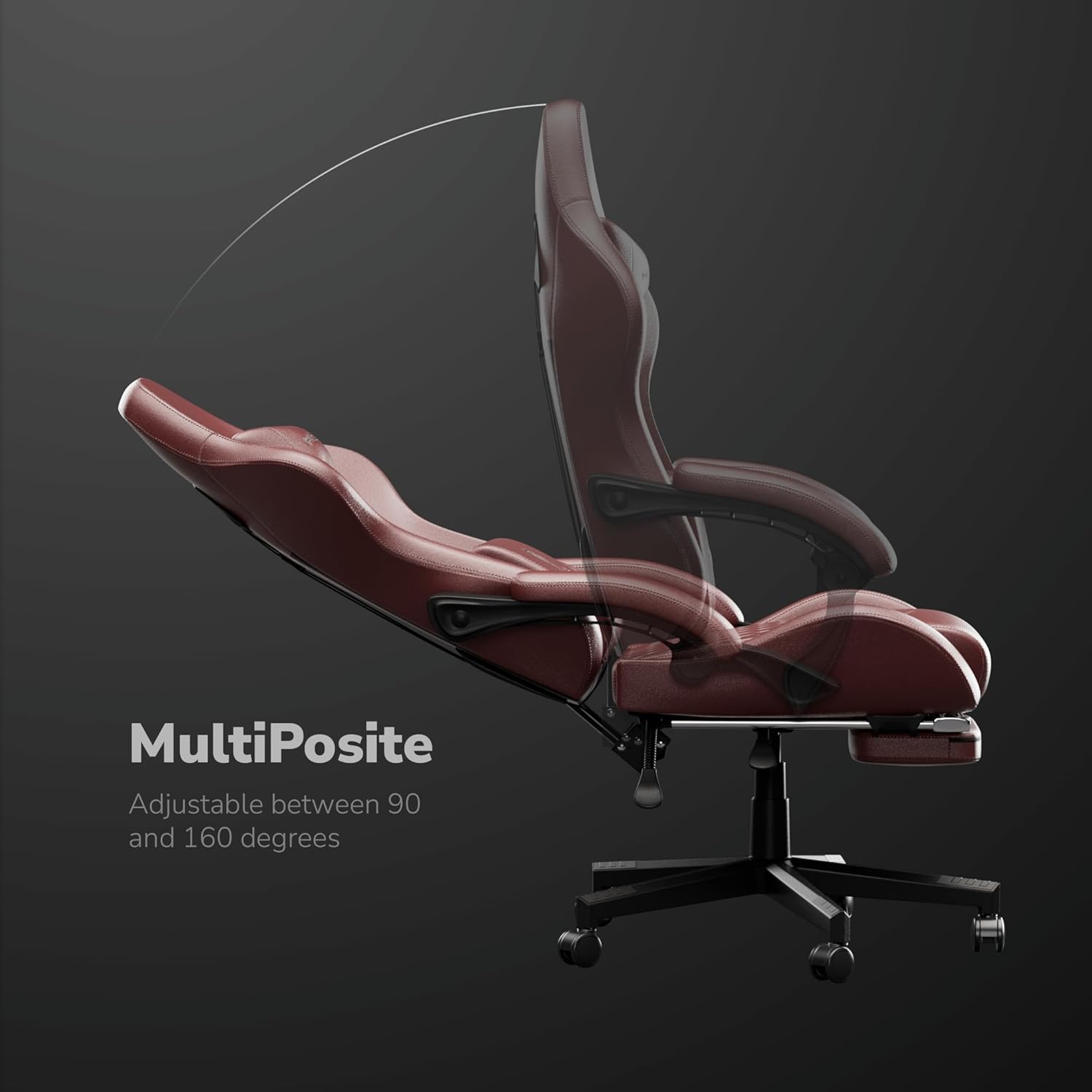
Image: The MultiPosite feature illustrates the adjustable recline range of the chair, from 90 to 160 degrees.

Image: Close-up of the Adapto Arm, highlighting its adjustable height and forward-backward movement for optimal arm support.

Image: Detail of the PneuMassage lumbar cushion, featuring a vibration mechanism for enhanced comfort and support.

Image: Close-up of the LegRest, providing foot support for comfort during extended sitting or reclining.
6. Nlekọta
- Nhicha: Jiri ihe dị nro hichaa elu akpụkpọ anụ PU ahụ, nke dị nro.amp cloth. For stubborn stains, use a mild soap solution and then wipe with a clean, damp akwa . Zere kemịkalụ siri ike ma ọ bụ ihe nhicha abrasive.
- Nyochaa ngwaike: Periodically check all screws and bolts to ensure they are tight. Retighten as needed to maintain stability and safety.
- Nlekọta Caster: Keep the casters clean from hair and debris to ensure smooth movement.
- Zenarị ibu ibu: Do not place excessive weight on the armrests or backrest.

Image: Detail of the DuraBreathe material, highlighting its durable, waterproof, and easy-to-clean properties.
7. Nchọpụta nsogbu
- Oche na-eti mkpu: Check all bolts and screws for tightness. Apply a small amount of silicone lubricant to moving parts if necessary.
- Ihe isi ike imezi elu: Hụ na ihe nkwụnye gas ahụ dị n'ọrụ nke ọma. Ọ bụrụ na nsogbu ahụ anọgide, silinda gas ahụ nwere ike ịchọ mgbanwe.
- Ndị na-agbagharị agbagharị anaghị agbagharị nke ọma: Remove any hair or debris wrapped around the caster wheels. Clean the wheels thoroughly.
- Backrest Not Locking: Verify that the recline lever is fully pushed down to lock the backrest in position.
8. Nkọwapụta
| Njirimara | Nkọwapụta |
|---|---|
| Ụdị | HICON |
| Nọmba nlereanya | HCG-6689 |
| Agba | Uhie |
| Ihe onwunwe | Aluminum, Faux Leather |
| Frame Ihe | Ọla |
| Ụdị ihe oche | Foam ebe nchekwa |
| Ibu Ibu | 16 kilogram |
| Arọ kacha akwadoro | 150 kilogram |
| Akụkụ ihe (L x W x H) | 64 x 62 x 124 centimita |
| Omimi oche | 55 sentimita asatọ |
| Ọnụọgụ nke ọnọdụ ndị na-eri nri | 3 |
| Enwere ike idozi | Ee |
| Mgbakọ chọrọ | Ee |
| Ojiji ime ime/n'èzí | Ime ụlọ |
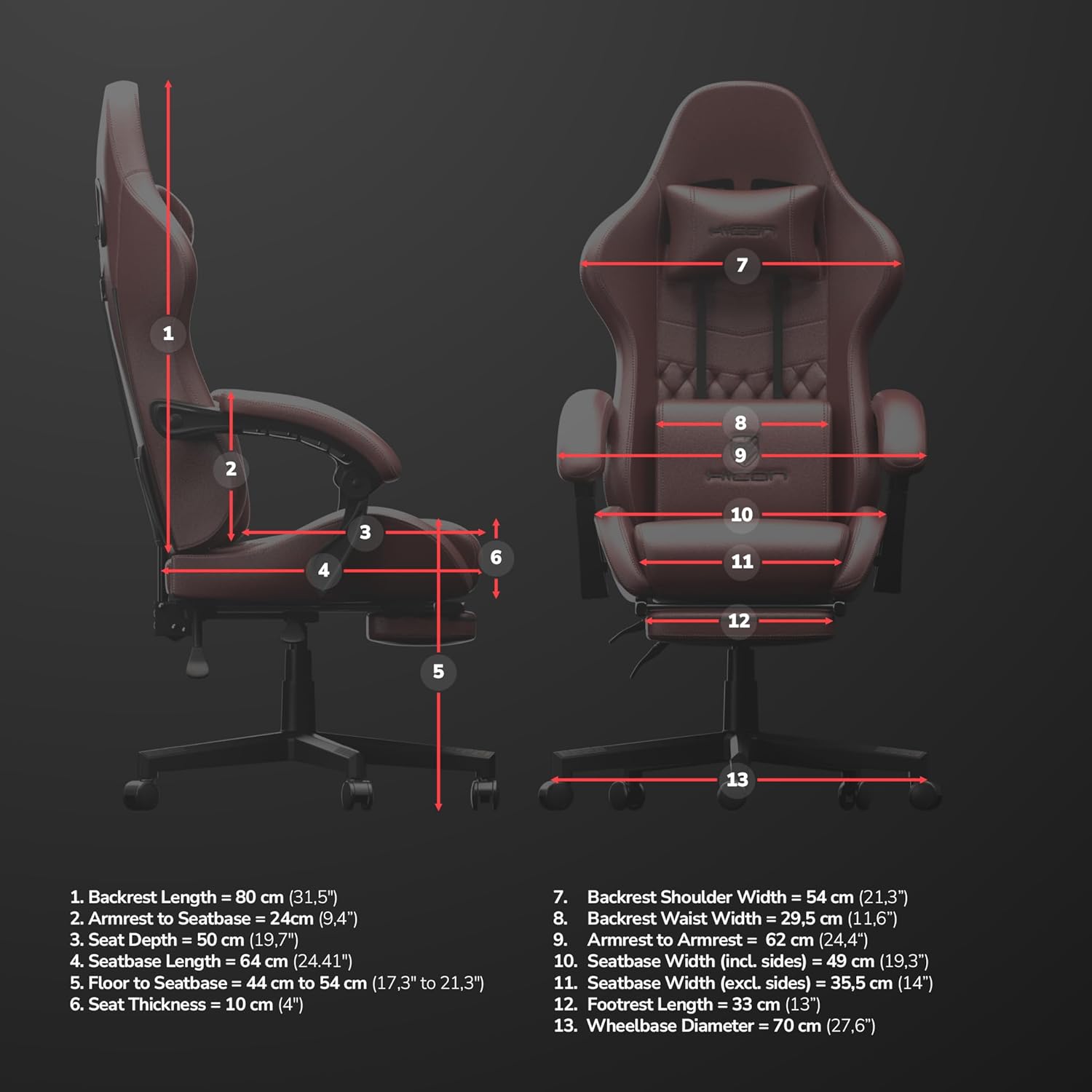
Image: Detailed dimensional diagram of the HICON Vittoria Gaming Chair, showing various measurements for reference.
9. Akwụkwọ ikike na nkwado
For warranty information or technical support, please refer to the documentation included with your purchase or contact the retailer/manufacturer directly. Keep your proof of purchase for warranty claims.