
Okwu mmalite
This manual provides detailed instructions for the SHIDU X1 Portable Bluetooth Speaker with Wireless Microphone. Please read this manual thoroughly before using the product to ensure proper operation and to maximize your user experience. This device is designed to deliver high-quality audio with versatile connectivity and entertainment features.
Ihe ngwugwu
Mgbe ị na-ewepụ ihe ndị a, biko hụ na ihe niile edepụtara n'okpuru dị ma dịkwa mma:
- 1 x SHIDU X1 Portable Bluetooth Speaker
- 1 x Wireless UHF Microphone
- 1 x Type-C Charging Plug
- 1 x AUX USB
- 1 x Live Stream Cable
- 1 x Akwụkwọ ntuziaka onye ọrụ
Ngwaahịa gafereview
Njikwa Okwu
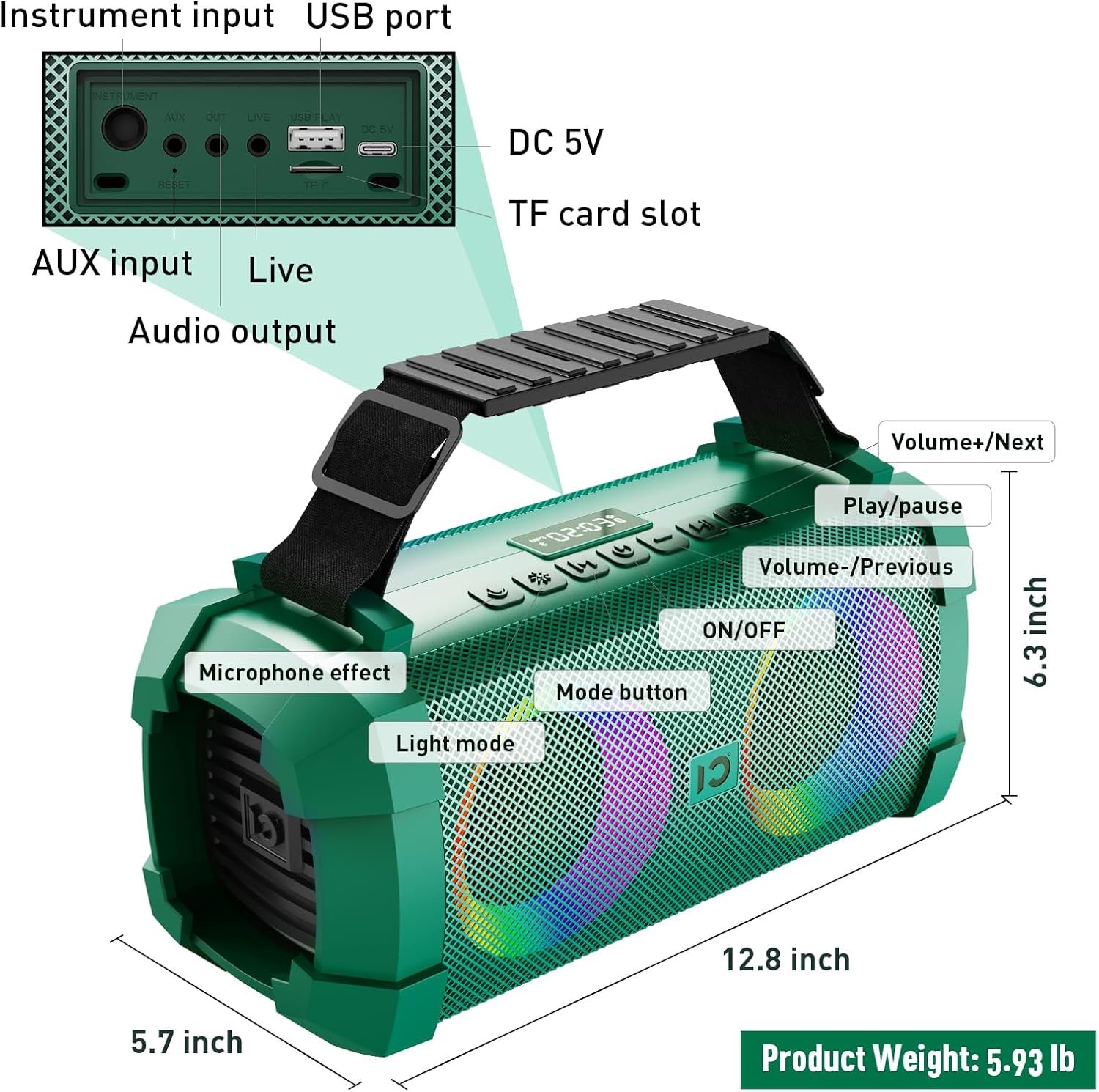
Image: SHIDU X1 Portable Bluetooth Speaker Control Panel Diagram
The speaker features a top-mounted control panel for easy access to various functions:
- Bọtịnụ ngbanwu/ Gbanyụọ: Long press to power the speaker on or off.
- Bọtịnụ ụkpụrụ: Short press to cycle through input modes (Bluetooth, AUX, TF Card, U-Disk).
- Bọtịnụ Ọnọdụ ọkụ: Short press to switch between 5 dynamic LED light modes. Long press to turn the lights off.
- Microphone Effect Button: Short press to cycle through 3 sound effects (Popular, Professional, Original) for the microphone.
- Volume - / Previous Track Button: Pịa obere oge maka egwu gara aga. Pịa ogologo oge iji belata olu.
- Bọtịnụ Kwụsị/Kwụsị: Pịa obere oge iji kpọọ ma ọ bụ kwụsịtụ ọdịyo.
- Volume + / Next Track Button: Pịa obere oge maka egwu na-esote. Pịa ogologo oge iji mee ka olu dịkwuo elu.
Wireless Microphone Controls
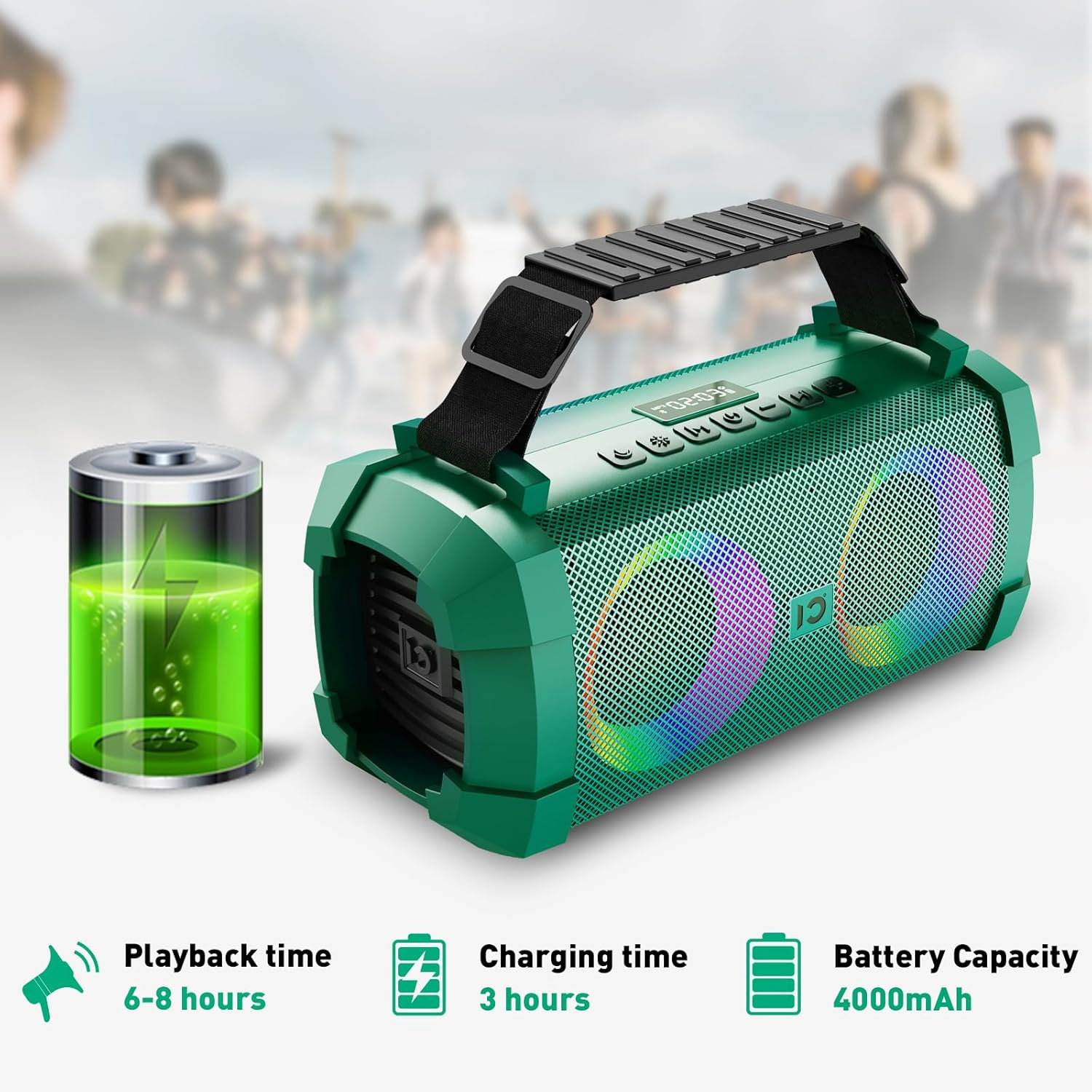
Image: SHIDU X1 Wireless Microphone Controls
The wireless microphone includes the following controls:
- Bọtịnụ ike: Long press to turn the microphone on or off.
- Frequency + Button: Short press to increase the microphone's frequency.
- Frequency - Button: Short press to decrease the microphone's frequency.
- Mpịakọta + bọtịnụ: Long press to increase microphone volume.
- Mpịakọta - bọtịnụ: Long press to decrease microphone volume.
- Ikanam ihuenyo: Displays current frequency and battery level.
Melite
Ịchaji Ọkà Okwu
Before first use, fully charge the speaker. Connect the provided Type-C charging plug to the DC 5V port on the speaker and plug it into a power source. The charging indicator will show the charging status. A full charge takes approximately 3 hours.

Image: SHIDU X1 Portable Bluetooth Speaker battery life details: 6-8 hours playback, 3 hours charging, 4000mAh capacity.
Ịgbanyụ/ Gbanyụọ
Pịa ogologo Gbanye/ Gbanyụọ button on the speaker's control panel to power it on or off.
Njikọ Bluetooth
- Ensure the speaker is powered on and in Bluetooth mode (indicated by a flashing Bluetooth icon or voice prompt). If not, short press the Ụdị bọtịnụ ka ịgbanwee gaa na ọnọdụ Bluetooth.
- Kwado Bluetooth na ngwaọrụ mkpanaka gị (smartphone, tabletị, wdg).
- Chọọ maka available Bluetooth devices and select "SHIDU X1" from the list.
- Once connected, the speaker will indicate successful pairing, and the Bluetooth icon will stop flashing.
Njikọ igwe okwu
The UHF wireless microphone is factory-paired with the speaker. Simply power on both the speaker and the microphone, and they should connect automatically. If pairing is lost, refer to the troubleshooting section.
Ntuziaka ọrụ
Ụdị ntinye ntinye
Mkpirisi pịa Ụdị button on the speaker to cycle through available input sources: Bluetooth, AUX, TF Card, and U-Disk (USB flash drive).
Adjusting Volume and Tracks
- Njikwa olu: Pịa ogologo Mpịakọta + button to increase volume, and long press the Mpịakọta - bọtịnụ iji belata olu.
- Sochie igodo: Mkpirisi pịa Track na-esote button to skip to the next song, and short press the Egwu gara aga button to go to the beginning of the current song or the previous song.
- Gwuo/kwụsịtụ: Mkpirisi pịa Gwuo/kwụsịtụ bọtịnụ ka kwụsịtụ ma ọ bụ maliteghachi ịkpọghachi.
Using Sound Effects
The speaker offers three distinct sound effects for the wireless microphone:

Image: SHIDU X1 Portable Bluetooth Speaker demonstrating Original, Popular, and Professional sound modes.
- Original Mode: Standard vocal output.
- Popular Mode: Enhances vocals for a more vibrant sound.
- Ụdị ọkachamara: Provides a refined vocal output suitable for performances.
Mkpirisi pịa Mmetụta igwe okwu button on the speaker to cycle through these effects.
Controlling LED Lights
The speaker features 5 dynamic LED light modes to enhance the atmosphere.

Image: SHIDU X1 Portable Bluetooth Speaker showcasing 5 types of lighting modes.
Mkpirisi pịa Ọnọdụ ọkụ button to cycle through the different lighting patterns. Long press the Ọnọdụ ọkụ button to turn the LED lights off.
Live Streaming Function
The SHIDU X1 includes a professional live streaming interface. Connect your device using the provided Live Stream Cable to enable karaoke live streaming functionality.

Image: SHIDU X1 Portable Bluetooth Speaker with professional live broadcast interface for karaoke.
Njirimara ngwaahịa gafereview
The SHIDU X1 is designed for versatile use, offering powerful sound and engaging features for various occasions.

Image: SHIDU X1 Portable Bluetooth Speaker with 60W output, Monstrous Bass, 3 Sound Effects, 5 Party Lights, Bluetooth 5.0, TF Card, 6.5mm Instrument Port, Live Streaming, UHF Wireless Mic, USB Flash Drive.
Experience deep bass and clear highs with 60W high-power stereo sound, suitable for both indoor and outdoor environments.

Image: SHIDU X1 Portable Bluetooth Speaker illustrating high-quality three-dimensional sound and overweight bass.
The speaker is ideal for various scenarios, including family karaoke, parties, band performances, and outdoor camping.

Image: SHIDU X1 Portable Bluetooth Speaker suitable for multiple scenarios: family karaoke, party interaction, band performance, outdoor camping.
Vidiyo ngwaahịa ngwaahịa
Video: Official SHIDU X1 Wireless Bluetooth Speaker with Wireless Microphone 60W Portable Karaoke Machine overview. This video demonstrates the product's features and functionality.
Nkọwapụta
| Ụdị | SHIDU |
| Nọmba nlereanya | X1 |
| Mpụta Wattage | Watt 60 (Ọkwa kachasị elu) / Watt 40 (RMS) |
| Teknụzụ Njikọta | Bluetooth 5.0, AUX, USB, TF Card |
| Akụkụ ihe (L x W x H) | 12.8 x 5.7 x 6.3 sentimita asatọ |
| Ibu Ibu | 5.6 pound |
| Ike batrị | 4000mAh |
| Oge nkwughachi | 6-8 hours (at medium volume) |
| Oge Nchaji | awa 3 |
| Mgbasa ozi arụnyere | Igwe okwu |
Nchọpụta nsogbu
If you encounter any issues with your SHIDU X1 speaker, please refer to the following common solutions:
- Enweghị ike: Ensure the speaker is fully charged. Connect the charging cable and allow it to charge for at least 30 minutes before attempting to power on again.
- Enweghị ụda: Check the volume levels on both the speaker and your connected device. Ensure the correct input mode is selected. If using Bluetooth, verify successful pairing.
- Okwu njikọta Bluetooth: Turn off Bluetooth on your device and the speaker, then restart both. Clear the speaker from your device's Bluetooth history and attempt to pair again. Ensure no other devices are actively connected to the speaker.
- Igwe okwu anaghị arụ ọrụ: Ensure the microphone is powered on and fully charged. Check the microphone's frequency settings and adjust if necessary. Re-pair the microphone if connection is lost (usually automatic).
- Ụda agbagọ: Belata olu nke ma ọkà okwu ma ngwaọrụ ejikọrọ. Hụ na isi iyi ọdịyo ahụ dị mma.
Nlekọta
To ensure the longevity and optimal performance of your SHIDU X1 speaker, follow these maintenance guidelines:
- Nhicha: Jiri ákwà dị nro ma kpọọ nkụ hichaa mpụta okwu ahụ. Ejila ihe nhicha ma ọ bụ ihe mgbaze.
- Nchekwa: Chekwaa ọkà okwu n'ebe dị jụụ, kpọrọ nkụ na-adịghị na ìhè anyanwụ kpọmkwem na oke okpomọkụ.
- Nlekọta batrị: For optimal battery life, avoid fully discharging the battery frequently. Charge the speaker regularly, even if not in use, to maintain battery health.
- Nguzogide mmiri: While designed for outdoor use, avoid submerging the speaker in water or exposing it to heavy rain.
Akwụkwọ ikike na nkwado
The SHIDU X1 Portable Bluetooth Speaker comes with a standard manufacturer's warranty. Please refer to the warranty card included in your package for specific terms and conditions.
For technical support, troubleshooting assistance, or warranty claims, please contact SHIDU customer service through the retailer where you purchased the product or visit the official SHIDU websaịtị maka ozi kọntaktị.