
Okwu mmalite
Thank you for choosing the AquilaPro Mini4 Golf Rangefinder. This device is designed to provide accurate distance measurements for an enhanced golfing experience. Please read this manual thoroughly before using the product to ensure proper operation and to maximize its lifespan.

Image: The AquilaPro Mini4 Golf Rangefinder, showing its compact design and key features.
Kedu ihe dị na Igbe ahụ
Upon opening your AquilaPro Mini4 package, you should find the following items:
- AquilaPro Mini4 Golf Rangefinder
- Protective Hard Shell Case
- Akwụkwọ ntuziaka (akwụkwọ a)
- -Dị-C Nchaji USB
- Akwa nhicha
Melite
1. Nchaji mbụ
Before first use, fully charge your AquilaPro Mini4 Rangefinder. The device features a built-in 750 mAh rechargeable battery.
- Locate the Type-C charging port on the device.
- Connect the provided Type-C charging cable to the rangefinder and a suitable USB power source (e.g., computer, wall adapter).
- A red light indicates charging. The light will turn off or change color (depending on model) when fully charged.
A full charge can provide over 30,000 measurements. The device has an intelligent power-saving feature that automatically shuts down after 30 seconds of inactivity to conserve battery.
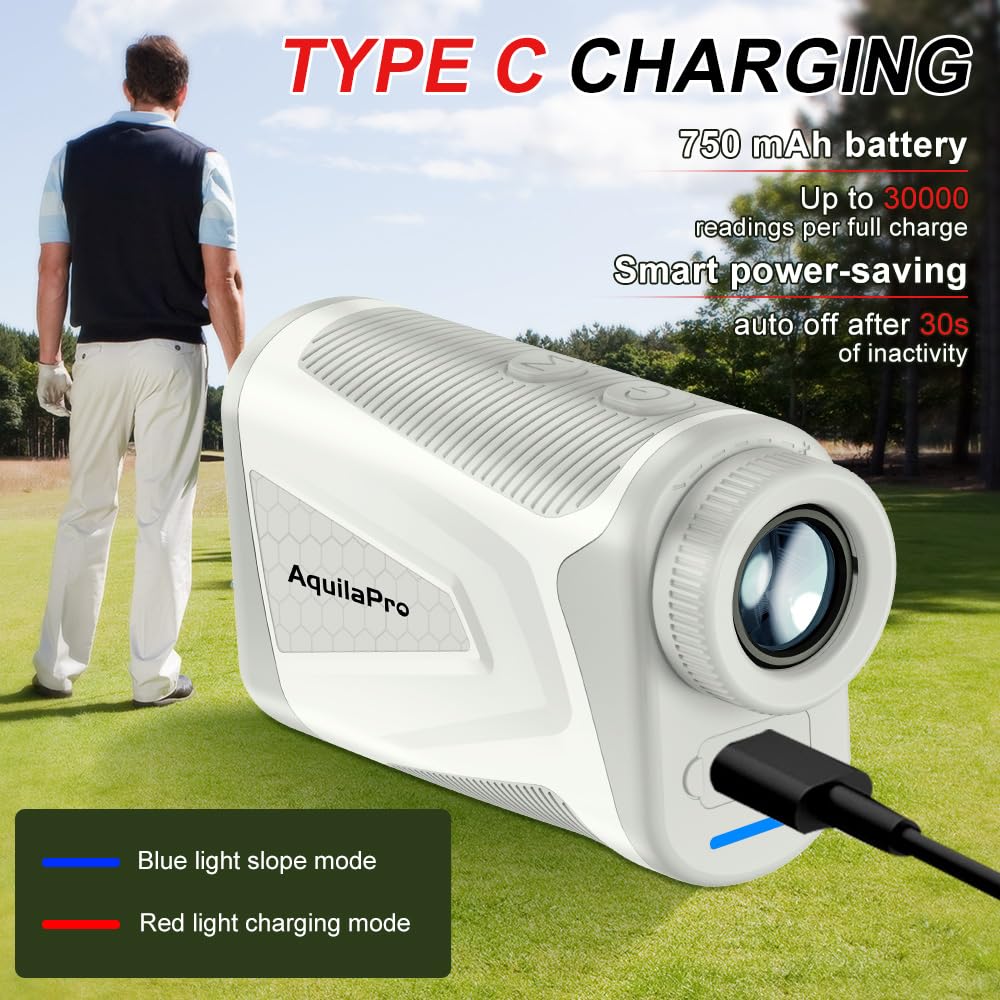
Image: The AquilaPro Mini4 Golf Rangefinder connected to a Type-C charging cable, illustrating the charging process.
2. Ịgbanye / gbanyụọ
Press the power button (usually located on the top or side) once to power on the device. The display will activate. To power off, either wait for the automatic shutdown or press and hold the power button (refer to specific device markings if available).
3. Ntugharị nkeji
The AquilaPro Mini4 supports unit conversions between yards, meters, and feet. To change the measurement unit, typically press and hold the 'MODE' button (or a dedicated unit button) for a few seconds until the unit changes on the display. Refer to the on-screen indicators for the current unit.
Ntuziaka ọrụ
1. Basic Distance Measurement
The rangefinder offers a measuring range of 4 to 1000 yards with an accuracy of ±0.5 yards. It features 7X magnification and fully multi-coated glass lenses for a bright and clear view.
- Lelee anya site na nku anya.
- Mee ka ihe ndị dị n'elu ihe mgbaru ọsọ gị zute ebe ị chọrọ ịga.
- Press the power/measurement button once to get a reading. The distance will be displayed on the internal HD LCD.
2. Mode Selection (Slope Compensation)
The AquilaPro Mini4 offers multiple modes, including non-slope mode for straight-line distances and golf slope compensation mode for adjusted distances based on elevation changes.
- Non-Slope Mode: Provides the direct line-of-sight distance to the target. This mode is typically legal for tournament play.
- Golf Slope Compensation Mode: Calculates and displays the "play as" distance, accounting for uphill or downhill slopes. This mode is generally not permitted in sanctioned tournaments.
To switch between modes, press the 'MODE' button. A visual indicator (e.g., a slope icon or a blue light) on the device or display will confirm the active mode. The device features a slope toggle for tournament legality.

Image: Illustration of the AquilaPro Mini4's slope compensation feature, showing how it adjusts distances for uphill and downhill shots.
3. Intelligent Flagpole Locking with Vibration
This feature helps to lock onto the flagstick, ignoring background objects, and provides a physical confirmation once locked.
- While in measurement mode, aim at the flagstick.
- Press and hold the measurement button, slowly scanning across the flagstick.
- The device will vibrate briefly once it has successfully locked onto the flag, and the distance will be displayed.

Image: The AquilaPro Mini4 demonstrating rapid flag locking, showing the target reticle on a flagstick with distance measurement.
4. Magnetic Mounting
The AquilaPro Mini4 is equipped with an upgraded magnet for secure mounting. This allows you to conveniently attach the rangefinder to metal surfaces, such as a golf cart frame, for easy access during play.

Image: The AquilaPro Mini4 Golf Rangefinder securely mounted to a golf cart frame using its enhanced magnet.
Nlekọta
1. Nhicha
To maintain optimal performance and clarity, keep the lenses and body of your rangefinder clean.
- Use the provided cleaning cloth to gently wipe the lenses. Avoid using abrasive materials or harsh chemicals.
- For the body, a soft, damp cloth can be used. Ensure no moisture enters the device.
2. Nlekọta batrị
The built-in Lithium-Ion battery is designed for long life. To prolong battery health:
- Zere ịchaji batrị ugboro ugboro.
- Chekwaa ngwaọrụ ahụ n'ebe dị jụụ, kpọrọ nkụ mgbe ọ naghị eji ya.
- If storing for extended periods, charge the battery to approximately 50% every few months.
3. Nchekwa
Always store the rangefinder in its protective hard shell case when not in use to prevent damage from impacts, dust, and moisture. The device has an IP54 waterproof rating, offering protection against splashes and dust, but it is not designed for submersion.
Nchọpụta nsogbu
If you encounter issues with your AquilaPro Mini4 Rangefinder, please refer to the following common solutions:
- Ngwaọrụ anaghị agbanye: Ensure the battery is fully charged. Connect the Type-C charging cable and allow it to charge for at least 30 minutes before attempting to power on again.
- Ọgụgụ na-ezighi ezi: Ensure the lenses are clean. Make sure you are aiming at a clear target and not through obstructions. Check that the correct measurement unit (yards, meters, feet) is selected.
- Mkpọchi ọkọlọtọ anaghị arụ ọrụ: Ensure you are in an appropriate mode for flag locking. Try scanning slowly across the flagstick. Ensure there are no strong reflective surfaces directly behind the flag that might interfere.
- Ngosipụta ahụ adịghị mma ma ọ bụ doo anya: Check battery level. Ensure lenses are clean. Adjust the diopter (if available) on the eyepiece for your vision.
Ọ bụrụ na nsogbu dịgidere, biko kpọtụrụ nkwado ndị ahịa maka enyemaka ọzọ.
Nkọwapụta
| Ụdị | AquilaPro |
| Nọmba nlereanya | miniPro (Mini4) |
| Oke nso | 4 ruo 1000 yad |
| Izi ezi | ±0.5 yaadị |
| Nkwalite | 7X |
| Ụdị batrị | Built-in 750 mAh Lithium-Ion Rechargeable |
| Nchaji ọdụ ụgbọ mmiri | Ụdị-C |
| Mmiri Nguzogide | IP54 (ihe mgbochi mmiri) |
| Ihe onwunwe | Acrylonitrile Butadiene Styrene |
| Ibu Ibu | 125 grams |
| Akụkụ ngwaahịa | 5.6L x 3W x 9.4H centimita |
| Ngwa gụnyere | Rangefinder, Case, User Manual, Charging Cable, Clean Cloth |
Akwụkwọ ikike na nkwado ndị ahịa
AquilaPro stands by the quality of its products. Your AquilaPro Mini4 Golf Rangefinder comes with a 1-afọ akwụkwọ ikike site na ụbọchị ịzụrụ.
Anyị na-enyekwa lifelong technical support to ensure you have the best experience with your device. Should you encounter any issues, have questions, or require assistance, please do not hesitate to contact our customer care team.
To expedite support, please have your order number ready when contacting us. Our dedicated team aims to respond to all inquiries within 24 hours.
Contact information (e.g., email address or website) would typically be provided here by the manufacturer.