
1. Okwu mmalite
Thank you for choosing the RORRY 4-in-1 MagSafe Wireless Charging Station and 10000mAh Portable Power Bank. This innovative device is designed to provide versatile and efficient charging for your iPhone, Apple Watch, and AirPods, both at home and on the go. It combines a multi-device charging stand with a detachable 10000mAh power bank, ensuring your devices are always powered.
2. Ngwaahịa gafereview
Akụkụ ndị bụ isi:
- Nchaji 4-na-1: Simultaneously charges iPhone (MagSafe), Apple Watch, and AirPods/Qi-compatible devices.
- Detachable 10000mAh Power Bank: The MagSafe charging module can be removed and used as a portable power bank.
- Nhazi a na-agbanwe agbanwe: The charging station and power bank kickstand are foldable for easy portability and storage.
- Nchaji ngwa ngwa: Supports 15W MagSafe fast charging for compatible iPhones.
- Ndakọrịta sara mbara: Compatible with iPhone 12-16 series, Apple Watch Ultra 2/10/9/8/7/SE/6/5/4/3, AirPods 2/3/4/Pro, and other Qi-compatible devices.
- Ihe mgbakwụnye agbakwunyere: The detachable power bank features a kickstand for vertical or horizontal viewing mgbe ị na-ana.
- Nchedo Nchedo: Built-in overcharge, over-discharge, overheat, and leakage protection.
Ọdịnaya ngwugwu:
- 1 x RORRY 4-in-1 Wireless Charging Station
- 1 x USB-C na eriri USB-C
- 1 x Metal Ring (for non-MagSafe compatible iPhones 8-11)
- 1 x Akwụkwọ ntuziaka onye ọrụ

Image: The RORRY 4-in-1 MagSafe Wireless Charging Station in use, simultaneously charging an iPhone, Apple Watch, and AirPods. The detachable power bank is shown separately.
3. Ozi nchekwa
Please read all safety instructions carefully before using this product. Failure to follow these instructions may result in fire, electric shock, injury, or damage to the product or property.
- Ewepụla ngwaọrụ ahụ na oke okpomọkụ, ìhè anyanwụ kpọmkwem, ma ọ bụ oke iru mmiri.
- Avoid dropping, disassembling, or attempting to repair the device yourself.
- Use only the recommended 20W USB-C power adapter (not included) for optimal performance and safety.
- Debe ngwaọrụ ahụ na mmiri ma ọ bụ mmiri mmiri ndị ọzọ.
- Gbaa mbọ hụ na ikuku ikuku dị mma n'oge ị na-akwụ ụgwọ iji gbochie ikpo oke ọkụ.
- This product is equipped with overcharge protection, over-discharge protection, overheat prevention, and leakage protection for safe operation.
4. Nhazi
- Jikọọ na Ike: Connect the provided USB-C to USB-C cable to the charging station's input port and to a 20W USB-C power adapter (not included). Plug the adapter into a wall outlet. The power indicator lights on the base will illuminate.
- Ebube mbụ: For first-time use, fully charge the detachable power bank by placing it on the charging station until its indicator lights show full charge.

Image: The RORRY 4-in-1 charging station demonstrating its ability to charge an iPhone, Apple Watch, and AirPods simultaneously, highlighting its 10000mAh capacity.
5. Ntuziaka ọrụ
5.1 Charging Your iPhone (MagSafe)
- Ensure the detachable power bank is securely attached to the charging station.
- Place your MagSafe-compatible iPhone (iPhone 12-16 series) onto the magnetic charging pad. The magnets will align the phone automatically.
- Charging will begin automatically at up to 15W.
- For iPhone 8-11 models, attach the included metal ring or use a MagSafe-compatible case (case thickness must be 3mm or less) to enable magnetic charging.
5.2 Ịchaji Apple Watch gị
- Place your Apple Watch onto the dedicated charging puck located on the side of the charging station.
- Charging will begin automatically at 2.5W.
5.3 Charging Your AirPods or Qi-Compatible Devices
- Place your AirPods charging case or any other Qi-compatible device onto the wireless charging pad at the base of the station.
- Charging will begin automatically at 5W.
5.4 Iji dị ka Portable Power Bank
- Gently detach the MagSafe charging module from the main charging station. This module now functions as a 10000mAh portable power bank.
- To charge your iPhone wirelessly, simply attach it magnetically to the power bank.
- The power bank also features a USB-C port for wired charging of other devices, such as flashlights or other smartphones.
5.5 Foldable Stand Functionality
- The main charging station can be folded for compact storage and transport.
- The detachable power bank has a built-in kickstand on its back. Extend this kickstand to prop up your iPhone for comfortable viewing in both vertical and horizontal orientations while wirelessly charging.
5.6 Ngosipụta ike
Ihe ngosi ike lamps on the mobile battery provide a visual indication of the remaining battery level and the current charging status.

Image: The RORRY 4-in-1 charging station demonstrating its foldable design and adjustable viewing angles for portability and convenience.
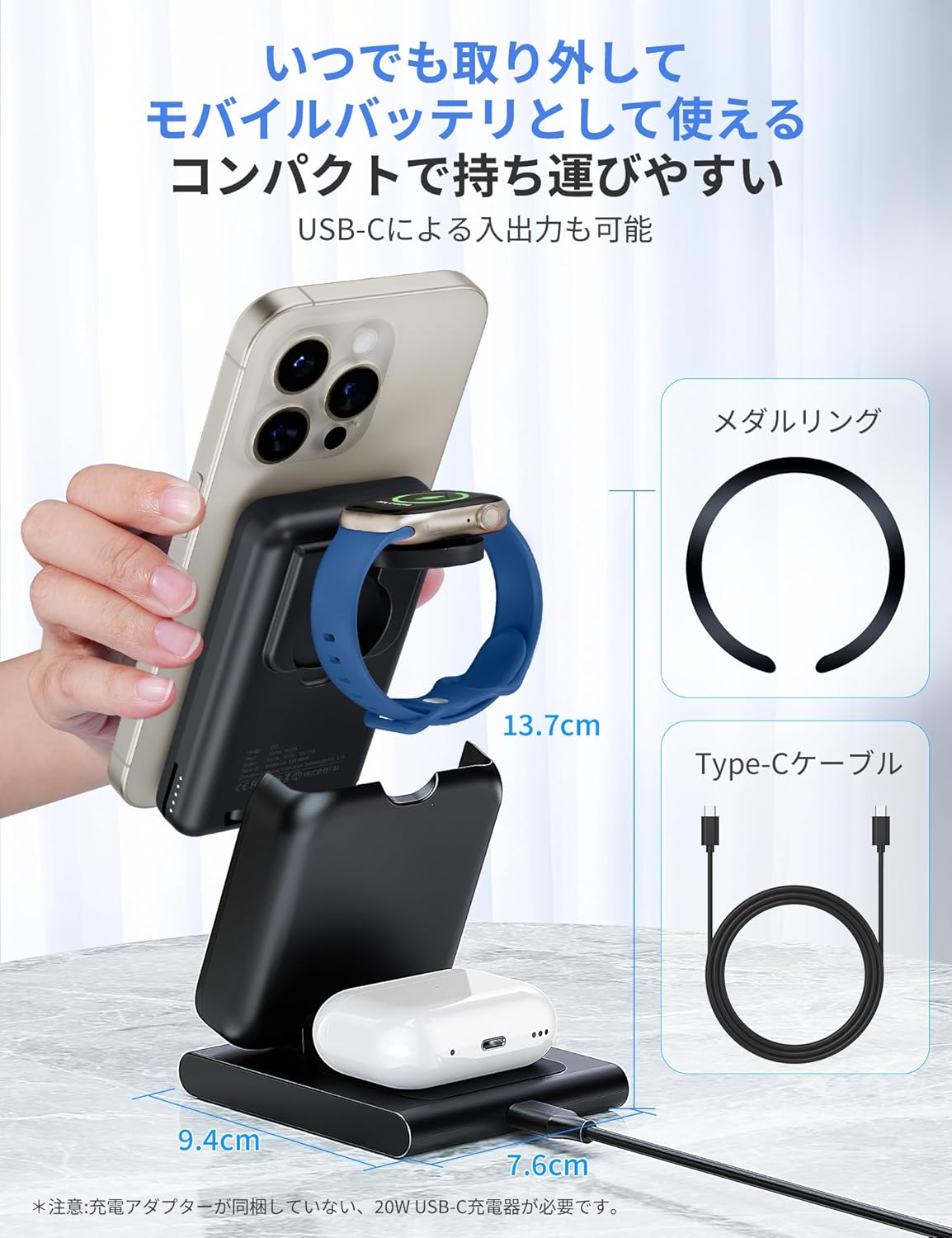
Image: The detachable RORRY power bank, highlighting its compact size, USB-C input/output, and the included metal ring for enhanced compatibility.
Video: A demonstration of the RORRY 4-in-1 charging station's functionality, including simultaneous charging of an iPhone, Apple Watch, and AirPods, and the detachable power bank feature with its integrated kickstand.
Video: This video illustrates the importance of having a portable power bank during emergencies like earthquakes and showcases the RORRY charger as a reliable backup power source.
6. Nkọwapụta
| Njirimara | Nkọwapụta |
|---|---|
| Nọmba nlereanya | D12 |
| Ike batrị | 10000mAh |
| iPhone Wireless Output | 15W (MagSafe compatible) |
| Ihe nrụpụta ikuku ikuku Apple Watch | 2.5W |
| AirPods/Qi Wireless Output | 5W |
| Ntinye Voltage | 5V |
| ọdụ ụgbọ mmiri USB | 1 (USB-C for input/output) |
| Agba | Agba ntụ |
| Akụkụ (Akwakọba) | 16.1 x 7.9 x 5.4 cm |
| Ibu (ngwaahịa) | 335 g |
| Usoro mgbakọ | Ugwu okpokoro |
| Teknụzụ Njikọta | USB |
| Ngwa dakọtara | iPhone 12-16 series, Apple Watch Ultra 2/10/9/8/7/SE/6/5/4/3, AirPods 2/3/4/Pro, Qi-compatible Android devices |
7. Nchọpụta nsogbu
- Ngwaọrụ anaghị akwụ ụgwọ:
- Ensure the charging station is properly connected to a 20W USB-C power adapter and a power outlet.
- Check if your device is correctly placed on the charging area (MagSafe, Apple Watch puck, or Qi base).
- Remove any thick phone cases (over 3mm) or cases that are not MagSafe compatible.
- Verify that your device is wireless charging compatible.
- If using the detachable power bank, ensure it is charged.
- Nchaji nwayọ:
- Ensure you are using a 20W USB-C power adapter. Lower wattagihe nkwụnye e nwere ike ime ka chajị dị nwayọ nwayọ.
- Avoid charging multiple devices simultaneously if you require maximum speed for a single device.
- Ensure there are no foreign objects between the charger and your device.
- ekpo oke ọkụ:
- It is normal for the charger and device to become slightly warm during charging. If it becomes excessively hot, discontinue use and contact support.
- Ensure proper ventilation around the charging station.
8. Akwụkwọ ikike na nkwado
This RORRY product comes with a akwụkwọ ikike otu afọ from the date of purchase. If you have any questions, concerns, or require support, please do not hesitate to contact us. Our customer service team is ready to assist you.
9. Ozi nnabata
The RORRY 4-in-1 MagSafe Wireless Charging Station and 10000mAh Portable Power Bank complies with various international safety and quality standards, including:
- PSE: Product Safety Electrical Appliance and Material Safety Law (Japan)
- FCC: Federal Communications Commission (United States)
- RoHS: Restriction of Hazardous Substances Directive (European Union)