
Okwu mmalite
The Havit Gamenote KB885L mechanical keyboard is engineered for precision, durability, and customization. It features a gasket structure design, providing a soft and stable typing experience while minimizing noise. The full key rollover with multi-key response ensures fast and accurate input, crucial for gaming. With customizable RGB backlighting, you can personalize your keyboard with various lighting modes and effects. The detachable USB-C cable enhances portability and simplifies cable management. This keyboard is built with mechanical switches rated for 50 million key presses, making it suitable for gamers, typists, and professionals who require long-lasting performance.
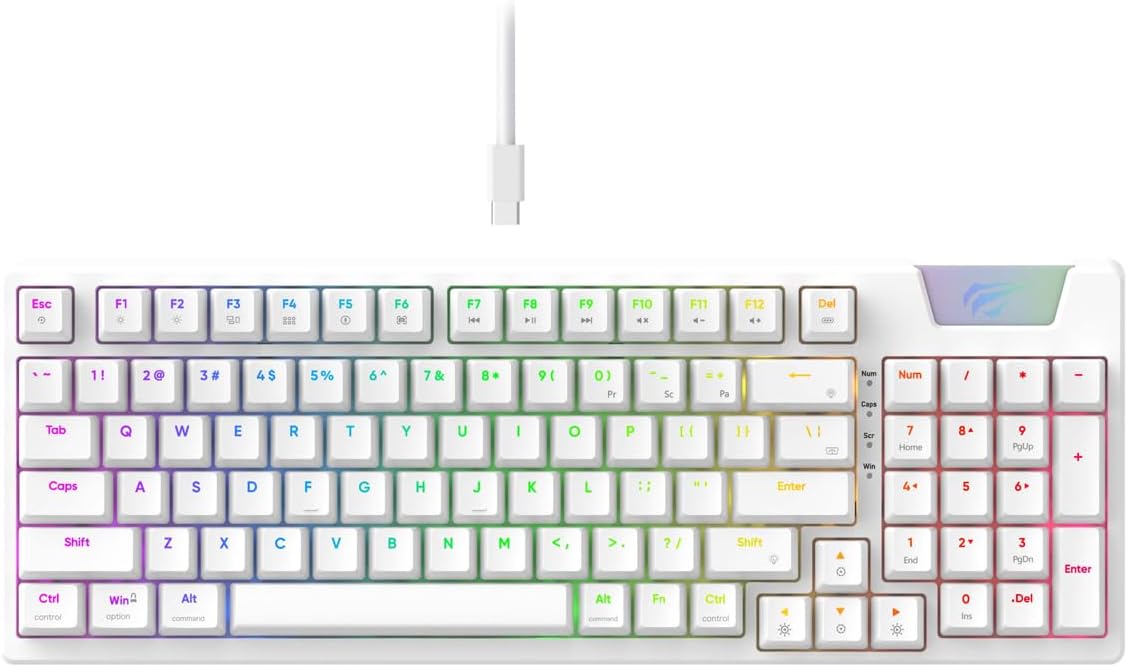
Image: The Havit Gamenote KB885L mechanical keyboard in white, showcasing its full layout and detachable USB-C cable.
Ntuziaka nhazi
Follow these steps to set up your Havit Gamenote KB885L mechanical keyboard:
- Mepee ahụigodo: Jiri nlezianya wepụ ahụigodo na ngwa ya na nkwakọ ngwaahịa.
- Jikọọ eriri USB-C: Insert the detachable USB Type-C cable into the port on the keyboard.
- Jikọọ na Kọmputa: Tinye eriri USB n'akụkụ nke ọzọ n'ọdụ ụgbọ mmiri USB dị na kọmputa gị.
- Nwụnye ọkwọ ụgbọala: Ahụigodo ahụ bụ nkwụnye na-egwu, ọ naghị achọkwa ndị ọkwọ ụgbọala ọzọ. Sistemu eji arụ ọrụ gị kwesịrị ịchọpụta na wụnye ndị ọkwọ ụgbọala dị mkpa.
- Ọrụ nnwale: Open a text editor or browser to test key presses and ensure all functions are working correctly.

Image: A close-up of the Havit Gamenote KB885L keyboard highlighting its portable design and detachable cable for easy setup and transport.
Ntuziaka ọrụ
The Havit Gamenote KB885L keyboard offers various features for an enhanced user experience:
Njikwa ọkụ azụ RGB
Igodo ahụ nwere ọkụ azụ RGB nke enwere ike ịhazi. Jiri njikọta igodo ndị a iji gbanwee mmetụta ọkụ:
- Fn + [Igodo]: Cycle through different RGB lighting modes. (Specific key combinations may vary, refer to on-keyboard legends if available).
- Igodo Fn + akụ: Gbanwee nchapụta na ọsọ nke mmetụta ọkụ.

Image: The Havit Gamenote KB885L keyboard displaying its vibrant RGB backlighting, illustrating customizable lighting effects.
Mbugharị igodo zuru oke (NKRO)
This keyboard supports Full Key Rollover, meaning every key press is registered independently, regardless of how many keys are pressed simultaneously. This feature is essential for fast-paced gaming and typing, preventing ghosting or missed inputs.
Ergonomic imewe
The keyboard is designed with ergonomics in mind to provide comfort during extended use. Its layout and keycap profile aim to reduce strain on your wrists and fingers.

Foto: A view of the Havit Gamenote KB885L keyboard highlighting its ergonomic design for comfortable use.
Nlekọta
Mmezi kwesịrị ekwesị na-eme ka keyboard gị dị ogologo ma rụọ ọrụ nke ọma:
- Nhicha: Regularly clean the keyboard with a soft, dry cloth. For deeper cleaning, use compressed air to remove dust and debris from between the keycaps. For stubborn dirt, a slightly damp Enwere ike iji akwa nwere ncha dị nro, na-ahụ na ọ dịghị mmiri mmiri na-abanye na keyboard.
- Zenarị Mwụfu: Debe mmiri mmiri na ahụigodo ka igbochi mmebi nke ihe dị n'ime. Ọ bụrụ na ọ wụfuru, kwụpụ igodo ahụ ozugbo wee hapụ ya ka ọ kpọọ nkụ kpamkpam tupu ị jikọọ ọzọ.
- Nlekọta USB: Handle the detachable USB-C cable with care. Avoid sharp bends or excessive pulling to prevent damage to the cable or connectors.
- Nchekwa: Mgbe ị na-ejighị ya, debe ahụigodo ahụ n'ebe dị ọcha ma kpọọ nkụ, ebe okpomọkụ dị oke njọ na-agaghị adị.
Nchọpụta nsogbu
If you encounter issues with your Havit Gamenote KB885L keyboard, try the following solutions:
- Ahụigodo Anaghị aza:
- Gbaa mbọ hụ na ejikọrọ eriri USB-C nke ọma na ma ahụigodo na kọmputa.
- Gbalịa itinye ahụigodo ahụ n'ọdụ ụgbọ mmiri USB dị iche na kọmputa gị.
- Nwalee kiiboodu na kọmpụta ọzọ iji chọpụta ma ọ bụrụ na nsogbu dị na ahụigodo ma ọ bụ sistemụ gị.
- Igwe ọkụ RGB anaghị arụ ọrụ:
- Check if the lighting is turned off using the Fn key combinations.
- Hụ na ejiri njikọ USB rụọ ọrụ nke ọma na keyboard ahụ.
- Igodo anaghị edebanye aha / Ghosting:
- Due to full key rollover, this is unlikely. However, ensure no debris is lodged under the keycap.
- If a specific key is consistently failing, it might indicate a switch issue. Contact support if the problem persists.
Nkọwapụta
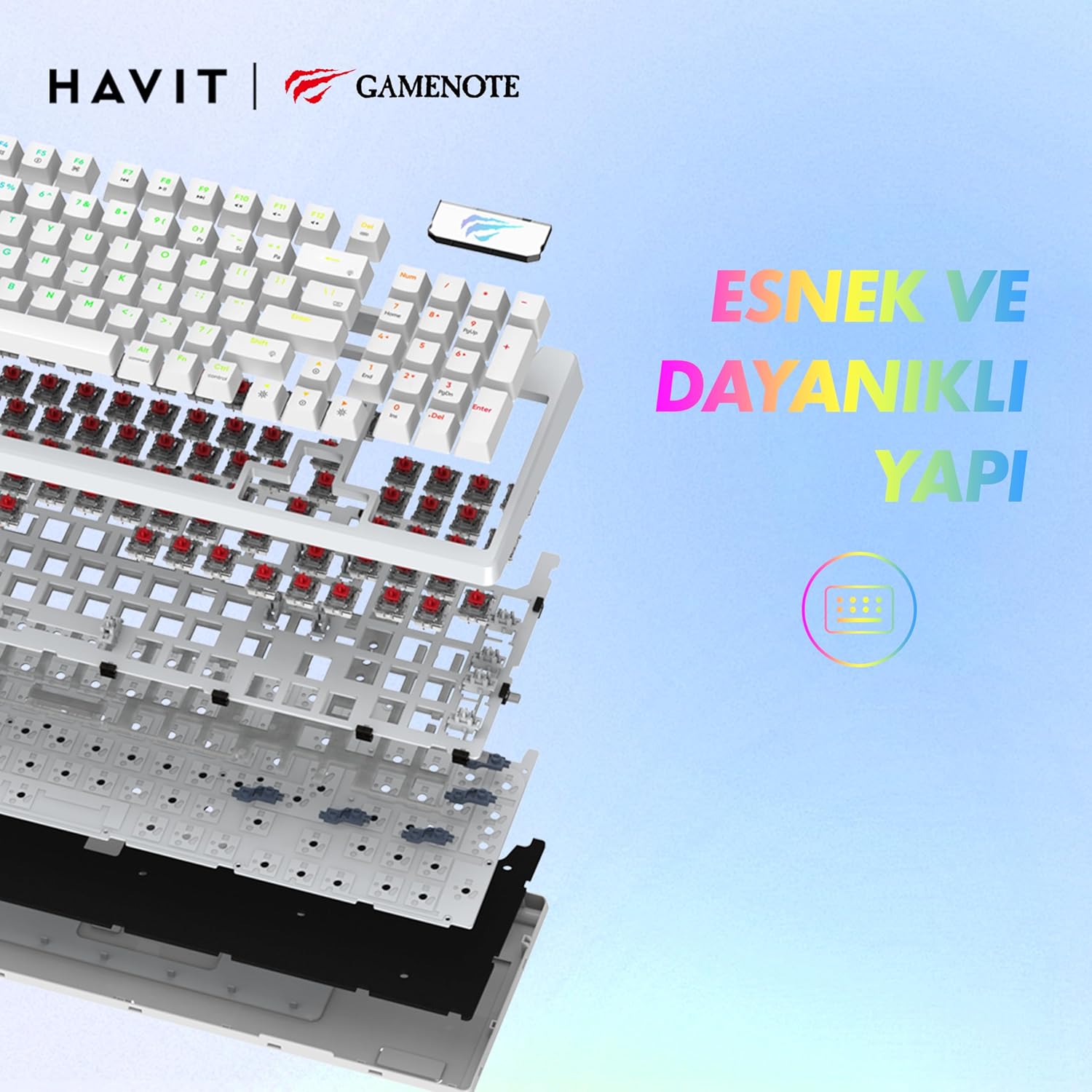
Foto: Ihe gbawara view of the Havit Gamenote KB885L keyboard, illustrating its internal gasket structure for enhanced stability and typing feel.
| Njirimara | Nkọwa |
|---|---|
| Ụdị | Havit |
| Nọmba nlereanya | KB885L |
| Ngwa dakọtara | Kọmputa |
| Teknụzụ Njikọta | USB |
| Nkọwa ahụigodo | Ịgba egwu |
| Eji akwadoro | Ịgba egwu |
| Njirimara Pụrụ Iche | Enwere ike ibugharị |
| Agba | Ọcha |
| Backlight Color Support | RGB (Red, Green, Blue model) |
| Ụdị | Oge a |
| Akụkụ ngwaahịa (L x W x H) | 38.7 x 14 x 4.5 cm |
| Asụsụ | Bekee |
| Isi Iyi Ike | Ike USB |
| Ngbanwe Ụdị | Atụ aka |
| Nhazi ahụigodo | QWERTY |
| Ntuzi aka | Ambidextrous |
| Ọnụọgụ igodo | 95 |
| Ọnụọgụ bọtịnụ | 104 |
| Ngwa gụnyere | eriri USB |
| Ihe onwunwe | Plastic |
| Key Press Lifespan | 50 Million (from description) |

Image: An illustration highlighting the Havit Gamenote KB885L's durable mechanical switches, rated for a 50 million key press lifespan.
Ozi akwụkwọ ikike
Keyboard Mechanical Havit Gamenote KB885L na-abịa na akwụkwọ ikike otu afọ from the date of purchase. This warranty covers manufacturing defects and issues arising from normal use. It does not cover damage caused by misuse, accidents, unauthorized modifications, or improper maintenance. Please retain your proof of purchase for warranty claims.
Nkwado ndị ahịa
For further assistance, technical support, or warranty inquiries, please contact Havit customer service through their official website or the retailer where you purchased the product. Have your model number (KB885L) and proof of purchase ready when contacting support.