
Pepisky D18B, D16B, D18E, D16E
Pepisky Remote Control User Manual
Models: D18B, D16B, D18E, D16E
1. Ngwaahịa gafereview
The Pepisky Remote Control is designed to provide precise and reliable control for your fishing bait boat models D18B, D16B, D18E, and D16E. It features an intuitive LCD display and a robust signal for effective operation over long distances.
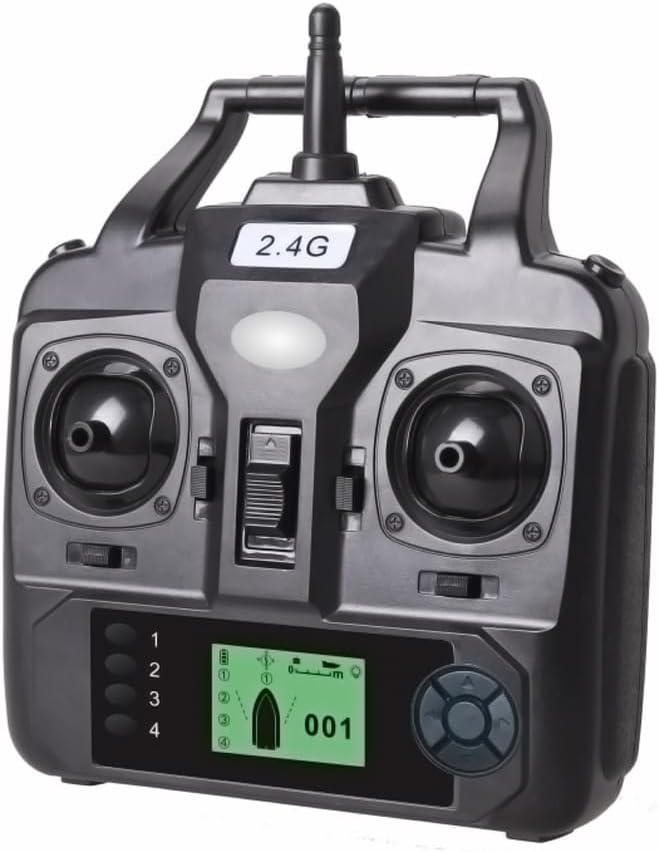
Foto: N'ihu view of the Pepisky Remote Control, showcasing its ergonomic design and central LCD screen.
Akụkụ ndị bụ isi:
- Ngosipụta LCD: Provides real-time information including boat distance, resolution, positioning points, battery life, and light status.
- Ogologo ogologo: Offers a strong signal with a remote control range of 400-500 meters.
- ndakọrịta: Specifically designed for Pepisky fishing bait boat models D18B, D16B, D18E, and D16E.
- Ihe owuwu na-adịgide adịgide: E ji plastik dị elu mee ya maka ogologo ndụ.
2. Ihe ngwugwu
Biko chọpụta na ihe niile dị na ngwugwu gị:
- 1 x Pepisky Remote Control Unit
Note: 4 AA batteries are required for operation and are not included in the package. The fishing bait boat is also not included.
3. Nkọwapụta

Image: The remote control with its dimensions indicated: 15.5cm / 6.1in width and 16.5cm / 6.5in height.
| Njirimara | Nkọwapụta |
|---|---|
| Ihe onwunwe | Plastic |
| Akụkụ ngwaahịa (L x W) | 15.5 cm x 16.5 cm (6.1 na x 6.5 inch) |
| Akụkụ ngwugwu (L x W x H) | Ihe dị ka 17 cm x 17 cm x 7 cm (6.7 na x 6.7 na x 2.8 in) |
| Ibu ngwugwu | Approx. 250 grams (8.8 ounces) |
| Oke njikwa anya | 400-500 mita |
| Isi Iyi Ike | Batrị 4 x AA (anaghị etinye ya) |
| Teknụzụ Njikọta | Ugboro ugboro Redio (RF) |
| Ụdị njikwa | Infrared (IR) |
| Agba | Nwa |
4. Nhazi
4.1 Ntinye batrị
The remote control requires 4 AA batteries for operation. Follow these steps to install them:
- Chọta ebe batrị dị n'azụ nke njikwa anya.
- Mikpuo mkpuchi nke batrị ahụ n'ala ma ọ bụ n'èzí iji mepee ya.
- Insert 4 AA batteries, ensuring the correct polarity (+ and -) as indicated inside the compartment.
- Mechie mkpuchi nke batrị batrị nke ọma.

Foto: N'azụ view of the remote control, highlighting the battery compartment cover.
4.2 Initial Pairing (if applicable)
Typically, the remote control is pre-paired with compatible Pepisky bait boats. If pairing is required, ensure both the remote control and the bait boat are powered off. Turn on the bait boat first, then the remote control. The devices should automatically connect. Refer to your bait boat's manual for specific pairing instructions if automatic connection does not occur.
5. Ntuziaka ọrụ
Familiarize yourself with the controls and display of your remote control for optimal operation of your fishing bait boat.
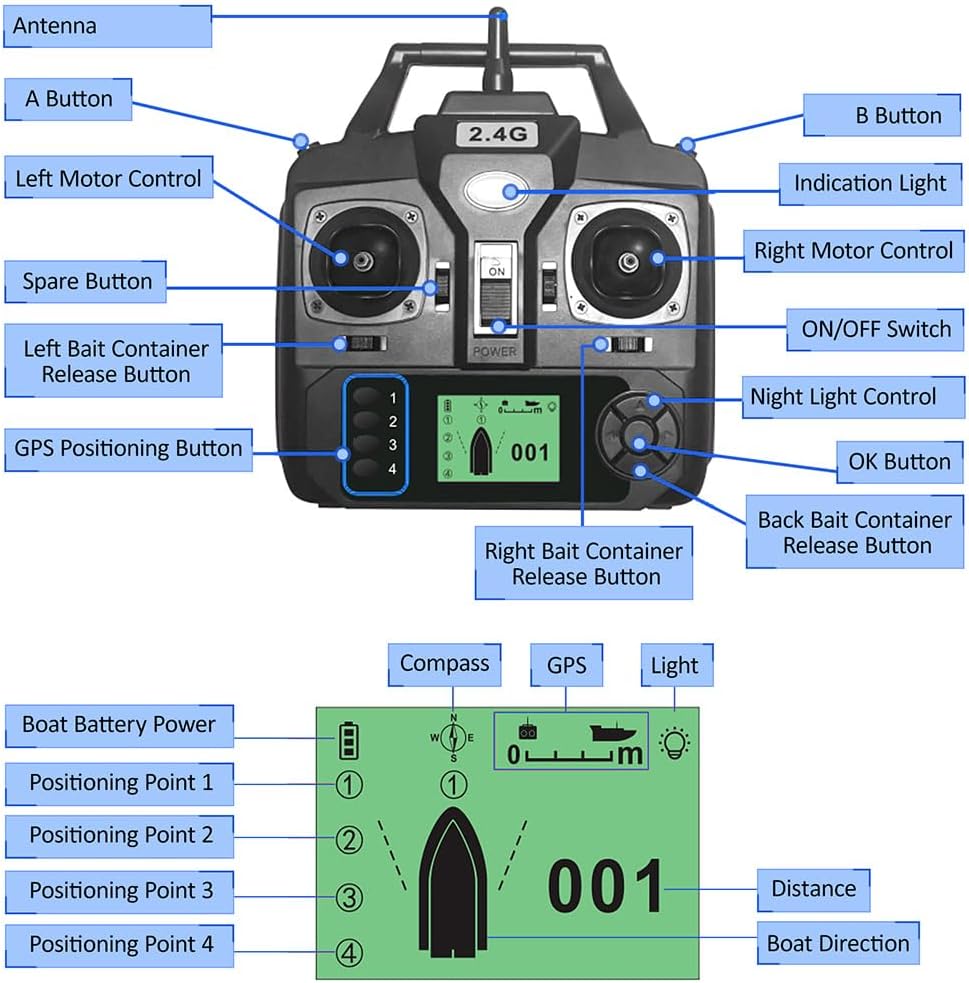
Image: Detailed diagram of the remote control, labeling all buttons, joysticks, and display elements for easy identification.
5.1 Control Layout:
- Antenna: Maka nnyefe mgbaàmà.
- A Button / B Button: Auxiliary function buttons (specific use may vary by boat model).
- Left Motor Control: Left joystick for controlling the left motor (forward/backward, turning).
- Right Motor Control: Right joystick for controlling the right motor (forward/backward, turning).
- Ìhè Ngosipụta: Na-egosi ike na ọnọdụ njikọ.
- Gbanyụọ/gbanyụọ Mgba ọkụ maka njikwa dị anya.
- Njikwa ọkụ abalị: Button to activate/deactivate the boat's night lights.
- OK bọtịnụ: Confirmation button for menu selections or actions.
- Left Bait Container Release Button: Releases bait from the left container.
- Right Bait Container Release Button: Releases bait from the right container.
- Back Bait Container Release Button: Releases bait from the rear container (if applicable).
- GPS Positioning Button: Activates GPS positioning functions.
- Spare Button: Unassigned button for future functions or specific boat models.
5.2 LCD Display Information:
- Boat Battery Power: Displays the current battery level of the bait boat.
- Positioning Point 1-4: Indicates saved GPS positioning points.
- Kompas: Shows the boat's current heading.
- GPS: Indicates GPS signal strength/status.
- Ìhè: Shows the status of the boat's lights.
- Ogologo: Displays the distance of the boat from the remote control.
- Boat Direction: Visual representation of the boat's orientation.
5.3 Isi arụ ọrụ:
- Ike Na: Slide the ON/OFF switch to the 'ON' position. The indication light will illuminate.
- Ntughari: Use the Left and Right Motor Control joysticks to steer the boat. Push both forward to move straight, pull back to reverse. Push one forward and the other back to turn.
- Bait Release: Press the corresponding Left, Right, or Back Bait Container Release Button to deploy bait.
- Ọkụ abalị: Press the Night Light Control button to turn the boat's lights on or off.
- Ndokwa GPS: Press the GPS Positioning Button to access or set GPS waypoints. Refer to your boat's specific GPS functions for detailed usage.
6. Nlekọta
Proper maintenance will ensure the longevity and optimal performance of your remote control.
- Nhicha: Wipe the remote control with a soft, dry cloth. Do not use harsh chemicals or abrasive cleaners.
- Nchekwa: Chekwaa ebe dịpụrụ adịpụ n'ebe dị jụụ, kpọrọ nkụ na-adịghị na ìhè anyanwụ kpọmkwem na oke okpomọkụ.
- Nlekọta batrị: Wepu batrị ma ọ bụrụ na agaghị eji njikwa ime ihe ruo ogologo oge iji gbochie ntapu.
- Zenarị mmiri: This remote control is not waterproof. Avoid exposure to water or high humidity.
7. Nchọpụta nsogbu
Ọ bụrụ na ị hụ nsogbu na njikwa remote gị, gbalịa ngwọta ndị a:
| Nsogbu | Ihe nwere ike ime | Ngwọta |
|---|---|---|
| Remote control does not power on. | Batrị nwụrụ anwụ ma ọ bụ arụnyere na ezighi ezi. | Dochie batrị ọhụrụ, na-ahụ na polarity ziri ezi. |
| Boat does not respond to remote control. | Not paired, out of range, or boat battery low. | Ensure boat is powered on and charged. Re-pair devices if necessary. Move closer to the boat. |
| Ngosipụta LCD adịghị mma ma ọ bụ enweghị ìhè. | Low remote control battery. | Dochie batrị njikwa anya. |
| Bait container does not open. | Mechanism jammed or boat battery low. | Check for obstructions. Ensure boat battery is sufficiently charged. |
8. Akwụkwọ ikike na nkwado
For information regarding warranty coverage and customer support, please refer to the documentation provided with your purchase or contact the seller directly. Keep your proof of purchase for any warranty claims.
Ask a question about this manual
Ask about setup, troubleshooting, compatibility, parts, safety, or missing instructions. Manuals+ will review the question and use this page’s manual context to help answer it.