
1. Okwu mmalite
The Spy Spot GL320MG is a compact 4G LTE real-time GPS tracker designed for monitoring vehicles, assets, and individuals. It comes equipped with a small, magnetic, and waterproof case, making it suitable for various applications where discreet and durable tracking is required. This manual provides comprehensive instructions for setting up, operating, and maintaining your GL320MG tracker.

Foto nke 1.1: The Spy Spot GL320MG GPS tracker shown within its magnetic waterproof case, alongside a smartphone displaying its live tracking interface. This image illustrates the device's compact size and its primary function of real-time location monitoring.
2. Atụmatụ igodo
- Nchọgharị oge: Provides live location updates via a dedicated application or websaịtị.
- Njikọ 4G LTE: Ensures reliable and fast data transmission for accurate tracking.
- Magnetic Waterproof Case: Offers secure attachment to metal surfaces and protection against environmental elements like rain and snow.
- Ogologo ndụ batrị: Features a 2600mAh internal battery for extended operation.
- Geo-Fencing: Allows users to set virtual boundaries and receive alerts when the tracker enters or exits defined areas.
- Data akụkọ ihe mere eme: Stores up to six months of tracking history, including routes, stops, and speeds.
- Automated Notifications: Configurable alerts for speed, movement, and boundary breaches via app or email.
- Mkpuchi sara mbara: Operates in the United States, Puerto Rico, Canada, and Mexico.

Foto nke 2.1: An infographic detailing the diverse applications of the GL320MG tracker, including theft prevention for car owners, monitoring for parents, route optimization for fleet managers, and locating elderly or children.
3. Getting Started: Setup and Activation
3.1. Subscription Requirement
The Spy Spot GL320MG requires an active service subscription for functionality. Tracking data is transmitted via cellular networks, necessitating a monthly or yearly plan. Subscription details and pricing are available on the Spy Spot website or through the tracking application.
3.2. Ịchaji ngwaọrụ
Before initial use, fully charge the GL320MG tracker. Connect the provided charging cable to the device and a standard USB power adapter. The LED indicator will show charging status.
3.3. Downloading the Application
The tracking software is accessible via a free application for iOS and Android devices, or through a web portal on any computer. Chọọ maka "Spy Spot GPS" or similar on the Apple App Store or Google Play Store.

Foto nke 3.1: A visual representation of the Spy Spot GPS application interface on smartphones, along with prominent icons for downloading the app from the Apple App Store and Google Play Store.
3.4. Ntinye ngwaọrụ
The GL320MG comes with an extra-strong magnetic case. Attach the case to any flat metal surface. For vehicles, common placement areas include the underside of the chassis or within the bumper. Ensure the device is securely fastened and has a clear line of sight to the sky for optimal GPS signal reception.
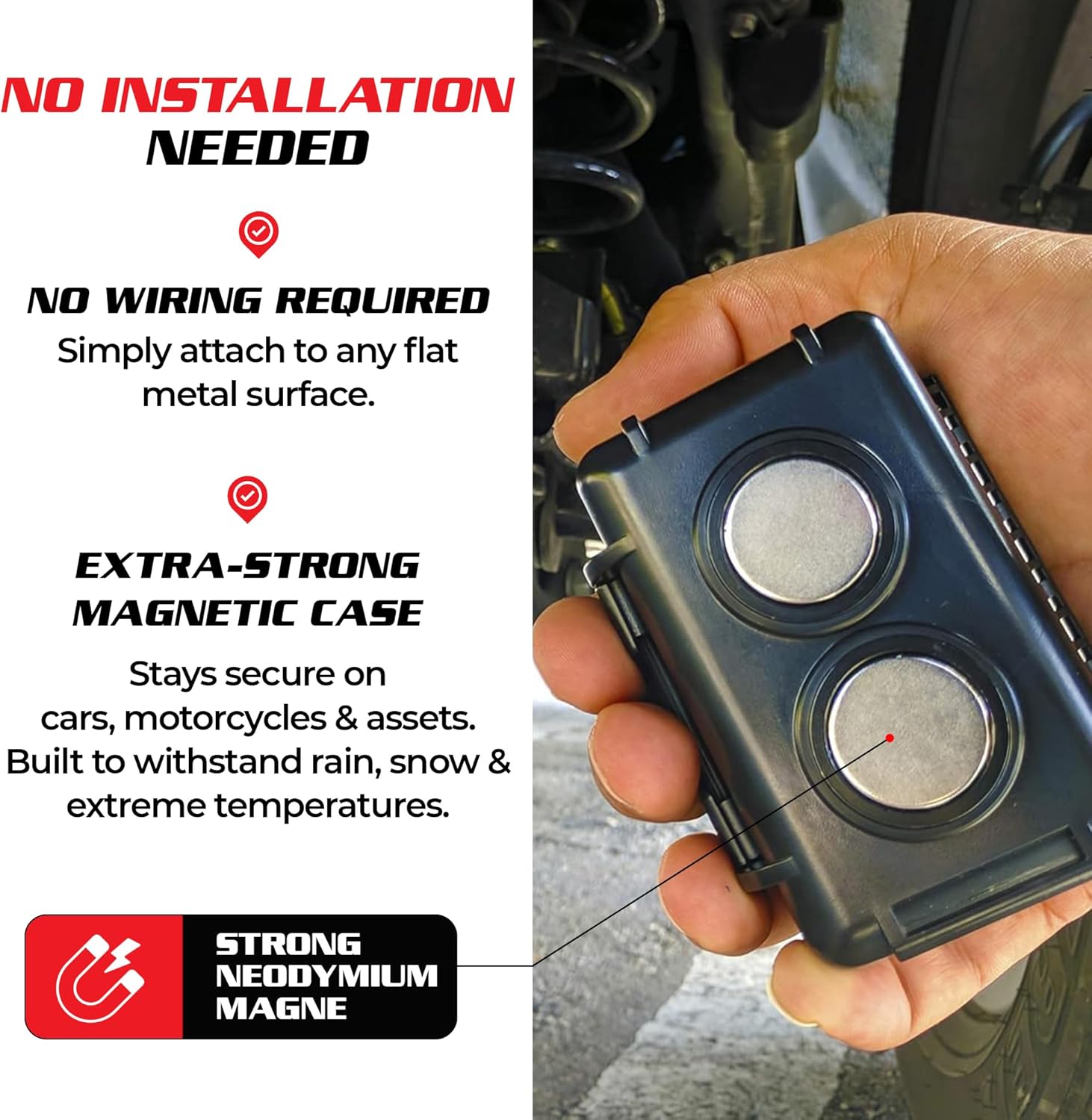
Foto nke 3.2: A nso-elu view of the GL320MG's magnetic waterproof case, highlighting the strong neodymium magnets on its back. This image demonstrates how the device can be securely attached to metal surfaces without wiring.
4. Ọrụ
4.1. Real-Time Tracking
Once activated and placed, access the Spy Spot GPS application or web portal. Log in with your credentials to view the tracker's current location on a map. The interface typically offers satellite view, okporo ámá view, and a breadcrumb trail of recent movements.

Foto nke 4.1: An infographic illustrating the comprehensive real-time GPS tracking and alert features of the Spy Spot system, including continuous location updates, historical data, and various alert options.
4.2. Geo-Fencing
Iji tọọ ngere geo:
- Navigate to the geo-fence section within the application or web portal.
- Define a perimeter on the map by drawing a shape (e.g., circle, polygon) around the desired area.
- Configure alerts to be sent when the tracker enters or exits this defined zone.

Foto nke 4.2: A smartphone screen showing the geo-fencing feature, where a user defines a virtual boundary on a map. This visual demonstrates how to set up smart boundary alerts for the tracker.
4.3. History Reports
The system maintains a six-month history log. Access this feature to review past routes, parking locations, travel speeds, and other detailed information about the tracker's movements over time.
4.4. Mkpu na ọkwa
Configure various alerts through the application settings, including:
- Ọsọ Ọsọ: Notifies if the tracker exceeds a set speed limit.
- Movement Alerts: Informs when the tracker begins moving after being stationary.
- Geo-Fence Alerts: Triggered upon entering or exiting defined areas.
5. Nlekọta
5.1. Njikwa batrị
The GL320MG is equipped with a 2600mAh battery. Battery life varies based on tracking frequency and usage. Recharge the device regularly to ensure continuous operation. A full charge typically provides 2-3 weeks of battery life under normal conditions.
5.2. Nlekọta Ikpe
The waterproof case is designed to protect the tracker from precipitation and temperature extremes. Periodically inspect the case for any damage or wear that might compromise its waterproof seal. Ensure the case is properly closed and sealed when the tracker is in use, especially in outdoor or harsh environments.

Foto nke 5.1: The GL320MG mini GPS tracker positioned inside its open magnetic waterproof case, illustrating the device's secure housing and compact design.
6. Nchọpụta nsogbu
6.1. Enweghị ebe data
- Check Subscription: Ensure your service plan is active and not expired.
- Ọkwa batrị: Verify the device is charged. Low battery can affect performance.
- Mgbama GPS: Ensure the tracker has a clear view of the sky. Obstructions (e.g., indoors, under heavy cover) can block GPS signals.
- Mkpuchi ekwentị: Confirm that the device is in an area with 4G LTE cellular coverage.
6.2. Inaccurate Location
- Ntinye aka mgbaama: Avoid placing the tracker near large metal objects or electronic devices that may interfere with GPS or cellular signals.
- Usoro ngwaọrụ: While not strictly necessary, ensuring the device is oriented with the antenna facing upwards can sometimes improve accuracy.
6.3. App/Web Portal Issues
- Njikọ Ịntanetị: Ensure your smartphone or computer has a stable internet connection.
- Mmelite ngwa: Check for and install any available updates for the Spy Spot GPS application.
- Ndakọrịta ihe nchọgharị: Ọ bụrụ na ị na-eji web portal, try a different web ihe nchọgharị ma ọ bụ hichapụ cache na kuki ihe nchọgharị gị.
7. Nkọwapụta
| Njirimara | Nkọwa |
|---|---|
| Nlereanya | GL320MG |
| Njikọta | 4G LTE Cellular |
| Akụkụ | 3.07 x 1.57 x 1.05 sentimita asatọ |
| Ibu Ibu | 5.6 ounces |
| Batrị | 2600mAh (1 Product Specific battery included) |
| Atụmatụ pụrụ iche | Magnetic Case, Portable, Weatherproof |
| Ngwa akwadoro | Alarm (via tracking platform) |
| Onye nrụpụta | Queclink |
| Mbụ Dị | Septemba 4, 2023 |
8. Subscription Information
The Spy Spot GL320MG GPS Tracker operates on a subscription-based service. This service enables the real-time data transmission and access to the tracking platform features. Various plans are available, typically offering different reporting frequencies (e.g., minute-by-minute or hourly updates) and pricing structures (monthly or yearly payments). There are no activation fees, and subscriptions can generally be canceled at any time.

Foto nke 8.1: An infographic outlining the flexible subscription plans available for the Spy Spot GPS tracking service, detailing different pricing tiers and coverage areas.
9. Nkwado na akwụkwọ ikike
9.1. Nkwado ndị ahịa
For technical assistance, subscription inquiries, or any questions regarding your Spy Spot GL320MG tracker, please refer to the contact information provided on the official Spy Spot website or within the tracking application. Support resources often include FAQs, online chat, email, or phone support.

Foto nke 9.1: A user accessing the Spy Spot tracking application on a smartphone from within a vehicle, demonstrating the remote accessibility of the tracking system from any device.
9.2. Akwụkwọ ikike ngwaahịa
Information regarding the product warranty for the Spy Spot GL320MG is typically provided at the point of purchase or can be found on the manufacturer's official website. Please retain your proof of purchase for warranty claims. Standard warranties generally cover manufacturing defects for a specified period.