
Okwu mmalite
Daalụ maka ịzụrụasing the OBEST EN8829-B Wireless Weather Station. This device provides accurate indoor and outdoor temperature and humidity readings, a 6-level weather forecast, time, date, and an alarm function. Please read this manual carefully to ensure proper setup and operation.
Ihe ngwugwu
- OBEST EN8829-B Weather Station (Main Unit)
- Ihe mmetụta ikuku n'èzí
- USB Power USB
- Akwụkwọ ntuziaka onye ọrụ
Ngwaahịa gafereview
The OBEST EN8829-B features a 6-inch color LCD display and a wireless outdoor sensor for comprehensive environmental monitoring.

Image: The main display unit of the OBEST EN8829-B weather station, showing indoor and outdoor temperature and humidity, weather forecast, date, moon phase, and time.
Akụkụ ndị bụ isi:
- 6-inch HTN color LCD display
- 6 touch buttons: [SET], [MODE], [ALERTS], [UP], [SNOOZE/LIGHT], [DOWN]
- 12H/24H time selection
- Alarm with snooze function (5-60 minutes)
- Perpetual calendar with M/D or D/M display
- Week display in 5 languages (German, English, French, Italian, Spanish)
- Temperature display in °C / °F
- Barometric pressure indication (last 12 hours) in hPa/mb or inHg
- 6-level weather forecast (sunny, cloudy, overcast, rainy, heavy rain, snow)
- 8 types of moon phase indication
- Memory function for highest/lowest indoor/outdoor temperature and humidity
- Indoor temperature alarm (upper and lower limits)
- USB ọdụ ụgbọ mmiri
- Adjustable backlight (4 levels with DC power, 10 seconds with battery)
Outdoor Sensor Features:
- IP54 waterproof rating
- Supports up to 3 sensors (one included)
- RF 433.92 MHz detection frequency
- Wireless transmission distance up to 60m / 100ft
- Ngosipụta ike dị ala
Melite
1. Powering the Main Unit
The main unit can be powered by either DC power or batteries.
- DC Power (Recommended): Connect the provided USB power cable to the main unit and a suitable USB power adapter (not included). This allows the backlight to remain on continuously with adjustable brightness.
- Ike batrị: Insert 3 AAA batteries (not included) into the battery compartment. When powered by batteries, the backlight will illuminate for 10 seconds after a button press to conserve power.
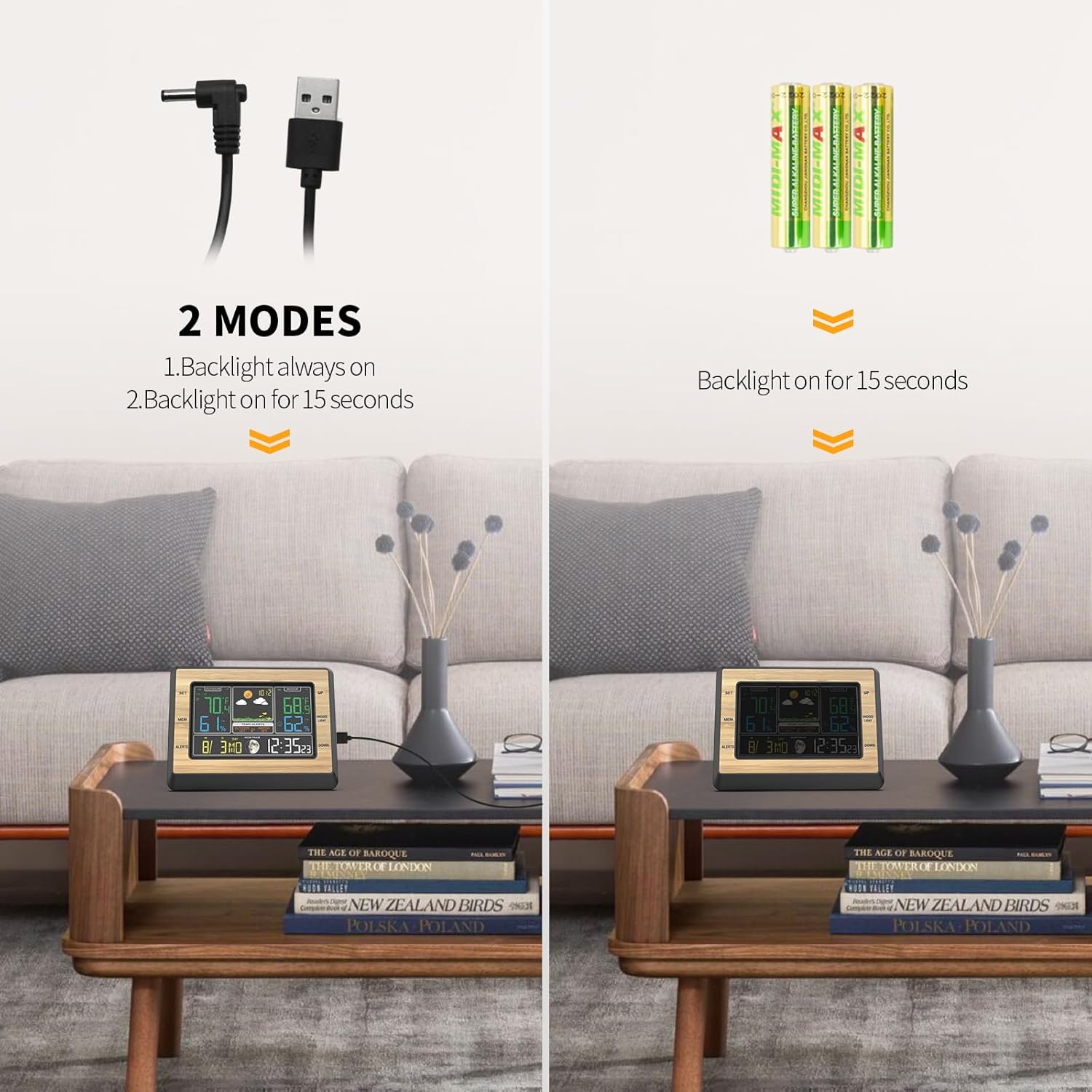
Image: Illustration of the two power modes for the weather station: DC power for continuous backlight and battery power for 15-second backlight.
2. Installing and Pairing the Outdoor Sensor
- Insert 2 AAA batteries (not included) into the outdoor sensor.
- Place the outdoor sensor in a shaded, dry location away from direct sunlight and rain, but where it can still transmit data to the main unit. The sensor is IP54 waterproof, but protection from extreme elements is recommended for longevity.
- The main unit will automatically search for and connect to the outdoor sensor. This may take a few minutes. Ensure both units are within the 60m / 100ft transmission range.
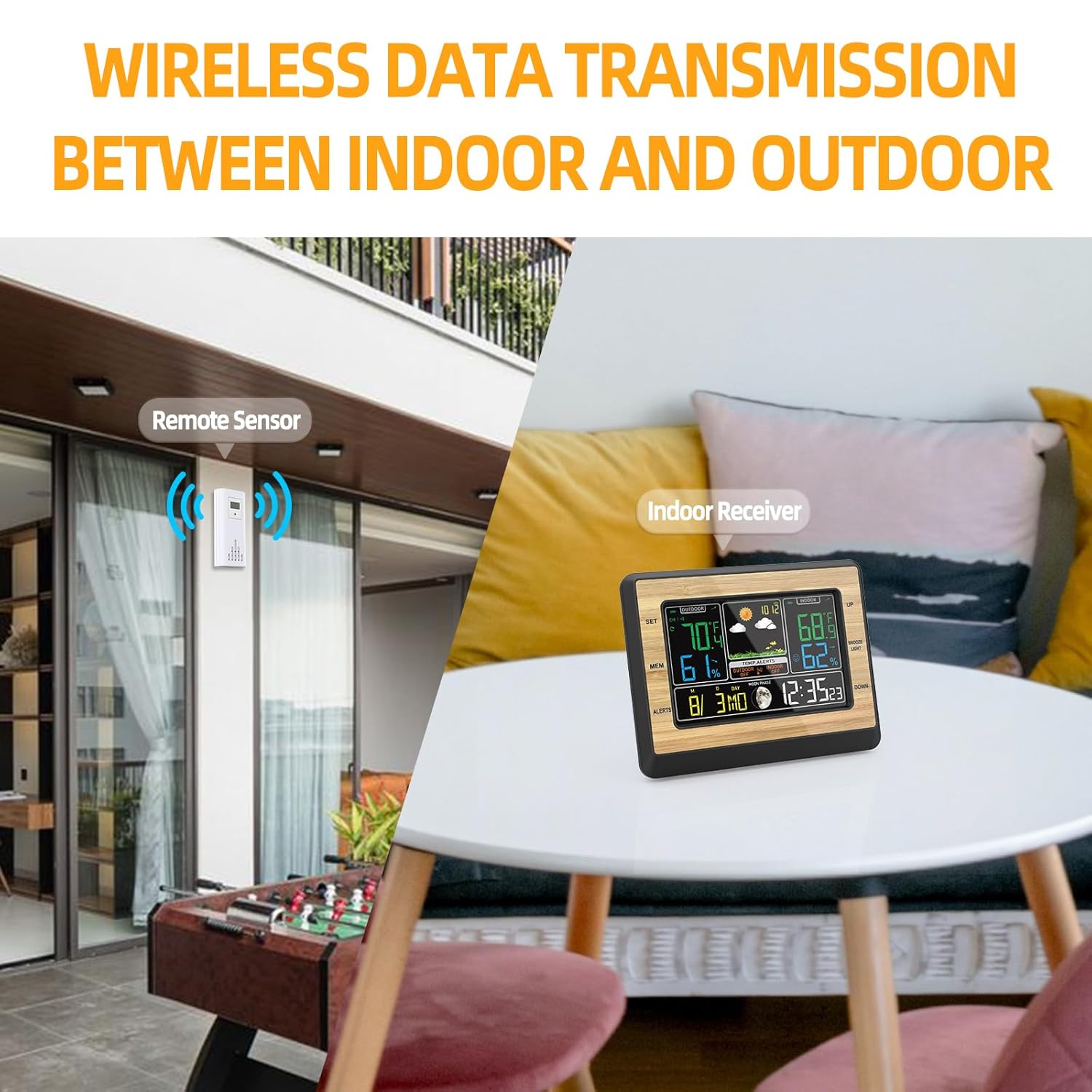
Image: Depicts the wireless data transmission between the remote outdoor sensor and the indoor receiver unit.
3. Ntọala mbụ
After powering on, you may need to set the time, date, and other preferences.
- Pịa ma jide [Kwupụta] bọtịnụ iji tinye ọnọdụ nhazi oge.
- Jiri ihe [N'elu] na [N'okpuru] bọtịnụ iji dozie ụkpụrụ.
- Pịa [Kwupụta] again to confirm and move to the next setting (e.g., 12/24H format, hour, minute, year, month, day, date format M/D or D/M, language for day of week).
- Pịa [MODE] button to exit settings at any time.
- To change temperature units (°C/°F), press the [N'elu] button in normal display mode.
Ntuziaka ọrụ
1. Ngosipụta Ozi
The main display shows various information:
- Outdoor Temperature & Humidity: Dị n'akụkụ aka ekpe nke ngosi.
- Okpomọkụ na iru mmiri dị n'ime ụlọ: Located on the right side of the display.
- Amụma ihu igwe: Icons indicating sunny, cloudy, rainy, etc., in the upper middle section.
- Oge na Datebọchị: At the bottom right.
- Oge Ọnwa: Icon next to the date.
- Nrụgide Barometric: Displayed in the upper middle section, below the weather forecast.
2. Ndozi ọkụ azụ
When powered by DC, the backlight has 4 adjustable levels.
- Pịa [Ezere/Ìhè] button to cycle through high brightness, medium light, low light, and off.
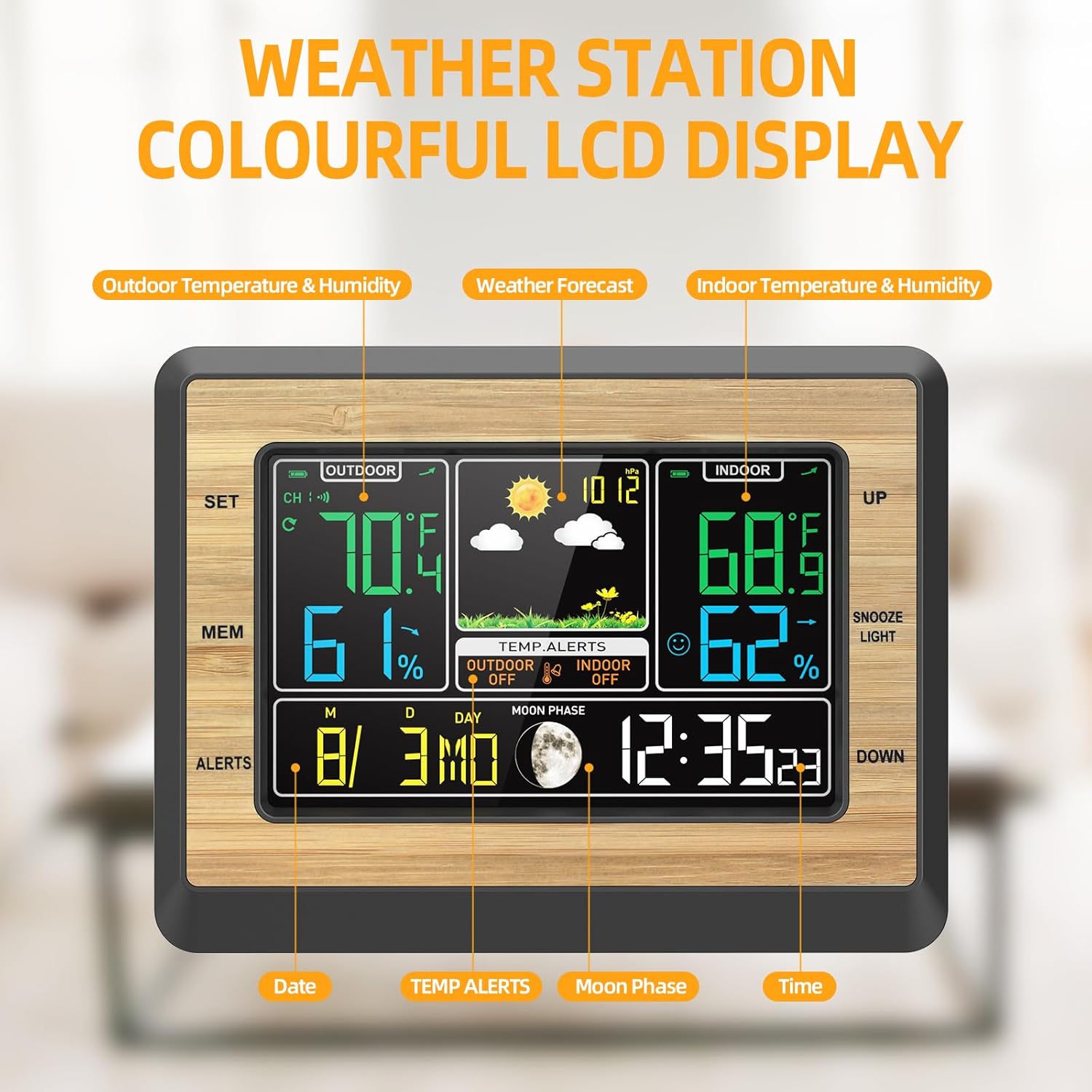
Image: Four panels illustrating the different backlight brightness levels (high, medium, low, off) of the weather station display.
3. Alarm and Snooze Function
- Ịtọ ntọala: Pịa [MODE] button repeatedly until the alarm time is displayed. Hold [Kwupụta] to adjust the alarm time using [Elu]/[DOWN]. Pịa [Kwupụta] iji gosi.
- Mkpu na-eme ka ọ rụọ ọrụ/gbanyụọ ya: In alarm display mode, press [N'elu] ịgbanwuo ma ọ bụ gbanyụọ oti mkpu.
- Soo: Mgbe oti mkpu dara, pịa [Ezere/Ìhè] button to activate snooze. The alarm will sound again after 5-60 minutes (adjustable in settings).
4. Temperature/Humidity Alerts
You can set upper and lower limits for indoor temperature alerts.
- Pịa [ALERTS] bọtịnụ ka view current alert settings.
- Jide [ALERTS] to enter alert setting mode. Use [Elu]/[DOWN] to adjust the desired high/low temperature limits.
- Pịa [ALERTS] iji kwado ma gaa na ntọala na-esote.
- When the temperature exceeds the set limits, an alarm will sound.
5. Max/Min Temperature and Humidity Memory
- Pịa [MEM] button to display the maximum recorded indoor/outdoor temperature and humidity.
- Pịa [MEM] again to display the minimum recorded values.
- Jide [MEM] to clear the recorded maximum/minimum values.
6. Amụma ihu igwe
The weather station provides a 6-level weather forecast based on barometric pressure changes. This is an approximation and should not replace professional weather services.

Image: Collage of six different weather scenes (desert, clouds, rain, snow) illustrating the 6-mode weather forecast feature of the station.
Nlekọta
1. Ngbanwe batrị
- When the low battery indicator appears on the display for either the main unit or the outdoor sensor, replace the batteries promptly.
- For the main unit, use 3 AAA batteries. For the outdoor sensor, use 2 AAA batteries.
- Hụ na polarity ziri ezi mgbe ị na-etinye batrị ọhụrụ.
2. Nhicha
- Jiri ihe dị nro, d hichaa isi ihe na ihe mmetụta ahụ.amp akwa .
- Ejila ihe nhicha ma ọ bụ ihe mgbaze eme ihe, n'ihi na ihe ndị a nwere ike imebi ihe ngosi ahụ ma ọ bụ casing.
3. Nlekọta n'ozuzu
- Avoid exposing the main unit to direct sunlight, extreme temperatures, or high humidity.
- Ensure the outdoor sensor is placed in a location that minimizes direct exposure to harsh weather conditions, despite its waterproof rating.
Nchọpụta nsogbu
- No outdoor temperature/humidity reading:
- Check if the outdoor sensor batteries are installed correctly and are not depleted.
- Ensure the sensor is within the transmission range (up to 60m / 100ft) and there are no major obstructions (thick walls, metal objects) between the sensor and the main unit.
- Try re-pairing the sensor by removing batteries from both units, then reinserting them into the sensor first, then the main unit.
- Inaccurate temperature/humidity readings:
- Ensure the sensor is not in direct sunlight or near heat sources/vents, which can affect readings.
- Allow both units to stabilize for at least 30 minutes after setup for accurate readings.
- Ngosipụta adịchaghị ma ọ bụ oghere:
- If using battery power, the backlight only stays on for 10 seconds after a button press.
- If using DC power, check the power cable connection. Press the [Ezere/Ìhè] button to adjust brightness.
- Replace batteries if the low battery indicator is on.
- Oti mkpu na-adịghị ada:
- Ensure the alarm function is activated (alarm icon visible on display).
- Check the alarm time settings.
Nkọwapụta
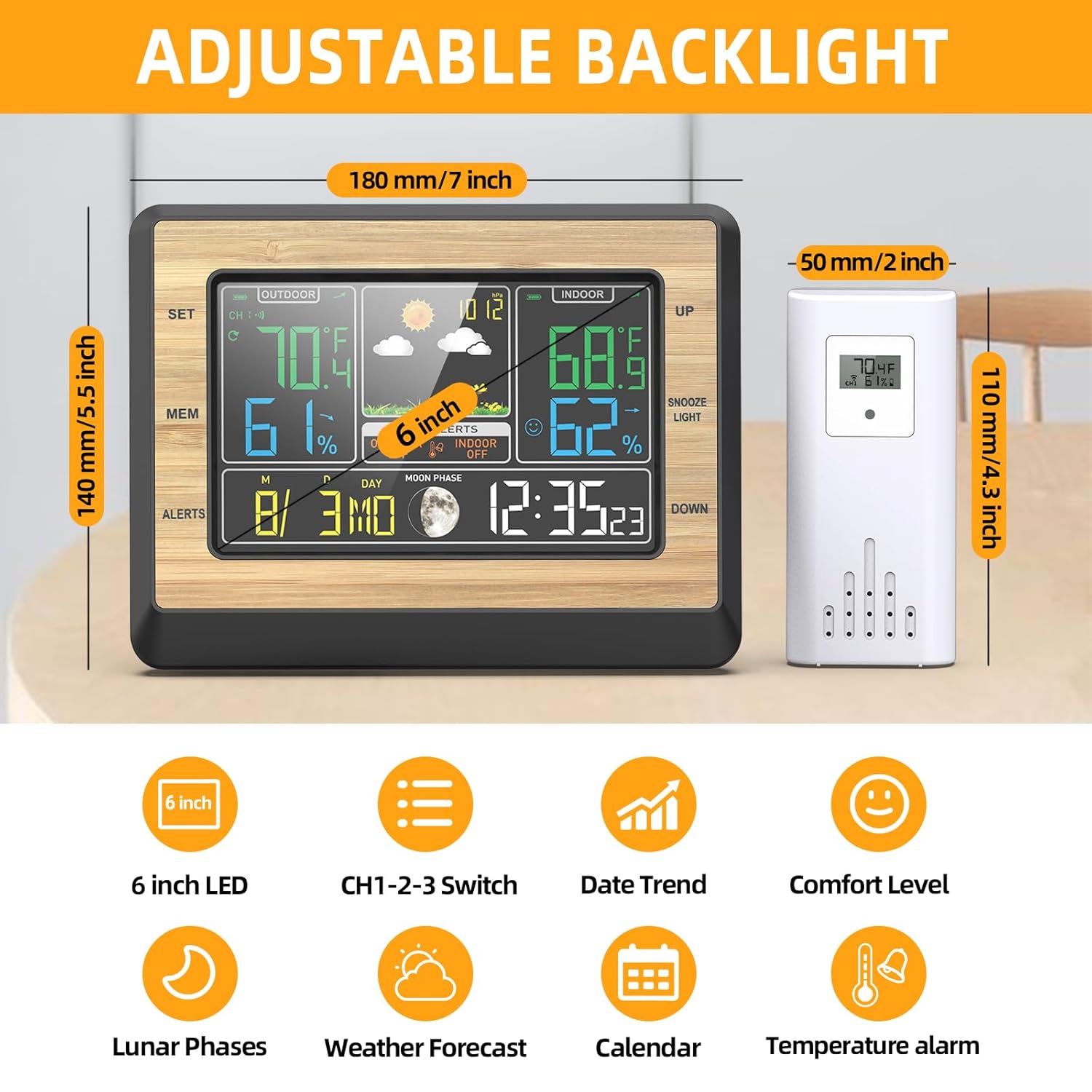
Image: Diagram showing the dimensions of the main unit (180mm/7 inch width, 140mm/5.5 inch height) and the outdoor sensor (50mm/2 inch width, 110mm/4.3 inch height), along with icons representing key features.
| Njirimara | Nkọwa |
|---|---|
| Nlereanya | EN8829-B |
| Ụdị ngosi | 6-inch agba LCD |
| Oke okpomọkụ nke ime ụlọ | -20°C ~ +70°C (-4°F ~ 158°F) |
| Oke okpomọkụ dị n'èzí | -40°C ~ +70°C (-40°F ~ 158°F) |
| Mkpebi okpomọkụ | 0.1°C /°F |
| Oke iru mmiri | 20% RH ~ 95% RH |
| Oke nrụgide Barometric | 850hPa/mb (25.1 inHg) -- 1100hPa/mb (32.48 inHg) |
| Ugboro ikuku | 433.92 MHz |
| Anya nnyefe ikuku | Up to 60m / 100ft (open air) |
| Isi ike nkeji | USB DC 5V or 3 x AAA batteries (not included) |
| Outdoor Sensor Power | Batrị 2 x AAA (anaghị etinye ya) |
| Nha Ngwaahịa (Isi ihe) | 19 x 6 x 15 cm (L x W x H) |
| Ibu ngwaahịa | 445 grams |
| Ihe onwunwe | Acrylonitrile Butadiene Styrene (ABS) |
Akwụkwọ ikike na nkwado
Warranty information for the OBEST EN8829-B Wireless Weather Station is not explicitly provided in the product details. For specific warranty terms or technical support, please contact the retailer or manufacturer directly.