
Okwu mmalite
The Coby Ultimate Wireless Speaker is designed to deliver a powerful and immersive audio experience, complemented by dynamic light-up modes. This portable speaker is engineered for high-fidelity sound, ensuring crisp highs, rich mids, and deep bass. With its travel-friendly design and extended battery life, it is suitable for various environments, from personal listening to social gatherings.

Image: The Coby Ultimate Wireless Speaker, showcasing its vibrant, multi-color light display on the front grille. The speaker is black with a robust, portable design.
Ngwaahịa gafereview na njikwa
Familiarize yourself with the speaker's layout and controls for optimal use.
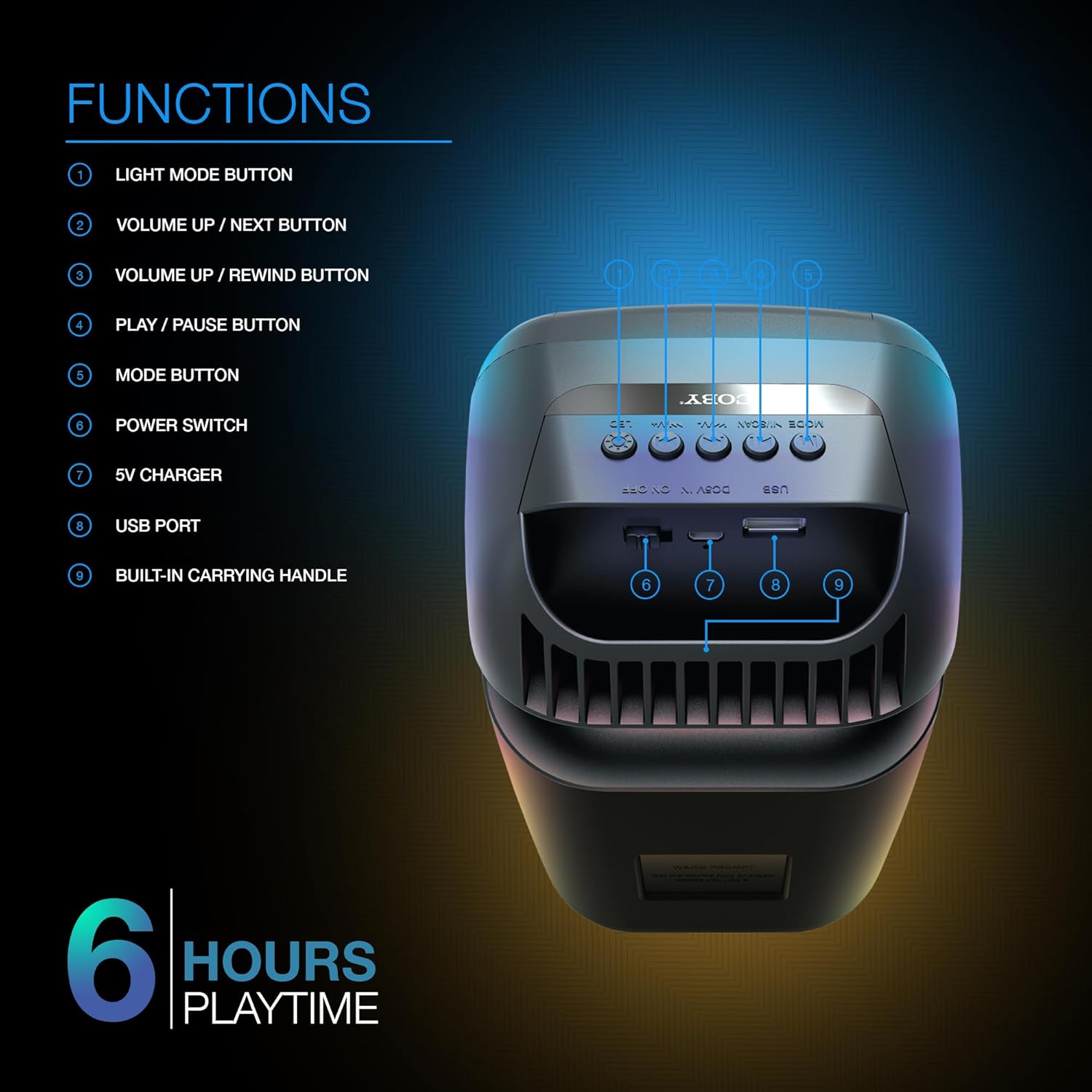
Image: A detailed diagram illustrating the top and rear controls of the Coby Ultimate Wireless Speaker. Numbered labels point to each function: Light Mode Button, Volume Up/Next, Volume Up/Rewind, Play/Pause, Mode Button, Power Switch, 5V Charger Port, USB Port, and Built-in Carrying Handle.
Ọrụ njikwa:
- Bọtịnụ Ọnọdụ ọkụ: Cycles through the 5 dazzling light-up modes.
- Volume Up / Next Button: Na-eme ka olu dịkwuo elu ma ọ bụ na-awụlikwa elu gaa na egwu ọzọ.
- Volume Up / Rewind Button: Decreases volume or rewinds the current track.
- Bọtịnụ Kwụsị/ Kwụsị: Starts or pauses audio playback.
- Bọtịnụ ụkpụrụ: Switches between different input modes (e.g., Bluetooth, FM Radio).
- Ike mgba ọkụ: Gbanyụọ ma ọ bụ gbanyụọ ọkà okwu.
- 5V chaja: Port for connecting the charging cable.
- Ọdụ ụgbọ mmiri USB: For USB media playback or charging external devices (if supported).
- Built-in Carrying Handle: Maka ibugharị ngwa ngwa.
Melite
1. gingchaji Okwu Okwu
Before first use, fully charge the speaker. Connect the provided 5V charging cable to the 5V Charger port on the speaker and plug the other end into a compatible USB power adapter (not included). The charging indicator light will show the charging status. A full charge provides up to 6 hours of playtime.
2. Ịgbanye / gbanyụọ
Locate the Power Switch on the speaker. Slide the switch to the 'ON' position to power on the device. Slide it to the 'OFF' position to power off.
3. Njikọ Bluetooth
- Ensure the speaker is powered on and in Bluetooth mode (indicated by the Mode button).
- Na ngwaọrụ mkpanaaka gị (smartphone, tabletị, wdg), gbanye Bluetooth wee chọọ ngwaọrụ dịnụ.
- Select "Coby CPA9000" or a similar name from the list of found devices.
- Once connected, the speaker will emit an audible confirmation, and you can begin streaming audio.
The speaker features Bluetooth version 5.3 for fast pairing and stable audio streaming.
Ọrụ
1. Ngwugharị ọdịyo
- Gwuo/kwụsịtụ: Press the Play/Pause button to start or pause the current track.
- Ndozi olu: Use the Volume Up / Next and Volume Up / Rewind buttons to adjust the playback volume.
- Sochie igodo: Briefly press the Volume Up / Next button to skip to the next track. Briefly press the Volume Up / Rewind button to go to the previous track.
2. Light-Up Modes
The speaker features 5 dazzling light-up modes that synchronize with your music. Press the Light Mode Button to cycle through the available light patterns and effects. Choose the mode that best suits your mood or environment.
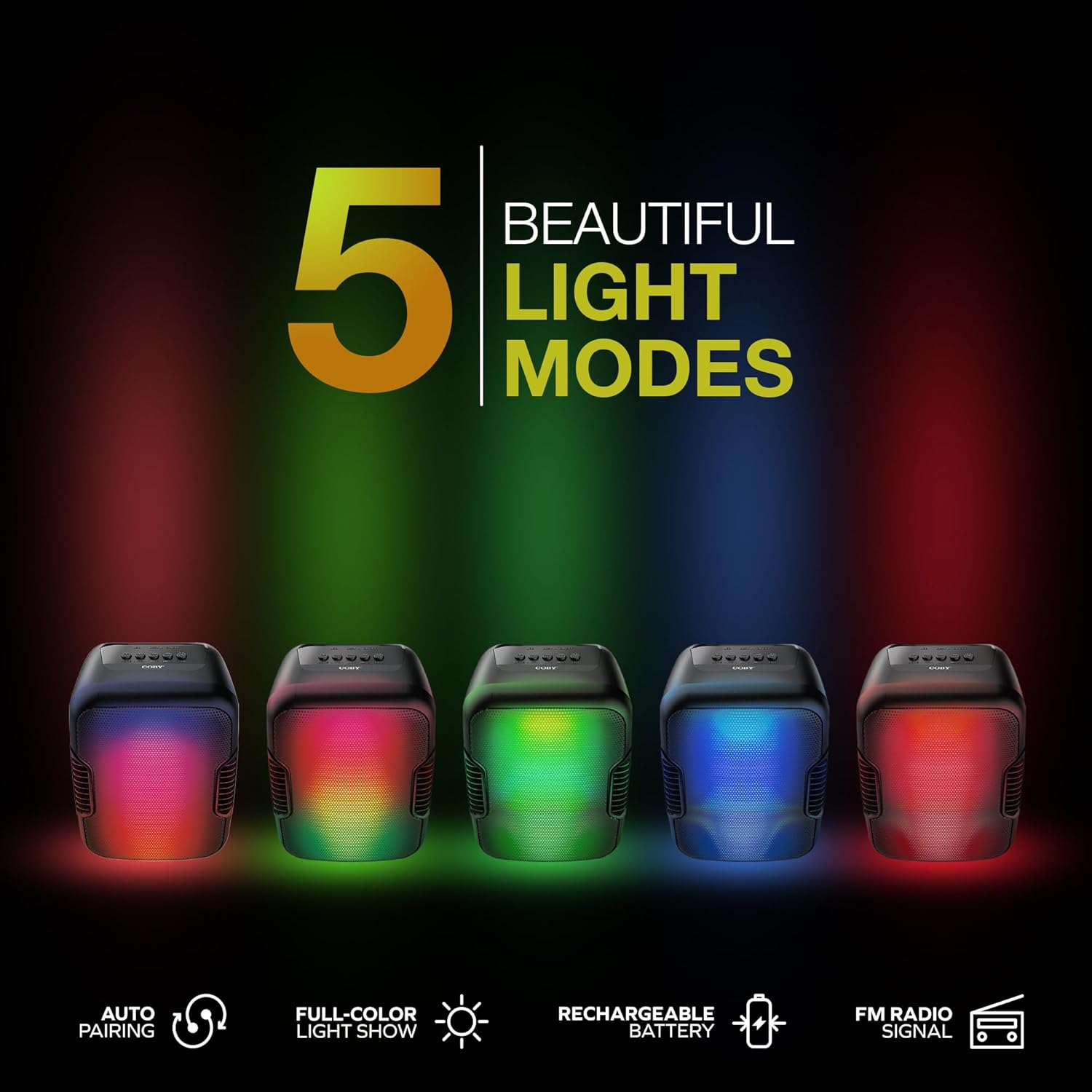
Image: Five Coby Ultimate Wireless Speakers arranged in a row, each displaying a different vibrant light mode, illustrating the variety of visual effects available.
3. FM Radio Function
To use the FM Radio, press the Mode button until you hear the FM radio signal. The speaker will automatically scan and tune into available stations. Use the Volume Up / Next and Volume Up / Rewind buttons to navigate between stations.
Nlekọta
- Nhicha: Jiri ákwà dị nro ma kpọọ nkụ hichaa mpụta okwu ahụ. Ejila ihe nhicha ma ọ bụ ihe mgbaze.
- Nchekwa: Chekwaa ọkà okwu n'ebe dị jụụ, kpọrọ nkụ pụọ na ìhè anyanwụ kpọmkwem na oke okpomọkụ mgbe ọ naghị eji ya ogologo oge.
- Nlekọta batrị: Iji mee ka batrị dị ogologo, zere ịgbapụta batrị ahụ mgbe niile. Chajie igwe okwu mgbe niile, ọbụlagodi na ọ naghị adị na ya mgbe niile.
Nchọpụta nsogbu
| Nsogbu | Ihe nwere ike ime | Ngwọta |
|---|---|---|
| Ọkà okwu anaghị agba ọkụ. | Batrị agwụla. | Charge the speaker fully using the provided charging cable. |
| Enweghị ụda sitere na ọkà okwu. | Volume is too low or muted; Device not paired correctly; Incorrect mode selected. | Increase volume on both speaker and connected device. Re-pair Bluetooth. Press Mode button to select correct input. |
| Njikọ Bluetooth anaghị akwụsi ike. | Device is out of range; Interference from other devices. | Move the connected device closer to the speaker. Avoid placing speaker near other wireless devices. |
| Light modes are not working. | Light mode feature is off. | Press the Light Mode Button to activate and cycle through modes. |
Nkọwapụta

Image: The Coby Ultimate Wireless Speaker shown with its dimensions: 9.46 inches height, 4.92 inches width, and 4.33 inches depth.
| Njirimara | Nkọwa |
|---|---|
| Aha Nlereanya | CPA9000 FLAME |
| Ụdị Ọkà Okwu | Subwoofer |
| Teknụzụ Njikọta | Bluetooth |
| Teknụzụ nzikọrịta ozi ikuku | Bluetooth 5.3 |
| Ọnọdụ mmepụta ọdịyo | Stereo |
| Ndụ batrị | Ruo awa 6 |
| Isi Iyi Ike | Akwadoro batrị (1 batrị lithium ion gụnyere) |
| Akụkụ ngwaahịa (D x W x H) | 4.33" x 4.92" x 9.46" |
| Ibu Ibu | 14.1 ounces |
| Njirimara Pụrụ Iche | USB Port, Light-Up Modes, Built-in Handle, FM Radio |
| Ngwa dakọtara | Smartphone, Mbadamba ụrọ |
| Usoro njikwa | Buttons on device |
| Enweghị mmiri | Ụgha |
| UPC | 810071493751 |
Akwụkwọ ikike na nkwado
The Coby Ultimate Wireless Speaker comes with a limited warranty. For specific warranty terms and conditions, please refer to the documentation included with your purchase or visit the official Coby website. For technical support or further assistance, please contact Coby customer service.