
Okwu mmalite
This manual provides detailed instructions for the installation, operation, and maintenance of your TEEHO TE342 Fingerprint Smart Keyless Entry Door Lock. Please read this guide thoroughly before installation and use to ensure proper functionality and security. Keep this manual for future reference.
Kedu ihe dị na Igbe ahụ
Chọpụta na akụrụngwa niile dị tupu ịmalite nrụnye:
- Mkpọchi ọnụ ụzọ akara mkpịsị aka
- Efere arịọnụ
- Skrọ (nha dị iche iche)
- Latch
- Tie ihe
- 2 Igodo ndabere
- Akwụkwọ ntuziaka
- Akwụkwọ ntuziaka onye ọrụ
Ntọala na nwụnye
1. Check Door Compatibility
Before installation, ensure your door dimensions are compatible with the TE342 lock. Refer to the diagram below for required measurements.

Foto: Door compatibility measurements including door thickness (1-3/8" to 2"), backset (2-3/8" or 2-3/4"), door hole diameter (1-1/2" or 2-1/8"), and latch hole (1" deep).
- Ọkpụrụkpụ ọnụ ụzọ: 1-3/8" ruo 2" (35mm ruo 50mm)
- Mbido: 2-3/8" ma ọ bụ 2-3/4" (60mm ma ọ bụ 70mm)
- Dayameta oghere ọnụ ụzọ: 1-1/2" ma ọ bụ 2-1/8" (38mm ma ọ bụ 54mm)
- Latch Hole Depth: Minimum 1" (25mm)
2. Nduzi Vidiyo Nwụnye
For a visual step-by-step guide, please watch the official installation video:
Vidiyo: TEEHO TE342 Bluetooth Smart Lock Installation Video. This video demonstrates the complete installation process for the smart lock.
3. Step-by-Step Installation Overview
- Wụnye Latch: Insert the latch into the door edge. Adjust its length (60mm or 70mm backset) if necessary by rotating and pulling the mechanism. Secure it with the provided screws.
- Wụnye Mgbakọ Mpụga: Pass the cable and spindle through the door hole. Ensure the tailpiece is horizontal. If your door hole is 38mm (1-1/2"), remove the spacer from the exterior assembly before installation.
- Chekwaa efere mgbago: Position the mounting plate on the interior side of the door, aligning it with the exterior assembly. Secure it using the mounting plate screws.
- Jikọọ Mgbakọ Ime: Connect the cable from the exterior assembly to the interior assembly. Ensure the thumb turn on the interior assembly is in a vertical position.
- Wụnye Mgbakọ ime ụlọ: Attach the interior assembly to the mounting plate. Secure it with the interior assembly screws.
- Fanye batrị: Load 4 AA alkaline batteries into the battery compartment. Ensure correct polarity.
- Tọgharịa mkpọchi: Press and hold the reset button for 5 seconds until you hear a 'BEEP'. The latch will rotate and extend automatically.
Ntuziaka ọrụ
1. Ụzọ mmeghe
The TEEHO TE342 offers multiple convenient ways to unlock your door:
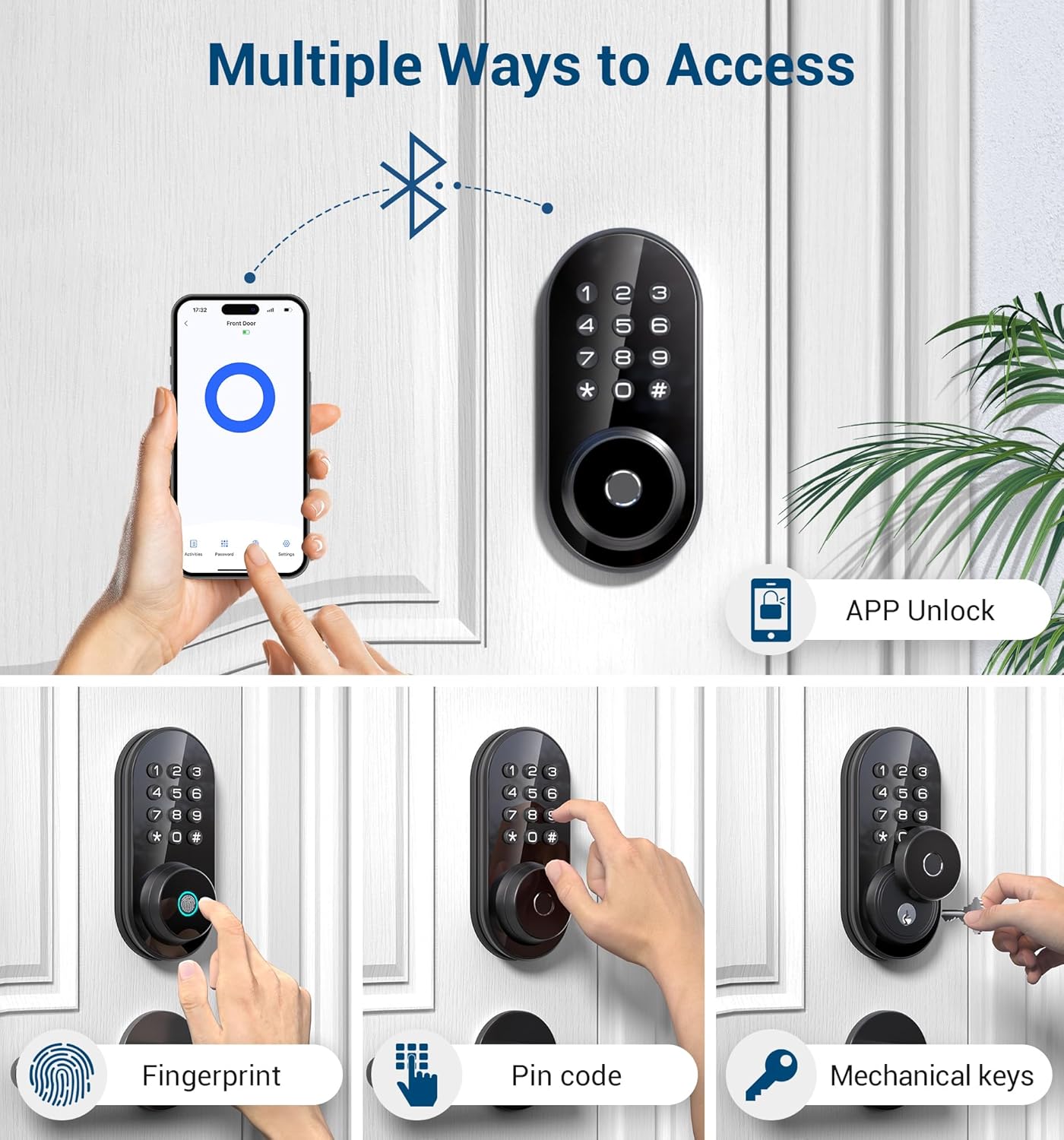
Foto: Multiple ways to access the TEEHO TE342 smart lock.
- APP Unlocking: Use the KK Home app on your smartphone to unlock the door remotely via Bluetooth.
- Mkpọghe mkpịsị aka: Register up to 20 fingerprints for quick access. The lock features 0.3-second recognition time with AI self-learning technology.
- Ntinye paswọọdụ: Set up to 20 unique passwords for family members or regular visitors.
- One-Time Passwords: Generate temporary, single-use passwords for visitors, which are automatically deleted after use.
- Igodo igwe: Two spare keys are provided for emergency manual unlocking.
2. App Control Features
Manage your lock conveniently through the KK Home app:

Foto: App Control via Bluetooth for the TEEHO smart lock.
- Nnweta dị anya: Grant permanent or temporary unlocking access to family members or remotely generate one-time passwords for visitors.
- Real-time Log Records: Track all lock and unlock activities in real-time, providing better control over your home security.
- Jikwaa ndị ọrụ: Differentiate between family (full permissions) and guest (limited permissions) access.
- Offline Random Passcode: Generate a random password (valid for 30 minutes) anytime, anywhere, even without an internet connection.
- Okwuntughe mgbochi peeping: Enter random numbers before or after the correct password to protect your code from being exposed.
For a detailed guide on app operations, please watch the official app operation video:
Vidiyo: TEEHO TE342 Fingerprint Smart Door Lock App Operation Video. This video demonstrates how to use the KK Home app for various lock functions.
3. Auto-Lock and One-Touch Locking
Enhance your security with automatic locking features:
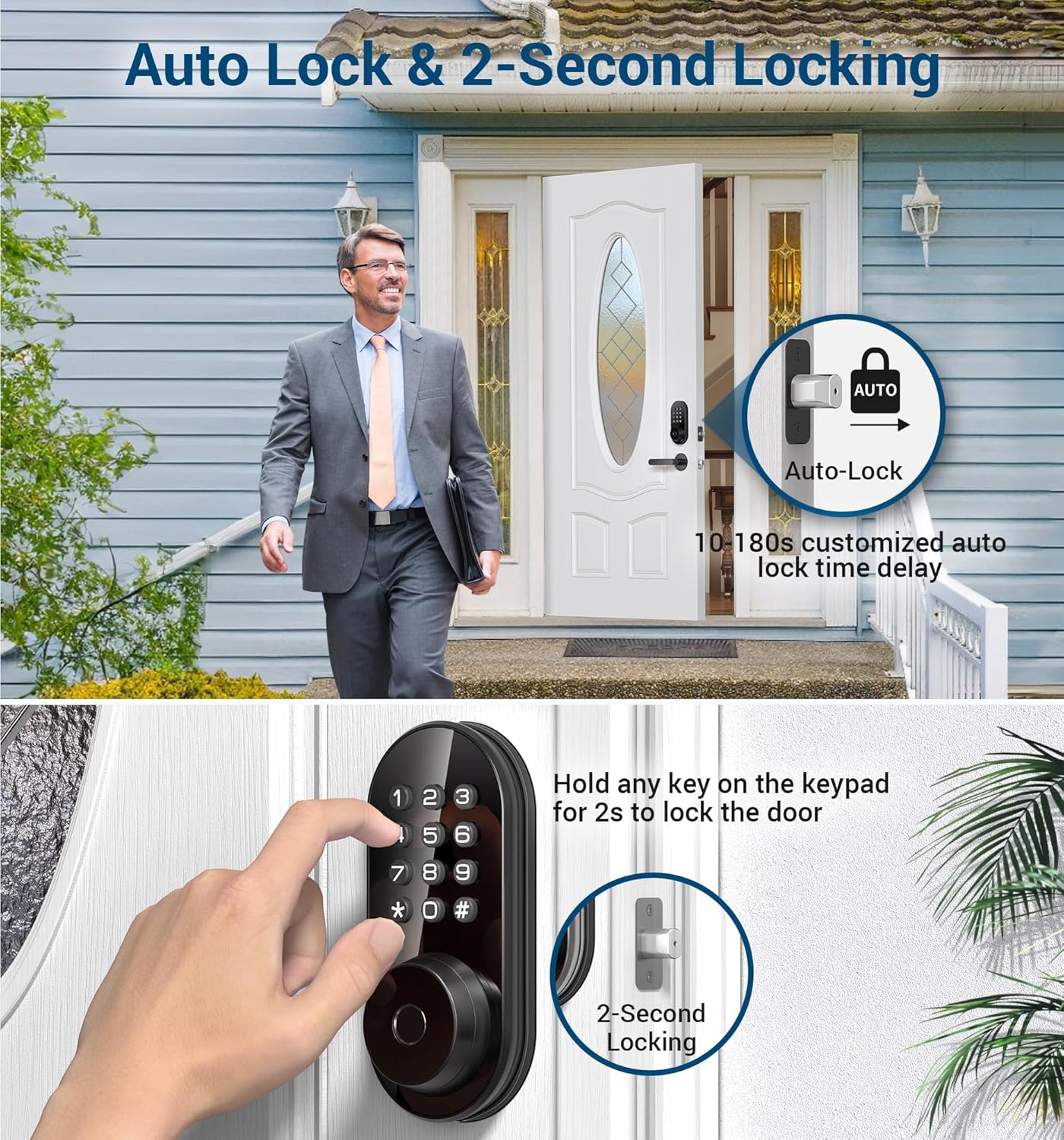
Foto: Auto Lock & 2-Second Locking features.
- Nchekwa onwe: The door lock automatically engages after a customizable delay of 10-99 seconds. This feature can be configured via the app.
- Mkpọchi otu mmetụ: From the outside, simply press and hold any key on the keypad for 2 seconds to instantly lock the door.
Nlekọta
1. Ngbanwe batrị
The lock requires 4 AA alkaline batteries. Replace all batteries at once with new ones when the low battery reminder is activated (typically below 20%). Avoid mixing different types of batteries.

Foto: Long Battery Life illustration, showing the battery compartment and a USB-C port for emergency power.
In case of complete battery drain, an emergency Type-C port is available on the exterior assembly for temporary power to unlock the door.
2. Ọnọdụ gburugburu
The TEEHO TE342 is designed to withstand various weather conditions, with an IP54 rating for dust and water resistance. It operates effectively in temperatures ranging from -31°F to 151°F.
Foto: Works Well in All Weather, highlighting the lock's durability in extreme temperatures and its IP54 waterproof rating.
Nchọpụta nsogbu
1. Nsogbu Njikọ Wi-Fi
If you encounter Wi-Fi connection issues during setup:
- Tọgharịa mkpọchi: Jide bọtịnụ nrụpụta maka sekọnd iri.
- Check Bluetooth & Wi-Fi: Ensure Bluetooth is enabled on your phone, your home Wi-Fi (2.4GHz only) is active, the router is functioning, and the lock is within 10 meters of the router.
- Melite ngwa: Ensure your KK Home app is updated to the latest version.
- Lelee batrị: Confirm the lock's battery is over 20%.
- Nyochaa eriri: Ensure connection cables are properly inserted.
2. Batrị na-agbapụta ngwa ngwa
If your smart lock's batteries are draining quickly:
- Check for Misalignment: Ensure the lock is correctly aligned and the hole depth of the door frame exceeds 25mm.
- Inspect Connection Wires: Ensure connection wires are correctly installed to prevent power supply issues.
- Verify Screw Installation: Check if the lock is securely installed using the provided screws.
- Jiri batrị Alkaline: Confirm you are using recommended 4 alkaline batteries. Replace all at once with new ones when needed.
3. Lock Not Working
If your smart lock is unresponsive:
- Tọgharịa mkpọchi: Jide bọtịnụ nrụpụta maka sekọnd iri.
- Lelee ike batrị: Ensure the lock's battery is over 20%.
- Update App and Firmware: Make sure your smart lock's app and firmware are up to date.
- Inspect Connection Wires: Ensure connection cables are properly inserted. Try to re-install the door lock.
- Dochie batrị: Confirm you are using recommended 4 alkaline batteries.
If issues persist, kindly provide the following details via email or phone call for further assistance:
- ESN number
- User account name for the KK Home App
- A photo or video of the lock
- Phone model, system version
- KK Home App version
Nkọwapụta
| Njirimara | Nkọwa |
|---|---|
| Ụdị | TEEHO |
| Aha Nlereanya | Mkpọchi ọnụ ụzọ smart TE342 |
| Ụdị mkpọchi | Biometric, Deadbolt, Combination Lock, Keypad, Smart |
| Ihe onwunwe | Aluminum alloy assembly, Plastic, Acrylic |
| Agba | Matte Black |
| Akụkụ akụkụ L x W x H | 9 x 6 x 4 sentimita asatọ |
| Ibu Ibu | 3.01 pound (1.37 Kilogram) |
| Protocol Njikọta | Bluetooth |
| Usoro njikwa | Ngwa |
| Ụdị njikwa | iOS, Android |
| Atụmatụ pụrụ iche | Fingerprint, App control, Real-time app notification, Remotely generate one-time code, Duress Anti-peep Wrong code alert, Away mode, Silent ANSI Grade 3 |
| Achọrọ batrị? | Yes (4 AA) |
| Ndakọrịta Smart Home | Smart Home Compatible |
Akwụkwọ ikike na nkwado
TEEHO offers a 30-day return and 1-year exchange service for this product. Additionally, lifetime after-sales service is provided to every customer.
- Nkwado Ekwentị Ntanetị: Available Monday to Friday, 9 AM to 5 PM EST.
- 24/7 After-Sales Email Service: For any inquiries or assistance.
Please refer to your product packaging or the official TEEHO websaịtị maka ozi kọntaktị kacha ugbu a.