
1. Okwu mmalite
The IHSENO Mini WiFi Smart Switch Relay is a compact and intelligent device designed to integrate your traditional lighting and appliances into a smart home system. It operates on 2.4GHz WiFi and is compatible with the Tuya Smart Life App, allowing for remote control, voice commands via Alexa and Google Home, and intelligent scheduling.

Foto 1.1: Ofeview of the IHSENO Mini WiFi Smart Switch Relay and its packaging.
Akụkụ ndị bụ isi:
- Mini WiFi Smart Switch: Designed for 2.4GHz WiFi, enabling whole-house intelligence through the Tuya APP.
- Tuya Smart Life App Control: Connects with other smart devices for intelligent scene linkage.
- Customize Different Scene Modes: Allows setting scenes like 'Reading' or 'Movie' and controlling various smart devices.
- Alexa & Google Home Enabled: Supports voice control for hands-free operation.
- Nhazi kọmpat: Fits into most standard electrical boxes, even with existing wiring.
2. Ozi nchekwa
Biko gụọ ntuziaka nchekwa niile nke ọma tupu echichi na arụ ọrụ. Ọdịda ịgbaso ntuziaka ndị a nwere ike ibute ujo eletrik, ọkụ ma ọ bụ ihe egwu ndị ọzọ.
- Akwadoro nwụnye ọkachamara: Electrical work should be performed by a qualified electrician.
- Gbanyụọ tupu echichi: Kwụpụ ike mgbe niile na ihe mgbawa sekit tupu ịwụnye ma ọ bụ rụzie ngwaọrụ ahụ.
- Eji ime ụlọ naanị: This device is intended for indoor use in dry locations.
- Voltage na ọkwa dị ugbu a: Agafela voltage (AC 100-240V) and current (3 Amps) ratings.
- Wiring: Ensure all wiring connections are secure and comply with local electrical codes. Input and output connections cannot be reversed.

Image 2.1: Safety and Certification details for the Mini Smart Switch.
3. Ntọala na nwụnye
The IHSENO Mini WiFi Smart Switch Relay is designed for easy integration into your existing electrical system. It supports both 1-way and 2-way control setups.
Eserese waya:
Ihe dị mkpa: Always ensure the power is OFF at the circuit breaker before performing any wiring. Input and output connections cannot be reversed.

Image 3.1: Wiring Method 1 - Direct connection to a lamp and mains power.

Image 3.2: Wiring Method 2 - Connection with a 1-way wall switch.

Image 3.3: Wiring Method 3 - Connection with a 2-way wall switch.
Ngwakọta ngwa:
- Budata ya Tuya Smart or Ndụ Smart ngwa sitere na ụlọ ahịa ngwa ama ama gị.
- Debanye ma ọ bụ banye na akaụntụ gị.
- Gbaa mbọ hụ na ejikọrọ ekwentị gị na netwọk WiFi 2.4GHz.
- Power on the smart switch. The indicator light should blink rapidly, indicating it's in pairing mode. If not, refer to the troubleshooting section for resetting the device.
- In the app, tap '+' to add a device. Select 'Electrical' > 'Switch (Wi-Fi)' or allow the app to auto-discover the device.
- Soro ntuziaka na ihuenyo ka ịmechaa usoro njikọta.
4. Ntuziaka ọrụ
Once installed and paired, you can control your IHSENO Mini WiFi Smart Switch Relay through various methods.
4.1. Njikwa Ime Ime Ngwa
Control your connected devices from anywhere using the Tuya Smart Life App, as long as your smartphone and the switch are connected to the internet.

Image 4.1: WiFi Remote Control functionality.

Image 4.2: App Remote Control in action, showing control of a lamp.
4.2. Njikwa olu
Integrate your smart switch with Amazon Alexa or Google Assistant for convenient voice commands.
- Mepee ngwa Alexa ma ọ bụ Google Home.
- Link your Tuya Smart Life account to the voice assistant.
- Chọpụta ngwaọrụ.
- Use commands like "Alexa, turn on the lamp" or "Hey Google, turn off the kitchen light."
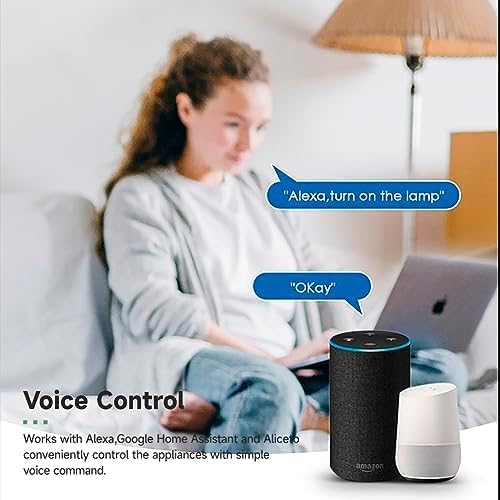
Image 4.3: Voice control with Alexa and Google Home.
4.3. Intelligent Timing and Scene Modes
Set schedules, countdowns, and create custom scene modes within the Tuya Smart Life App.
- Oge: Schedule devices to turn on/off at specific times (e.g., 23:30 Off).
- Ịgba ígwè: Set recurring schedules (e.g., 08:00 ON Everyday).
- Ngụgụ: Tọọ oge maka ngwaọrụ ahụ ka ọ gbanyụọ mgbe oge akọwapụtara gasịrị.
- Ụdị ihe nkiri: Combine multiple smart devices to activate with a single command or schedule (e.g., 'Movie Night' scene dims lights and turns on entertainment).
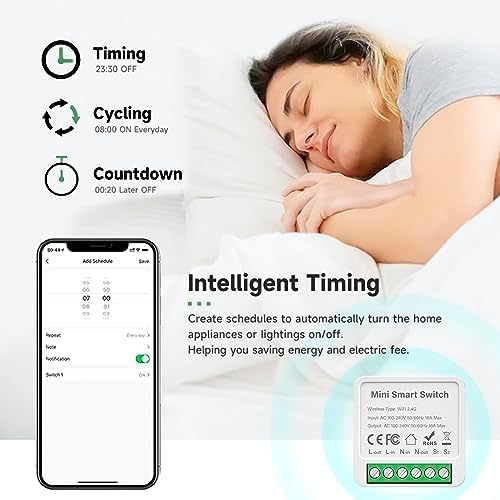
Image 4.4: Intelligent Timing features in the app.
4.4. Sharing Function
Share control of your smart devices with family members through the Tuya Smart Life App.

Image 4.5: Sharing function for family members.
5. Nlekọta
To ensure the longevity and optimal performance of your IHSENO Mini WiFi Smart Switch Relay, follow these simple maintenance guidelines:
- Nhicha: Jiri akwa dị nro dị nro hichaa ngwaọrụ ahụ. Ejila ihe nhicha mmiri ma ọ bụ ikuku ikuku.
- gburugburu: Avoid exposing the device to excessive moisture, extreme temperatures, or direct sunlight.
- Nyocha: Periodically check wiring connections for any signs of wear or looseness.
6. Nchọpụta nsogbu
If you encounter issues with your IHSENO Mini WiFi Smart Switch Relay, refer to the following common problems and solutions:
- Ngwa anaghị ejikọta:
- Ensure your WiFi network is 2.4GHz. The device does not support 5GHz WiFi.
- Check that the device is powered on and the indicator light is blinking rapidly. If not, power cycle the device or perform a factory reset (refer to app instructions for reset procedure).
- Move the device closer to your WiFi router during pairing.
- Device offline in app:
- Verify your home WiFi network is active and has internet access.
- Check the power supply to the smart switch.
- Malitegharịa rawụta WiFi gị.
- Njikwa olu anaghị arụ ọrụ:
- Ensure your Tuya Smart Life account is correctly linked to Alexa or Google Home.
- Check the device name in the voice assistant app; ensure it's easy to pronounce and recognize.
- Verify your voice assistant device is connected to the internet.
- Physical switch not responding:
- Ensure all wiring connections are secure and correct according to the diagrams.
- Check if the physical switch itself is functional.
7. Nkọwapụta
Technical specifications for the IHSENO Mini WiFi Smart Switch Relay:

Foto 7.1: Nkọwa ngwaahịa zuru ezu.
| Nkọwapụta | Nkọwa |
|---|---|
| Ụdị | IHSENO |
| Nlereanya | B0CF1FYYBN |
| Ụdị ikuku | Njikọ WiFi 2.4G |
| Ntinye Voltage | AC 100-240V 50/60Hz |
| Mmepụta Voltage | AC 100-240V 50/60Hz |
| Oke dị ugbu a | 3 Amps (Note: Product image shows 16A Max, but product specifications list 3 Amps. Please verify with product packaging.) |
| Ụdị nkwụnye | Ugwu elu |
| Ngwa kọntaktị | Ọla kọpa |
| Ihe onwunwe | PC V0 (Fireproof) |
| Nha | 41x20x41mm (approx. 1.6*0.8*1.6 inches) |
| Ụdị ọrụ | (ON)-ON-OFF |
| Ngbanwe Ụdị | 1-ụzọ |
| Gbanwee Style | Pịa bọtịnụ |
| Ndakọrịta ngwa | Smart Life (Support iOS & Android) |
8. Akwụkwọ ikike na nkwado
IHSENO is committed to providing high-quality products and customer satisfaction.
If you have any questions about this product, please feel free to contact our customer service team. We aim to reply within 24 hours to assist you with any inquiries or issues.
Biko rụtụ aka na akwụkwọ ịzụrụ ihe maka usoro na ọnọdụ akwụkwọ ikike akọwapụtara.