
1. Okwu mmalite
The AudioQuest PowerQuest 707 is a high-performance 12-outlet power conditioner and non-sacrificial surge protector designed to optimize the performance and protect your valuable audio/video equipment. It features advanced noise-dissipation technologies and robust surge protection to ensure clean, stable power delivery.
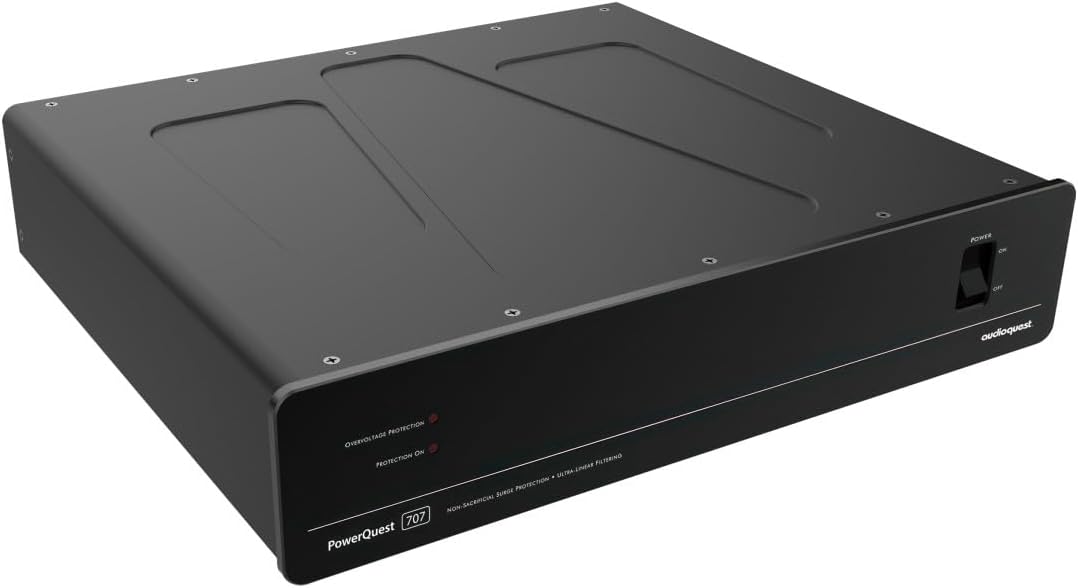
Foto 1: N'ihu view of the AudioQuest PowerQuest 707.
2. Ntọala na nwụnye
2.1 Ntinye
The PowerQuest 707 features a rack-mountable design, allowing for seamless integration into standard home theater A/V racks. Ensure adequate ventilation around the unit.
2.2 Ijikọ n'ike
- Ensure the PowerQuest 707's power switch is in the Gbanyụọ ọnọdụ.
- Connect the supplied PQ-715 detachable power cable to the IEC inlet on the rear of the PowerQuest 707.
- Plug the flat-to-wall 45° plug of the power cable into a grounded AC wall outlet. The flat-to-wall design facilitates installation in tight spaces.

Ọgụgụ 2: N'azụ view of the PowerQuest 707 showing the IEC inlet and various outlets.
2.3 Ijikọ Ngwaọrụ Gị
The PowerQuest 707 features two types of outlets:
- 4x High-Current Outlets: These outlets are specifically designed for power ampliifiers, agbakwunyere amplifiers, powered receivers, and powered subwoofers. They minimize AC impedance to the amplifier power supply for optimal performance.
- 8x Ultra-Linear-Filtered Outlets: These outlets are designed for source devices such as CD players, turntables, TVs, and streamers. They are isolated from the High-Current outlets to effectively manage noise.
Connect your audio/video components to the appropriate outlets. Ensure all connections are secure.
3. Ọrụ
3.1 Gbanyụọ/ gbanyụọ
Once all connections are made, flip the power switch on the front panel to the ON position. The "Protection On" indicator light should illuminate.

Figure 3: Front panel detail showing the power switch and indicator lights.
3.2 Ihe ngosi ọkụ
- Protection On: This light indicates that the surge protection circuitry is active and functioning correctly.
- Mfefetage Nchedo: This light illuminates if the incoming AC voltage exceeds a safe threshold (140VAC). The unit will automatically shut down power to connected devices and reset once the voltage returns to a safe range.
3.3 Teknụzụ Ndị Dị Mkpa
- Non-Sacrificial Surge Protection: The PowerQuest 707 can withstand multiple transient power surges and spikes up to 6000V or 3000A without damage. This protection is designed to be robust and does not degrade over time.
- Ultra-Linear Noise-Dissipation: This technology provides wide-bandwidth linear filtration across more than 20 octaves, ensuring consistent noise reduction. This contributes to a quieter background and enhanced audio/video clarity.
- Transient-Power Correction: A low-impedance circuit provides a reservoir of 45 amps (peak, up to 25mS) for current-starved amplification components. This ensures uncompressed current on demand, improving dynamic contrasts.
4. Nlekọta
The AudioQuest PowerQuest 707 requires minimal maintenance.
- Keep the unit clean by wiping it with a soft, dry cloth. Avoid using liquid cleaners or solvents.
- Gbaa mbọ hụ na a naghị egbochi oghere ikuku.
- There are no user-serviceable parts inside the PowerQuest 707. Do not attempt to open the chassis.
5. Nchọpụta nsogbu
| Nsogbu | Ihe nwere ike ime | Ngwọta |
|---|---|---|
| "Protection On" light is off. | Unit is not powered on, or there is no AC input. | Ensure the power switch is ON. Check that the power cable is securely connected to both the unit and a live AC wall outlet. |
| "Overvoltage Protection" light is illuminated. | AC na-abata voltage di oke elu. | The unit has automatically shut down. It will reset once the voltage returns to a safe range. If the problem persists, consult an electrician. |
| Enweghị ike na ngwaọrụ ejikọrọ. | PowerQuest 707 is off, or devices are not properly connected. | Verify the PowerQuest 707 is powered on and the "Protection On" light is illuminated. Check that all device power cables are securely plugged into the PowerQuest 707 outlets. |
| No perceived improvement in audio/video performance. | Perception of improvement can vary based on existing electrical conditions and connected equipment. | Ensure all components are connected to the appropriate outlets (High-Current vs. Ultra-Linear-Filtered). Allow time for your system to acclimate. |
6. Nkọwapụta

Ọgụgụ 4: N'elu-ala view of the PowerQuest 707, highlighting front and rear features.
- Ụdị: POWERQ707
- Ụlọ ahịa: 12 (4x High-Current, 8x Ultra-Linear-Filtered)
- Non-Sacrificial Surge Protection: Withstands multiple strikes up to 6000V / 3000A
- Extreme-Voltage Kwụsị: Activates at 140VAC, resets automatically
- Transient-Power Correction: 45 amps kacha elu (ruo 25mS)
- Akụkụ ngwaahịa: 14.9 x 17 x 3.7 sentimita (37.8 x 43.2 x 9.4 cm)
- Ibu ihe: 16.7 pound (7.57 n'arọ)
- Ihe: Ọla
- Ngwa dakọtara: Desktop, Server (and other audio/video components)
- Ike Ike: PQ-715 2m Detachable Power Cable with Flat-to-Wall Plug
7. Akwụkwọ ikike na nkwado
7.1 Ozi akwụkwọ ikike
For detailed warranty information, please refer to the warranty card included with your product or visit the official AudioQuest websaịtị. Debe ihe akaebe nke ịzụrụ maka akwụkwọ ikike.
7.2 Nkwado nka na ụzụ
If you encounter any issues not covered in this manual or require further assistance, please contact AudioQuest customer support. Contact details can typically be found on the AudioQuest websaịtị ma ọ bụ na nkwakọ ngwaahịa.