
Homsee B0CCP22CP9
Homsee Modern Nightstands with LED Light and 2 Drawers (Set of 2)
Model: B0CCP22CP9
Ozi nchekwa dị mkpa
Biko gụọ ma ghọta ntuziaka niile tupu mgbakọ na iji. Debe akwụkwọ ntuziaka a maka ntụnye aka n'ọdịnihu.
- Soro ntuziaka mgbakọ enyere mgbe niile.
- Be cautious when handling sharp objects during assembly.
- Ensure the nightstand is properly assembled to maintain stability.
- Do not exceed the weight limit of the table.
- Debe obere akụkụ n'ebe ụmụaka nọ n'oge mgbakọ.
Ihe ngwugwu
Nyochaa na akụrụngwa niile dị tupu ịmalite mgbakọ.
- Nduzi Mgbakọ
- Installation Hardware (screws, dowels, etc.)
- Nightstand Panels (top, bottom, sides, back, drawer fronts, drawer sides/backs)
- Drawer Slide Rails
- LED Light Strip with USB connector
If any parts are missing or damaged, please contact Homsee customer support.
Nkọwapụta
| Ụdị | Homsee |
| Nọmba nlereanya | B0CCP22CP9 |
| Akụkụ ngwaahịa (D x W x H) | 15.7"D x 19.6"W x 20"H |
| Frame Ihe | Osisi injinia |
| Agba | White With Light |
| Onu ogugu | 2 |
| Mgbakọ chọrọ | Ee |
| Ndị a tụrụ aro maka Mgbakọ | 1 |
| Ngwa akwadoro | Screwdriver |
Ntuziaka Mgbakọ
Follow the detailed step-by-step instructions provided in the included Assembly Guide. A screwdriver is recommended for assembly.
Kwụpụ 1: Chọpụta akụrụngwa
Unpack all parts and compare them with the parts list in your Assembly Guide. Ensure all hardware is present.
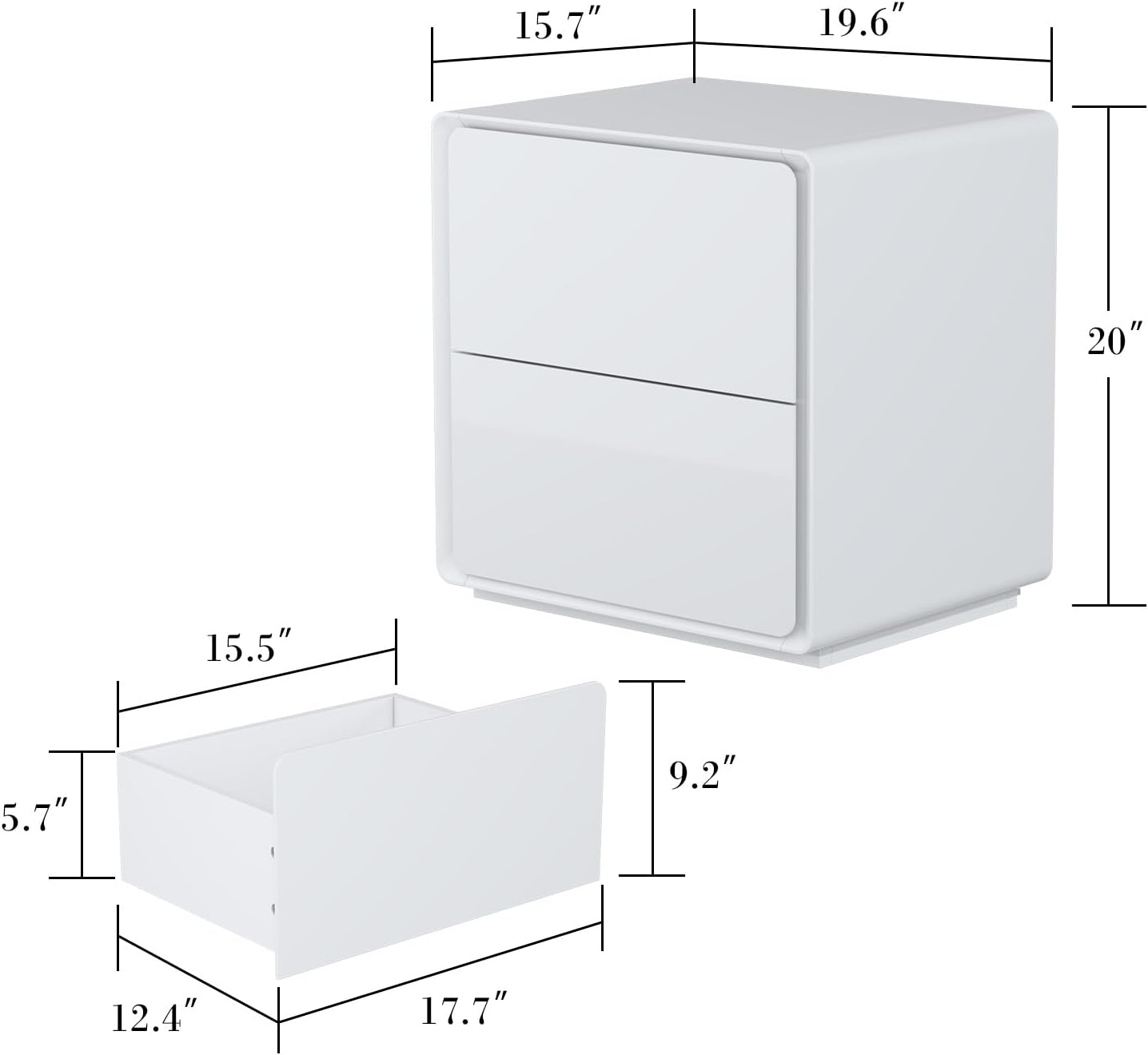
Image: Overall dimensions of the nightstand and individual drawer components.
Kwụpụ 2: Chịkọta Frame Main
Connect the side panels to the top and bottom panels using the provided hardware. Refer to the diagrams in the Assembly Guide for correct orientation.
Step 3: Install Drawer Slide Rails
Attach the drawer slide rails to the inner sides of the nightstand frame and to the drawer boxes. Ensure they are level and aligned for smooth operation.

Image: Detail of the drawer slide mechanism.
Nzọụkwụ 4: Chịkọta Drawers
Construct the two drawers according to the instructions, then attach the drawer fronts. The drawers are designed without external handles for a sleek look.

Image: The nightstand with both drawers open, demonstrating storage capacity.
Kwụpụ 5: Wụnye eriri ọkụ LED
After completing the main assembly, carefully stick the LED light strip to the designated area on the base of the nightstand. Connect the USB port to a suitable power adapter (not included).

Image: Detail of the illuminated LED light strip at the base of the nightstand.
Ntuziaka ọrụ
Iji ọkụ LED
The integrated LED light strip provides a warm yellow illumination. To activate, connect the USB cable from the light strip to any standard USB power adapter (e.g., phone charger, USB port on a computer). The light functions as a subtle night lamp.
Iji Drawers
The two drawers operate on smooth slide rails. To open, gently pull the top edge of the drawer front. To close, push the drawer firmly until it is flush with the nightstand frame.

Image: The nightstand with drawers partially open and LED light on, showcasing ọrụ ya.
Nlekọta na nlekọta
- Nhicha: The coated surface is sleek and easy to clean. Use a soft, damp cloth to wipe down the surfaces. Avoid abrasive cleaners or harsh chemicals that may damage the finish.
- Nchara Jiri akwa kpọrọ nkụ na nke dị nro kpuchie uzuzu mgbe niile.
- Mwụfu: Wipe up spills immediately to prevent staining or damage to the engineered wood.
- Nlekọta Drawer: Periodically check the drawer slide rails for any debris and ensure they operate smoothly.
- Ọkụ LED: The LED light strip is designed for long-term use. If it malfunctions, contact customer support. Do not attempt to repair it yourself.
Nchọpụta nsogbu
| Nsogbu | Ihe nwere ike ime | Ngwọta |
|---|---|---|
| Draws anaghị asọfe nke ọma. | Misaligned slide rails or debris in the tracks. | Check that the slide rails are correctly installed and aligned. Clean any debris from the tracks. |
| Ọkụ LED anaghị agba ọkụ. | USB power not connected or faulty power adapter. | Ensure the USB cable is securely connected to a working power adapter. Try a different USB power source. |
| Ebe a na-ere ihe n'abalị na-ama jijiji. | Njikọ rụrụ arụ ma ọ bụ ala na-enweghị isi. | Tighten all screws. Ensure the nightstand is placed on a flat, level surface. |
Akwụkwọ ikike na nkwado
For warranty information or technical support, please contact Homsee customer service. Keep your purchase receipt and model number (B0CCP22CP9) handy when contacting support.
Homsee Customer Service: Refer to your purchase documentation or the Homsee official websaịtị maka nkọwa kọntaktị.
Ask a question about this manual
Ask about setup, troubleshooting, compatibility, parts, safety, or missing instructions. Manuals+ will review the question and use this page’s manual context to help answer it.