
1. Okwu mmalite
This manual provides detailed instructions for the MokerLink 5-Port 2.5 Gigabit PoE Switch with 10G SFP+. This unmanaged network switch is designed to enhance your network performance with high-speed connectivity and Power over Ethernet capabilities. It features 5 x 2.5 Gigabit Ethernet ports and 1 x 10G SFP+ port, making it suitable for various applications from home entertainment to small office networks.

Foto 1.1: N'ihu view of the MokerLink 5-Port 2.5 Gigabit PoE Switch, showcasing ya kọmpat imewe na ọdụ ụgbọ mmiri.
2. Ihe ngwugwu
Verify the following items are included in your package:
- MokerLink 5-Port 2.5 Gigabit PoE Switch (Model: 5*2.5G POE)
- Ihe nkwụnye ọkụ
- Akwụkwọ ntuziaka onye ọrụ
Ọ bụrụ na ihe ọ bụla efuo ma ọ bụ mebie, biko kpọtụrụ ndị ọrụ nkwado ndị ahịa.
3. Akụrụngwa Ngwaahịa
- 2.5G Ethernet Ports: Equipped with 5 x 2.5 Gigabit Ethernet Ports, compliant with IEEE802.3bz (2.5G) standard, supporting 10/100/1000Mbps and 2.5G adaptive speeds.
- 10G SFP+ Uplink: Includes 1 x 10G SFP+ Port, compatible with 1G/2.5G SFP modules (module not included). This provides high-bandwidth uplink capabilities.
- Nkwado PoE+: Ports 1-4 support IEEE802.3af/at Power over Ethernet, with each port delivering up to 30W. The switch has a total PoE power budget of 65W. Note: This switch does not support passive 24V PoE.
- Arụmọrụ dị elu: Features a 45Gbps backplane bandwidth for excellent data forwarding and a packet forwarding rate of 33.48Mpps.
- Unmanaged Plug and Play: Requires no configuration. Simply connect the power cord and Ethernet cables for immediate operation. Supports auto MDI/MDIX and auto-negotiation.
- Durable and Silent Design: Constructed with a metal casing for durability and efficient heat dissipation. The fanless design ensures quiet operation and low energy consumption.
- Nwụnye na-agbanwe agbanwe: Supports both desktop placement and wall-mounting.
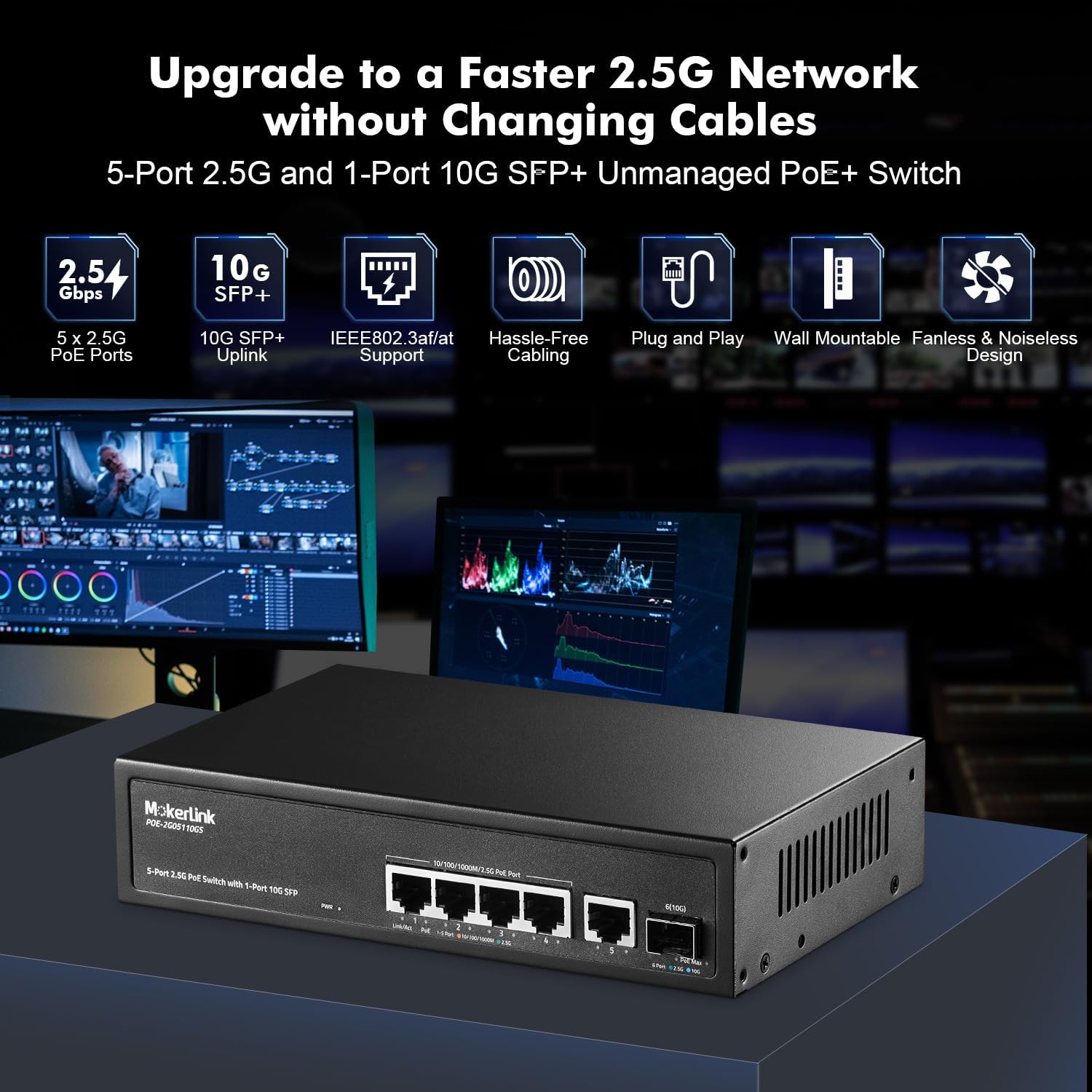
Foto 3.1: Ofeview of the switch highlighting key features like 2.5G PoE ports, 10G SFP+ uplink, IEEE802.3af/at support, plug and play, wall mountable, and fanless design.

Image 3.2: Diagram illustrating PoE+ support, showing how the switch powers devices like IP cameras and wireless access points, while also connecting to non-PoE devices.
4. Nhazi
The MokerLink 5-Port 2.5 Gigabit PoE Switch is designed for easy plug-and-play installation.
4.1 Ijikọ mgba ọkụ
- Njikọ ike: Connect the provided power adapter to the DC input port on the switch and then plug it into a standard electrical outlet. The Power LED indicator will illuminate.
- Njikọ ngwaọrụ netwọk: Connect your network devices (e.g., computers, routers, NAS, WiFi 6 APs) to the 2.5G Ethernet ports (1-5) using standard Ethernet cables (CAT5e, CAT6, or CAT6a recommended for optimal performance).
- PoE Device Connection: For Power over Ethernet devices (e.g., IP cameras, VoIP phones, wireless access points), connect them to PoE ports 1-4. The switch will automatically detect and provide power if the device is IEEE802.3af/at compliant.
- Uplink Connection (Optional): If using the 10G SFP+ port for an uplink, insert a compatible SFP module (not included) and connect it to your network backbone or another switch.

Image 4.1: The switch connected to various 2.5G devices like a NAS, WiFi 6 AP, router, laptop, and gaming PC, demonstrating its application in a high-performance network.
4.2 Nwụnye anụ ahụ
The switch can be placed on a desktop or mounted on a wall.
- Ndokwa Desktọpụ: Place the switch on a flat, stable surface, ensuring adequate ventilation around the device.
- Ịkwanye mgbidi: Use appropriate screws and anchors (not included) to secure the switch to a wall. The device features mounting holes on its underside for this purpose. Ensure the mounting location allows for proper cable management and ventilation.

Image 4.2: The switch demonstrating its wall-mounting capability and fanless design for silent operation and good heat dissipation.
5. Ntuziaka ọrụ
Once connected, the switch operates automatically without requiring any user configuration.
5.1 LED egosi
The front panel features LED indicators to display the switch's status:
- PWR (Power Indicator):
- Na: Agbanyere
- Gbanyụọ: Agbanyụrụ
- Link/Act (Per Port):
- Orange (Left): 10/100/1000Mbps connection
- Green (Left): 2.5Gbps connection
- Flashing: Data activity
- PoE (Per Port 1-4):
- Green (Right): PoE on
- Off: PoE off
- PoE Max (PoE Power Light):
- Green: Usage < 90%
- Flashing: Usage 90% - 95%
- On: Usage > 95% (Indicates high PoE power consumption)
- SFP+ Link/Act (10G SFP+ Port):
- Blue: 10Gbps connection
- Green: 2.5Gbps connection
- Flashing: Data activity

Foto 5.1: Zuru ezu view of the switch's ports and LED indicators, explaining their functions for monitoring network and PoE status.
5.2 Ihe ngosi vidiyo
Lee vidio a maka onye isi nchịkwaview of MokerLink PoE switch functionality and setup. While this video features an 11-port model, the basic principles of connection and operation are similar.
Video 5.2: An official MokerLink video demonstrating features and setup of a similar PoE switch model.
6. Nlekọta
The MokerLink 5-Port 2.5 Gigabit PoE Switch is designed for low maintenance due to its fanless operation and durable metal casing.
- Nhicha: Periodically wipe the exterior of the switch with a soft, dry cloth to remove dust. Do not use liquid cleaners or aerosols.
- Igwe ikuku: Ensure the switch is placed in a well-ventilated area. Although fanless, proper airflow helps maintain optimal operating temperature. Avoid blocking the ventilation holes on the sides of the device.
- okirikiri ike: If you experience network issues, a simple power cycle (unplugging the power adapter, waiting 10 seconds, and plugging it back in) can often resolve minor problems.
7. Nchọpụta nsogbu
If you encounter issues with your MokerLink PoE Switch, refer to the following common troubleshooting steps:
- Enweghị ike:
- Gbaa mbọ hụ na ejikọrọ ihe nkwụnye ọkụ na nke ọma na ma mgba ọkụ na ebe ọkụ na-arụ ọrụ.
- Check if the Power LED is illuminated. If not, try a different power outlet.
- Enweghị njikọ/ọrụ na ọdụ ụgbọ mmiri:
- Verify that the Ethernet cable is securely connected to both the switch port and the network device.
- Gbalịa eriri Ethernet dị iche.
- Gbaa mbọ hụ na agbanyere ngwaọrụ ejikọrọ ma na-arụ ọrụ nke ọma.
- Check the Link/Act LED for the specific port. If it's off, there might be no connection or a faulty cable/device.
- Ngwaọrụ PoE anaghị enweta ike:
- Ensure the PoE device is connected to one of the PoE-enabled ports (1-4).
- Verify that the PoE device is IEEE802.3af/at compliant. This switch does not support passive 24V PoE.
- Check the PoE LED for the specific port. If it's off, the device might not be drawing power or is incompatible.
- Monitor the PoE Max LED. If it's solid orange, the total power budget might be exceeded. Disconnect some PoE devices or use devices with lower power consumption.
- Ọsọ netwọk dị nwayọ:
- Ensure you are using CAT5e, CAT6, or CAT6a Ethernet cables for 2.5G connections. Older or lower-quality cables may limit speed.
- Verify that your connected devices (e.g., network cards, routers) support 2.5G Ethernet.
- Check the Link/Act LED color for the port; green indicates 2.5Gbps, orange indicates 1Gbps or lower.
- ekpo oke ọkụ:
- Ensure the switch is in a well-ventilated area and its ventilation holes are not obstructed.
- Avoid placing the switch in enclosed spaces or near heat sources.
- If the device feels excessively hot, consider reducing the number of connected PoE devices if the PoE Max LED indicates high usage.
8. Nkọwapụta
| Njirimara | Nkọwapụta |
|---|---|
| Nọmba nlereanya | 5*2.5G POE (POE-2G05110GS) |
| ọdụ ụgbọ mmiri | 5 x 2.5G Ethernet Ports, 1 x 10G SFP+ Port |
| Standardkpụrụ PoE | IEEE802.3af/at (Ports 1-4) |
| Max Power Per PoE Port | 30W |
| Mkpokọta mmefu ego ike PoE | 65W |
| Bandwit azụ ụgbọ elu | 45Gbps |
| Ọnụego mbugharị ngwugwu | 33.48Mpps |
| MAC Okwu Isiokwu Size | 4K |
| Ogwe osisi Jumbo | 12k bytes |
| Ngbanwe Ụdị | Ejikwaghị ya |
| Akụkụ (L x W x H) | 25 x 20 x 8 cm |
| Ibu | 880 g |
| Ihe gbasara ikpe | Ọla |
| Agba | Nwa |
| Voltage | 24 Volts (Input to power adapter) |
| Ngwa dakọtara | Desktop, Gaming Console, Server, NAS, WiFi 6 AP |

Image 8.1: Physical dimensions of the MokerLink 5-Port 2.5 Gigabit PoE Switch.
9. Akwụkwọ ikike na nkwado
This MokerLink product comes with a Akwụkwọ ikike nke afọ 1 site na ụbọchị ịzụrụ.
For technical support, troubleshooting assistance, or warranty claims, please contact MokerLink customer service through the retailer where the product was purchased or visit the official MokerLink websaịtị maka ozi kọntaktị.
Biko dowe ihe akaebe nke ịzụrụ ihe maka nkwado akwụkwọ ikike.