
1. Ngwaahịa gafereview
The Joysico USB C Wired Type C Earbuds are designed for comfort, durability, and clear audio, featuring an over-ear hook design for secure fit during activities and an in-line remote for easy control.
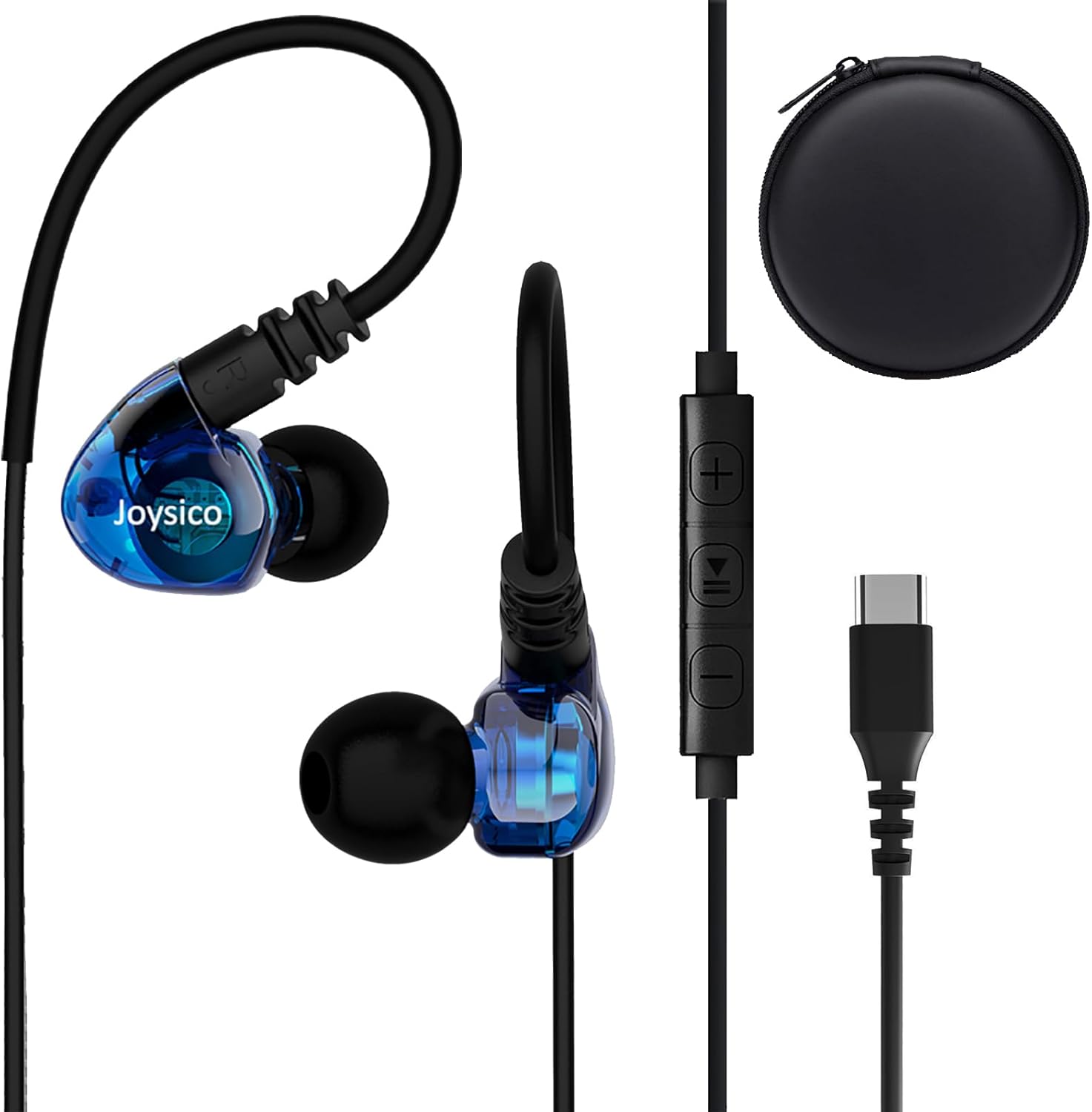
Image: Joysico USB C Wired Type C Earbuds, showing the earbuds, in-line remote, USB-C connector, and included carrying case.
Akụkụ ndị bụ isi:
- Njikọ USB-C: Direct plug-and-play with USB-C devices.
- Over-Ear Hook Design: Provides a secure and comfortable fit, ideal for sports and active use.
- In-line Microphone: For clear hands-free calls and voice commands.
- Multi-function Remote: Control volume, playback, and calls.
- Cable na-adịgide adịgide: Thick and sturdy cable with reinforced plug.
2. Ihe ngwugwu
Biko chọpụta na ihe niile dị na ngwugwu:
- Joysico USB C Wired Type C Earbuds
- Akwụkwọ ntuziaka (akwụkwọ a)
- Eartips (various sizes: Small, Medium, Large silicone, and Memory Foam)
- Akpa na-ebu nchekwa
- Clip uwe elu

Image: An illustration of the package contents, including the earbuds, a 52-inch cord, a carrying case, a shirt clip, and four pairs of replacement ear tips (S, M, L silicone, and memory foam).
3. Ntọala na Njikọ
These earbuds are designed for simple plug-and-play operation with USB-C compatible devices.
Jikọọ na ngwaọrụ gị:
- Locate the USB-C port on your device (e.g., smartphone, tablet, laptop).
- Insert the USB-C connector of the earbuds firmly into the device's USB-C port.
- Your device should automatically recognize the earbuds as an audio output device.
Mara: For some devices, especially certain Macbook models, you may need to manually select the earbuds as the audio output device in your system's sound settings.

Foto: nkọwa zuru ezu view of the USB-C connector and its robust design, highlighting its ease of insertion and removal, and the sturdy construction of the earbud cable.
4. Yiri ekwe ntị
Proper fit is crucial for comfort, sound quality, and secure wear, especially during physical activity.
Achieving a Comfortable and Secure Fit:
- Choose the Right Eartips: Experiment with the included silicone (S, M, L) and memory foam eartips to find the size that creates a comfortable seal in your ear canal. A good seal enhances bass response and noise isolation.
- Position the Earbuds: Jiri nwayọọ tinye ntị ntị n'ime ọwa ntị gị.
- Adjust the Over-Ear Hook: Guide the flexible ear hook over the top of your ear. The hook should rest comfortably behind your ear, securing the earbud in place.
- Use the Shirt Clip: Attach the included shirt clip to your clothing to minimize cable movement and reduce microphonics (noise from cable rubbing).

Image: A person wearing the earbuds, illustrating how the over-ear hook and ergonomic design provide a comfortable and secure fit, even for users with smaller ear canals.

Image: A person engaged in a workout, demonstrating the earbuds' ability to stay securely in place without falling out or requiring adjustments during physical activity.
5. Operating the Controls
The in-line remote provides convenient control over your audio and calls.

Image: A diagram detailing the functions of the in-line remote, including volume up/down, play/pause, next/previous track, answer/end/reject calls, and voice assistant activation. The microphone's position is also indicated.
Ọrụ dịpụrụ adịpụ:
| Bọtịnụ/Ihe omume | Ọrụ |
|---|---|
| + Bọtịnụ | Elu elu |
| - Bọtịnụ | Mpịakọta ọnụ |
| Center Button (Single Press) | Kpọọ/Kwụsị Egwu; Zaa/Kwụsị Oku |
| Center Button (Double Press) | Track na-esote |
| Center Button (Triple Press) | Egwu gara aga |
| Center Button (Long Press) | Reject Call; Activate Voice Assistant |
Mara: Remote functions may vary or be limited on certain devices or applications. Refer to your device's manual for specific compatibility details regarding external audio controls.
6. Ndakọrịta
These USB C headphones are designed for broad compatibility with devices featuring a USB-C audio output.
Ngwa dakọtara gụnyere:
- Ngwa Apple: iPhone 15 series (15, 15 Plus, 15 Pro, 15 Pro Max), iPad Pro, iPad Air, iPad Mini, MacBook Pro, MacBook Air.
- Samsung galaxy: S24, S23, S22, S21 Ultra, S20 FE, Note 10, Note 20, and other USB-C enabled Galaxy phones and tablets.
- Google Pixel: All Pixel phones with USB-C.
- OnePlus: Various models with USB-C.
- Other Android Phones: Most Android smartphones and tablets with a USB-C port.
- Laptops/Chromebooks: Devices with USB-C audio output.
No adapter is needed, and the earbuds are designed to work even with phone cases on.

Image: An illustration demonstrating the wide compatibility of the USB-C earbuds with various devices, including popular smartphone brands, tablets, and laptops.
7. Nlekọta na nlekọta
Proper care will extend the life and maintain the performance of your earbuds.
- Nhicha: Regularly clean the eartips with a soft, dry cloth. For the earbuds themselves, use a slightly damp cloth and ensure they are completely dry before storage. Do not use harsh chemicals or abrasive materials.
- Nchekwa: When not in use, store the earbuds in the provided protective carrying case to prevent tangling and damage.
- Zere Oke Ọnọdụ: Do not expose the earbuds to extreme temperatures, high humidity, or direct sunlight for prolonged periods. While sweatproof, avoid submerging them in water.
- Jiri Nlekọta Aka: Avoid pulling the cable forcefully when disconnecting from your device. Always grasp the USB-C plug.
8. Nchọpụta nsogbu
Ọ bụrụ na ị na-enwe nsogbu, gbalịa ngwọta ndị a:
Okwu na azịza ndị nkịtị:
- Enweghị ụda:
- Ensure the USB-C connector is fully inserted into your device.
- Check your device's volume settings and ensure it's not muted.
- Verify that the earbuds are selected as the audio output device in your device's sound settings.
- Test the earbuds with another compatible device to rule out a device-specific issue.
- Igwe okwu anaghị arụ ọrụ:
- Ensure the microphone is not covered.
- Check your device's microphone input settings.
- Some apps or devices may not fully support the in-line microphone. Test with a standard call app.
- Njikwa anya anaghị aza:
- Ensure the earbuds are properly connected.
- Some remote functions may not be supported by all devices or applications.
- Ụda adịghị mma/Ọdịiche dị n'etiti ụda na ụda:
- Ensure eartips provide a good seal in your ear canal. Try different eartip sizes.
- Lelee isi iyi ọdịyo maka nsogbu dị mma.
- Hichaa irighiri ihe ọ bụla sitere na nozzles ntị.
9. Nkọwapụta
| Njirimara | Nkọwa |
|---|---|
| Aha Nlereanya | YC-1 BLUE |
| Teknụzụ Njikọta | Ejiri waya (USB-C) |
| Jack ekweisi | USB C |
| Ntinye ntị | In Ear with Over-Ear Hook |
| Njikwa mkpọtụ | Mwepu ụda |
| Igwe okwu | Integrated, Noise Canceling |
| Ụdị njikwa | Volume Control, Remote (Button) |
| Ogologo eriri USB | 52 sentimita / 131 cm |
| Ibu Ibu | 20 grams / 0.705 ounces |
| Ọkwa Nguzogide mmiri | Mmiri anaghị agbaze (Ọsụsọ) |
| Oke ugboro ugboro | 20 Hz - 20,000 Hz |
| Mgbochi | 32 Ohm |
| Ihe onwunwe | Plastic |
10. Akwụkwọ ikike Ozi
Joysico provides a Akwụkwọ ikike nke afọ 1 for these USB C Wired Type C Earbuds from the date of purchase. This warranty covers manufacturing defects and issues arising from normal use.
Akwụkwọ ikike a anaghị ekpuchi mmebi sitere na ojiji na-ezighị ezi, ihe mberede, mgbanwe na-enweghị ikike, ma ọ bụ mmebi nkịtị.
To Claim Warranty Support:
Please retain your proof of purchase. For warranty claims or technical support, contact Joysico customer service through the retailer where the product was purchased or visit the official Joysico support websaịtị (ọ bụrụ na ọ dị).
Image: An illustration highlighting the 1-year warranty provided with the product, alongside the earbuds and the various ear tip sizes and shirt clip.