
1. Okwu mmalite
The TOPPING D70 Pro Sabre is a high-performance Digital-to-Analog Converter (DAC) designed for audiophiles seeking exceptional sound quality. Featuring the ES9039SPro chip, advanced I/V conversion circuitry, and versatile input/output options, this device delivers precise and immersive audio reproduction. It supports various audio formats and offers a user-friendly interface for an enhanced listening experience.
2. Ozi nchekwa
- Ewepụla ma ọ bụ gbanwee ngwaọrụ. Mgbanwe na-akwadoghị nwere ike mebie akwụkwọ ikike ma bute ihe egwu nchekwa.
- Keep the device away from water, moisture, and high temperatures.
- Gbaa mbọ hụ na ikuku ikuku dị na gburugburu unit ahụ iji gbochie ikpo oke ọkụ.
- Jiri naanị eriri ike na ihe ndị ọzọ enyere.
- Disconnect the power cable during lightning storms or when unused for extended periods.
3. Ihe ngwugwu
Biko lelee ma ihe niile dị na ngwugwu ahụ:
- 1 x TOPPING D70 Pro Sabre DAC
- 1 x Njikwa anya
- 1 x eriri USB
- 1 x Igwe ọkụ AC
- 1 x eriri Bluetooth
- Akwụkwọ ntuziaka onye ọrụ 1 x (akwụkwọ a)

Image: TOPPING D70 Pro Sabre DAC with its included accessories and dimensions.
4. Ngwaahịa gafereview
4.1 Ogwe ihu

Foto: N'ihu view of the TOPPING D70 Pro Sabre, showing the full-color display and control knob.
The front panel features a full-color display (Aurora UI) that shows current input, sample rate, volume level, and other playback information. A multi-function knob allows for input selection, volume adjustment, and menu navigation. Touch buttons provide quick access to various settings and display modes like FFT and VU meters.
4.2 Ogwe azụ

Foto: N'azụ view of the TOPPING D70 Pro Sabre, illustrating the various input and output connections.
The rear panel provides a comprehensive set of input and output options:
- Ntinye: USB, AES, Optical, Coaxial, Bluetooth 5.1 (with antenna connector).
- Nsonaazụ: Balanced XLR, Unbalanced RCA.
- Ike: Ntinye ike AC.
5. Nhazi
5.1 Ijikọ ike
- Connect the provided AC power cable to the power input on the rear panel of the D70 Pro Sabre.
- Plug the other end of the AC power cable into a suitable wall outlet.
5.2 Ijikọ isi iyi ọdịyo
Họrọ otu n'ime ụzọ ntinye ndị a:
- Ntinye USB: Connect a USB cable from your computer (Windows 10/11, macOS, Linux) to the USB input on the D70 Pro Sabre. For Windows systems, a driver installation may be required for ASIO applications.
- Optical/Coaxial/AES Input: Connect your digital audio source (e.g., CD player, streamer) using an optical, coaxial, or AES cable to the corresponding input on the D70 Pro Sabre.
- Ntinye Bluetooth: Screw the Bluetooth antenna onto the designated connector on the rear panel.
5.3 Ijikọ na Amplifier/Headphones
Connect the D70 Pro Sabre to your amplifier ma ọ bụ ekweisi amplifier using either XLR or RCA cables:
- Mmepụta XLR: For balanced connections, use XLR cables to connect the D70 Pro Sabre to an amplifier with XLR inputs.
- Mpụta RCA: For unbalanced connections, use RCA cables to connect the D70 Pro Sabre to an amplifier with RCA inputs.

Image: Diagram illustrating typical connections for the D70 Pro Sabre with a PC, headphone amplifier, and headphones.
6. Ntuziaka ọrụ
6.1 Gbanyụọ ma ọ bụ gbanyụọ
Press the power button on the front panel or the remote control to turn the device on or off.
6.2 Nhọrọ ntinye
Rotate the multi-function knob or use the remote control to cycle through available inputs (USB, AES, Optical, Coaxial, Bluetooth).
6.3 Njikwa olu
Rotate the multi-function knob to adjust the output volume. The D70 Pro Sabre features independent volume memory for Single Ended, Balanced, and All modes, automatically recalling the last used volume for each output type.

Image: The D70 Pro Sabre display showing the current volume level and PCM sampọnụego.
6.4 Display Modes (Aurora UI)
The D70 Pro Sabre features an intuitive Aurora UI with a full-color display. Use the touch buttons or remote to navigate and customize the display, including options for FFT (Fast Fourier Transform) and VU (Volume Unit) meters to visualize playback information.
6.5 Njikọ Bluetooth
- Select Bluetooth as the input source on the D70 Pro Sabre.
- On your Bluetooth device (e.g., smartphone, tablet), search for available devices and select "TOPPING D70 Pro Sabre".
- Once paired, audio will be streamed wirelessly to the DAC. The D70 Pro Sabre supports LDAC, aptX-Adaptive, aptX HD, aptX, AAC, and SBC codecs for high-quality wireless audio transmission.

Image: Illustration of Bluetooth 5.1 connectivity and performance graphs of the D70 Pro Sabre.
6.6 Timbre Fine-Tuning
The D70 Pro Sabre allows direct switching between different timbre modes: Default, Valve, and Transistor. These modes adjust the sound characteristics to suit your preference.
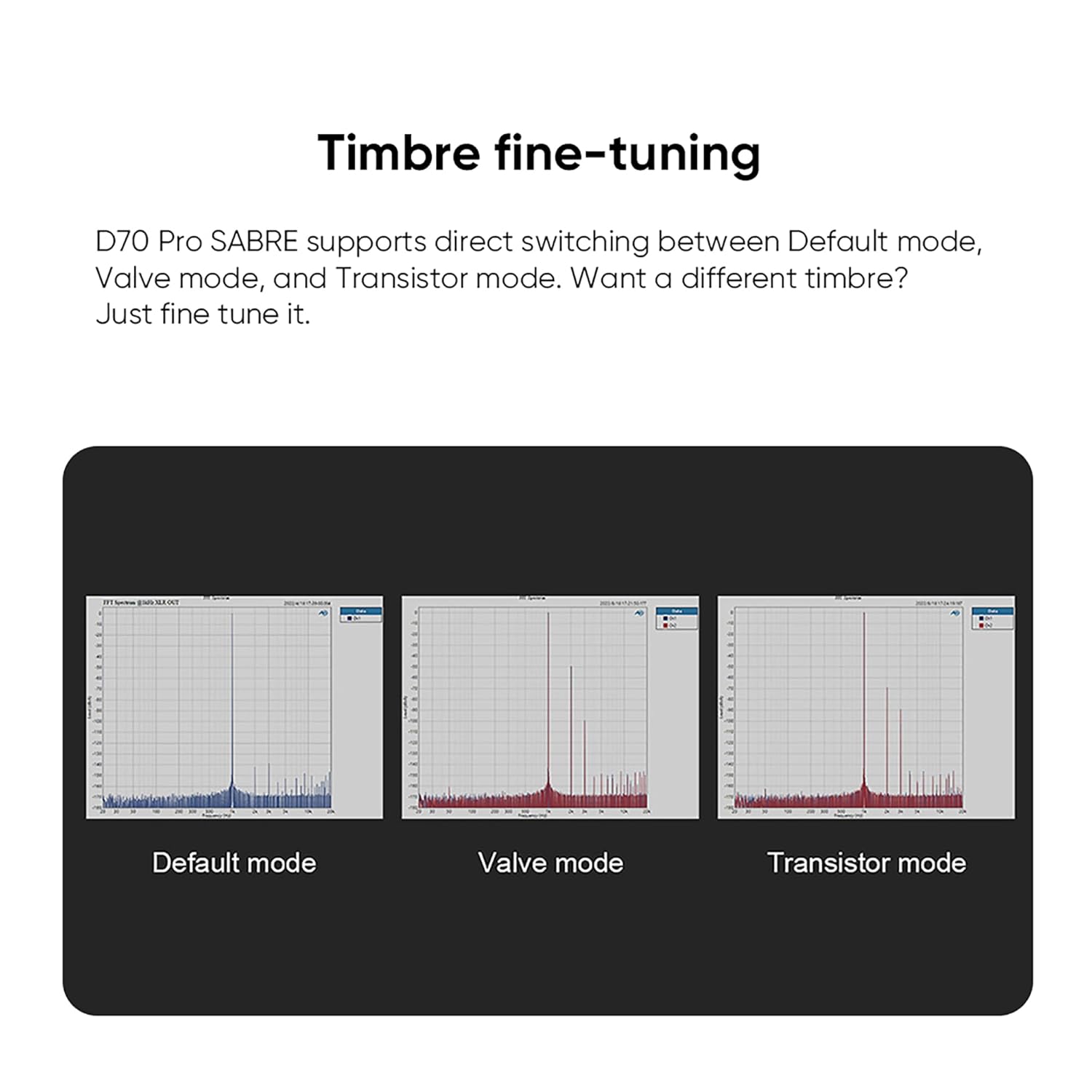
Image: Visual representation of the Default, Valve, and Transistor timbre modes available on the D70 Pro Sabre.
7. Nlekọta
- Clean the device regularly with a soft, dry cloth. Avoid using abrasive cleaners or solvents.
- Ensure all connections are secure and free from dust.
- Chekwaa ngwaọrụ ahụ n'ebe dị jụụ, kpọrọ nkụ mgbe ọ naghị eji ya.
8. Nchọpụta nsogbu
| Nsogbu | Ihe nwere ike ime | Ngwọta |
|---|---|---|
| Enweghị mmepụta ụda | Incorrect input selected, cables loose, amplifier off, volume too low. | Verify input selection, check all cable connections, ensure amplifier is on and volume is adequate. |
| Njikọ Bluetooth anaghị akwụsi ike | Antenna not connected, interference, device too far. | Ensure Bluetooth antenna is securely attached. Reduce distance between devices. Avoid sources of interference. |
| Enweghị ngosi | Device not powered on, display settings. | Check power connection and power button. Adjust display settings via menu. |
| Ụda agbagọ | ezighi eziample rate, faulty cable, source issue. | Check source sample rate matches DAC capabilities. Try different cables. Test with another audio source. |
9. Nkọwapụta
The TOPPING D70 Pro Sabre DAC features the powerful ES9039SPro chip and advanced I/V conversion circuitry. Below are key performance parameters (Line Out/USB In@96kHz):
| Oke | Mmepụta RCA | XLR Mmepụta |
|---|---|---|
| THD+N (A-wt) @1kHz | <0.00008% | <0.00006% |
| THD @90kBw (No-wt) @20-20kHz | <0.0004% | <0.0002% |
| SNR (A-wt) @1kHz | 128dB | 133dB |
| Dynamic Range (A-wt) @1kHz | 128dB | 133dB |
| Nzaghachi ugboro ugboro | 20Hz-20kHz (+0.05dB), 20Hz-40kHz (+0.2dB) | 20Hz-20kHz (+0.05dB), 20Hz-40kHz (+0.2dB) |
| Output Level @0dBFS (4V mode) | Ugboro abụọ | Ugboro abụọ |
| Output Level @0dBFS (5V mode) | Ugboro abụọ | Ugboro abụọ |
| mkpọtụ (A-wt) | <1.0uVrms | <1.0uVrms |
| Channel Crosstalk @1kHz | -128dB | -140dB |
| Balance ọwa | 0.3dB | 0.3dB |
| Mmepụta Mmebi | 50Ω | 100Ω |
Note: The above data is the result obtained from TOPPING's laboratory tests at AC220V 50Hz, with D70 Pro SABRE set to 5V output mode.
Nkọwa n'ozuzu:
- Onye nrụpụta: Topping
- Nọmba akụkụ: D70Pro SE
- Arọ ngwaahịa: 2.02 kilogram
- Akụkụ ngwaahịa: 22.2 x 17.6 x 4.8 cm
- Agba: Nwa
- Ụdị ihu: RCA, USB
- Minimum/Maximum Supply Voltage: 5 volts (DC)
10. Akwụkwọ ikike na nkwado
TOPPING provides after-sales support and technical assistance for its products. If you encounter any issues during purchase or use, please contact the seller directly for assistance. For general inquiries or technical support, refer to the official TOPPING websaịtị ma ọ bụ kpọtụrụ ndị ahịa ha ọrụ.
The seller, AOSHIDA Audio-JP, is available to assist with product-related concerns. You can find their contact information on the Amazon platform.