
1. Okwu mmalite
The FOREO UFO 3 is an advanced 5-in-1 facial spa device designed to enhance your skincare routine. It combines various technologies to deliver a comprehensive facial treatment, including deep moisturizing, anti-aging benefits, and improved skin appearance. This device integrates warming, cooling, T-Sonic pulsations, and full-spectrum LED light therapy to optimize the absorption of mask ingredients and address multiple skin concerns.

The FOREO UFO 3 device, showcasing ya kọmpat na ergonomic imewe.
2. Kedu ihe dị na Igbe ahụ
Upon unboxing your FOREO UFO 3, ensure all components are present:
- FOREO UFO 3 Device: The main facial treatment device.
- Device Stand: For convenient storage and display.
- Ndenye Malite Guide: Essential instructions for initial setup.
- eriri USB: Maka ịchaji ngwaọrụ.
- General Manual: Detailed user information and safety guidelines.

Illustration of the FOREO UFO 3 packaging contents.
3. Nhazi
Before using your FOREO UFO 3 device, it is necessary to unlock and register it via the FOREO For You mobile application. Follow these steps:
- Budata ya FOREO For You ngwa na ekwentị mkpanaaka gị.
- Banye na akaụntụ gị ma ọ bụ debanye aha maka nke ọhụrụ.
- Add device (located at the top of your screen).
- Họrọ usoro ngwaọrụ.
- Press and hold the Power button for 5 seconds to connect your device to the mobile app.
- Dejupụta ozi ịzụrụ.
Ngwaọrụ gị adịla njikere maka ojiji.
Official video demonstrating how to use the FOREO For You application for device setup and control.
For more information and to download the app, visit www.foreo.com/app.
4. Ijikwa ngwaọrụ
The FOREO UFO 3 offers a range of advanced features for a comprehensive facial treatment:
- Cooling Cryo-Therapy: This feature helps to firm the skin, minimize pores, lock in moisture and active ingredients, reduce puffiness, and fight inflammation.
- Warming Thermo-Therapy: Gentle warmth boosts radiance, softens and prepares the skin, and enhances the deeper absorption of skincare ingredients.
- T-Sonic ịhịa aka n'ahụ: Pulsations gently relax facial muscle tension points and stimulate blood circulation for a revitalized complexion.
- Full Spectrum LED Light Therapy: Features 8 different LED colors with 'Constant' and 'Pulse' mode options to address various skin needs.
To begin a treatment, secure a UFO-Activated mask onto the device. Then, use the FOREO For You app to select a pre-programmed treatment or customize your own. The app will guide you through the process, indicating when to move the device across your face.
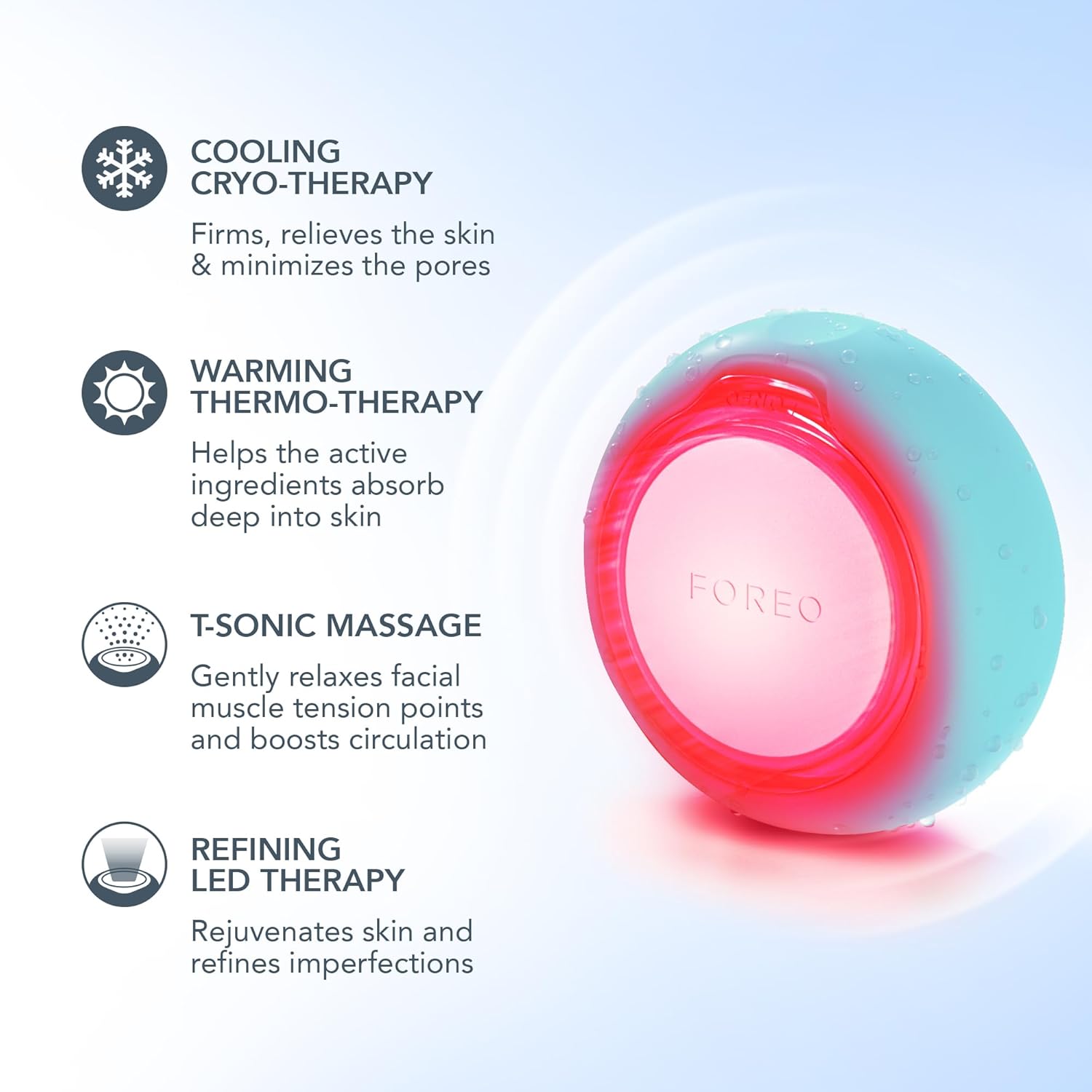
gafereview of the core technologies integrated into the UFO 3 device.

The device utilizes full-spectrum LED lights to target diverse skin concerns.
5. UFO-Activated Masks
The FOREO UFO 3 is designed to be used with UFO-Activated masks, which are formulated to work synergistically with the device's technologies. Each mask type offers specific benefits, from deep hydration to anti-aging and brightening.
To use a mask:
- Remove the attachment ring from your UFO 3 device.
- Place a UFO-Activated mask onto the device.
- Secure the mask by reattaching the ring.
- Scan the mask's barcode using the FOREO For You app to activate the corresponding treatment.
- Follow the app's instructions for the optimal treatment duration and technique.

A selection of UFO-Activated masks designed for use with the FOREO UFO 3.
6. Benefits and Results
Regular use of the FOREO UFO 3 with UFO-Activated masks can lead to visible improvements in skin health and appearance:
- Increased Skin Moisture: Clinically proven to increase skin moisture by 126% in just 2 minutes, keeping skin moisturized for up to 6 hours.
- Reduced Wrinkles: Proven to reduce the appearance of wrinkles in 1 week.
- Deep Nourishment: Enhances the absorption of active ingredients for deeply nourished skin.
- Depuffing & Brightening: Helps to reduce puffiness and brighten the complexion.
- Minimized Fine Lines: Contributes to a smoother skin texture by minimizing the appearance of fine lines.

The UFO 3 provides significant hydration benefits.

Visual representation of skin improvements after using the device.

The device is designed to visibly reduce wrinkles with consistent use.
7. Nlekọta
Nhicha
After each use, remove the mask and rinse the UFO 3 device under warm running water. Gently wipe the device with a soft, lint-free cloth. Avoid using cleaning products containing alcohol, petrol, or acetone, as these may irritate the skin and damage the silicone. Ensure the device is completely dry before storing.
Ịchaji
The FOREO UFO 3 is powered by a rechargeable Lithium-Ion battery. To charge, connect the provided USB charging cable to the device and a compatible USB power source. A full charge typically takes up to 2 hours. The device will indicate its charging status, usually through an LED light.
8. Nchọpụta nsogbu
If you encounter issues with your FOREO UFO 3 device, refer to the following common solutions:
Device Not Activating
- Batrị adịghị: Recharge the device using the USB charging cable for up to 2 hours until fully charged. Then, restart your device by holding down the power button.
- Device cannot be switched off/interface buttons do not respond: The microprocessor may be temporarily malfunctioning. Press and hold the power button to restart the device.
Device Not Syncing to FOREO App
- Ensure your device is fully charged and that your phone's Bluetooth is turned on.
- Gbanyụọ Bluetooth gị wee gbanye ọzọ ka ịnwa ịjikọ ọzọ.
- Mechie ngwa FOREO wee mepee ya ka ịmalitegharịa usoro ahụ.
- Delete and reinstall the application; the app may need an update.
- After deleting and reinstalling the app, restart your phone.
- Hichapụ kuki ekwentị gị na ebe nchekwa cache.
- Ensure your mobile operating system has been updated to the latest version.
9. Nkọwapụta
| Njirimara | Nkọwa |
|---|---|
| Akụkụ ngwaahịa | 1.42 x 5.91 x 4.72 sentimita asatọ |
| Ibu Ibu | 1.41 ounces |
| Nọmba Nlereanya ihe | F1535 |
| Batrị | 1 batrị lithium ion achọrọ (gụnyere) |
| Onye nrụpụta | FOREO |
| Ụdị | FOREO |
| Ụdị ihe | Ngwaọrụ |
| Uru ngwaahịa | Deep facial hydration for smooth, radiant & fresh skin, clinically proven to reduce lines & wrinkles in 1 week |
| Isi ísì | Enweghị isi |
| Ụdị ihe efu | Enweghị obi ọjọọ |
10. Akwụkwọ ikike & Nkwado
For detailed information regarding the product warranty, returns, and customer support, please refer to the official FOREO website or the warranty card included with your product. You can also contact FOREO customer service directly for assistance with any issues or inquiries.
Official FOREO Support: www.foreo.com/support